mirror of
https://github.com/debauchee/barrier.git
synced 2026-10-23 08:07:53 -06:00
[GH-ISSUE #1221] failed to connect to server: connection refused #982
Labels
No labels
HiDPI
bounty
bsd/freebsd
bsd/openbsd
bug
bug
build-infra
cantfix
critical
doc
duplicate
enhancement
fix-available
from git
from release
good first issue
help wanted
installer/package
invalid
linux
macOS
meta
needs testing
pull-request
query
question
regression
regression
v2.4.0
windows
wontfix
work-in-progress
No milestone
No project
No assignees
1 participant

Notifications
Due date
No due date set.
Dependencies
No dependencies set
Reference
github-starred/barrier#982
Loading…
Reference in a new issue
No description provided.
Delete branch "%!s()"
Deleting a branch is permanent. Although the deleted branch may continue to exist for a short time before it actually gets removed, it CANNOT be undone in most cases. Continue?
Originally created by @ghost on GitHub (Jul 3, 2021).
Original GitHub issue: https://github.com/debauchee/barrier/issues/1221
Operating Systems
Server: macOS Big Sur 11.4
Client: Ubuntu Desktop 21.04
Barrier Version
2.3.3 (client and server)
Steps to reproduce bug
Start server on mac
Start client on ubuntu auto config
...nothing happens
manually configure client with server ip
... nothing happens
Log from Server (This repeats)
[2021-07-02T23:21:43] ERROR: cannot listen for clients: cannot bind address: Address already in use
Log from client (This repeats)
info: starting client
info: config file: /tmp/Barrier.L50056
info: log level: info
note: started client
note: connecting to '': :::24800
info: OpenSSL 1.1.1 11 Sep 2018
Warning: failed to connect to server: connection refused
info: stopping barrier desktop process
note: connecting to '': :::24800
info: openSSL 1.1.1 11 Sep 2018
note: stopped client
info: process exited normally
Other details
I have tried to reverse it with ubuntu server and mac client, doesn't work.
I do not have a firewall turned on
I have configured my server to have the other screen with a reasonable name to it
On the server side, two ip addresses show but neither one is bold
To see if port 24800 was open on both sides I ran
$ sudo lsof -i 24800
COMMAND PID USR FD TYPE DEVICE SIZE/OFF NODE NAME
barriers 31668 Tal 3u IPv6 0x5dd4494fce1f20c1 0t0 TCP *:24800 (LISTEN)
barriers 31668 Tal 8u IPv6 0x5dd4494fc35f5741 0t0 TCP localhost:24800->localhost:59835 (CLOSE_WAIT)
barriers 31668 Tal 9u IPv6 0x5dd4494fc853aa61 0t0 TCP 10.40.59.96:24800->10.40.59.96:59861 (CLOSE_WAIT)
barriers 31668 Tal 10u IPv6 0x5dd4494fc8539da1 0t0 TCP 10.40.59.96:24800->10.40.59.96:59882 (CLOSE_WAIT)
barriers 31668 Tal 12u IPv6 0x5dd4494fc35f6a61 0t0 TCP 10.40.59.96:24800->10.40.59.96:60299 (CLOSE_WAIT)
commandrc pid user FD Type Device size/off Node Name
barrierc 48100 tal 6u IPv4 144298 0t0 TCP tal-desktop:40116->10.40.59.96:24800 (SYN_SENT)
@sepkov commented on GitHub (Jul 3, 2021):
Server says port is in use. Change barrier server's port or check which app is using that port.
@ghost commented on GitHub (Jul 3, 2021):
I wrote this as if I was a non-techi so no more after me would labor so long for such a simple fix.
I fixed it, turns out I had to change the name of my client on my server configuration to match the client name on the client side, then I had to use
ifconfigon my mac(server side) to get the actual ip, turns out the ip's being displayed in barrier were all wrong. When both my mac and pi were connected to the same wifi (apartment's wifi), I pinged my mac's(server side) ip from my raspberry pi(client side) running ubuntu to learn that they could not talk even. They are on the same wifi so it's just strange wtf idk.... So I put both them both on my iphone's hotspot ranifconfigagain on my mac to get my mac's(server side) ip address (the eth0 ipv4 address) then on my rasperberry pi(client side) I unclicked the autoconfig entered my mac's ip and boom it worked.@dondell commented on GitHub (Apr 10, 2022):
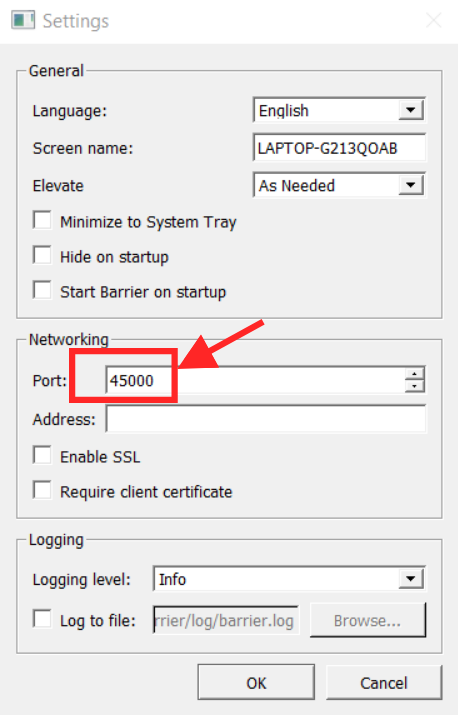
Make sure both port number in server and client are the same.
@kimihuang commented on GitHub (Nov 20, 2023):
I faced the same problem of 'Connection refused' as well.
I have a Mac server and an Ubuntu client. Previously, I could connect without any problems. However, the Mac's IP address changed, resulting in a failed connection. Therefore, the solution to this issue is to simply update the client's IP address to connect to the server.