[GH-ISSUE #982] Dead corners aren't active when resuming Windows 10 from sleep #786

Open
opened 2026-05-05 07:07:09 -06:00 by gitea-mirror · 0 comments
Owner

Originally created by @adambaranyai on GitHub (Dec 9, 2020).
Original GitHub issue: https://github.com/debauchee/barrier/issues/982

Description
I use Barrier's "dead corners" feature and have top-left and bottom-left options checked. I do this so when I drag a window to the left side of my desktop to snap it on the left of my screen in Windows 10, then I don't accidentally end up trying to drag the window to my laptop screen that is physically located on the left of my desktop.

Repro steps

  1. Select "Configure Server..." option on Barrier's main screen
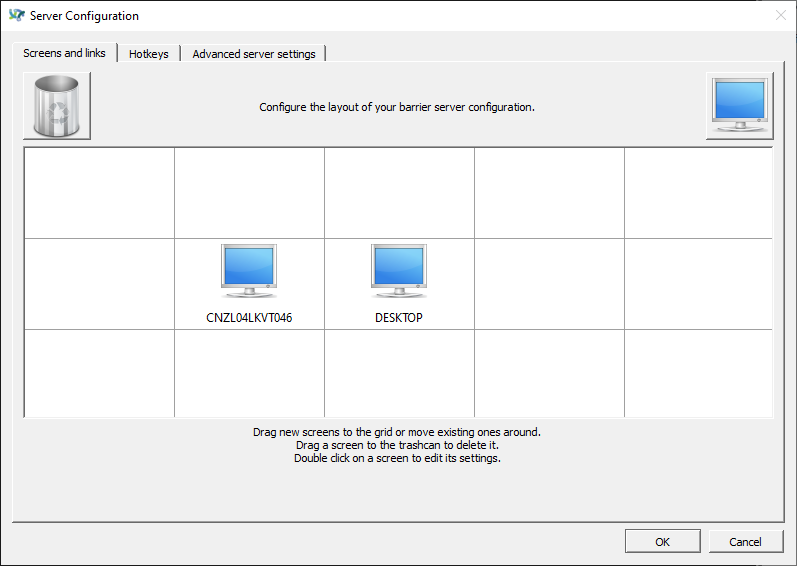
  2. Under "Screens and links" setup two computers right next to each other in the same horizontal line. For the sake of easy understanding of the problem, call the right one "Desktop"
  3. Setup the other computer on the left of "Desktop" and make Barrier work between the two computers. Desktop is the server and the other computer is the client.
  4. Go to Configure Server >> Advanced server settings
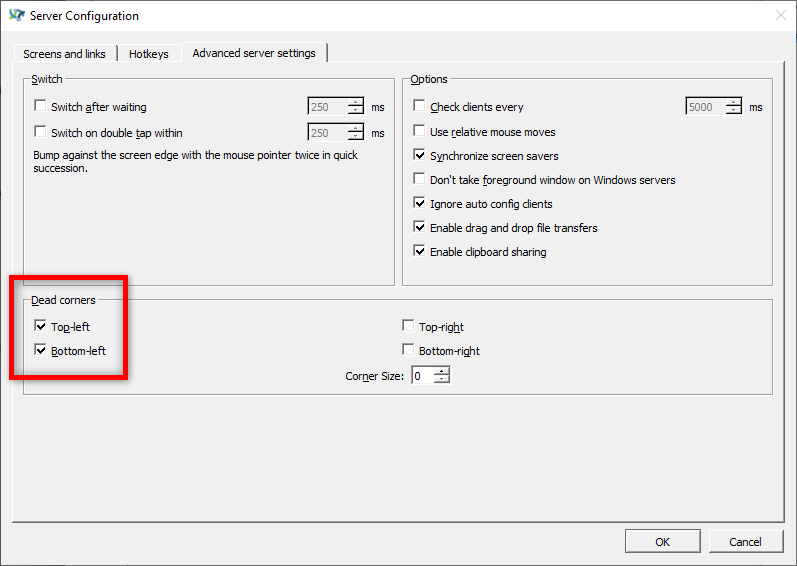
  5. Check top-left and bottom-left dead corners then click on OK
  6. Try to drag any open window to the left side of your screen and notice it works as expected
  7. Try to move your mouse to the left of your screen and notice that Barrier continues to show the mouse cursor over your other device's screen (Barrier works as expected so far)
  8. Now send the computer on the right called "Desktop" to sleep (ie: to stand by)
  9. Wake the computer up
  10. Try to drag a window to snap on the left of your screen on "Desktop" computer
  11. Notice that the dead corners don't work until you Reload Barrier

Expected behavior

I expect Barrier to apply the dead corner settings when waking up my Desktop computer (Barrier server) from the sleep feature of Windows 10. Currently I need to reapply the dead corner settings every time I wake my Desktop computer up from sleep if I want to use windows snapping feature of Windows 10. Until I reload Barrier I'm unable to snap screens on the left edge of my screen.

Screenshots
Screen setup:
2020-12-10_08h30_05
Dead corners setup:
2020-12-10_08h30_29
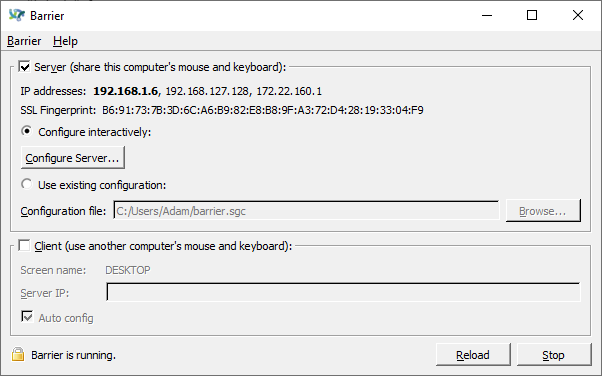
Server setup:
2020-12-10_08h31_02

Desktop (please complete the following information):

  • OS: Windows 10 Pro x64 Build 19041.685
  • Barrier version 2.3.3-release-3395cca9
Originally created by @adambaranyai on GitHub (Dec 9, 2020). Original GitHub issue: https://github.com/debauchee/barrier/issues/982 **Description** I use Barrier's "dead corners" feature and have top-left and bottom-left options checked. I do this so when I drag a window to the left side of my desktop to snap it on the left of my screen in Windows 10, then I don't accidentally end up trying to drag the window to my laptop screen that is physically located on the left of my desktop. **Repro steps** 1. Select "Configure Server..." option on Barrier's main screen 2. Under "Screens and links" setup two computers right next to each other in the same horizontal line. For the sake of easy understanding of the problem, call the right one "Desktop" 3. Setup the other computer on the left of "Desktop" and make Barrier work between the two computers. Desktop is the server and the other computer is the client. 4. Go to Configure Server >> Advanced server settings 5. Check top-left and bottom-left dead corners then click on OK 6. Try to drag any open window to the left side of your screen and notice it works as expected 7. Try to move your mouse to the left of your screen and notice that Barrier continues to show the mouse cursor over your other device's screen (Barrier works as expected so far) 8. Now send the computer on the right called "Desktop" to sleep (ie: to stand by) 9. Wake the computer up 10. Try to drag a window to snap on the left of your screen on "Desktop" computer 11. Notice that the dead corners don't work until you Reload Barrier **Expected behavior** I expect Barrier to apply the dead corner settings when waking up my Desktop computer (Barrier server) from the sleep feature of Windows 10. Currently I need to reapply the dead corner settings every time I wake my Desktop computer up from sleep if I want to use windows snapping feature of Windows 10. Until I reload Barrier I'm unable to snap screens on the left edge of my screen. **Screenshots** Screen setup: ![2020-12-10_08h30_05](https://user-images.githubusercontent.com/22993140/101677953-242e1b80-3ac2-11eb-9cd8-c5b47163ba37.png) Dead corners setup: ![2020-12-10_08h30_29](https://user-images.githubusercontent.com/22993140/101677964-26907580-3ac2-11eb-828a-7415e092ee6f.png) Server setup: ![2020-12-10_08h31_02](https://user-images.githubusercontent.com/22993140/101677968-27c1a280-3ac2-11eb-888e-b58be9da4fc5.png) **Desktop (please complete the following information):** - OS: Windows 10 Pro x64 Build 19041.685 - Barrier version 2.3.3-release-3395cca9
Sign in to join this conversation.
No milestone
No project
No assignees
1 participant
Notifications
Due date
The due date is invalid or out of range. Please use the format "yyyy-mm-dd".

No due date set.

Dependencies

No dependencies set.

Reference: github-starred/barrier#786
No description provided.