[GH-ISSUE #1650] recover mouse on client computer #1221

Open
opened 2026-05-05 07:37:08 -06:00 by gitea-mirror · 8 comments
Owner

Originally created by @Patoche1978 on GitHub (Apr 21, 2022).
Original GitHub issue: https://github.com/debauchee/barrier/issues/1650

What happened?

Barrier 2.4.0 installed on four apple computers, macOS Monterey.
All three client computers are connected well to the server one.
Mouse and keyboard are passing well from one to the others.

My issue is that, as I'm on a live show situation, I have to keep all other keyboards and mouses as I can't take the risk of either barrier or network failure.

Point is, once I passed the pointer to a client computer, and back to its home computer, I have hard time getting control back on the client computer, with its own mouse and keyboard.
Sometimes, it works by shaking the mouse a few times, sometimes not. Sometimes, just left click, sometimes not.

Is there a proper way to do this or is it something not usual for barrier use ? Could it be something better implemented ?

Version

v2.4.0

Git commit hash (if applicable)

No response

If applicable, where did you install Barrier from?

GitHub

What OSes are you seeing the problem on? (Check all that apply)

macOS

What OS versions are you using?

macOS 12.3 Monterey (but same behavior on older OS)

Relevant log output

No response

Any other information

No response

Originally created by @Patoche1978 on GitHub (Apr 21, 2022). Original GitHub issue: https://github.com/debauchee/barrier/issues/1650 ### What happened? Barrier 2.4.0 installed on four apple computers, macOS Monterey. All three client computers are connected well to the server one. Mouse and keyboard are passing well from one to the others. My issue is that, as I'm on a live show situation, I have to keep all other keyboards and mouses as I can't take the risk of either barrier or network failure. Point is, once I passed the pointer to a client computer, and back to its home computer, I have hard time getting control back on the client computer, with its own mouse and keyboard. Sometimes, it works by shaking the mouse a few times, sometimes not. Sometimes, just left click, sometimes not. Is there a proper way to do this or is it something not usual for barrier use ? Could it be something better implemented ? ### Version v2.4.0 ### Git commit hash (if applicable) _No response_ ### If applicable, where did you install Barrier from? GitHub ### What OSes are you seeing the problem on? (Check all that apply) macOS ### What OS versions are you using? macOS 12.3 Monterey (but same behavior on older OS) ### Relevant log output _No response_ ### Any other information _No response_
Author
Owner

@jjmmfi commented on GitHub (May 3, 2022):

I use Barrier too for a live show and have had similar annoying problems. +1 for this issue.

<!-- gh-comment-id:1115776585 --> @jjmmfi commented on GitHub (May 3, 2022): I use Barrier too for a live show and have had similar annoying problems. +1 for this issue.
Author
Owner

@forrest-herman commented on GitHub (May 9, 2022):

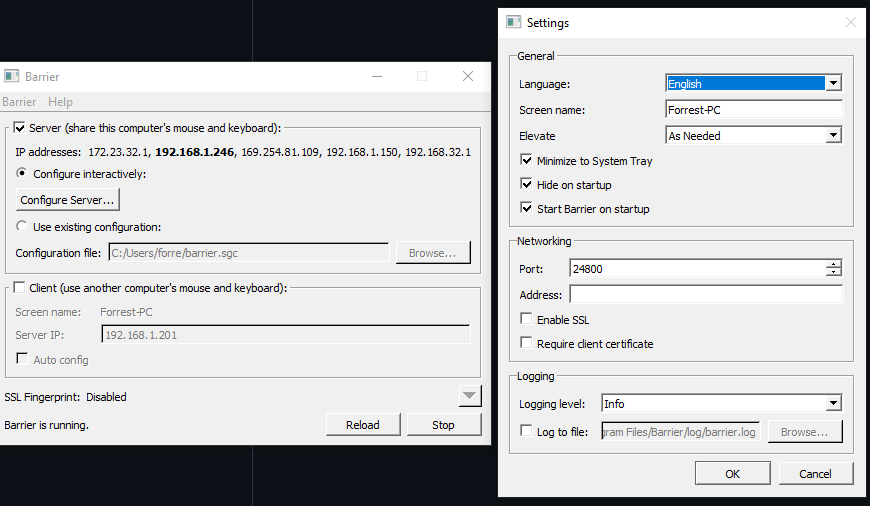
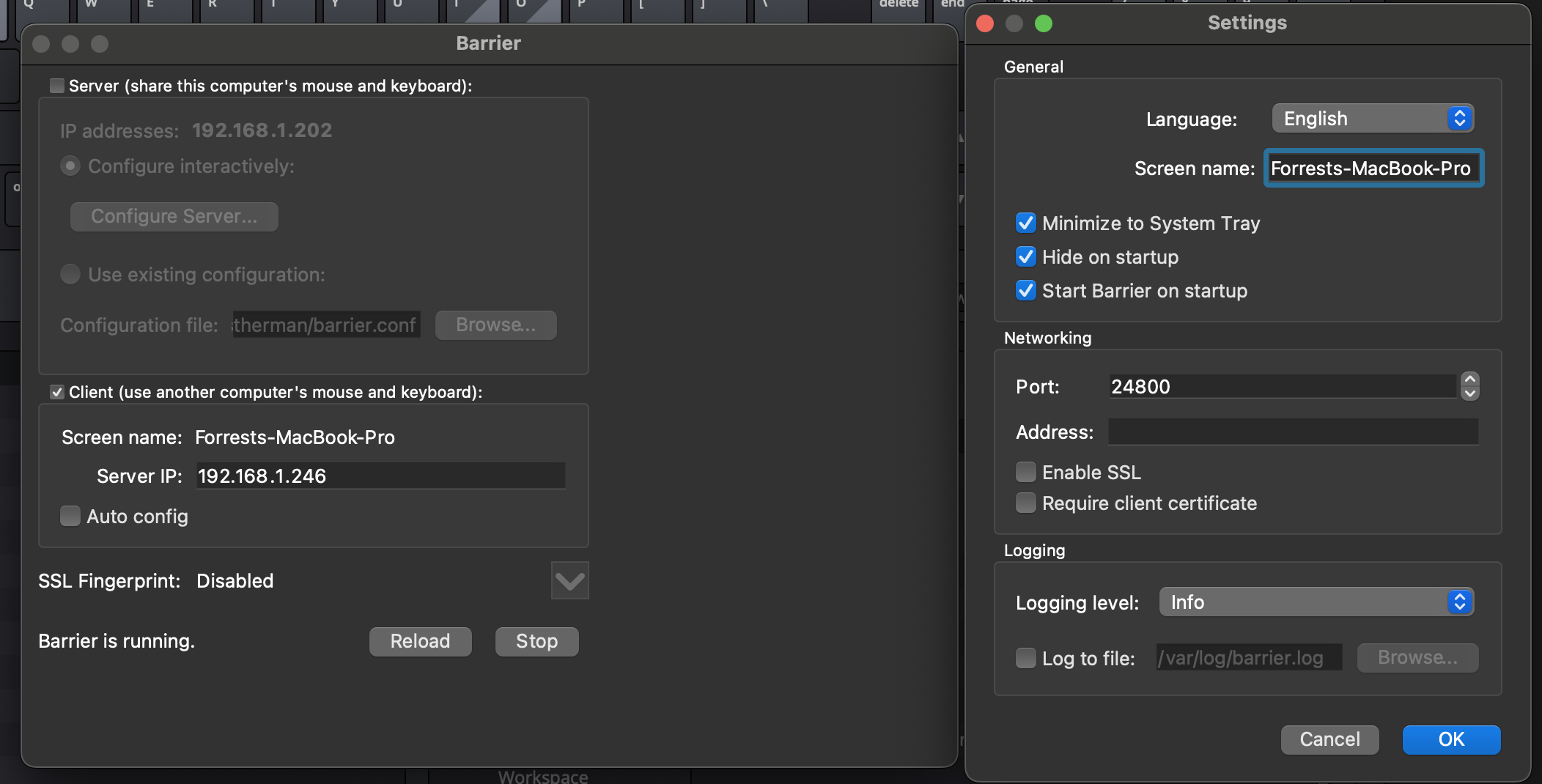
I just installed Barrier on my Macbook and Windows PC (PC is the Server, Mac the client) and after using the PC mouse and keyboard with the Mac for a bit, if I return to the Windows system and then try to use the Mac trackpad, the mouse cursor is invisible.

<!-- gh-comment-id:1121504785 --> @forrest-herman commented on GitHub (May 9, 2022): I just installed Barrier on my Macbook and Windows PC (PC is the Server, Mac the client) and after using the PC mouse and keyboard with the Mac for a bit, if I return to the Windows system and then try to use the Mac trackpad, the mouse cursor is invisible.
Author
Owner

@jjmmfi commented on GitHub (May 10, 2022):

I can say I have had exactly similar behavior also. The only solution I found is to try bringing the mouse back to the client and hopefully, the mouse becomes visible. I am pretty new with Barrier so take that in mind. :)

One time in a "Mac as a server, another Mac as client, other Windows machines as clients" situation I even had the client mouse visible on the client screen and I could only move it using the mouse on the server. Even when I closed the Barrier on the server Mac the mouse was stuck on the screen. When I disconnected the client Mac's mouse and reconnected it, it worked normally again.

In a conclusion, I think Barrier is not very well working when you try to use multiple mouse and keyboards. I mean when using the client's own mouse when connected to a server, would cause some problems. Maybe that needs some fixes in the code.

To my understanding, it might also be worth trying to rearrange the displays, especially when using different resolutions. I read here in Github issues that when using multiple monitors Barrier treats computer's all monitors as a big rectangle.

<!-- gh-comment-id:1121975751 --> @jjmmfi commented on GitHub (May 10, 2022): I can say I have had exactly similar behavior also. The only solution I found is to try bringing the mouse back to the client and hopefully, the mouse becomes visible. I am pretty new with Barrier so take that in mind. :) One time in a "Mac as a server, another Mac as client, other Windows machines as clients" situation I even had the client mouse visible on the client screen and I could only move it using the mouse on the server. Even when I closed the Barrier on the server Mac the mouse was stuck on the screen. When I disconnected the client Mac's mouse and reconnected it, it worked normally again. In a conclusion, I think Barrier is not very well working when you try to use multiple mouse and keyboards. I mean when using the client's own mouse when connected to a server, would cause some problems. Maybe that needs some fixes in the code. To my understanding, it might also be worth trying to rearrange the displays, especially when using different resolutions. I read here in Github issues that when using multiple monitors Barrier treats computer's all monitors as a big rectangle.
Author
Owner

@cinnamonKale commented on GitHub (Jun 1, 2022):

This isn't a full fix, but has helped me with the same issue with my client macbook's trackpad.

Go into the settings for the client and server, then check "Fix Preserve Focus".

I turned this on for my client macbook, and when I took the focus out of it, I was able to use the client trackpad to regain focus. But I had to click the trackpad to make it work, which is what makes it not a full fix.

Screen Shot 2022-06-01 at 10 12 14
<!-- gh-comment-id:1143743493 --> @cinnamonKale commented on GitHub (Jun 1, 2022): This isn't a full fix, but has helped me with the same issue with my client macbook's trackpad. Go into the settings for the client and server, then check "**Fix Preserve Focus**". I turned this on for my client macbook, and when I took the focus out of it, I was able to use the client trackpad to regain focus. But I had to click the trackpad to make it work, which is what makes it not a full fix. <img width="568" alt="Screen Shot 2022-06-01 at 10 12 14" src="https://user-images.githubusercontent.com/6350880/171438836-5b396bb3-494e-42a7-91ee-68e04375bed0.png">
Author
Owner

@forrest-herman commented on GitHub (Jun 24, 2022):

Hi @cinnamonKale, I am unable to find that window that you see there, with the fixes section...
The MacBook is the Client and the Windows PC is the Server
image
Screen Shot 2022-06-23 at 10 57 16 PM

<!-- gh-comment-id:1165142796 --> @forrest-herman commented on GitHub (Jun 24, 2022): Hi @cinnamonKale, I am unable to find that window that you see there, with the fixes section... The MacBook is the Client and the Windows PC is the Server ![image](https://user-images.githubusercontent.com/58410716/175453290-f14dea9c-5b6f-4bff-bf2b-d4192adc8764.png) <img width="1052" alt="Screen Shot 2022-06-23 at 10 57 16 PM" src="https://user-images.githubusercontent.com/58410716/175453303-1b2681ac-6d04-46f1-ae72-89cc689b7039.png">
Author
Owner

@cinnamonKale commented on GitHub (Jun 24, 2022):

@forrest-herman I've uninstalled barrier so I can't remember exactly how to access that settings page. It may be accessible by right clicking each screen in the layout settings. Otherwise just poke around for it

<!-- gh-comment-id:1165553446 --> @cinnamonKale commented on GitHub (Jun 24, 2022): @forrest-herman I've uninstalled barrier so I can't remember exactly how to access that settings page. It may be accessible by right clicking each screen in the layout settings. Otherwise just poke around for it
Author
Owner

@QuantumKuba commented on GitHub (Oct 12, 2022):

I just installed Barrier on my Macbook and Windows PC (PC is the Server, Mac the client) and after using the PC mouse and keyboard with the Mac for a bit, if I return to the Windows system and then try to use the Mac trackpad, the mouse cursor is invisible.

Same issue here. But in my case the coursour doesnt bo back to the windows machine.

<!-- gh-comment-id:1276246923 --> @QuantumKuba commented on GitHub (Oct 12, 2022): > I just installed Barrier on my Macbook and Windows PC (PC is the Server, Mac the client) and after using the PC mouse and keyboard with the Mac for a bit, if I return to the Windows system and then try to use the Mac trackpad, the mouse cursor is invisible. Same issue here. But in my case the coursour doesnt bo back to the windows machine.
Author
Owner

@QuantumKuba commented on GitHub (Oct 12, 2022):

Hi @cinnamonKale, I am unable to find that window that you see there, with the fixes section...
The MacBook is the Client and the Windows PC is the Server
image
Screen Shot 2022-06-23 at 10 57 16 PM

You have to go into Configure Server on the server device and Double click on your client desktop icon from there you can access this menu. You can select this setting for both client and server device.

<!-- gh-comment-id:1276314318 --> @QuantumKuba commented on GitHub (Oct 12, 2022): > Hi @cinnamonKale, I am unable to find that window that you see there, with the fixes section... > The MacBook is the Client and the Windows PC is the Server > ![image](https://user-images.githubusercontent.com/58410716/175453290-f14dea9c-5b6f-4bff-bf2b-d4192adc8764.png) > <img alt="Screen Shot 2022-06-23 at 10 57 16 PM" width="1052" src="https://user-images.githubusercontent.com/58410716/175453303-1b2681ac-6d04-46f1-ae72-89cc689b7039.png"> You have to go into Configure Server on the server device and Double click on your client desktop icon from there you can access this menu. You can select this setting for both client and server device.
Sign in to join this conversation.
No milestone
No project
No assignees
1 participant
Notifications
Due date
The due date is invalid or out of range. Please use the format "yyyy-mm-dd".

No due date set.

Dependencies

No dependencies set.

Reference: github-starred/barrier#1221
No description provided.