[GH-ISSUE #170] LG Monitor: have to unmute manually after muting #125

Closed
opened 2026-05-05 05:06:40 -06:00 by gitea-mirror · 138 comments
Owner

Originally created by @abdelgad on GitHub (Jan 11, 2020).
Original GitHub issue: https://github.com/MonitorControl/MonitorControl/issues/170

Originally assigned to: @waydabber on GitHub.

Monitor: LG 34WL500 (Ultrawide)

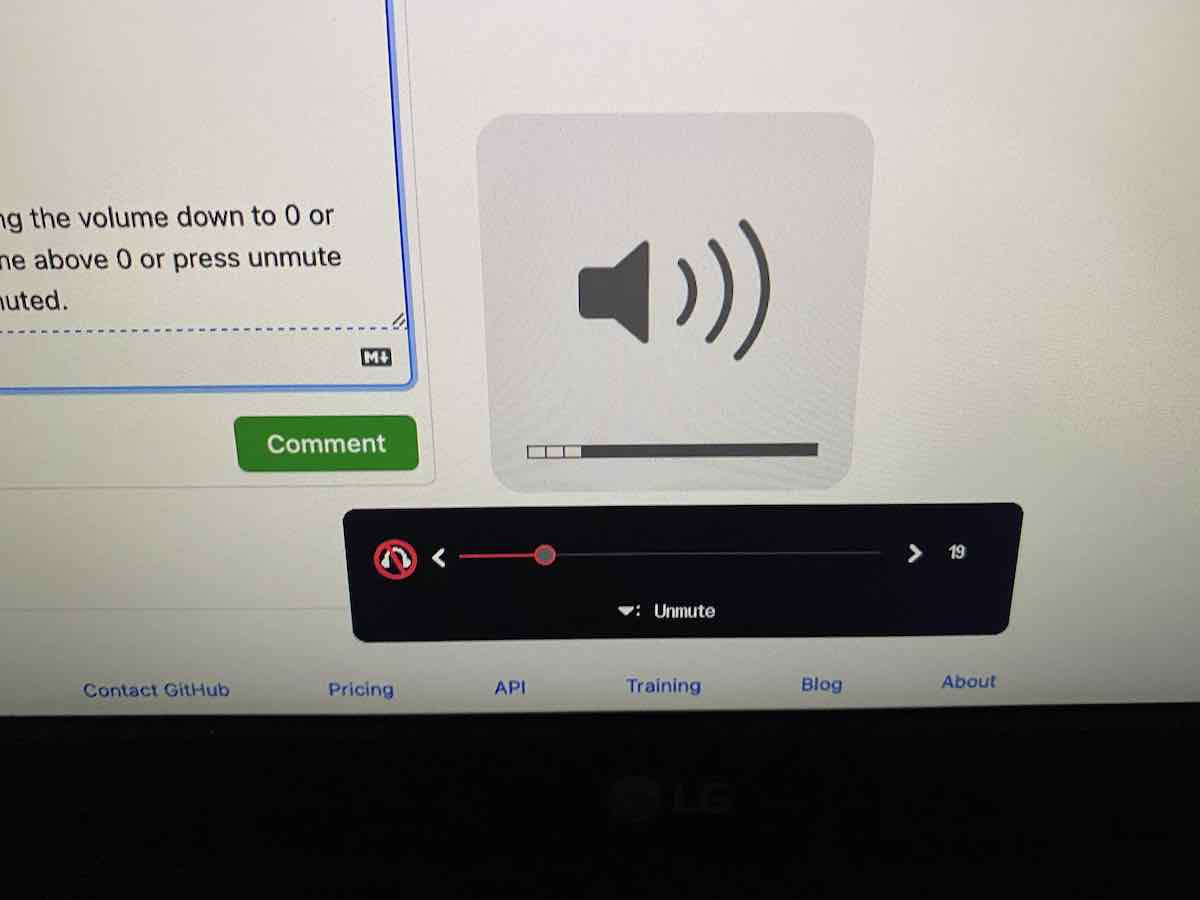
after muting (using the keyboard mute key) or getting the volume level to 0, the monitor is muted, unmuting however (with the keyboard mute key) doesn't work, I can adjust the volume but the monitor will stay muted, I have to unmute the monitor manually (using the monitor physical key)
IMG_4384

Originally created by @abdelgad on GitHub (Jan 11, 2020). Original GitHub issue: https://github.com/MonitorControl/MonitorControl/issues/170 Originally assigned to: @waydabber on GitHub. Monitor: LG 34WL500 (Ultrawide) after muting (using the keyboard mute key) or getting the volume level to 0, the monitor is muted, unmuting however (with the keyboard mute key) doesn't work, I can adjust the volume but the monitor will stay muted, I have to unmute the monitor manually (using the monitor physical key) ![IMG_4384](https://user-images.githubusercontent.com/59240245/72208480-462eb080-34a3-11ea-9f11-0f3a43b73f73.jpg)
gitea-mirror 2026-05-05 05:06:40 -06:00
Author
Owner

@JoniVR commented on GitHub (Jan 24, 2020):

What version of MonitorControl? You can see it in the settings.

<!-- gh-comment-id:578070565 --> @JoniVR commented on GitHub (Jan 24, 2020): What version of MonitorControl? You can see it in the settings.
Author
Owner

@odenak commented on GitHub (Mar 31, 2020):

I have the same problem on my LG 43UD79-B. I'm using 1.7.1. I didn't have this problem on 1.7.0 and prior. I believe this bug may have been introduced as part of https://github.com/the0neyouseek/MonitorControl/pull/116

<!-- gh-comment-id:606779167 --> @odenak commented on GitHub (Mar 31, 2020): I have the same problem on my LG 43UD79-B. I'm using 1.7.1. I didn't have this problem on 1.7.0 and prior. I believe this bug may have been introduced as part of https://github.com/the0neyouseek/MonitorControl/pull/116
Author
Owner

@kumowoon1025 commented on GitHub (Apr 14, 2020):

I can sort of reproduce this if I mute the display with the controls on it. But not if I only control from the Mac.

<!-- gh-comment-id:613433454 --> @kumowoon1025 commented on GitHub (Apr 14, 2020): I can sort of reproduce this if I mute the display with the controls on it. But not if I only control from the Mac.
Author
Owner

@kevinjohncutler commented on GitHub (Apr 23, 2020):

I've also experienced this lately on my LG, but only if the display sleeps on mute. After wake it requires manual unmuting.

<!-- gh-comment-id:618197219 --> @kevinjohncutler commented on GitHub (Apr 23, 2020): I've also experienced this lately on my LG, but only if the display sleeps on mute. After wake it requires manual unmuting.
Author
Owner

@luispinho commented on GitHub (Apr 28, 2020):

Also happens with the LG 27UL550. Once I mute by going all the way to 0, the monitor doesn't unmute when I increase the volume again (I have to unmute in the monitor by pressing down in the joystick and then it works properly). Using version 2.0.0 of MonitorControl. If you need any more info, let me know. Thank you very much for making this great piece of software!

<!-- gh-comment-id:620763602 --> @luispinho commented on GitHub (Apr 28, 2020): Also happens with the LG 27UL550. Once I mute by going all the way to 0, the monitor doesn't unmute when I increase the volume again (I have to unmute in the monitor by pressing down in the joystick and then it works properly). Using version 2.0.0 of MonitorControl. If you need any more info, let me know. Thank you very much for making this great piece of software!
Author
Owner

@ghost commented on GitHub (Aug 7, 2020):

Exact same issue. Otherwise love the app. Thanks for the hard work!

<!-- gh-comment-id:670667868 --> @ghost commented on GitHub (Aug 7, 2020): Exact same issue. Otherwise love the app. Thanks for the hard work!
Author
Owner

@chaim1221 commented on GitHub (Sep 14, 2020):

"Me too." This is probably related to #94, #107, and #149. I'm guessing what you guys did is to force a mute on zero volume. You need to now unmute when volume starts at 0 and is increased.

<!-- gh-comment-id:692191796 --> @chaim1221 commented on GitHub (Sep 14, 2020): "Me too." This is probably related to #94, #107, and #149. I'm guessing what you guys did is to force a mute on zero volume. You need to now _unmute_ when volume starts at 0 and is increased.
Author
Owner

@hfahmy commented on GitHub (Sep 24, 2020):

I have a broken joystick on my monitor. Download this app to get the volume controls back. But this but got in the way. A speedy fix would be much appreciated :) Thanks for the hard work!

<!-- gh-comment-id:698455270 --> @hfahmy commented on GitHub (Sep 24, 2020): I have a broken joystick on my monitor. Download this app to get the volume controls back. But this but got in the way. A speedy fix would be much appreciated :) Thanks for the hard work!
Author
Owner

@ricardopolo commented on GitHub (Oct 20, 2020):

Same issue here!! I don't thing priority is minor, if you change the volume using the mac keys latter you need to start using the joystick in the monitor to be able to use Monitor Control again

<!-- gh-comment-id:713163301 --> @ricardopolo commented on GitHub (Oct 20, 2020): Same issue here!! I don't thing priority is minor, if you change the volume using the mac keys latter you need to start using the joystick in the monitor to be able to use Monitor Control again
Author
Owner

@leej35 commented on GitHub (Nov 12, 2020):

Same here. Monitor: LG 34WN80C-B, Version: 2.1.0 (Build 721).

<!-- gh-comment-id:726180877 --> @leej35 commented on GitHub (Nov 12, 2020): Same here. Monitor: LG 34WN80C-B, Version: 2.1.0 (Build 721).
Author
Owner

@leej35 commented on GitHub (Nov 12, 2020):

As it is said, using version 1.7.0 help me to circumvent the issue: https://github.com/MonitorControl/MonitorControl/releases/tag/v1.7.0

I have the same problem on my LG 43UD79-B. I'm using 1.7.1. I didn't have this problem on 1.7.0 and prior. I believe this bug may have been introduced as part of #116

<!-- gh-comment-id:726182274 --> @leej35 commented on GitHub (Nov 12, 2020): As it is said, using version 1.7.0 help me to circumvent the issue: https://github.com/MonitorControl/MonitorControl/releases/tag/v1.7.0 > I have the same problem on my LG 43UD79-B. I'm using 1.7.1. I didn't have this problem on 1.7.0 and prior. I believe this bug may have been introduced as part of #116
Author
Owner

@riobard commented on GitHub (Dec 10, 2020):

I'm using an LG monitor and can confirm the bug was introduced in 1.7.1 by #116 as 1.7.0 does not have this problem.

<!-- gh-comment-id:742239676 --> @riobard commented on GitHub (Dec 10, 2020): I'm using an LG monitor and can confirm the bug was introduced in 1.7.1 by #116 as 1.7.0 does not have this problem.
Author
Owner

@robertbressi commented on GitHub (Dec 10, 2020):

I've never seen this happen on my Samsung monitor (and sorry for not noticing this before I was tagged today 😳 ), so I'm wondering whether there's something specific about LG monitors that isn't playing nicely here...

I'm guessing what you guys did is to force a mute on zero volume. You need to now unmute when volume starts at 0 and is increased.

Just to respond to this comment specifically... it's definitely set up to do that 😅

--
A couple of questions (for anyone with an affected monitor to answer):

  1. Can you confirm that the sequence of repro steps here are:
  • Have volume > 0; monitor is unmuted
  • Decrease volume to 0; monitor becomes muted
  • Attempt to increase volume to > 0; monitor remains muted
  1. When you're in the above state (volume > 0 but monitor is still muted), does pressing the mute key unmute the monitor?
  2. Is this reproducible 100% of the time, or is it intermittent?
  3. If you mute using the mute key with the volume above 0, then unmute using the mute key, does the monitor unmute as expected?
<!-- gh-comment-id:742257370 --> @robertbressi commented on GitHub (Dec 10, 2020): I've never seen this happen on my Samsung monitor (and sorry for not noticing this before I was tagged today 😳 ), so I'm wondering whether there's something specific about LG monitors that isn't playing nicely here... >I'm guessing what you guys did is to force a mute on zero volume. You need to now unmute when volume starts at 0 and is increased. Just to respond to this comment specifically... it's definitely set up to do that 😅 -- A couple of questions (for anyone with an affected monitor to answer): 1. Can you confirm that the sequence of repro steps here are: - Have volume > 0; monitor is unmuted - Decrease volume to 0; monitor becomes muted - Attempt to increase volume to > 0; monitor remains muted 2. When you're in the above state (volume > 0 but monitor is still muted), does pressing the mute key unmute the monitor? 3. Is this reproducible **100%** of the time, or is it intermittent? 4. If you **mute** using the mute key with the volume above 0, then **unmute** using the mute key, does the monitor unmute as expected?
Author
Owner

@riobard commented on GitHub (Dec 10, 2020):

@robertbressi

  1. Yes.
  2. No.
  3. Yes, 100%.
  4. No.

A simpler description of the symptom would be if the monitor volume is muted (either by lowering the volume down to 0 or pressing mute key directly), it will always stay muted, even if you try to increase volume above 0 or press unmute key. The OSD will show the correct volume number if you increase it above 0, but it is always muted.

I've attached a screenshot here:
IMG_8205

Note that macOS volume indicator clearly shows the volume is NOT muted, but the monitor OSD shows the volume is still muted even when it registers a non-zero volume number.

<!-- gh-comment-id:742761363 --> @riobard commented on GitHub (Dec 10, 2020): @robertbressi 1. Yes. 2. No. 3. Yes, 100%. 4. No. A simpler description of the symptom would be if the monitor volume is muted (either by lowering the volume down to 0 or pressing mute key directly), it will always stay muted, even if you try to increase volume above 0 or press unmute key. The OSD will show the correct volume number if you increase it above 0, but it is always muted. I've attached a screenshot here: ![IMG_8205](https://user-images.githubusercontent.com/22984/101822850-ec2be480-3b64-11eb-96d7-adac3031f86d.jpg) Note that macOS volume indicator clearly shows the volume is NOT muted, but the monitor OSD shows the volume is still muted even when it registers a non-zero volume number.
Author
Owner

@shamal commented on GitHub (Dec 11, 2020):

I have this exact issue. MonitorControl version 2.1.0 (Build 721) on LG 34WN80C-B.

<!-- gh-comment-id:743094356 --> @shamal commented on GitHub (Dec 11, 2020): I have this exact issue. MonitorControl version 2.1.0 (Build 721) on LG 34WN80C-B.
Author
Owner

@riobard commented on GitHub (Dec 11, 2020):

@shamal Please try version 1.7.0 and 1.7.1 to help @robertbressi pinpoint the issue.

<!-- gh-comment-id:743100674 --> @riobard commented on GitHub (Dec 11, 2020): @shamal Please try version 1.7.0 and 1.7.1 to help @robertbressi pinpoint the issue.
Author
Owner

@robertbressi commented on GitHub (Dec 11, 2020):

@riobard: Thanks for the info there.

Based on your description, I wonder whether the true unmute DDC command is working correctly on your LG monitor. The way to confirm this would be to use ddcctl to more-directly deliver the command to your monitor.

If you're good with a bit more advanced debugging, can you please install ddcctl (https://github.com/kfix/ddcctl):

git clone git@github.com:kfix/ddcctl.git
cd ddcctl
make; make install

Once installed, have your volume set to > 0 (and have some sound playing), then run the following two commands (I assume you only have one external monitor, hence the -d 1, but if you have multiple, run ddcctl on its own and enter the number that corresponds to the position in the list that your LG monitor appears):

ddcctl -d 1 -m 1
ddcctl -d 1 -m 2

The first command should mute the monitor, and the second should unmute it. Let me know how that goes or if you have any questions 👍

<!-- gh-comment-id:743281151 --> @robertbressi commented on GitHub (Dec 11, 2020): @riobard: Thanks for the info there. Based on your description, I wonder whether the **true unmute** DDC command is working correctly on your LG monitor. The way to confirm this would be to use `ddcctl` to more-directly deliver the command to your monitor. If you're good with a bit more advanced debugging, can you please install `ddcctl` (https://github.com/kfix/ddcctl): ``` git clone git@github.com:kfix/ddcctl.git cd ddcctl make; make install ``` Once installed, have your volume set to **> 0** (and have some sound playing), then run the following two commands (I assume you only have one external monitor, hence the `-d 1`, but if you have multiple, run `ddcctl` on its own and enter the number that corresponds to the position in the list that your LG monitor appears): ``` ddcctl -d 1 -m 1 ddcctl -d 1 -m 2 ``` The first command should **mute** the monitor, and the second should **unmute** it. Let me know how that goes or if you have any questions 👍
Author
Owner

@riobard commented on GitHub (Dec 11, 2020):

@robertbressi Thanks a lot for the guide. Here's my result executing the commands you requested:

To mute:

 ./ddcctl -d 1 -m 1
D: NSScreen #459114948 (2560x1440 0°) HiDPI
D: NSScreen #583700161 (1920x1080 0°) HiDPI
I: found 2 external displays
I: polling display 1's EDID
I: got edid.name: LG HDR 4K
D: action: m: 1
D: setting VCP control #141 => 1

And to unmute:

 ./ddcctl -d 1 -m 2
D: NSScreen #459114948 (2560x1440 0°) HiDPI
D: NSScreen #583700161 (1920x1080 0°) HiDPI
I: found 2 external displays
I: polling display 1's EDID
I: got edid.name: LG HDR 4K
D: action: m: 2
D: setting VCP control #141 => 2

As you can see I have two external monitors and I'm trying to control the first one. Both ddcctl commands work perfectly and I have the monitor volume muted/unmuted successfully. I'd assume from the results that 1) the monitor is working fine, and 2) the ddcctl command is working fine, therefore the bug is likely in the control logic in the Swift code?

<!-- gh-comment-id:743294783 --> @riobard commented on GitHub (Dec 11, 2020): @robertbressi Thanks a lot for the guide. Here's my result executing the commands you requested: To mute: ```sh  ./ddcctl -d 1 -m 1 D: NSScreen #459114948 (2560x1440 0°) HiDPI D: NSScreen #583700161 (1920x1080 0°) HiDPI I: found 2 external displays I: polling display 1's EDID I: got edid.name: LG HDR 4K D: action: m: 1 D: setting VCP control #141 => 1 ``` And to unmute: ```sh  ./ddcctl -d 1 -m 2 D: NSScreen #459114948 (2560x1440 0°) HiDPI D: NSScreen #583700161 (1920x1080 0°) HiDPI I: found 2 external displays I: polling display 1's EDID I: got edid.name: LG HDR 4K D: action: m: 2 D: setting VCP control #141 => 2 ``` As you can see I have two external monitors and I'm trying to control the first one. Both `ddcctl` commands work perfectly and I have the monitor volume muted/unmuted successfully. I'd assume from the results that 1) the monitor is working fine, and 2) the `ddcctl` command is working fine, therefore the bug is likely in the control logic in the Swift code?
Author
Owner

@robertbressi commented on GitHub (Dec 11, 2020):

@riobard: Awesome, that's super-helpful, thanks!

Sounds to me like something funky is going on with unmute specifically in the Swift code (since you were not able to successfully unmute via MonitorControl either by pressing the mute key or changing the volume while muted), so that gives me a good place to start investigating 👍

<!-- gh-comment-id:743299630 --> @robertbressi commented on GitHub (Dec 11, 2020): @riobard: Awesome, that's super-helpful, thanks! Sounds to me like something funky is going on with unmute specifically in the Swift code (since you were not able to successfully unmute via MonitorControl either by pressing the mute key or changing the volume while muted), so that gives me a good place to start investigating 👍
Author
Owner

@robertbressi commented on GitHub (Dec 16, 2020):

@riobard: Apologies for making you do the bulk of the diagnostic work here, but would you be able to run another ddcctl sequence and provide the output? It's much the same as last time, but with an additional couple of steps:

  1. Make sure your monitor is unmuted and the volume set to >0
  2. Run ddcctl -d 1 -m \? and capture the output (the \ may or may not be important depending on your shell - if it doesn't work with the \, try again without it)
  3. Run ddcctl -d 1 -m 1 and capture the output (the monitor should become muted)
  4. Run ddcctl -d 1 -m \? and capture the output
  5. Run ddcctl -d 1 -m 2 and capture the output (the monitor should become unmuted)
  6. Run ddcctl -d 1 -m \? and capture the output

Thanks in advance!

<!-- gh-comment-id:746575685 --> @robertbressi commented on GitHub (Dec 16, 2020): @riobard: Apologies for making you do the bulk of the diagnostic work here, but would you be able to run another `ddcctl` sequence and provide the output? It's much the same as last time, but with an additional couple of steps: 1. Make sure your monitor is **unmuted** and the volume set to **>0** 2. Run `ddcctl -d 1 -m \?` and capture the output (the `\` may or may not be important depending on your shell - if it doesn't work _with_ the `\`, try again without it) 3. Run `ddcctl -d 1 -m 1` and capture the output (the monitor should become muted) 4. Run `ddcctl -d 1 -m \?` and capture the output 5. Run `ddcctl -d 1 -m 2` and capture the output (the monitor should become unmuted) 6. Run `ddcctl -d 1 -m \?` and capture the output Thanks in advance!
Author
Owner

@riobard commented on GitHub (Dec 16, 2020):

@robertbressi Glad to help pinpoint the issue. Following are the results:

Monitor is unmuted and volume set to > 0 before running the following:

 ./ddcctl -d 1 -m \?
D: NSScreen #459114948 (2560x1440 0°) HiDPI
D: NSScreen #583700161 (1920x1080 0°) HiDPI
I: found 2 external displays
I: polling display 1's EDID
I: got edid.name: LG HDR 4K
D: action: m: ?
D: querying VCP control: #141 =?
E: No data after 10 tries! 
E: DDC send command failed!
E: VCP control #141 (0x8d) = current: 0, max: 0

 ./ddcctl -d 1 -m 1
D: NSScreen #459114948 (2560x1440 0°) HiDPI
D: NSScreen #583700161 (1920x1080 0°) HiDPI
I: found 2 external displays
I: polling display 1's EDID
I: got edid.name: LG HDR 4K
D: action: m: 1
D: setting VCP control #141 => 1

 ./ddcctl -d 1 -m \?
D: NSScreen #459114948 (2560x1440 0°) HiDPI
D: NSScreen #583700161 (1920x1080 0°) HiDPI
I: found 2 external displays
I: polling display 1's EDID
I: got edid.name: LG HDR 4K
D: action: m: ?
D: querying VCP control: #141 =?
D: Tries required to get data: 2 
I: VCP control #141 (0x8d) = current: 1, max: 100

  ./ddcctl -d 1 -m 2
D: NSScreen #459114948 (2560x1440 0°) HiDPI
D: NSScreen #583700161 (1920x1080 0°) HiDPI
I: found 2 external displays
I: polling display 1's EDID
I: got edid.name: LG HDR 4K
D: action: m: 2
D: setting VCP control #141 => 2

  ./ddcctl -d 1 -m \?
D: NSScreen #459114948 (2560x1440 0°) HiDPI
D: NSScreen #583700161 (1920x1080 0°) HiDPI
I: found 2 external displays
I: polling display 1's EDID
I: got edid.name: LG HDR 4K
D: action: m: ?
D: querying VCP control: #141 =?
E: No data after 10 tries! 
E: DDC send command failed!
E: VCP control #141 (0x8d) = current: 0, max: 0

The monitor is properly muted and unmuted after step 3 and 5. Let me know if you need further testing results.

<!-- gh-comment-id:746734926 --> @riobard commented on GitHub (Dec 16, 2020): @robertbressi Glad to help pinpoint the issue. Following are the results: Monitor is unmuted and volume set to > 0 before running the following: ```sh  ./ddcctl -d 1 -m \? D: NSScreen #459114948 (2560x1440 0°) HiDPI D: NSScreen #583700161 (1920x1080 0°) HiDPI I: found 2 external displays I: polling display 1's EDID I: got edid.name: LG HDR 4K D: action: m: ? D: querying VCP control: #141 =? E: No data after 10 tries! E: DDC send command failed! E: VCP control #141 (0x8d) = current: 0, max: 0  ./ddcctl -d 1 -m 1 D: NSScreen #459114948 (2560x1440 0°) HiDPI D: NSScreen #583700161 (1920x1080 0°) HiDPI I: found 2 external displays I: polling display 1's EDID I: got edid.name: LG HDR 4K D: action: m: 1 D: setting VCP control #141 => 1  ./ddcctl -d 1 -m \? D: NSScreen #459114948 (2560x1440 0°) HiDPI D: NSScreen #583700161 (1920x1080 0°) HiDPI I: found 2 external displays I: polling display 1's EDID I: got edid.name: LG HDR 4K D: action: m: ? D: querying VCP control: #141 =? D: Tries required to get data: 2 I: VCP control #141 (0x8d) = current: 1, max: 100  ./ddcctl -d 1 -m 2 D: NSScreen #459114948 (2560x1440 0°) HiDPI D: NSScreen #583700161 (1920x1080 0°) HiDPI I: found 2 external displays I: polling display 1's EDID I: got edid.name: LG HDR 4K D: action: m: 2 D: setting VCP control #141 => 2  ./ddcctl -d 1 -m \? D: NSScreen #459114948 (2560x1440 0°) HiDPI D: NSScreen #583700161 (1920x1080 0°) HiDPI I: found 2 external displays I: polling display 1's EDID I: got edid.name: LG HDR 4K D: action: m: ? D: querying VCP control: #141 =? E: No data after 10 tries! E: DDC send command failed! E: VCP control #141 (0x8d) = current: 0, max: 0 ``` The monitor is properly muted and unmuted after step 3 and 5. Let me know if you need further testing results.
Author
Owner

@robertbressi commented on GitHub (Dec 17, 2020):

@riobard: Thanks again for the extra testing. This is the cause of the issue right here:

 ./ddcctl -d 1 -m \?
...
I: VCP control #141 (0x8d) = current: 1, max: 100

From issue reports in the past, on other displays, max: 100 indicates that the display doesn't support the "true" mute/unmute DDC command (see https://github.com/MonitorControl/MonitorControl/issues/107), hence that's what I implemented in 1.7.1 😅

The fact that muting still works tells me that while the display is unmuted (even though you were getting max: 0 for -m \?), the display is indicating that it does support "true" mute/unmute command, but when it's muted, the display is indicating that it doesn't support that command.

@JoniVR, @the0neyouseek:
I'm starting to think that it's probably better that we make the ability to mute/unmute using the 0x8D command a per-display option in the Advanced tab in Preferences. Without a consistent set of criteria that determines whether any given display actually supports 0x8D, it's impossible to code a check that applies to all displays. Let me know if either of you have strong feelings about this solution.

If you don't feel it's worth it, another option is just to remove 0x8D handling from the app entirely and revert to using volume = 0 to "simulate" mute without actually using the mute command (even though this has been known to cause monitors like mine - Samsung C34J79x - to not completely mute the sound).

Happy to make the changes either way, or if you have any other solutions, also happy to discuss 👍

<!-- gh-comment-id:747218115 --> @robertbressi commented on GitHub (Dec 17, 2020): @riobard: Thanks again for the extra testing. This is the cause of the issue right here: ```  ./ddcctl -d 1 -m \? ... I: VCP control #141 (0x8d) = current: 1, max: 100 ``` From issue reports in the past, on other displays, `max: 100` indicates that the display **doesn't** support the "true" mute/unmute DDC command (see https://github.com/MonitorControl/MonitorControl/issues/107), hence that's what I implemented in 1.7.1 😅 The fact that muting still works tells me that while the display is unmuted (even though you were getting `max: 0` for `-m \?`), the display is indicating that it **does** support "true" mute/unmute command, but when it's muted, the display is indicating that it **doesn't** support that command. @JoniVR, @the0neyouseek: I'm starting to think that it's probably better that we make the ability to mute/unmute using the 0x8D command a per-display option in the Advanced tab in Preferences. Without a consistent set of criteria that determines whether any given display **actually** supports 0x8D, it's impossible to code a check that applies to all displays. Let me know if either of you have strong feelings about this solution. If you don't feel it's worth it, another option is just to remove 0x8D handling from the app entirely and revert to using `volume = 0` to "simulate" mute without actually using the mute command (even though this has been known to cause monitors like mine - Samsung C34J79x - to not completely mute the sound). Happy to make the changes either way, or if you have any other solutions, also happy to discuss 👍
Author
Owner

@riobard commented on GitHub (Dec 17, 2020):

@robertbressi I'm a bit puzzled by the following description:

From issue reports in the past, on other displays, max: 100 indicates that the display doesn't support the "true" mute/unmute DDC command (see #107), hence that's what I implemented in 1.7.1 😅
The fact that muting still works tells me that while the display is unmuted (even though you were getting max: 0 for -m ?), the display is indicating that it does support "true" mute/unmute command, but when it's muted, the display is indicating that it doesn't support that command.

Is there anyway I can find a specification for the VCP control thing? It's highly counter-intuitive that max: 100 means no unmute and max: 0 the opposite. Since I don't understand enough of the details, my wild guess would be… why not just send true mute/unmute command anyway (regardless of what the monitor reports)? Would that fix both issues?

<!-- gh-comment-id:747405587 --> @riobard commented on GitHub (Dec 17, 2020): @robertbressi I'm a bit puzzled by the following description: > From issue reports in the past, on other displays, max: 100 indicates that the display doesn't support the "true" mute/unmute DDC command (see #107), hence that's what I implemented in 1.7.1 😅 > The fact that muting still works tells me that while the display is unmuted (even though you were getting max: 0 for -m \?), the display is indicating that it does support "true" mute/unmute command, but when it's muted, the display is indicating that it doesn't support that command. Is there anyway I can find a specification for the `VCP control` thing? It's highly counter-intuitive that `max: 100` means no unmute and `max: 0` the opposite. Since I don't understand enough of the details, my wild guess would be… why not just send true mute/unmute command anyway (regardless of what the monitor reports)? Would that fix both issues?
Author
Owner

@robertbressi commented on GitHub (Dec 17, 2020):

@riobard: Thanks for your thoughts there. This issue has... a long history.

It's highly counter-intuitive that max: 100 means no unmute and max: 0 the opposite.

I chuckled when I read that comment, because yeah, I thought the same thing when I discovered that fact back when I first wrote the mute/unmute functionality. To explain a little further: generally, if the true mute/unmute command is supported on a display, the possible values are 1 (muted) and 2 (unmuted). Before this LG issue came about, my research indicated that a display with a value range of 0 to 100 for that command was just mirroring its volume values, showing that it didn't support muting and unmuting, only changing the volume.

why not just send true mute/unmute command anyway (regardless of what the monitor reports)? Would that fix both issues?

That's how I implemented the true mute/unmute command in the first place, but on displays that don't support it, sending that command to the display will do absolutely nothing, which meant that the mute and unmute keys did nothing for those displays when using MonitorControl.

This was exactly the reason why I put in the max value check - if any display didn't have the expected 1 and 2 value range for true mute/unmute, I would just send the volume command with a value of 0 as a proxy for muting the display. It's not great, but it's the best option I have for displays which don't support true mute/unmute.

Unfortunately though, since I now know that there are some displays (like yours) on which the value range is 1 and 2 while unmuted and 0 to 100 while muted, it's clear that even the value check isn't good enough to 100% determine whether a given display supports true mute/unmute or not. This makes it basically impossible to create a universal check across all displays.

Is there anyway I can find a specification for the VCP control thing?

The spec isn't the problem here - it's pretty clear about how each command should work. The problem is that display manufacturers aren't obligated to follow the spec, hence, you end up with a ton of variation that makes it extremely difficult, if not impossible, to create functionality that will work universally across all displays.

This is a key reason why the per-display Advanced preferences panel exists in MonitorControl, and why I'm suggesting that we use it to allow true mute/unmute to be used for monitors that fully support it.

<!-- gh-comment-id:747480451 --> @robertbressi commented on GitHub (Dec 17, 2020): @riobard: Thanks for your thoughts there. This issue has... a long history. > It's highly counter-intuitive that max: 100 means no unmute and max: 0 the opposite. I chuckled when I read that comment, because yeah, I thought the same thing when I discovered that fact back when I first wrote the mute/unmute functionality. To explain a little further: generally, if the true mute/unmute command is supported on a display, the possible values are 1 (muted) and 2 (unmuted). Before this LG issue came about, my research indicated that a display with a value range of 0 to 100 for that command was just mirroring its **volume** values, showing that it didn't support muting and unmuting, only changing the volume. > why not just send true mute/unmute command anyway (regardless of what the monitor reports)? Would that fix both issues? That's how I implemented the true mute/unmute command in the first place, but on displays that don't support it, sending that command to the display will do absolutely nothing, which meant that the mute and unmute keys did nothing for those displays when using MonitorControl. This was exactly the reason why I put in the max value check - if any display didn't have the expected 1 and 2 value range for true mute/unmute, I would just send the volume command with a value of 0 as a proxy for muting the display. It's not great, but it's the best option I have for displays which don't support true mute/unmute. Unfortunately though, since I now know that there are some displays (like yours) on which the value range is 1 and 2 while unmuted and 0 to 100 while muted, it's clear that even the value check isn't good enough to 100% determine whether a given display supports true mute/unmute or not. This makes it basically impossible to create a universal check across all displays. > Is there anyway I can find a specification for the VCP control thing? The spec isn't the problem here - it's pretty clear about how each command **should** work. The problem is that display manufacturers aren't obligated to follow the spec, hence, you end up with a ton of variation that makes it extremely difficult, if not impossible, to create functionality that will work universally across all displays. This is a key reason why the per-display Advanced preferences panel exists in MonitorControl, and why I'm suggesting that we use it to allow true mute/unmute to be used for monitors that fully support it.
Author
Owner

@riobard commented on GitHub (Dec 17, 2020):

@robertbressi Thanks very much for the detailed explanation! So if I understand you correctly, this I: VCP control #141 (0x8d) command is only for muting/unmuting, not for adjusting volumes? What does VCP stand for? Volume Control Protocol?

I've done some further experimenting with the command, and what I found is gonna blow up your mind: with the monitor unmuted and volume > 0, repeated running ddcctl -d 1 -m \? would show different results from time to time!

 ./ddcctl -d 1 -m \?
D: NSScreen #459114948 (2560x1440 0°) HiDPI
D: NSScreen #583700161 (1920x1080 0°) HiDPI
I: found 2 external displays
I: polling display 1's EDID
I: got edid.name: LG HDR 4K
D: action: m: ?
D: querying VCP control: #141 =?
E: No data after 10 tries! 
E: DDC send command failed!
E: VCP control #141 (0x8d) = current: 0, max: 0

 ./ddcctl -d 1 -m \?
D: NSScreen #459114948 (2560x1440 0°) HiDPI
D: NSScreen #583700161 (1920x1080 0°) HiDPI
I: found 2 external displays
I: polling display 1's EDID
I: got edid.name: LG HDR 4K
D: action: m: ?
D: querying VCP control: #141 =?
D: Tries required to get data: 5 
I: VCP control #141 (0x8d) = current: 2, max: 100

 ./ddcctl -d 1 -m \?
D: NSScreen #459114948 (2560x1440 0°) HiDPI
D: NSScreen #583700161 (1920x1080 0°) HiDPI
I: found 2 external displays
I: polling display 1's EDID
I: got edid.name: LG HDR 4K
D: action: m: ?
D: querying VCP control: #141 =?
E: No data after 10 tries! 
E: DDC send command failed!
E: VCP control #141 (0x8d) = current: 0, max: 0

What's this warning E: No data after 10 tries! about?

<!-- gh-comment-id:747585718 --> @riobard commented on GitHub (Dec 17, 2020): @robertbressi Thanks very much for the detailed explanation! So if I understand you correctly, this `I: VCP control #141 (0x8d)` command is only for muting/unmuting, not for adjusting volumes? What does `VCP` stand for? Volume Control Protocol? I've done some further experimenting with the command, and what I found is gonna blow up your mind: with the monitor unmuted and volume > 0, repeated running `ddcctl -d 1 -m \?` would show different results from time to time! ```sh  ./ddcctl -d 1 -m \? D: NSScreen #459114948 (2560x1440 0°) HiDPI D: NSScreen #583700161 (1920x1080 0°) HiDPI I: found 2 external displays I: polling display 1's EDID I: got edid.name: LG HDR 4K D: action: m: ? D: querying VCP control: #141 =? E: No data after 10 tries! E: DDC send command failed! E: VCP control #141 (0x8d) = current: 0, max: 0  ./ddcctl -d 1 -m \? D: NSScreen #459114948 (2560x1440 0°) HiDPI D: NSScreen #583700161 (1920x1080 0°) HiDPI I: found 2 external displays I: polling display 1's EDID I: got edid.name: LG HDR 4K D: action: m: ? D: querying VCP control: #141 =? D: Tries required to get data: 5 I: VCP control #141 (0x8d) = current: 2, max: 100  ./ddcctl -d 1 -m \? D: NSScreen #459114948 (2560x1440 0°) HiDPI D: NSScreen #583700161 (1920x1080 0°) HiDPI I: found 2 external displays I: polling display 1's EDID I: got edid.name: LG HDR 4K D: action: m: ? D: querying VCP control: #141 =? E: No data after 10 tries! E: DDC send command failed! E: VCP control #141 (0x8d) = current: 0, max: 0 ``` What's this warning `E: No data after 10 tries! ` about?
Author
Owner

@robertbressi commented on GitHub (Dec 17, 2020):

@riobard:

So if I understand you correctly, this I: VCP control #141 (0x8d) command is only for muting/unmuting, not for adjusting volumes?

Right. There's another command (0x62) which controls the display's speaker volume. You can mess around with it by using ddcctl -d 1 -v <1-254,\?> instead of ddcctl -d 1 -m <1-2,\?>.

What does VCP stand for? Volume Control Protocol?

A VCP control/command/code is a virtual control panel code - a code which can be used to identify a parameter to be retrieved and set on a display. The VCPs are part of the Monitor Control Command Set (MCCS), which is the specification for monitor-to-computer communication. If you're curious, DDC stands for Display Data Channel, which is the mechanism by which a computer can modify the parameters of a connected display.

What's this warning E: No data after 10 tries! about?

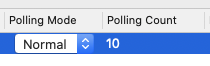
Ah yes, the fun stuff. If you've ever opened the MonitorControl preferences and hit the Advanced tab, you'll like have seen these two options:
image

Those options exist because DDC is inherently unreliable - sometimes it takes multiple tries to read/write data to and from the connected display. To get around this, we actually poll the display multiple times to make sure we're actually getting a reading for the requested data. In your specific case, ddcctl tried to poll the display 10 times to get the value for the 0x8d command, and the display didn't respond in time to provide that data.

<!-- gh-comment-id:747628753 --> @robertbressi commented on GitHub (Dec 17, 2020): @riobard: > So if I understand you correctly, this `I: VCP control #141 (0x8d)` command is only for muting/unmuting, not for adjusting volumes? Right. There's another command (0x62) which controls the display's speaker volume. You can mess around with it by using `ddcctl -d 1 -v <1-254,\?>` instead of `ddcctl -d 1 -m <1-2,\?>`. > What does VCP stand for? Volume Control Protocol? A VCP control/command/code is a _virtual control panel_ code - a code which can be used to identify a parameter to be retrieved and set on a display. The VCPs are part of the _Monitor Control Command Set_ (**MCCS**), which is the specification for monitor-to-computer communication. If you're curious, **DDC** stands for _Display Data Channel_, which is the mechanism by which a computer can modify the parameters of a connected display. > What's this warning E: No data after 10 tries! about? Ah yes, the fun stuff. If you've ever opened the MonitorControl preferences and hit the Advanced tab, you'll like have seen these two options: ![image](https://user-images.githubusercontent.com/3928269/102528226-201a7480-4053-11eb-84f0-8ab5275a36fd.png) Those options exist because DDC is inherently unreliable - sometimes it takes multiple tries to read/write data to and from the connected display. To get around this, we actually poll the display multiple times to make sure we're actually getting a reading for the requested data. In your specific case, `ddcctl` tried to poll the display 10 times to get the value for the 0x8d command, and the display didn't respond in time to provide that data.
Author
Owner

@robertbressi commented on GitHub (Dec 18, 2020):

@chaim1221: Thanks for your comments. I understand this is a frustrating issue, and trust me, it's frustrating for me too!

This is getting too pedantic...

In a world where every display followed the MCCS standards as written, I would totally agree with you.

Unfortunately, that's not the case, and there are several edge cases that prevent us from having a one-size-fits-all, simple approach like you're suggesting. What works for your display may not work for others, and I'm trying my best to come up with a solution that is at least passable for all.

The volume buttons should not mute the monitor, period. If you feel you have to mute the monitor at zero volume (which is ridiculous, because it's already at zero volume)...

Zero volume on some displays does not always mean that the sound is muted, hence why the mute/unmute function was added and integrated into the volume control functionality in the app.

If you feel you have to mute the monitor at zero volume... then kindly unmute it when volume > 0

As previously mentioned on this thread, the app is designed to send the unmute command when volume > 0. Per my fairly long-running discussion with @riobard above, TL;DR: there is an issue on some LG displays which makes the app think that unmuting is not supported on those displays, which I've proposed a solution for and tagged the main contributors of the app for their opinion on.

Happy to address any other concerns you might have - I'm just interested in getting the problem fixed to the best of my ability given the variance of cases we're dealing with here.

<!-- gh-comment-id:748255599 --> @robertbressi commented on GitHub (Dec 18, 2020): @chaim1221: Thanks for your comments. I understand this is a frustrating issue, and trust me, it's frustrating for me too! > This is getting too pedantic... In a world where every display followed the MCCS standards as written, I would totally agree with you. Unfortunately, that's not the case, and there are several edge cases that prevent us from having a one-size-fits-all, simple approach like you're suggesting. What works for your display may not work for others, and I'm trying my best to come up with a solution that is at least **passable** for all. > The volume buttons should not mute the monitor, period. If you feel you have to mute the monitor at zero volume (which is ridiculous, because it's already at zero volume)... Zero volume on some displays does **not** always mean that the sound is muted, hence why the mute/unmute function was added and integrated into the volume control functionality in the app. > If you feel you have to mute the monitor at zero volume... then kindly unmute it when volume > 0 As previously mentioned on this thread, the app **is designed to** send the unmute command when volume > 0. Per my fairly long-running discussion with @riobard above, TL;DR: there is an issue on some LG displays which makes the app think that unmuting is not supported on those displays, which I've proposed a solution for and tagged the main contributors of the app for their opinion on. Happy to address any other concerns you might have - I'm just interested in getting the problem fixed to the best of my ability given the variance of cases we're dealing with here.
Author
Owner

@chaim1221 commented on GitHub (Dec 18, 2020):

@robertbressi

I'm so sorry, I almost instantly deleted the comments (but, emails go out right away). I didn't read the full context, and didn't realize that you were the dev discussing how to fix it.

<!-- gh-comment-id:748308947 --> @chaim1221 commented on GitHub (Dec 18, 2020): @robertbressi I'm so sorry, I almost instantly deleted the comments (but, emails go out right away). I didn't read the full context, and didn't realize that you were the dev discussing how to fix it.
Author
Owner

@riobard commented on GitHub (Dec 18, 2020):

@robertbressi Thanks very very much for your patience explaining the ugliness of DDC! I've come to much better understanding of the situation now. For the short-term fix, would it be possible to send both 1) true 0x8D mute/unmute command and 2) 0x62 volume adjustment command to set volume to zero? Maybe also remember the current volume level before sending 0x62 so we can set it back when unmute.

<!-- gh-comment-id:748373517 --> @riobard commented on GitHub (Dec 18, 2020): @robertbressi Thanks very very much for your patience explaining the ugliness of DDC! I've come to much better understanding of the situation now. For the short-term fix, would it be possible to send both 1) true 0x8D mute/unmute command and 2) 0x62 volume adjustment command to set volume to zero? Maybe also remember the current volume level before sending 0x62 so we can set it back when unmute.
Author
Owner

@robertbressi commented on GitHub (Dec 19, 2020):

@chaim1221

No worries - I didn't notice you'd deleted the comments when I wrote my response because I viewed the page straight after getting the email.

This issue has a pretty long and convoluted history, so I hope at least that my responses might provide some quicker context for other folks who are also experiencing the issue.

<!-- gh-comment-id:748430980 --> @robertbressi commented on GitHub (Dec 19, 2020): @chaim1221 No worries - I didn't notice you'd deleted the comments when I wrote my response because I viewed the page straight after getting the email. This issue has a pretty long and convoluted history, so I hope at least that my responses might provide some quicker context for other folks who are also experiencing the issue.
Author
Owner

@robertbressi commented on GitHub (Dec 19, 2020):

@riobard

Thanks very very much for your patience explaining the ugliness of DDC! I've come to much better understanding of the situation now.

Only too happy to have someone else to bemoan the pain together with, haha 😅

For the short-term fix, would it be possible to send both 1) true 0x8D mute/unmute command and 2) 0x62 volume adjustment command to set volume to zero? Maybe also remember the current volume level before sending 0x62 so we can set it back when unmute.

Hmm... that's a decent idea, but I'm a little concerned about sending additional commands to displays that don't need them. Given that DDC is so poorly-adhered to, we'd risk triggering cases where the order we choose to send the commands in (either mute, then zero volume or vice-versa, and either unmute, then restore volume or vice-versa) could cause unexpected behavior on some displays.

I think, in the meantime, I'll prep a build with the mute/unmute setting in the Advanced section of Preferences and put up a PR for it, so at least there's something ready to go.

<!-- gh-comment-id:748438033 --> @robertbressi commented on GitHub (Dec 19, 2020): @riobard > Thanks very very much for your patience explaining the ugliness of DDC! I've come to much better understanding of the situation now. Only too happy to have someone else to bemoan the pain together with, haha 😅 > For the short-term fix, would it be possible to send both 1) true 0x8D mute/unmute command and 2) 0x62 volume adjustment command to set volume to zero? Maybe also remember the current volume level before sending 0x62 so we can set it back when unmute. Hmm... that's a decent idea, but I'm a little concerned about sending additional commands to displays that don't need them. Given that DDC is so poorly-adhered to, we'd risk triggering cases where the order we choose to send the commands in (either mute, then zero volume or vice-versa, and either unmute, then restore volume or vice-versa) could cause unexpected behavior on some displays. I think, in the meantime, I'll prep a build with the mute/unmute setting in the Advanced section of Preferences and put up a PR for it, so at least there's something ready to go.
Author
Owner

@riobard commented on GitHub (Dec 19, 2020):

@robertbressi Yeah, DDC seems to be really messed up. Yesterday I was having problems with long delays (tens of seconds) between volume adjustment keypresses and actual effects. The unreliability nature of command execution does not really help 😂

A proper fix might involve a monitor database to track all quirks, similarly to what smartmontools with all sorts of weird hard drives. Before that happens, please let me know if I can help testing your new build!

<!-- gh-comment-id:748445760 --> @riobard commented on GitHub (Dec 19, 2020): @robertbressi Yeah, DDC seems to be really messed up. Yesterday I was having problems with long delays (tens of seconds) between volume adjustment keypresses and actual effects. The unreliability nature of command execution does not really help 😂 A proper fix might involve a monitor database to track all quirks, similarly to what `smartmontools` with all sorts of weird hard drives. Before that happens, please let me know if I can help testing your new build!
Author
Owner

@robertbressi commented on GitHub (Dec 27, 2020):

@riobard: I've created a test app release that contains the option to enable mute/unmute for individual displays in the Advanced tab of the app's preferences.

The changeset was minimal - all I did was add the enable mute/unmute preference per display (in the Advanced tab) and replaced the old 0x8D command support check with the preference value. The preference value defaults to off initially, so running this version of the app should restore the mute/unmute behavior from pre-1.7.1 for LG displays like yours.

The test app has been versioned as 999.999.999 with build number 999999 so you can easily identify it by opening the app's preferences and looking at the General tab.

I've changed the identifier of the test app and notarized it with Apple, so it shouldn't conflict with the production version of MonitorControl you have installed on your computer (any preferences you may have set on the production version will not be present in the test app).

Despite this, I'd recommend not replacing your usual production MonitorControl app file with the test app file - quit your production MonitorControl app and run the test app from elsewhere on your computer instead. When you run the test app for the first time, you'll see a message asking you to enable Accessibility permission for the test app (MonitorControl-Test.app) in your Security & Privacy preferences in order to grant the test app access to use shortcut keys on your computer.

Let me know if the test app works to fix the mute/unmute issue with your LG display 👍

--
@JoniVR, @the0neyouseek: Still need your judgement on whether the enable mute/unmute preference in the Advanced tab is the right way to go.

I'm fairly confident it's the best path forward to balance the different mute/unmute issues we've seen (at least without more test data to narrow down the pattern of display support for the 0x8D command), but there are additional changes that need to be made which I either can't do on my own (e.g.: translations), or don't want to sink more work into (e.g.: documentation) if this isn't going to be an approach you find acceptable.

<!-- gh-comment-id:751428706 --> @robertbressi commented on GitHub (Dec 27, 2020): @riobard: I've created a [test app release](https://github.com/robertbressi/MonitorControl/releases/tag/v999.999.999) that contains the option to enable mute/unmute for individual displays in the Advanced tab of the app's preferences. The changeset was minimal - all I did was add the enable mute/unmute preference per display (in the Advanced tab) and replaced the old 0x8D command support check with the preference value. The preference value defaults to `off` initially, so running this version of the app should restore the mute/unmute behavior from pre-1.7.1 for LG displays like yours. The test app has been versioned as `999.999.999` with build number `999999` so you can easily identify it by opening the app's preferences and looking at the General tab. I've changed the identifier of the test app and notarized it with Apple, so it shouldn't conflict with the production version of MonitorControl you have installed on your computer (any preferences you may have set on the production version will not be present in the test app). Despite this, I'd recommend **not** replacing your usual production MonitorControl app file with the test app file - quit your production MonitorControl app and run the test app from elsewhere on your computer instead. When you run the test app for the first time, you'll see a message asking you to enable `Accessibility` permission for the test app (`MonitorControl-Test.app`) in your `Security & Privacy` preferences in order to grant the test app access to use shortcut keys on your computer. Let me know if the test app works to fix the mute/unmute issue with your LG display 👍 -- @JoniVR, @the0neyouseek: Still need your judgement on whether the enable mute/unmute preference in the Advanced tab is the right way to go. I'm fairly confident it's the best path forward to balance the different mute/unmute issues we've seen (at least without more test data to narrow down the pattern of display support for the 0x8D command), but there are additional changes that need to be made which I either can't do on my own (e.g.: translations), or don't want to sink more work into (e.g.: documentation) if this isn't going to be an approach you find acceptable.
Author
Owner

@riobard commented on GitHub (Dec 27, 2020):

@robertbressi Thanks very much for the test build! After enabling the Enable Mute option in the Advanced tab, I can confirm that it correctly mutes/unmutes my LG monitor!

<!-- gh-comment-id:751441290 --> @riobard commented on GitHub (Dec 27, 2020): @robertbressi Thanks very much for the test build! After enabling the Enable Mute option in the Advanced tab, I can confirm that it correctly mutes/unmutes my LG monitor!
Author
Owner

@JoniVR commented on GitHub (Dec 27, 2020):

@robertbressi I think it's fine to put it into the Advanced tab as that's what it's supposed to do. However, as I mentioned in #330, I think we're running out of space for features in the Advanced tab and we could really use a different UI there that scales better to allow for more features.

I'd be happy to take other suggestions there too but we can't keep cramming in new stuff into advanced as the panel is already pretty wide and side-scrolling is not a good experience imo. I'm thinking of doing a redesign there soon but I'm resting as much as possible right now as I'm facing some RSI issues.

<!-- gh-comment-id:751474208 --> @JoniVR commented on GitHub (Dec 27, 2020): @robertbressi I think it's fine to put it into the Advanced tab as that's what it's supposed to do. However, as I mentioned in #330, I think we're running out of space for features in the Advanced tab and we could really use a different UI there that scales better to allow for more features. I'd be happy to take other suggestions there too but we can't keep cramming in new stuff into advanced as the panel is already pretty wide and side-scrolling is not a good experience imo. I'm thinking of doing a redesign there soon but I'm resting as much as possible right now as I'm facing some RSI issues.
Author
Owner

@robertbressi commented on GitHub (Dec 27, 2020):

@riobard: Fantastic! Thanks so much for testing it out 👍

@JoniVR:

I think it's fine to put it into the Advanced tab as that's what it's supposed to do.

Awesome - I'll put up a PR for this change. I'm also happy to draft a change to the relevant Wiki page for the new preference. In regards to translations, do I need to contact all of the individual contributors that provided the original translations, or is using Google Translate acceptable for the meantime?

...I think we're running out of space for features in the Advanced tab and we could really use a different UI there that scales better to allow for more features

Agreed - I'll definitely check out a few case studies and see if there are some other less cramped options for the Advanced preferences UI. For this particular issue though, since the bug affects core functionality, I don't think the redesign should block it.

...but I'm resting as much as possible right now as I'm facing some RSI issues

Hope you feel better soon! I too have experienced the scourge of RSI, and ended up having to do some physical therapy for it, actually.

There were a couple of things that helped me lessen its impact:

  • Using a mechanical keyboard instead of the MacBook Pro or Apple keyboards
  • Switching to a Logitech MX Master 2 mouse from the Apple Magic Mouse and Magic Trackpad
  • Sleeping on my side, avoiding bending my arm at the elbow and wrist
  • Using a hand brace during long periods of computer work
<!-- gh-comment-id:751505283 --> @robertbressi commented on GitHub (Dec 27, 2020): @riobard: Fantastic! Thanks so much for testing it out 👍 @JoniVR: > I think it's fine to put it into the Advanced tab as that's what it's supposed to do. Awesome - I'll put up a PR for this change. I'm also happy to draft a change to the relevant Wiki page for the new preference. In regards to translations, do I need to contact all of the individual contributors that provided the original translations, or is using Google Translate acceptable for the meantime? >...I think we're running out of space for features in the Advanced tab and we could really use a different UI there that scales better to allow for more features Agreed - I'll definitely check out a few case studies and see if there are some other less cramped options for the Advanced preferences UI. For this particular issue though, since the bug affects core functionality, I don't think the redesign should block it. >...but I'm resting as much as possible right now as I'm facing some RSI issues Hope you feel better soon! I too have experienced the scourge of RSI, and ended up having to do some physical therapy for it, actually. There were a couple of things that helped me lessen its impact: - Using a mechanical keyboard instead of the MacBook Pro or Apple keyboards - Switching to a Logitech MX Master 2 mouse from the Apple Magic Mouse and Magic Trackpad - Sleeping on my side, avoiding bending my arm at the elbow and wrist - Using a hand brace during long periods of computer work
Author
Owner

@JoniVR commented on GitHub (Dec 27, 2020):

I'm also happy to draft a change to the relevant Wiki page for the new preference.

That'd be great!

In regards to translations, do I need to contact all of the individual contributors that provided the original translations, or is using Google Translate acceptable for the meantime?

No, personally I wouldn't bother too much with them, translations are nice to have but contributors will update them automatically once they notice some translations are missing.. they also shouldn't slow down development or require you to ask people for help on every feature. Just make sure you make the strings localisable and update the files.

I recently added a Bartycrouch run script to automatically update the translation files, so if you install Bartycrouch locally, it should automatically update the translation files on every run, that seems enough for me :)

For this particular issue though, since the bug affects core functionality, I don't think the redesign should block it.

Agreed, it's something for a separate PR anyways.

Hope you feel better soon! I too have experienced the scourge of RSI, and ended up having to do some physical therapy for it, actually.

Yes I've recently replaced my MX Master 2s for an MX Master Vertical actually as that seems even better, although you do lose some of the awesome functionality/buttons :(

I've also upgraded to a height adjustable desk and will generally focus more on ergonomics and taking regular breaks.. I should still have quite a long career ahead but I'm noticing the importance of taking care of your body. Will probably start going for a swim every once in a while once COVID passes too.

Anyways, getting off topic, looking forward to the PR, I'll try to merge some other PRs soon as there are quite a few open ones now. Thanks for your effort on this!

<!-- gh-comment-id:751506754 --> @JoniVR commented on GitHub (Dec 27, 2020): > I'm also happy to draft a change to the relevant Wiki page for the new preference. That'd be great! > In regards to translations, do I need to contact all of the individual contributors that provided the original translations, or is using Google Translate acceptable for the meantime? No, personally I wouldn't bother too much with them, translations are nice to have but contributors will update them automatically once they notice some translations are missing.. they also shouldn't slow down development or require you to ask people for help on every feature. Just make sure you make the strings localisable and update the files. I [recently](https://github.com/MonitorControl/MonitorControl/commit/7f98df3a91ed461cd33d991edfd5de68b6fc6008) added a [Bartycrouch](https://github.com/Flinesoft/BartyCrouch) run script to automatically update the translation files, so if you install Bartycrouch locally, it should automatically update the translation files on every run, that seems enough for me :) > For this particular issue though, since the bug affects core functionality, I don't think the redesign should block it. Agreed, it's something for a separate PR anyways. > Hope you feel better soon! I too have experienced the scourge of RSI, and ended up having to do some physical therapy for it, actually. Yes I've recently replaced my MX Master 2s for an MX Master Vertical actually as that seems even better, although you do lose some of the awesome functionality/buttons :( I've also upgraded to a height adjustable desk and will generally focus more on ergonomics and taking regular breaks.. I should still have quite a long career ahead but I'm noticing the importance of taking care of your body. Will probably start going for a swim every once in a while once COVID passes too. Anyways, getting off topic, looking forward to the PR, I'll try to merge some other PRs soon as there are quite a few open ones now. Thanks for your effort on this!
Author
Owner

@waydabber commented on GitHub (Aug 20, 2021):

Just to let you guys know, this fix will be in 3.0.0. Thanks for @robertbressi on the fix and sorry for the delay!

<!-- gh-comment-id:902968135 --> @waydabber commented on GitHub (Aug 20, 2021): Just to let you guys know, this fix will be in 3.0.0. Thanks for @robertbressi on the fix and sorry for the delay!
Author
Owner

@waydabber commented on GitHub (Aug 21, 2021):

Hi, we have relased the 3.0.0 version. Could you please test if this issue is resolved and report back? Thank you!

<!-- gh-comment-id:903128747 --> @waydabber commented on GitHub (Aug 21, 2021): Hi, we have relased the [3.0.0 version](https://github.com/MonitorControl/MonitorControl/releases/tag/v3.0.0-rc1). Could you please test if this issue is resolved and report back? Thank you!
Author
Owner

@riobard commented on GitHub (Aug 21, 2021):

@waydabber Tried 3.0.0RC1, unfortunately unmute is highly unreliable on my LG monitor connected via DisplayPort to an Intel Mac mini (tried both default and Mute DDC command in Advanced preference). Previous patch and test build by @robertbressi is working flawlessly.

<!-- gh-comment-id:903173740 --> @riobard commented on GitHub (Aug 21, 2021): @waydabber Tried 3.0.0RC1, unfortunately unmute is highly unreliable on my LG monitor connected via DisplayPort to an Intel Mac mini (tried both default and Mute DDC command in Advanced preference). Previous patch and test build by @robertbressi is working flawlessly.
Author
Owner

@waydabber commented on GitHub (Aug 21, 2021):

Hi, did you turn off Enable Mute DDC Command? The code that handles this is direclty from @robertbressi's solution so it should work in an identical manner.

Screen Shot 2021-08-21 at 22 57 10
<!-- gh-comment-id:903175491 --> @waydabber commented on GitHub (Aug 21, 2021): Hi, did you turn off Enable Mute DDC Command? The code that handles this is direclty from @robertbressi's solution so it should work in an identical manner. <img width="803" alt="Screen Shot 2021-08-21 at 22 57 10" src="https://user-images.githubusercontent.com/37590873/130334599-fe4c1504-9bb6-40c8-ba11-bcc5e7d45ad6.png">
Author
Owner

@waydabber commented on GitHub (Aug 21, 2021):

I did debug the function now. If you simply decrease the volume to zero, the mute command is not called. If the Enable Mute is not activated, then the Mute button simply sets the Volume to zero and then restores it once pressed again. If Enable Mute is activated, then the Mute button calls the DDC audioMuteScreenBlank command with the proper enable/disable value. So this function should work as intended.

<!-- gh-comment-id:903176160 --> @waydabber commented on GitHub (Aug 21, 2021): I did debug the function now. If you simply decrease the volume to zero, the mute command is not called. If the Enable Mute is not activated, then the Mute button simply sets the Volume to zero and then restores it once pressed again. If Enable Mute is activated, then the Mute button calls the DDC audioMuteScreenBlank command with the proper enable/disable value. So this function should work as intended.
Author
Owner

@riobard commented on GitHub (Aug 21, 2021):

Tried both enabling and disabling it, same result: unmute is unreliable. It rarely actually unmutes.

<!-- gh-comment-id:903176285 --> @riobard commented on GitHub (Aug 21, 2021): Tried both enabling and disabling it, same result: unmute is unreliable. It rarely actually unmutes.
Author
Owner

@waydabber commented on GitHub (Aug 21, 2021):

I see. Well in this case the problem seems to be something else.

@robertbressi - what do you think, can you help debugging this further for riobard? Since I don't have an affected display, I can't really tell the difference, only by looking at the debugger and catching in what cases the mute command is called.

Thank you!

<!-- gh-comment-id:903176988 --> @waydabber commented on GitHub (Aug 21, 2021): I see. Well in this case the problem seems to be something else. @robertbressi - what do you think, can you help debugging this further for riobard? Since I don't have an affected display, I can't really tell the difference, only by looking at the debugger and catching in what cases the mute command is called. Thank you!
Author
Owner

@riobard commented on GitHub (Aug 21, 2021):

@waydabber What you said here contradicts with what I observe:

If you simply decrease the volume to zero, the mute command is not called.

In reality, regardless of whether Enable Mute DDC command is active in advanced setting, the display is muted once the volume reaches zero. It might be a firmware decision to automatically mute once volume is zero.

Once the volume is muted, unmute will

  1. Never work if Enable Mute DDC command is inactive, and
  2. Occasionally work if Enable Mute DDC command is active.

I'm pretty sure the problem isn't about the logical correctness, because occasionally unmute does work: just that it's highly unreliable. I can only successfully unmute once in about a 3~10 tries.

For comparison, the issue does not exist in the test build provided by @robertbressi . So there is definitely some difference between that build and 3.0.0RC1.

<!-- gh-comment-id:903184589 --> @riobard commented on GitHub (Aug 21, 2021): @waydabber What you said here contradicts with what I observe: > If you simply decrease the volume to zero, the mute command is not called. In reality, regardless of whether `Enable Mute DDC command` is active in advanced setting, the display is muted once the volume reaches zero. It _might_ be a firmware decision to automatically mute once volume is zero. Once the volume is muted, unmute will 1. Never work if `Enable Mute DDC command` is inactive, and 2. Occasionally work if `Enable Mute DDC command` is active. I'm pretty sure the problem isn't about the logical correctness, because occasionally unmute does work: just that it's highly unreliable. I can only successfully unmute once in about a 3~10 tries. For comparison, the issue does not exist in the test build provided by @robertbressi . So there is definitely some difference between that build and 3.0.0RC1.
Author
Owner

@waydabber commented on GitHub (Aug 22, 2021):

Certainly, there are lot of differences, but those do not to be relevant regarding this chane. Based on @robertbressi's remakrs the goal of the change was to stop sending the mute/unmute command (.audioMuteScreenBlank) when it is not enabled. There are two places in the app where we send this command and both happen only if the mute command is enabled (see the condition if self.enableMuteUnmute). Otherwise it won't happen:

baf734cc0f/MonitorControl/Model/ExternalDisplay.swift (L88)

baf734cc0f/MonitorControl/Model/ExternalDisplay.swift (L130)

There might be other factors that I somehow oversaw or other circumstances that affect this issue and of which I am unaware of. I really hope @robertbressi will help give you more insight and help with this issue!

<!-- gh-comment-id:903194782 --> @waydabber commented on GitHub (Aug 22, 2021): Certainly, there are lot of differences, but those do not to be relevant regarding this chane. Based on @robertbressi's [remakrs](https://github.com/MonitorControl/MonitorControl/issues/170#issuecomment-751428706) the goal of the change was to stop sending the mute/unmute command (`.audioMuteScreenBlank`) when it is not enabled. There are two places in the app where we send this command and both happen only if the mute command is enabled (see the condition `if self.enableMuteUnmute`). Otherwise it won't happen: https://github.com/MonitorControl/MonitorControl/blob/baf734cc0f740154df0e0c0c99aea00656e4a9a5/MonitorControl/Model/ExternalDisplay.swift#L88 https://github.com/MonitorControl/MonitorControl/blob/baf734cc0f740154df0e0c0c99aea00656e4a9a5/MonitorControl/Model/ExternalDisplay.swift#L130 There might be other factors that I somehow oversaw or other circumstances that affect this issue and of which I am unaware of. I really hope @robertbressi will help give you more insight and help with this issue!
Author
Owner

@waydabber commented on GitHub (Aug 22, 2021):

There seems to be some other issues regarding this change:

https://github.com/MonitorControl/MonitorControl/issues/527

Maybe we should Enable Mute by default in 3.1.0?

If Unmute is unreliable, we could also add an option to call it multiple times in a row, maybe it will work then?

<!-- gh-comment-id:903235619 --> @waydabber commented on GitHub (Aug 22, 2021): There seems to be some other issues regarding this change: https://github.com/MonitorControl/MonitorControl/issues/527 Maybe we should Enable Mute by default in 3.1.0? If Unmute is unreliable, we could also add an option to call it multiple times in a row, maybe it will work then?
Author
Owner

@riobard commented on GitHub (Aug 22, 2021):

When MC sends Unmute command to the monitor, does it poll multiple times as defined by Polling Count?

<!-- gh-comment-id:903238402 --> @riobard commented on GitHub (Aug 22, 2021): When MC sends Unmute command to the monitor, does it poll multiple times as defined by Polling Count?
Author
Owner

@waydabber commented on GitHub (Aug 22, 2021):

No, polling count affects only DDC reads in the app.

<!-- gh-comment-id:903242875 --> @waydabber commented on GitHub (Aug 22, 2021): No, polling count affects only DDC reads in the app.
Author
Owner

@riobard commented on GitHub (Aug 22, 2021):

I'm wondering is it possible that DDC writes (when sending unmute command) could fail since sometimes it does work?

<!-- gh-comment-id:903249305 --> @riobard commented on GitHub (Aug 22, 2021): I'm wondering is it possible that DDC writes (when sending unmute command) could fail since sometimes it does work?
Author
Owner

@waydabber commented on GitHub (Aug 22, 2021):

Write commands usually don't fail, but if the firmware is faulty or slow it might be that it does not register this command properly (as apparently this is the case). I didn't really review the Intel side of DDC communications (which is done by an external module called DDC.swift) since I worked on the Apple Silicon version and its libraries. If you can download XCode and clone the app, you can try changing the number of write cycles by modifying this line:

baf734cc0f/MonitorControl/Model/ExternalDisplay.swift (L274)

You simply should add the following code before that line a few times and see if it helps:

_ = self.ddc?.write(command: command, value: value, errorRecoveryWaitTime: 2000)

You can also try changing the errorRecoveryWaitTime setting and see if it changes things.

(please note that this will affect all writes so commands will duplicate/triplicate - you can make this better by adding conditions that only mute commands are issued multiple times - but for a quick test this is not necessary)

<!-- gh-comment-id:903253618 --> @waydabber commented on GitHub (Aug 22, 2021): Write commands usually don't fail, but if the firmware is faulty or slow it might be that it does not register this command properly (as apparently this is the case). I didn't really review the Intel side of DDC communications (which is done by an external module called DDC.swift) since I worked on the Apple Silicon version and its libraries. If you can download XCode and clone the app, you can try changing the number of write cycles by modifying this line: https://github.com/MonitorControl/MonitorControl/blob/baf734cc0f740154df0e0c0c99aea00656e4a9a5/MonitorControl/Model/ExternalDisplay.swift#L274 You simply should add the following code **_before_** that line a few times and see if it helps: `_ = self.ddc?.write(command: command, value: value, errorRecoveryWaitTime: 2000)` You can also try changing the `errorRecoveryWaitTime` setting and see if it changes things. (please note that this will affect all writes so commands will duplicate/triplicate - you can make this better by adding conditions that only mute commands are issued multiple times - but for a quick test this is not necessary)
Author
Owner

@riobard commented on GitHub (Aug 22, 2021):

TBH I'm not at all familiar with compiling Mac apps… I bet it's more useful to wait for @robertbressi's feedback since his test build works flawlessly in my case.

<!-- gh-comment-id:903257099 --> @riobard commented on GitHub (Aug 22, 2021): TBH I'm not at all familiar with compiling Mac apps… I bet it's more useful to wait for @robertbressi's feedback since his test build works flawlessly in my case.
Author
Owner

@waydabber commented on GitHub (Aug 22, 2021):

All right. Maybe the difference lies in how DDC.swift works as there were some troubles how it works on Intel in XCode 12. But let's give @robertbressi room to look into the issue then. :)

<!-- gh-comment-id:903258099 --> @waydabber commented on GitHub (Aug 22, 2021): All right. Maybe the difference lies in how DDC.swift works [as there were some troubles how it works on Intel in XCode 12](https://github.com/MonitorControl/MonitorControl/issues/478). But let's give @robertbressi room to look into the issue then. :)
Author
Owner

@robertbressi commented on GitHub (Aug 22, 2021):

Apologies in advance if I'm a bit tardy responding to these issues - I haven't been working on MonitorControl for a while and am generally busy with my day job. In terms of this issue, I'm a bit hamstrung here, because I don't have an LG monitor to test on, nor am I currently running Big Sur, so it's more of a guess-and-check case for me right now.

My change to enable/disable the mute command was very limited in its scope (literally swapping a check for max value of the mute/unmute DDC command for the preference pane setting), so I'm surprised that there has been a regression in this area after my patch build seemed to work well.

Looking through the other changes made in ExternalDisplay.swift, the only thing I can suspect may be causing a problem might be this change which removes a check that prevents the same DDC volume value being re-set if the command is repeated. It's possible that re-setting the same value here is causing some kind of conflict. Was there a specific reason for the removal of the !isAlreadySet check in that code, @waydabber?

<!-- gh-comment-id:903333127 --> @robertbressi commented on GitHub (Aug 22, 2021): Apologies in advance if I'm a bit tardy responding to these issues - I haven't been working on MonitorControl for a while and am generally busy with my day job. In terms of this issue, I'm a bit hamstrung here, because I don't have an LG monitor to test on, nor am I currently running Big Sur, so it's more of a guess-and-check case for me right now. My change to enable/disable the mute command was very limited in its scope (literally swapping a check for max value of the mute/unmute DDC command for the preference pane setting), so I'm surprised that there has been a regression in this area after my patch build seemed to work well. Looking through the other changes made in `ExternalDisplay.swift`, the only thing I can suspect may be causing a problem might be [this change](https://github.com/MonitorControl/MonitorControl/commit/d46c429c075c6932ace7aa3eb25b669332f86665#diff-43aa741cd5c1cdd3a9b008efa1c62cedf6e74d2d741ad633d8adb64a9129d4c8L116-L119) which removes a check that prevents the same DDC volume value being re-set if the command is repeated. It's possible that re-setting the same value here is causing some kind of conflict. Was there a specific reason for the removal of the `!isAlreadySet` check in that code, @waydabber?
Author
Owner

@waydabber commented on GitHub (Aug 23, 2021):

Hi, we can add it back. I think it interfered with 'Further lower brightness...' thing but it doesn't need to be + it seemed more prudent to not have this option since the user might intentionally try to repeat a command (for example he might want to sent the brightness to zero even though the app thinks it's already zero if the display was changed using its OSD or changed its brightness by itself - as there are displays which sometimes do such things.).

@riobard can try if this is the problem by carefully lowering the volume in a way that it reaches zero only once and then be sure not to lower volume anymore - does increasing the volume again works this way?

An other solution might be is that we have an option to never allow the volume to go to zero, but only to 1 (which should be quite low as well) and for zero we might or might not use the mute command depending on which one works better.

<!-- gh-comment-id:903484193 --> @waydabber commented on GitHub (Aug 23, 2021): Hi, we can add it back. I think it interfered with 'Further lower brightness...' thing but it doesn't need to be + it seemed more prudent to not have this option since the user might intentionally try to repeat a command (for example he might want to sent the brightness to zero even though the app thinks it's already zero if the display was changed using its OSD or changed its brightness by itself - as there are displays which sometimes do such things.). @riobard can try if this is the problem by carefully lowering the volume in a way that it reaches zero only once and then be sure not to lower volume anymore - does increasing the volume again works this way? An other solution might be is that we have an option to never allow the volume to go to zero, but only to 1 (which should be quite low as well) and for zero we might or might not use the mute command depending on which one works better.
Author
Owner

@riobard commented on GitHub (Aug 23, 2021):

by carefully lowering the volume in a way that it reaches zero only once and then be sure not to lower volume anymore - does increasing the volume again works this way?

Nope. The LG monitor's OSD goes from 6 to 0 and becomes muted, and I cannot reliably unmute either by increasing volume or by pressing unmute key. It's something else causing this issue. If you have other hypothesis I can try it out :)

<!-- gh-comment-id:903873532 --> @riobard commented on GitHub (Aug 23, 2021): > by carefully lowering the volume in a way that it reaches zero only once and then be sure not to lower volume anymore - does increasing the volume again works this way? Nope. The LG monitor's OSD goes from 6 to 0 and becomes muted, and I cannot reliably unmute either by increasing volume or by pressing unmute key. It's something else causing this issue. If you have other hypothesis I can try it out :)
Author
Owner

@waydabber commented on GitHub (Aug 23, 2021):

All right. If this is the case then I don't think the problem is related to isAlreadySet.

The best course of action would be to try to figure out using ddcctl (or m1ddc if the machine is M1) that exactly what sequence of commands are needed to make the display increase its volume. You should try to set the volume to zero or mute, or first to zero and then mute etc and then try to use unmute, volume=1 or both or multiple unmutes etc. to see what works and what doesn't. Maybe this will help figuring out what is the problem.

You can also try to use option+shift+volume to decrease the volume level to 1 and see if it passes for a mute or not. If its almost like a mute, then we can add an advanced option like 'Never allow volume below 1 and never mute' or something like thet.

<!-- gh-comment-id:904103258 --> @waydabber commented on GitHub (Aug 23, 2021): All right. If this is the case then I don't think the problem is related to `isAlreadySet`. The best course of action would be to try to figure out using ddcctl (or m1ddc if the machine is M1) that exactly what sequence of commands are needed to make the display increase its volume. You should try to set the volume to zero or mute, or first to zero and then mute etc and then try to use unmute, volume=1 or both or multiple unmutes etc. to see what works and what doesn't. Maybe this will help figuring out what is the problem. You can also try to use option+shift+volume to decrease the volume level to 1 and see if it passes for a mute or not. If its almost like a mute, then we can add an advanced option like 'Never allow volume below 1 and never mute' or something like thet.
Author
Owner

@riobard commented on GitHub (Aug 24, 2021):

@waydabber I've repeated the experiment in https://github.com/MonitorControl/MonitorControl/issues/170#issuecomment-743294783 with ddcctl to mute/unmute the display, and it works reliably. It means that 1) the monitor is responding correctly to DDC commands, and 2) ddcctl sends the correct commands to the monitor. Together with the fact that @robertbressi's test build works reliably, the only logical conclusion is that MC 3.0.0RC1 build changed something which prevents MC from reliably sending unmute commands to the monitor.

Is there anyway to see logs of DDC commands that MC sends?

<!-- gh-comment-id:904369765 --> @riobard commented on GitHub (Aug 24, 2021): @waydabber I've repeated the experiment in https://github.com/MonitorControl/MonitorControl/issues/170#issuecomment-743294783 with `ddcctl` to mute/unmute the display, and it works reliably. It means that 1) the monitor is responding correctly to DDC commands, and 2) `ddcctl` sends the correct commands to the monitor. Together with the fact that @robertbressi's test build works reliably, the only logical conclusion is that MC 3.0.0RC1 build changed something which prevents MC from reliably sending unmute commands to the monitor. Is there anyway to see logs of DDC commands that MC sends?
Author
Owner

@waydabber commented on GitHub (Aug 24, 2021):

What happens if you set the volume to zero and then mute via ddctl?? Does it unmute if you simply increase the volume via ddcctl or simply unmute or both? I think there are scenarios when MC does not send an unmute display after mute (simply tries to increase volume) or when sends both zero volume and mute (except of course when mute is disabled explicitly as implemented by @robertbressi but you say that this does not solve the issue). I can look into what is happening exactly next week since I am currently on holiday and don't have any external displays with me to work with.

An other possibility is that this problem is related to this: https://github.com/MonitorControl/MonitorControl/issues/478 , but since that is an Intel issue, I don't know much about that (I've been working on general changes and the M1 DDC as I don't have an Intel mac anymore).

DDC commands can be caught but you'd need XCode for that and add some of your own logs or breakpoints in the code. There is no option to log these commands via the distributed app.

<!-- gh-comment-id:904425535 --> @waydabber commented on GitHub (Aug 24, 2021): What happens if you set the volume to zero and then mute via ddctl?? Does it unmute if you simply increase the volume via ddcctl or simply unmute or both? I think there are scenarios when MC does not send an unmute display after mute (simply tries to increase volume) or when sends both zero volume and mute (except of course when mute is disabled explicitly as implemented by @robertbressi but you say that this does not solve the issue). I can look into what is happening exactly next week since I am currently on holiday and don't have any external displays with me to work with. An other possibility is that this problem is related to this: https://github.com/MonitorControl/MonitorControl/issues/478 , but since that is an Intel issue, I don't know much about that (I've been working on general changes and the M1 DDC as I don't have an Intel mac anymore). DDC commands can be caught but you'd need XCode for that and add some of your own logs or breakpoints in the code. There is no option to log these commands via the distributed app.
Author
Owner

@riobard commented on GitHub (Aug 24, 2021):

I think there are scenarios when MC does not send an unmute display after mute (simply tries to increase volume) or when sends both zero volume and mute

This might be the culprit: once LG monitor is muted (either by mute command or volume decreased to zero), it has to receive an explicit unmute command to actually unmute. Simply increasing volume above zero does not unmute it. Could you please verify that's the difference between @robertbressi's test build and 3.0.0RC1 after holiday?

<!-- gh-comment-id:904472860 --> @riobard commented on GitHub (Aug 24, 2021): > I think there are scenarios when MC does not send an unmute display after mute (simply tries to increase volume) or when sends both zero volume and mute This _might_ be the culprit: once LG monitor is muted (either by mute command or volume decreased to zero), it has to receive an explicit unmute command to actually unmute. Simply increasing volume above zero _does not_ unmute it. Could you please verify that's the difference between @robertbressi's test build and 3.0.0RC1 after holiday?
Author
Owner

@waydabber commented on GitHub (Aug 24, 2021):

I don't think that is the difference but that does not matter - can you try if you enable mute DDC command and always use UNMUTE when engaged MUTE via the mute key (or a MUTE+UNMUTE after the volume reaches zero and you want to increase it again) fixes the issue? If so, then we can add an other option for this (like 'Always issue an UNMUTE command' when changing volume or something similar).

<!-- gh-comment-id:904723500 --> @waydabber commented on GitHub (Aug 24, 2021): I don't think that is the difference but that does not matter - can you try if you enable mute DDC command and always use UNMUTE when engaged MUTE via the mute key (or a MUTE+UNMUTE after the volume reaches zero and you want to increase it again) fixes the issue? If so, then we can add an other option for this (like 'Always issue an UNMUTE command' when changing volume or something similar).
Author
Owner

@riobard commented on GitHub (Aug 24, 2021):

can you try if you enable mute DDC command and always use UNMUTE when engaged MUTE via the mute key (or a MUTE+UNMUTE after the volume reaches zero and you want to increase it again) fixes the issue?

It does! ddcctl -d 1 -m 2 reliably unmute the display muted by MC (either by pressing mute key or by decreasing volume to zero. So the problem appears to be that MC 3.0.0RC1 sometimes does not send unmute DDC commands to the monitor. Could you please verify this? Under what circumstances do MC send unmute commands? Is it possible that MC thinks the monitor is not muted and thus does not send unmute commands, when in fact the monitor is muted, causing the mismatch of states? (Hypothesis 1)

I also noticed something subtle: the monitor's volume and mute state can be controlled independently (except that mute is automatically activated when volume drops to zero). For example, I can ddcctl -d 1 -v 50 to set the monitor's volume at 50% and ddcctl -d 1 -m 1 to mute the monitor. After both commands succeed, the monitor's OSD shows a muted speaker icon and volume reading at 50. OTOH, MC always decreases volume to 0 when pressing the mute key. Is it possible to not doing this when Enable Mute DDC command is activated? Just sending a single mute command is sufficient.

<!-- gh-comment-id:904775716 --> @riobard commented on GitHub (Aug 24, 2021): > can you try if you enable mute DDC command and always use UNMUTE when engaged MUTE via the mute key (or a MUTE+UNMUTE after the volume reaches zero and you want to increase it again) fixes the issue? It does! `ddcctl -d 1 -m 2` reliably unmute the display muted by MC (either by pressing mute key or by decreasing volume to zero. So the problem appears to be that MC 3.0.0RC1 sometimes does not send unmute DDC commands to the monitor. Could you please verify this? Under what circumstances do MC send unmute commands? Is it possible that MC thinks the monitor is not muted and thus does not send unmute commands, when in fact the monitor is muted, causing the mismatch of states? (Hypothesis 1) I also noticed something subtle: the monitor's volume and mute state can be controlled independently (except that mute is automatically activated when volume drops to zero). For example, I can `ddcctl -d 1 -v 50` to set the monitor's volume at 50% and `ddcctl -d 1 -m 1` to mute the monitor. After both commands succeed, the monitor's OSD shows a muted speaker icon and volume reading at 50. OTOH, MC always decreases volume to 0 when pressing the mute key. Is it possible to not doing this when `Enable Mute DDC command` is activated? Just sending a single mute command is sufficient.
Author
Owner

@waydabber commented on GitHub (Aug 24, 2021):

Well, if the mute key is used, then

when muted:

  • App will set volume to 0
  • App will set mute to 1 - on (if mute DDC is enabled)

when unmuted:

  • App will set volume to the previous value (or 1 if previous value is unavailable)
  • App will set mute to 2 - off (if mute DDC is enabled)

If slider reaches zero, then the same thing happens as when the mute key is pressed if the display is unmuted and vice versa (it calls the same logic as described before). In case of the slider however, then the volume is then set a second time to the desired level as a separate action (so this will result in a volume set to 0 » mute set to 1 » volume set to 0 operation or volume set to X » mute set to 2 (off) » volume set to X).

If the user uses the volume up/down buttons a different logic does a similar thing as the slider, but it does not set the volume twice as it has its own logic which changes the mute setting after setting the volume only if needed.

The peculiar thing is that except the slider the unmute action always happens after setting the volume so if setting the volume is ineffective when mute is active for a display, after unmute the display might still seem to be muted since originally the volume was set to 0 prior to being muted.

You should try if the slider works well or not, as this might give a clue on this.

<!-- gh-comment-id:904816266 --> @waydabber commented on GitHub (Aug 24, 2021): Well, if the **mute key** is used, then when muted: - App will set volume to 0 - App will set mute to 1 - on (if mute DDC is enabled) when unmuted: - App will set volume to the previous value (or 1 if previous value is unavailable) - App will set mute to 2 - off (if mute DDC is enabled) If **slider** reaches zero, then the same thing happens as when the mute key is pressed if the display is unmuted and vice versa (it calls the same logic as described before). In case of the slider however, then the volume is then set a second time to the desired level as a separate action (so this will result in a _volume set to 0 » mute set to 1 » volume set to 0_ operation or _volume set to X » mute set to 2 (off) » volume set to X_). If the user uses the **volume up/down** buttons a different logic does a similar thing as the slider, but it does not set the volume twice as it has its own logic which changes the mute setting after setting the volume only if needed. The peculiar thing is that except the slider the unmute action always happens after setting the volume so if setting the volume is ineffective when mute is active for a display, after unmute the display might still seem to be muted since originally the volume was set to 0 prior to being muted. You should try if the slider works well or not, as this might give a clue on this.
Author
Owner

@riobard commented on GitHub (Aug 26, 2021):

For MC 3.0.0.RC1 my observations are:

When monitor is muted:

  • Unmute Key sometimes works to unmute
  • Volume Up Key sometimes works to unmute (but always successfully change monitor volume level according to OSD)
  • Slider up never works (but always successfully change monitor volume level according to OSD)
<!-- gh-comment-id:906585954 --> @riobard commented on GitHub (Aug 26, 2021): For MC 3.0.0.RC1 my observations are: When monitor is muted: - Unmute Key sometimes works to unmute - Volume Up Key sometimes works to unmute (but always successfully change monitor volume level according to OSD) - Slider up never works (but always successfully change monitor volume level according to OSD)
Author
Owner

@waydabber commented on GitHub (Aug 26, 2021):

Well, based on this, I am not entirely sure what should be done. What I'll do is that I'll make the display send mute only when the volume is supposed to reach 0 but never volume 0 - if the 'Enable Mute DDC command' is activated. Maybe this helps. Since this option is not enabled by default I don't think it will hurt anybody. :)

The current version 3.0.0 is feature locked, we are adding only critical fixes (so far there is none) and new translations, so this change will be in an upcoming future release.

<!-- gh-comment-id:906606075 --> @waydabber commented on GitHub (Aug 26, 2021): Well, based on this, I am not entirely sure what should be done. What I'll do is that I'll make the display send mute only when the volume is supposed to reach 0 but never volume 0 - if the 'Enable Mute DDC command' is activated. Maybe this helps. Since this option is not enabled by default I don't think it will hurt anybody. :) The current version 3.0.0 is feature locked, we are adding only critical fixes (so far there is none) and new translations, so this change will be in an upcoming future release.
Author
Owner

@riobard commented on GitHub (Aug 26, 2021):

I'm not sure if the problem is about when/whether to send mute commands as the symptoms all point to the possiblity of MC missing unmute commands.

It's especially frustrating since there exists a test build that works reliably…or could there be any difference between the two building environments? Or maybe some other dependencies? What other factors could cause this strange deviation? 😵

<!-- gh-comment-id:906745511 --> @riobard commented on GitHub (Aug 26, 2021): I'm not sure if the problem is about when/whether to send mute commands as the symptoms all point to the possiblity of MC missing _unmute_ commands. It's especially frustrating since there exists a test build that works reliably…or could there be any difference between the two building environments? Or maybe some other dependencies? What other factors could cause this strange deviation? 😵
Author
Owner

@waydabber commented on GitHub (Aug 26, 2021):

I have no clue. I didn't find where would MC have a missing unmute command, neither did @robertbressi. As I have mentioned, there is a code optimization change with the Intel version but I don't think this causes the issue as it would not affect selectively mute only. I'd probably need a display that prohibits this issue for testing (I have an LG UHD display but it does not have this problem).

I am be happy to change whatever needs to be changed in the code but right now I am not sure what to change and why exactly. The only thing I can think of is that I would not set the volume to 0 but use only mute/unmute. It is not logical why this should solve the problem, but the issue is not logical anyway (it is mostly a problem with a specific display model with shaky firmware) so who knows. If you have the time and courage, it would be best if you could clone MC, try changing the code and figure out what works and what doesn't.

<!-- gh-comment-id:906759272 --> @waydabber commented on GitHub (Aug 26, 2021): I have no clue. I didn't find where would MC have a missing unmute command, neither did @robertbressi. As I have mentioned, there is a code optimization change with the Intel version but I don't think this causes the issue as it would not affect selectively mute only. I'd probably need a display that prohibits this issue for testing (I have an LG UHD display but it does not have this problem). I am be happy to change whatever needs to be changed in the code but right now I am not sure what to change and why exactly. The only thing I can think of is that I would not set the volume to 0 but use only mute/unmute. It is not logical why this should solve the problem, but the issue is not logical anyway (it is mostly a problem with a specific display model with shaky firmware) so who knows. If you have the time and courage, it would be best if you could clone MC, try changing the code and figure out what works and what doesn't.
Author
Owner

@the0neyouseek commented on GitHub (Aug 26, 2021):

Maybe sending an unmute command on volume up each time would fix the issue for this specific problem.

Here's the code checking if display is currently muted and sending unmute command:
4886a96994/MonitorControl/Model/ExternalDisplay.swift (L117-L121)

Removing the .isMuted() checks may do the trick. Something like :

muteValue = volumeOSDValue > 0 ? 2 : 1
<!-- gh-comment-id:906765033 --> @the0neyouseek commented on GitHub (Aug 26, 2021): Maybe sending an unmute command on volume up each time would fix the issue for this specific problem. Here's the code checking if display is currently muted and sending `unmute` command: https://github.com/MonitorControl/MonitorControl/blob/4886a96994028db4a63f3dde684a72d8f56d058e/MonitorControl/Model/ExternalDisplay.swift#L117-L121 Removing the `.isMuted()` checks may do the trick. Something like : ```swift muteValue = volumeOSDValue > 0 ? 2 : 1 ```
Author
Owner

@riobard commented on GitHub (Aug 26, 2021):

LG isn't known for high-quality firmware but I doubt this is an issue with the monitor itself as both @robertbressi's test build and ddcctl tool work reliably to unmute. So the logical conclusion has to be that some non-obvious changes between that test build and 3.0.0RC1 caused this weirdness.

Guess I have to learn some Swift and Xcode to see if I can triage it…

Meanwhile if anyone has any guesses please give it a try! I can help testing all your wild hypotheses! 😆

<!-- gh-comment-id:906774861 --> @riobard commented on GitHub (Aug 26, 2021): LG isn't known for high-quality firmware but I doubt this is an issue with the monitor itself as both @robertbressi's test build and `ddcctl` tool work reliably to unmute. So the logical conclusion has to be that some non-obvious changes between that test build and 3.0.0RC1 caused this weirdness. Guess I have to learn some Swift and Xcode to see if I can triage it… Meanwhile if anyone has any guesses please give it a try! I can help testing all your wild hypotheses! 😆
Author
Owner

@robertbressi commented on GitHub (Aug 26, 2021):

@the0neyouseek: That could be the clincher here - if DDC within MC 3.0.0rc1 is not able to reliably read the value for .audioMuteScreenBlank from the monitor, it might not actually execute the unmute command when it needs to.

There was no indication of problems reading the value for whether the monitor was muted using my test build, but it's definitely possible that reading this value has become unreliable with the newer builds of the app. Would probably be good to create a test build with your proposed fix for @riobard to test:

muteValue = volumeOSDValue > 0 ? 2 : 1

I'm happy to try and do this later tonight, but it may be quicker for you to do it, since I haven't got my environment set up for MC 3.0.0rc1 yet.

<!-- gh-comment-id:906781362 --> @robertbressi commented on GitHub (Aug 26, 2021): @the0neyouseek: That could be the clincher here - if DDC within MC 3.0.0rc1 is not able to reliably read the value for `.audioMuteScreenBlank` from the monitor, it might not actually execute the unmute command when it needs to. There was no indication of problems reading the value for whether the monitor was muted using my test build, but it's definitely possible that reading this value has become unreliable with the newer builds of the app. Would probably be good to create a test build with your proposed fix for @riobard to test: ``` muteValue = volumeOSDValue > 0 ? 2 : 1 ``` I'm happy to try and do this later tonight, but it may be quicker for you to do it, since I haven't got my environment set up for MC 3.0.0rc1 yet.
Author
Owner

@the0neyouseek commented on GitHub (Aug 26, 2021):

Here's a quick and dirty test build (not signed) MonitorControl-test.dmg.zip

<!-- gh-comment-id:906786474 --> @the0neyouseek commented on GitHub (Aug 26, 2021): Here's a quick and dirty test build (not signed) [MonitorControl-test.dmg.zip](https://github.com/MonitorControl/MonitorControl/files/7063042/MonitorControl-test.dmg.zip)
Author
Owner

@riobard commented on GitHub (Aug 26, 2021):

@robertbressi But that doesn't explain why pressing unmute key does not work reliably? (Unless unmute key also checks if the monitor is muted in the first place?? I haven't read the code yet.)

<!-- gh-comment-id:906787329 --> @riobard commented on GitHub (Aug 26, 2021): @robertbressi But that doesn't explain why pressing unmute key does not work reliably? (Unless unmute key also checks if the monitor is muted in the first place?? I haven't read the code yet.)
Author
Owner

@robertbressi commented on GitHub (Aug 26, 2021):

@robertbressi But that doesn't explain why pressing unmute key does not work reliably? (Unless unmute key also checks if the monitor is muted in the first place?? I haven't read the code yet.)

@riobard: Ah, missed that nuance. But yes, the mute/unmute functionality also pre-checks the current mute value, so that would be suspect too.
4886a96994/MonitorControl/Model/ExternalDisplay.swift (L67-L72)

<!-- gh-comment-id:906788431 --> @robertbressi commented on GitHub (Aug 26, 2021): > @robertbressi But that doesn't explain why pressing unmute key does not work reliably? (Unless unmute key also checks if the monitor is muted in the first place?? I haven't read the code yet.) @riobard: Ah, missed that nuance. But yes, the mute/unmute functionality also pre-checks the current mute value, so that would be suspect too. https://github.com/MonitorControl/MonitorControl/blob/4886a96994028db4a63f3dde684a72d8f56d058e/MonitorControl/Model/ExternalDisplay.swift#L67-L72
Author
Owner

@robertbressi commented on GitHub (Aug 26, 2021):

Fair warning here though - I don't remember specifically why I needed to check the current mute value before sending the command. It may have been for something as benign as efficiency (read: trying not to send superfluous commands), or it could have been because doing so caused some other issues.

<!-- gh-comment-id:906788963 --> @robertbressi commented on GitHub (Aug 26, 2021): Fair warning here though - I don't remember specifically why I needed to check the current mute value before sending the command. It may have been for something as benign as efficiency (read: trying not to send superfluous commands), or it could have been because doing so caused some other issues.
Author
Owner

@riobard commented on GitHub (Aug 26, 2021):

@the0neyouseek Thanks very much for the build! Unfortunately I just left home for the weekend. Will test it ASAP once I get back next week! 😀

<!-- gh-comment-id:906801894 --> @riobard commented on GitHub (Aug 26, 2021): @the0neyouseek Thanks very much for the build! Unfortunately I just left home for the weekend. Will test it ASAP once I get back next week! 😀
Author
Owner

@riobard commented on GitHub (Aug 26, 2021):

@robertbressi I have high suspicion this might be the case because I could not get any reading back using ddcctl a couple days ago when testing it for @waydabber. Will try @the0neyouseek's build once I get back home to verify it and keep you posted.

<!-- gh-comment-id:906802733 --> @riobard commented on GitHub (Aug 26, 2021): @robertbressi I have high suspicion this might be the case because I could not get any reading back using `ddcctl` a couple days ago when testing it for @waydabber. Will try @the0neyouseek's build once I get back home to verify it and keep you posted.
Author
Owner

@waydabber commented on GitHub (Aug 27, 2021):

Hi all, I checked this when I went through the code and honestly I don't think that the check for the current value is a problem here, since this does not actually read the display (reading is only done once when the displays are updated - this happens at startup, display reconfiguration or after sleep), but it only reads the stored preferences which the app uses to follow the state.

  func isMuted() -> Bool {
    return self.getValue(for: .audioMuteScreenBlank) == 1
  }

  func getValue(for command: DDC.Command) -> Int {
    return self.prefs.integer(forKey: "\(command.rawValue)-\(self.identifier)")
  }

But hey, let @riobard check out the build and let's see, it might change things anyway, maybe I am missing something!

<!-- gh-comment-id:906963264 --> @waydabber commented on GitHub (Aug 27, 2021): Hi all, I checked this when I went through the code and honestly I don't think that the check for the current value is a problem here, since this does not actually read the display (reading is only done once when the displays are updated - this happens at startup, display reconfiguration or after sleep), but it only reads the stored preferences which the app uses to follow the state. ``` func isMuted() -> Bool { return self.getValue(for: .audioMuteScreenBlank) == 1 } ``` ``` func getValue(for command: DDC.Command) -> Int { return self.prefs.integer(forKey: "\(command.rawValue)-\(self.identifier)") } ``` But hey, let @riobard check out the build and let's see, it might change things anyway, maybe I am missing something!
Author
Owner

@waydabber commented on GitHub (Aug 28, 2021):

It seems like @wilbit has the same issue (see the recent comments in #427) with a similar 34" LG display.

<!-- gh-comment-id:907613469 --> @waydabber commented on GitHub (Aug 28, 2021): It seems like @wilbit has the same issue (see the recent comments in #427) with a similar 34" LG display.
Author
Owner

@riobard commented on GitHub (Aug 29, 2021):

OK, I've got back home and tested @the0neyouseek's build, and the result isn't what I expected: the build does not work at all to change the LG monitor's volume (according to monitor OSD). It seems neither the slider nor volume up/down/mute/unmute keys reliably communicate with the monitor. At the same time, the test build by @robertbressi works perfectly.

Now I'm increasingly wondering if there're changes in the building environment?? @robertbressi Could you please confirm what version of Xcode and macOS you were using to build the test version https://github.com/robertbressi/MonitorControl/releases/tag/v999.999.999?

<!-- gh-comment-id:907819503 --> @riobard commented on GitHub (Aug 29, 2021): OK, I've got back home and tested @the0neyouseek's build, and the result isn't what I expected: the build does not work at all to change the LG monitor's volume (according to monitor OSD). It seems neither the slider nor volume up/down/mute/unmute keys reliably communicate with the monitor. At the same time, the test build by @robertbressi works perfectly. Now I'm increasingly wondering if there're changes in the building environment?? @robertbressi Could you please confirm what version of Xcode and macOS you were using to build the test version https://github.com/robertbressi/MonitorControl/releases/tag/v999.999.999?
Author
Owner

@JoniVR commented on GitHub (Aug 29, 2021):

I can explain why that's probably happening. Currently, there's an issue in DDC.swift, which requires Optimisation to be set to -Onone in release builds, but it only applies this setting when you remove the SPM Package and add the DDC.Swift files to the project manually (I guess compiler settings don't apply to SPM packages?). This is how latest release was built as a temp workaround. It's also probably why @the0neyouseek figured everything was working fine (because the issue only happens on release builds, my best guess is due to some compiler optimisation changes in Swift 5.2)

So that issue is probably related to #478, and can be fixed in the test build by recompiling it by manually including DDC.Swift, and setting compiler optimisation to -Onone. Still have to look into it all properly. Compiling the project simply as a debug build might also work, not sure.

<!-- gh-comment-id:907820151 --> @JoniVR commented on GitHub (Aug 29, 2021): I can explain why that's probably happening. Currently, there's an issue in DDC.swift, which requires Optimisation to be set to `-Onone` in release builds, but it only applies this setting when you remove the SPM Package and add the DDC.Swift files to the project manually (I guess compiler settings don't apply to SPM packages?). This is how latest release was built as a temp workaround. It's also probably why @the0neyouseek figured everything was working fine (because the issue only happens on release builds, my best guess is due to some compiler optimisation changes in Swift 5.2) So that issue is probably related to #478, and can be fixed in the test build by recompiling it by manually including DDC.Swift, and setting compiler optimisation to `-Onone`. Still have to look into it all properly. Compiling the project simply as a debug build might also work, not sure.
Author
Owner

@riobard commented on GitHub (Aug 29, 2021):

@JoniVR Is it possible to use earlier version of Swift to build for now? At least we can be sure if that's the cause for all this weirdness :)

<!-- gh-comment-id:907821108 --> @riobard commented on GitHub (Aug 29, 2021): @JoniVR Is it possible to use earlier version of Swift to build for now? At least we can be sure if that's the cause for all this weirdness :)
Author
Owner

@the0neyouseek commented on GitHub (Aug 29, 2021):

Yup that's on me, I forgot the build optimization thing. I'll do another test build asap.

<!-- gh-comment-id:907822177 --> @the0neyouseek commented on GitHub (Aug 29, 2021): Yup that's on me, I forgot the build optimization thing. I'll do another test build asap.
Author
Owner

@JoniVR commented on GitHub (Aug 29, 2021):

I highly doubt you'll be able to compile the current project with Xcode build tools < 12.5 since the Preferences package requires it. Not sure though. Last version I remember it working correctly with was Xcode 11.3.1, Xcode 11.4 shipped with Swift 5.2 (also see #238), along with some compiler optimisation tweaks (they mentioned these in the changelogs). However that's unrelated to the actual mute issues you're experiencing, just probably the reason behind the reliability issue in @the0neyouseek's build.

<!-- gh-comment-id:907822301 --> @JoniVR commented on GitHub (Aug 29, 2021): I highly doubt you'll be able to compile the current project with Xcode build tools < 12.5 since the Preferences package requires it. Not sure though. Last version I remember it working correctly with was Xcode 11.3.1, Xcode 11.4 shipped with Swift 5.2 (also see #238), along with some compiler optimisation tweaks ([they mentioned these in the changelogs](https://swift.org/blog/swift-5-2-released/)). However that's unrelated to the actual mute issues you're experiencing, just probably the reason behind the reliability issue in @the0neyouseek's build.
Author
Owner

@the0neyouseek commented on GitHub (Aug 29, 2021):

Here's a debug build MonitorControl-debug.zip

Edit: I've just exported a debug build, and, as i'm doing this from my phone through rdp, I didn't test it so I don't know if it works. If it doesn't change anything from the last then I'll do the DDC.swift fix

<!-- gh-comment-id:907823863 --> @the0neyouseek commented on GitHub (Aug 29, 2021): Here's a debug build [MonitorControl-debug.zip](https://github.com/MonitorControl/MonitorControl/files/7072877/MonitorControl-debug.zip) *Edit: I've just exported a debug build, and, as i'm doing this from my phone through rdp, I didn't test it so I don't know if it works. If it doesn't change anything from the last then I'll do the `DDC.swift` fix*
Author
Owner

@riobard commented on GitHub (Aug 29, 2021):

@the0neyouseek Thanks for the new build! It fixed the volume change issue, so slider and volume up/down keys now reliably change monitor volume (verified by OSD). But unmute is still unreliable, but it seems to have better chances at actually unmute the monitor if I repeated change volume level or unmute key. Therefore the previous hypothesis about reading failure might not be completely correct. I guess without solving the DDC reliability issue we cannot be sure the root cause :(

<!-- gh-comment-id:907827613 --> @riobard commented on GitHub (Aug 29, 2021): @the0neyouseek Thanks for the new build! It fixed the volume change issue, so slider and volume up/down keys now reliably change monitor volume (verified by OSD). But unmute is still unreliable, but it seems to have better chances at actually unmute the monitor if I repeated change volume level or unmute key. Therefore the previous hypothesis about reading failure might not be completely correct. I guess without solving the DDC reliability issue we cannot be sure the root cause :(
Author
Owner

@waydabber commented on GitHub (Aug 29, 2021):

Therefore the previous hypothesis about reading failure might not be completely correct.

Well, khmm... since there is no read involved, so... yes. :)

The problem does not seem to have any logic in it, we are dealing with a display that has a faulty firmware. What I propose is when 'Enable Mute DDC command' is on, we should never set the volume to zero at all, instead always use mute+unmute only. To be on the safe side, we can repeat the mute and unmute commands two or three times in a row + on unmute we can also set the volume to the desired level again afterwards, maybe do this multiple times in a row as well. This might fix the issue most of the time.

<!-- gh-comment-id:907844211 --> @waydabber commented on GitHub (Aug 29, 2021): > Therefore the previous hypothesis about reading failure might not be completely correct. Well, khmm... [since there is no read involved](https://github.com/MonitorControl/MonitorControl/issues/170#issuecomment-906963264), so... yes. :) The problem does not seem to have any logic in it, we are dealing with a display that has a faulty firmware. What I propose is when 'Enable Mute DDC command' is on, we should never set the volume to zero at all, instead always use mute+unmute only. To be on the safe side, we can repeat the mute and unmute commands two or three times in a row + on unmute we can also set the volume to the desired level again afterwards, maybe do this multiple times in a row as well. This might fix the issue most of the time.
Author
Owner

@the0neyouseek commented on GitHub (Aug 29, 2021):

It isn't a monitor read issue that's true, but that's not really what we were testing with the previous build.

Previously the unmute command was only sent if the previous saved volume value was zero, now it is sending an unmute command every time you change volume if it is above zero. So, spamming volume up would spam the unmute command.

But I agree with @waydabber it's more of a display issue than a MC issue, even though it's weird that @robertbressi 's build works every time…

<!-- gh-comment-id:907847094 --> @the0neyouseek commented on GitHub (Aug 29, 2021): It isn't a monitor read issue that's true, but that's not really what we were testing with the previous build. Previously the unmute command was only sent if the previous saved volume value was zero, now it is sending an unmute command every time you change volume if it is above zero. So, spamming volume up would spam the unmute command. But I agree with @waydabber it's more of a display issue than a MC issue, even though it's weird that @robertbressi 's build works every time…
Author
Owner

@waydabber commented on GitHub (Aug 29, 2021):

Previously the unmute command was only sent if the previous saved volume value was zero, now it is sending an unmute command every time you change volume if it is above zero.

Oh, I didn't get that, sorry. This means that we must be sending a lot of unmute commands and still it has no effect? Well, that's not good. My proposed solution will not help then either since I essentially wanted to do something similar (except that we also never send 0 volume to the display as this might cause the issue).

We could also try to build @robertbressi's version with the current XCode and disabled optimization and see if that works or not. If not, then maybe it's the optimization change that affects DDC.Swift's ability to send a proper mute/unmute command somehow. If it works then there must be something else we miss. This is not a very solid idea but I have no better one at the moment.

<!-- gh-comment-id:907850493 --> @waydabber commented on GitHub (Aug 29, 2021): > Previously the unmute command was only sent if the previous saved volume value was zero, now it is sending an unmute command every time you change volume if it is above zero. Oh, I didn't get that, sorry. This means that we must be sending a lot of unmute commands and still it has no effect? Well, that's not good. My proposed solution will not help then either since I essentially wanted to do something similar (except that we also never send 0 volume to the display as this might cause the issue). We could also try to build @robertbressi's version with the current XCode and disabled optimization and see if that works or not. If not, then maybe it's the optimization change that affects DDC.Swift's ability to send a proper mute/unmute command somehow. If it works then there must be something else we miss. This is not a very solid idea but I have no better one at the moment.
Author
Owner

@robertbressi commented on GitHub (Aug 29, 2021):

Now I'm increasingly wondering if there're changes in the building environment?? @robertbressi Could you please confirm what version of Xcode and macOS you were using to build the test version

I'm on macOS 10.15.6, and was building using Xcode 11.3.1 because of the previous issues building on Xcode 12.

<!-- gh-comment-id:907850520 --> @robertbressi commented on GitHub (Aug 29, 2021): > Now I'm increasingly wondering if there're changes in the building environment?? @robertbressi Could you please confirm what version of Xcode and macOS you were using to build the test version I'm on macOS 10.15.6, and was building using Xcode 11.3.1 because of the previous issues building on Xcode 12.
Author
Owner

@robertbressi commented on GitHub (Aug 29, 2021):

What I'm failing to understand here is why things would be messing up if the Enable Mute DDC Command setting is switched off - MC shouldn't even try to mute or unmute when that setting is disabled, it should only set volume to zero and not zero respectively without sending mute or unmute commands 😕

<!-- gh-comment-id:907851592 --> @robertbressi commented on GitHub (Aug 29, 2021): What I'm failing to understand here is why things would be messing up if the `Enable Mute DDC Command` setting is switched **off** - MC shouldn't even try to mute or unmute when that setting is disabled, it should only set volume to zero and not zero respectively without sending mute or unmute commands 😕
Author
Owner

@robertbressi commented on GitHub (Aug 29, 2021):

@waydabber, @the0neyouseek: Maybe we should add more verbose logging into a test build to try and see exactly what's going on specifically with @riobard's display - those logs turn up in Console.app, so it might clue us into whatever it is we're missing.

<!-- gh-comment-id:907854783 --> @robertbressi commented on GitHub (Aug 29, 2021): @waydabber, @the0neyouseek: Maybe we should add more verbose logging into a test build to try and see exactly what's going on specifically with @riobard's display - those logs turn up in Console.app, so it might clue us into whatever it is we're missing.
Author
Owner

@waydabber commented on GitHub (Aug 29, 2021):

I think these displays do not only have an issue with mute but with volume=0 as well (or maybe only with that). See this discussion about an other 34" Samsung (formerly reported as LG :)) with similar issue: https://github.com/MonitorControl/MonitorControl/issues/427#issuecomment-907596011

I made a test code that avoids setting volume to zero and uses only mute/unmute when Enable Mute DDC command is on.

<!-- gh-comment-id:907859671 --> @waydabber commented on GitHub (Aug 29, 2021): I think these displays do not only have an issue with mute but with volume=0 as well (or maybe only with that). See this discussion about an other 34" Samsung (formerly reported as LG :)) with similar issue: https://github.com/MonitorControl/MonitorControl/issues/427#issuecomment-907596011 I made a test code that avoids setting volume to zero and uses only mute/unmute when `Enable Mute DDC command` is on.
Author
Owner

@waydabber commented on GitHub (Aug 30, 2021):

Hi @riobard, @wilbit - can you try this (unsigned) build? This never zeros the volume but instead only uses mute/unmute (one time, there is no repetition).

(since this is unsigned, you'll need to click 'Open Anyway' under Security&Privacy in Preferences).

Thank you!

update: you have to activate Enable Mute DDC command under Displays in the advanced section!

<!-- gh-comment-id:908540395 --> @waydabber commented on GitHub (Aug 30, 2021): Hi @riobard, @wilbit - can you try [this (unsigned) build](https://www.dropbox.com/s/w1md5rjyll0lsyo/MonitorControl.zip?dl=1)? This never zeros the volume but instead only uses mute/unmute (one time, there is no repetition). (since this is unsigned, you'll need to click 'Open Anyway' under Security&Privacy in Preferences). Thank you! update: you have to activate `Enable Mute DDC command` under Displays in the advanced section!
Author
Owner

@riobard commented on GitHub (Aug 31, 2021):

@waydabber This build works reliably! Now pressing unmute key almost always unmute the display (with only occasional failures). Changing volume also unmute reliably.

Everything seems to work expected… except you said it never drops volume to zero right? Repeatedly pressing volume down key, I can bring the monitor volume to a min value of 6% (previously it can drop to 0%). However if I press volume down again, the monitor becomes muted (according to OSD with muted speaker icon). I thought it supposed to stay at 6% without getting a mute command? Or is this a firmware quirk? Slider behaves similarly, though the min volume level is unstable (seems a problem with percentage calculation?), and slider also sometimes mute the display.

Please let me know what other tests I should try.

<!-- gh-comment-id:908932440 --> @riobard commented on GitHub (Aug 31, 2021): @waydabber This build works reliably! Now pressing unmute key almost always unmute the display (with only occasional failures). Changing volume also unmute reliably. Everything seems to work expected… except you said it never drops volume to zero right? Repeatedly pressing volume down key, I can bring the monitor volume to a min value of 6% (previously it can drop to 0%). However if I press volume down again, the monitor becomes muted (according to OSD with muted speaker icon). I thought it supposed to stay at 6% _without_ getting a mute command? Or is this a firmware quirk? Slider behaves similarly, though the min volume level is unstable (seems a problem with percentage calculation?), and slider also sometimes mute the display. Please let me know what other tests I should try.
Author
Owner

@waydabber commented on GitHub (Aug 31, 2021):

Hi, if 'Enable Mute DDC command" is enabled, then this version will never issue volume=0. If it calculates that volume should reach zero, it will issue a Mute command instead, but let the volume remain a higher than 0 value. So if your volume level is 6%, and then press keydown, it would bring the volume down to 0% but instead volume will remain 6% and a mute will be issued - the display should be silent, which in practice is the same as volume 0%. On LG displays this will result in a mute (monitor) OSD popup with volume level shown as being the last volume set before mute (on my LG display it will show an OSD for example with Volume set to 6 + the Speaker as 'X' signifying a mute - probably speaker as crossed with displays that have a different OSD graphics). This is the expected behavior and not a bug.

Using the keyboard it is normal to change the volume in increments of 6-7s only since the keyboard controls are tuned to the 16 chiclets of the macOS volume OSDs. If you want to have a finer control, you need to press Shift+Option+Volume Up/Down - this way you'll be able to change the volume in increments of 1 using the keyboard.

The slider works the same way, but since there is some delay built into how the slider behaves, if you move it quickly, the last volume setting before reaching 0 can be as high as 50%, so if Mute DDC is enabled, your display OSD will show 50% volume with Mute enabled - this is normal with this build. If you unmute via the keyboard, the volume should not jump back to 50% but to 6% (1 macOS OSD chiclet).

The min volume level being unstable via the slider is probably this issue. This works this way by design. It could be changed but nobody responded whether I should change it or not, so I closed that issue.


Good news is that this experimental version seems to fix this LG mute issue and according to the other thread, also fixes the age old 'does not work with multiple identical monitors' issue then.

<!-- gh-comment-id:908945392 --> @waydabber commented on GitHub (Aug 31, 2021): Hi, if 'Enable Mute DDC command" is enabled, then this version will never issue volume=0. If it calculates that volume should reach zero, it will issue a Mute command instead, but let the volume remain a higher than 0 value. So if your volume level is 6%, and then press keydown, it would bring the volume down to 0% but instead volume will remain 6% and a mute will be issued - the display should be silent, which in practice is the same as volume 0%. On LG displays this will result in a mute (monitor) OSD popup with volume level shown as being the last volume set before mute (on my LG display it will show an OSD for example with Volume set to 6 + the Speaker as 'X' signifying a mute - probably speaker as crossed with displays that have a different OSD graphics). This is the expected behavior and not a bug. Using the keyboard it is normal to change the volume in increments of 6-7s only since the keyboard controls are tuned to the 16 chiclets of the macOS volume OSDs. If you want to have a finer control, you need to press Shift+Option+Volume Up/Down - this way you'll be able to change the volume in increments of 1 using the keyboard. The slider works the same way, but since there is some delay built into how the slider behaves, if you move it quickly, the last volume setting before reaching 0 can be as high as 50%, so if Mute DDC is enabled, your display OSD will show 50% volume with Mute enabled - this is normal with this build. If you unmute via the keyboard, the volume should not jump back to 50% but to 6% (1 macOS OSD chiclet). The min volume level being unstable via the slider is [probably this issue](https://github.com/MonitorControl/MonitorControl/issues/278). This works this way by design. It could be changed but nobody responded whether I should change it or not, so I closed that issue. --- Good news is that this experimental version seems to fix this LG mute issue and according to the other [thread](https://github.com/MonitorControl/MonitorControl/issues/49), also fixes the age old 'does not work with multiple identical monitors' issue then.
Author
Owner

@riobard commented on GitHub (Aug 31, 2021):

Thanks a lot for the detailed explanation! Then everything works as intended! :) So do we know the root cause of this weirdness now?

<!-- gh-comment-id:908977700 --> @riobard commented on GitHub (Aug 31, 2021): Thanks a lot for the detailed explanation! Then everything works as intended! :) So do we know the root cause of this weirdness now?
Author
Owner

@waydabber commented on GitHub (Aug 31, 2021):

No, this is just a flaky monitor firmware causing problems - the fix is designed to circumvent this based on observation of the offending set of circumstances that make the firmware bug kick in. I hope this solves the problem for the 34" Sammy having a similar issue (@wilbit).

Since the fix is a benign one and does not affect displays which do not have this firmware problem in an adverse way, we can have this fix in the upcoming production version.

<!-- gh-comment-id:908982426 --> @waydabber commented on GitHub (Aug 31, 2021): No, this is just a flaky monitor firmware causing problems - the fix is designed to circumvent this based on observation of the offending set of circumstances that make the firmware bug kick in. I hope this solves the problem for the 34" Sammy having a similar issue (@wilbit). Since the fix is a benign one and does not affect displays which do not have this firmware problem in an adverse way, we can have this fix in the upcoming production version.
Author
Owner

@riobard commented on GitHub (Aug 31, 2021):

I see. It's puzzling that @robertbressi's test build works with the buggy firmware. Because so many changes have happened between the two builds, we might never know why🤷‍♂️

At least it works now! 😄

<!-- gh-comment-id:909022435 --> @riobard commented on GitHub (Aug 31, 2021): I see. It's puzzling that @robertbressi's test build works with the buggy firmware. Because so many changes have happened between the two builds, we might never know why🤷‍♂️ At least it works now! 😄
Author
Owner

@wilbit commented on GitHub (Aug 31, 2021):

For me it does not work reliably.
I can easy reproduce that I up and down volume, but there is not sound.
Seems like when the sound is muted (by pressing Mute or decreasing volume to zero (which is also Mute, because Enable Mute DDC command is enabled), it does not always unmutes.

PS: it also reproducible with v2.1.0, but a little less often (by my feels). Perhaps, because v.2.1.0 uses longer delays.

<!-- gh-comment-id:909022740 --> @wilbit commented on GitHub (Aug 31, 2021): For me it does not work reliably. I can easy reproduce that I up and down volume, but there is not sound. Seems like when the sound is muted (by pressing `Mute` or decreasing volume to zero (which is also `Mute`, because `Enable Mute DDC command` is enabled), it does not always unmutes. PS: it also reproducible with v2.1.0, but a little less often (by my feels). Perhaps, because v.2.1.0 uses longer delays.
Author
Owner

@riobard commented on GitHub (Aug 31, 2021):

@wilbit Maybe you could try this build and see if it works? https://github.com/robertbressi/MonitorControl/releases/tag/v999.999.999

<!-- gh-comment-id:909025007 --> @riobard commented on GitHub (Aug 31, 2021): @wilbit Maybe you could try this build and see if it works? https://github.com/robertbressi/MonitorControl/releases/tag/v999.999.999
Author
Owner

@waydabber commented on GitHub (Aug 31, 2021):

@wilbit oh sorry to hear that. So you say that mute is always engaged but unmute sometimes does not work? Let's see if the build mentioned by @riobard works. If not, we can still experiment with issuing more than one unmute commands in a row.

<!-- gh-comment-id:909035656 --> @waydabber commented on GitHub (Aug 31, 2021): @wilbit oh sorry to hear that. So you say that mute is always engaged but unmute sometimes does not work? Let's see if the build mentioned by @riobard works. If not, we can still experiment with issuing more than one unmute commands in a row.
Author
Owner

@wilbit commented on GitHub (Aug 31, 2021):

Using this build I cannot reproduce the issue. So, it work reliably. 🚀

The only bug I've noticed (which is different): Sound was muted before I started the app (btw, I've renamed it to MonitorControl for not being forced to allow something in mac's Control Panel) and I could not unmute it, because Enable Mute was disabled. When I clicked Enable Mute, I unmuted sound. Then I tried to mute the sound and disable Enable Mute - it unmuted the sound (so, I guess, there is a hack, but the hack does not work when settings are not migrated from another version of the app)

<!-- gh-comment-id:909038272 --> @wilbit commented on GitHub (Aug 31, 2021): Using [this build](https://github.com/robertbressi/MonitorControl/releases/tag/v999.999.999) I cannot reproduce the issue. So, it work reliably. 🚀 The only bug I've noticed (which is different): Sound was muted before I started the app (btw, I've renamed it to MonitorControl for not being forced to allow something in mac's Control Panel) and I could not unmute it, because `Enable Mute` was disabled. When I clicked `Enable Mute`, I unmuted sound. Then I tried to mute the sound and disable `Enable Mute` - it unmuted the sound (so, I guess, there is a hack, but the hack does not work when settings are not migrated from another version of the app)
Author
Owner

@waydabber commented on GitHub (Aug 31, 2021):

The plot thickens... :)

<!-- gh-comment-id:909051648 --> @waydabber commented on GitHub (Aug 31, 2021): The plot thickens... :)
Author
Owner

@waydabber commented on GitHub (Aug 31, 2021):

I'll try to make some additional changes. The Arm64 version sends every write command twice as a standard practice while the Intel code sends everything only once it seems and hopes for the best. Maybe changing this will help a bit with reliability.

<!-- gh-comment-id:909065454 --> @waydabber commented on GitHub (Aug 31, 2021): I'll try to make some additional changes. The Arm64 version sends every write command twice as a standard practice while the Intel code sends everything only once it seems and hopes for the best. Maybe changing this will help a bit with reliability.
Author
Owner

@waydabber commented on GitHub (Aug 31, 2021):

@wilbit - here is an unsigned test build that issues commands twice on Intel + has some other changes as well that maybe helps. Hope this does not break things for @riobard. :) Again, this requires you to click 'Open Anyway' in Preferences/Security. The source of this build is here - if you don't trust in unsigned builds and want to build it yourself. Thank you!

<!-- gh-comment-id:909193885 --> @waydabber commented on GitHub (Aug 31, 2021): @wilbit - here is an [unsigned test build](https://www.dropbox.com/s/w1md5rjyll0lsyo/MonitorControl.zip?dl=1) that issues commands twice on Intel + has some other changes as well that maybe helps. Hope this does not break things for @riobard. :) Again, this requires you to click 'Open Anyway' in Preferences/Security. The source of this build [is here](https://github.com/MonitorControl/MonitorControl/tree/temp/debug) - if you don't trust in unsigned builds and want to build it yourself. Thank you!
Author
Owner

@riobard commented on GitHub (Aug 31, 2021):

@waydabber The new double-hit build works fine here, but you might want to only play volume change sound once if possible :)

<!-- gh-comment-id:909314776 --> @riobard commented on GitHub (Aug 31, 2021): @waydabber The new double-hit build works fine here, but you might want to only play volume change sound once if possible :)
Author
Owner

@riobard commented on GitHub (Aug 31, 2021):

@waydabber and we definitely need to figure out what's so magic about @robertbressi's build that it worked despite any firmware quirks 😂

<!-- gh-comment-id:909317792 --> @riobard commented on GitHub (Aug 31, 2021): @waydabber and we definitely need to figure out what's so magic about @robertbressi's build that it worked despite any firmware quirks 😂
Author
Owner

@waydabber commented on GitHub (Aug 31, 2021):

Yeah, there are some unknowns, like what's the problem with DDC on Intel when Swift optimization is set to -O. These things might be related. Or not. :)

What do you mean by the volume change sound? Is it played twice? The double sending change was low level directly in the Intel DDC routine and should not affect the audio played by the app. Or does this LG display itself give out a noise when volume change occures? if so then double sending a command might induce this.

<!-- gh-comment-id:909342213 --> @waydabber commented on GitHub (Aug 31, 2021): Yeah, there are some unknowns, like what's the problem with DDC on Intel when Swift optimization is set to `-O`. These things might be related. Or not. :) What do you mean by the volume change sound? Is it played twice? The double sending change was low level directly in the Intel DDC routine and should not affect the audio played by the app. Or does this LG display itself give out a noise when volume change occures? if so then double sending a command might induce this.
Author
Owner

@riobard commented on GitHub (Aug 31, 2021):

What do you mean by the volume change sound? Is it played twice?

It's the macOS system volume change sound. I'm not sure if it's enabled by default, but you could find it in System Preferences / Sound / Sound Effects panel with the checkbox “Play feedback when volume is changed”. With previous builds the feedback sound is played only once, but with your latest build it's played twice.

<!-- gh-comment-id:909480406 --> @riobard commented on GitHub (Aug 31, 2021): > What do you mean by the volume change sound? Is it played twice? It's the macOS system volume change sound. I'm not sure if it's enabled by default, but you could find it in System Preferences / Sound / Sound Effects panel with the checkbox “Play feedback when volume is changed”. With previous builds the feedback sound is played only once, but with your latest build it's played twice.
Author
Owner

@waydabber commented on GitHub (Aug 31, 2021):

Yes, I am aware of the function (which is only semi-useful imho - rather slow and half the time sounds distorted for some reason). It does not play twice for me + I didn't change anything at all on that front. The double-issuing of DDC commands happens at a low level directly in the communication logic and does not affect the playing of the audio or showing the volume OSD in any way. :)

<!-- gh-comment-id:909485723 --> @waydabber commented on GitHub (Aug 31, 2021): Yes, I am aware of the function (which is only semi-useful imho - rather slow and half the time sounds distorted for some reason). It does not play twice for me + I didn't change anything at all on that front. The double-issuing of DDC commands happens at a low level directly in the communication logic and does not affect the playing of the audio or showing the volume OSD in any way. :)
Author
Owner

@riobard commented on GitHub (Aug 31, 2021):

I don't know how to explain the difference but I captured the sound with my phone so you can hear yourself:

Single-hit (previous builds): https://user-images.githubusercontent.com/22984/131556581-d1558ee9-3f94-4f0c-9d7b-3c82000a3637.mp4

Double-hit (latest build): https://user-images.githubusercontent.com/22984/131556637-08e0f044-9848-4a85-bc10-95ae040f5575.mp4

<!-- gh-comment-id:909492815 --> @riobard commented on GitHub (Aug 31, 2021): I don't know how to explain the difference but I captured the sound with my phone so you can hear yourself: Single-hit (previous builds): https://user-images.githubusercontent.com/22984/131556581-d1558ee9-3f94-4f0c-9d7b-3c82000a3637.mp4 Double-hit (latest build): https://user-images.githubusercontent.com/22984/131556637-08e0f044-9848-4a85-bc10-95ae040f5575.mp4
Author
Owner

@waydabber commented on GitHub (Aug 31, 2021):

Hmm. This is interesting. This is not how it should sound at all. It sounds like you had double sound on the old builds as well but it was playing faster (the two sounds are overlapping more), probably because I uploaded a debug build which is slower.

But why would it play twice? You are using the standard apple keyboard's volume keys, right?

<!-- gh-comment-id:909497511 --> @waydabber commented on GitHub (Aug 31, 2021): Hmm. This is interesting. This is not how it should sound at all. It sounds like you had double sound on the old builds as well but it was playing faster (the two sounds are overlapping more), probably because I uploaded a debug build which is slower. But why would it play twice? You are using the standard apple keyboard's volume keys, right?
Author
Owner

@waydabber commented on GitHub (Aug 31, 2021):

:)

<!-- gh-comment-id:909501546 --> @waydabber commented on GitHub (Aug 31, 2021): :)
Author
Owner

@riobard commented on GitHub (Aug 31, 2021):

The single-hit sound is recorded using @robertbressi's test build, and the double-hit sound is recorded using your latest double-write build. I have no idea why they sound differently :| Yes I'm using the Volume Up/Down key on the keyboard.

<!-- gh-comment-id:909502563 --> @riobard commented on GitHub (Aug 31, 2021): The single-hit sound is recorded using @robertbressi's test build, and the double-hit sound is recorded using your latest double-write build. I have no idea why they sound differently :| Yes I'm using the Volume Up/Down key on the keyboard.
Author
Owner

@waydabber commented on GitHub (Aug 31, 2021):

ahh, you should compare to a previous 3.0.0 build please.

Maybe its the recording, but to me it sounds the single-hit sound is actually a faster double-hit one. You can check this if you compare to this one:

/System/Library/LoginPlugins/BezelServices.loginPlugin/Contents/Resources/volume.aiff

<!-- gh-comment-id:909507656 --> @waydabber commented on GitHub (Aug 31, 2021): ahh, you should compare to a previous 3.0.0 build please. Maybe its the recording, but to me it sounds the single-hit sound is actually a faster double-hit one. You can check this if you compare to this one: /System/Library/LoginPlugins/BezelServices.loginPlugin/Contents/Resources/volume.aiff
Author
Owner

@riobard commented on GitHub (Aug 31, 2021):

Hmmm… it's getting very interesting. I tried 3.0.0RC1 and it sounds the same to me as your latest build. I also listened the .aiff file and it's a true single tick sound. So now there're three different sounds: 1) true single tick; 2) a fast double ticks; and 3) a slow double ticks.

What's more interesting is that both fast/slow double ticks occur only on external displays (both connected via DisplayPort in USB-C Alt Mode). My Mac mini's builtin speaker, a headphone via its audio jack, and a headphone via USB sound interface, all three of them played the true single tick sound.

I'm completely losing my mind now!

<!-- gh-comment-id:909523462 --> @riobard commented on GitHub (Aug 31, 2021): Hmmm… it's getting very interesting. I tried 3.0.0RC1 and it sounds the same to me as your latest build. I also listened the .aiff file and it's a true single tick sound. So now there're _three_ different sounds: 1) true single tick; 2) a fast double ticks; and 3) a slow double ticks. What's more interesting is that both fast/slow double ticks occur _only_ on external displays (both connected via DisplayPort in USB-C Alt Mode). My Mac mini's builtin speaker, a headphone via its audio jack, and a headphone via USB sound interface, all three of them played the true single tick sound. I'm completely losing my mind now!
Author
Owner

@waydabber commented on GitHub (Aug 31, 2021):

Fast/slow double clicks are the same, its because of the optimization level and added logging in the build I provided which makes it slower.

There are several issues:

  • Using the mac native sound output, the volume sound is happening only on volume keypress release, not at every change. This is not the case with MonitorControl.
  • Sometimes the sound gets distorted and I receive constant errors in the console from the audio subsystem about something being wrong.
  • You have the double sound which I have no idea why is happening and I don't experience this issue. :) Maybe for some reason both macOS and the app plays a sound for you? This should not be the case since I think the OS does not play a sound if the audio output is a digital one without volume controls. What macOS version are you on?
<!-- gh-comment-id:909528095 --> @waydabber commented on GitHub (Aug 31, 2021): Fast/slow double clicks are the same, its because of the optimization level and added logging in the build I provided which makes it slower. There are several issues: - Using the mac native sound output, the volume sound is happening only on volume keypress release, not at every change. This is not the case with MonitorControl. - Sometimes the sound gets distorted and I receive constant errors in the console from the audio subsystem about something being wrong. - You have the double sound which I have no idea why is happening and I don't experience this issue. :) Maybe for some reason both macOS and the app plays a sound for you? This should not be the case since I think the OS does not play a sound if the audio output is a digital one without volume controls. What macOS version are you on?
Author
Owner

@wilbit commented on GitHub (Aug 31, 2021):

@wilbit - here is an unsigned test build that issues commands twice on Intel + has some other changes as well that maybe helps.

It works perfect 🎉 . I cannot reproduce the issue, @waydabber

<!-- gh-comment-id:909575946 --> @wilbit commented on GitHub (Aug 31, 2021): > @wilbit - here is an [unsigned test build](https://www.dropbox.com/s/w1md5rjyll0lsyo/MonitorControl.zip?dl=1) that issues commands twice on Intel + has some other changes as well that maybe helps. It works perfect 🎉 . I cannot reproduce the issue, @waydabber
Author
Owner

@waydabber commented on GitHub (Aug 31, 2021):

@wilbit - Amazing! Great news!

On a side note - I did fix this one:

  • Using the mac native sound output, the volume sound is happening only on volume keypress release, not at every change. This is not the case with MonitorControl.

Now only after the final keyUp event will make the clicking sound as it supposed to work. I had to rewrite a ton of code to achieve this lol.

<!-- gh-comment-id:909596796 --> @waydabber commented on GitHub (Aug 31, 2021): @wilbit - Amazing! Great news! On a side note - I did fix this one: - Using the mac native sound output, the volume sound is happening only on volume keypress release, not at every change. This is not the case with MonitorControl. Now only after the final keyUp event will make the clicking sound as it supposed to work. I had to rewrite a ton of code to achieve this lol.
Author
Owner

@waydabber commented on GitHub (Aug 31, 2021):

Can you guys please try this unsigned test build as well? This has some additional fixes in it.

The double sound is not fixed I think since I don't know why it is happening on @riobard's setup (it doesn't happen for me) but it would be beneficial to try if long pressing the volume up/down key so a key repeat occurs, how the duplicate sound behaves? Is there a duplicate sound only after key release or there is one sound on the first keypress and then one at release?

@wilbit - do you experience the duplicate sound issue described by @riobard? This should only happen if 'Play feedback when volume is changed' enabled in System Preferences under Sound.

Screen Shot 2021-08-31 at 22 27 04

Thank you!

<!-- gh-comment-id:909609866 --> @waydabber commented on GitHub (Aug 31, 2021): Can you guys please try this [unsigned test build](https://www.dropbox.com/s/w1md5rjyll0lsyo/MonitorControl.zip?dl=1) as well? This has some additional fixes in it. The double sound is not fixed I think since I don't know why it is happening on @riobard's setup (it doesn't happen for me) but it would be beneficial to try if long pressing the volume up/down key so a key repeat occurs, how the duplicate sound behaves? Is there a duplicate sound only after key release or there is one sound on the first keypress and then one at release? @wilbit - do you experience the duplicate sound issue described by @riobard? This should only happen if 'Play feedback when volume is changed' enabled in System Preferences under Sound. <img width="780" alt="Screen Shot 2021-08-31 at 22 27 04" src="https://user-images.githubusercontent.com/37590873/131571263-b8ca8af4-1c6a-4286-8cdd-e7eaf9669144.png"> Thank you!
Author
Owner

@riobard commented on GitHub (Sep 1, 2021):

@waydabber Tried the latest build. The double sound is still there. Long pressing either volume change key, the sound is trigged only on key release. There's no sound at all while the key is pressed (meanwhile actual volume is changing, verified by both monitor OSD and system volume indicator). macOS version is 11.5.2 (latest).

I think this behavior is also incorrect. The sound should be played at each chiclet change, right?

<!-- gh-comment-id:909912485 --> @riobard commented on GitHub (Sep 1, 2021): @waydabber Tried the latest build. The double sound is still there. Long pressing either volume change key, the sound is trigged only on key release. There's no sound at all while the key is pressed (meanwhile actual volume is changing, verified by both monitor OSD and system volume indicator). macOS version is 11.5.2 (latest). I think this behavior is also incorrect. The sound should be played at each chiclet change, right?
Author
Owner

@waydabber commented on GitHub (Sep 1, 2021):

No, the sound should also play only on key up once and should not play every key repeat - so what you describe (aside from the double sound) is the correct behavior. If you don't long press the key (to have repeat) but press it multiple times, then there is a sound on each chiclet change. This is how macOS works normally with the built-in speaker as well.

It would be great if somebody else could confirm the existence of the double sound thing on Intel. It does not happen for me (I am on M1 and Monterey) and I don't see in the code why this would happen.

<!-- gh-comment-id:909954718 --> @waydabber commented on GitHub (Sep 1, 2021): No, the sound should also play only on key up once and should not play every key repeat - so what you describe (aside from the double sound) is the correct behavior. If you don't long press the key (to have repeat) but press it multiple times, then there is a sound on each chiclet change. This is how macOS works normally with the built-in speaker as well. It would be great if somebody else could confirm the existence of the double sound thing on Intel. It does not happen for me (I am on M1 and Monterey) and I don't see in the code why this would happen.
Author
Owner

@riobard commented on GitHub (Sep 1, 2021):

I see. Then the pre-3.0 builds are incorrect as they play multiple ticking sounds while the key is pressed.

<!-- gh-comment-id:910024733 --> @riobard commented on GitHub (Sep 1, 2021): I see. Then the pre-3.0 builds are incorrect as they play multiple ticking sounds while the key is pressed.
Author
Owner

@waydabber commented on GitHub (Sep 1, 2021):

Yes, I just changed this behavior in this build to conform with how macOS works.

<!-- gh-comment-id:910028177 --> @waydabber commented on GitHub (Sep 1, 2021): Yes, I just changed this behavior in this build to conform with how macOS works.
Author
Owner

@riobard commented on GitHub (Sep 1, 2021):

Great! I also noticed that now mute does not drop volume to 0, which is nice! 👍

<!-- gh-comment-id:910046683 --> @riobard commented on GitHub (Sep 1, 2021): Great! I also noticed that now mute does not drop volume to 0, which is nice! 👍
Author
Owner

@wilbit commented on GitHub (Sep 1, 2021):

@wilbit - do you experience the duplicate sound issue described by @riobard? This should only happen if 'Play feedback when volume is changed' enabled in System Preferences under Sound.

No, I don't. The sound in the unsigned build from https://github.com/MonitorControl/MonitorControl/issues/170#issuecomment-909609866 sounds as the same as in v2.1.0 to me

<!-- gh-comment-id:910067116 --> @wilbit commented on GitHub (Sep 1, 2021): > @wilbit - do you experience the duplicate sound issue described by @riobard? This should only happen if 'Play feedback when volume is changed' enabled in System Preferences under Sound. No, I don't. The sound in the unsigned build from https://github.com/MonitorControl/MonitorControl/issues/170#issuecomment-909609866 sounds as the same as in v2.1.0 to me
Author
Owner

@waydabber commented on GitHub (Sep 1, 2021):

Thanks @wilbit for the response! This is then not a generic Intel mac thing but must be specific to @riobard's setup. Still have no idea what's wrong.

<!-- gh-comment-id:910075146 --> @waydabber commented on GitHub (Sep 1, 2021): Thanks @wilbit for the response! This is then not a generic Intel mac thing but must be specific to @riobard's setup. Still have no idea what's wrong.
Author
Owner

@waydabber commented on GitHub (Sep 1, 2021):

Ok, I think I know what's wrong. If there are multiple external displays and Change Brightness and Volume for all screens is enabled (or display mirroring is activated thus multiple displays are affected), then a sound will be played for all displays, duplicating the sound.

Is this the case @riobard ?

<!-- gh-comment-id:910127645 --> @waydabber commented on GitHub (Sep 1, 2021): Ok, I think I know what's wrong. If there are multiple external displays and `Change Brightness and Volume for all screens` is enabled (or display mirroring is activated thus multiple displays are affected), then a sound will be played for all displays, duplicating the sound. Is this the case @riobard ?
Author
Owner

@waydabber commented on GitHub (Sep 1, 2021):

@riobard - can you please try this updated build if it solves the duplicated sound problem? Thank you!

<!-- gh-comment-id:910211296 --> @waydabber commented on GitHub (Sep 1, 2021): @riobard - can you please try [this updated build](https://www.dropbox.com/s/w1md5rjyll0lsyo/MonitorControl.zip?dl=1) if it solves the duplicated sound problem? Thank you!
Author
Owner

@riobard commented on GitHub (Sep 1, 2021):

Yes, that's the case! Multiple monitors! The new build has no double tick sound anymore! Thanks a lot!

<!-- gh-comment-id:910306040 --> @riobard commented on GitHub (Sep 1, 2021): Yes, that's the case! Multiple monitors! The new build has no double tick sound anymore! Thanks a lot!
Author
Owner

@waydabber commented on GitHub (Sep 1, 2021):

Great! Then all issues are solved! :)

<!-- gh-comment-id:910352209 --> @waydabber commented on GitHub (Sep 1, 2021): Great! Then all issues are solved! :)
Author
Owner

@riobard commented on GitHub (Sep 6, 2021):

@waydabber Hey I just found out a new edge case: when unmute with two external monitors, MC plays volume change alert sound twice. Not sure if it's similar to the previous case when changing volume?

<!-- gh-comment-id:913672038 --> @riobard commented on GitHub (Sep 6, 2021): @waydabber Hey I just found out a new edge case: when unmute with two external monitors, MC plays volume change alert sound twice. Not sure if it's similar to the previous case when changing volume?
Author
Owner

@waydabber commented on GitHub (Sep 7, 2021):

Yes, it is similar to that issue.

<!-- gh-comment-id:914053004 --> @waydabber commented on GitHub (Sep 7, 2021): Yes, it is similar to that issue.
Author
Owner

@waydabber commented on GitHub (Sep 7, 2021):

I fixed this one but it will be in 3.1.0 only, not in 3.0.0 final. My display needs some time to turn back on its amplifier so I actually never heard this sound on unmute, probably that's why I missed it.

<!-- gh-comment-id:914082595 --> @waydabber commented on GitHub (Sep 7, 2021): I fixed this one but it will be in 3.1.0 only, not in 3.0.0 final. My display needs some time to turn back on its amplifier so I actually never heard this sound on unmute, probably that's why I missed it.
Author
Owner

@riobard commented on GitHub (Sep 7, 2021):

Great! :)

<!-- gh-comment-id:914132346 --> @riobard commented on GitHub (Sep 7, 2021): Great! :)
Author
Owner

@shamal commented on GitHub (Oct 19, 2021):

I still have this issue on LG 34WN80C 34”

  • macOS version: Catalina 10.15.7 (19H1419)
  • Mac model: MacBook Pro (16-inch, 2019)
  • MonitorControl version: Version 4.0.0 Build 6632 - Intel
  • Monitor(s): LG 34WN80C 34”
  • Apple Silicon/M1 (yes or no): no
<!-- gh-comment-id:947131905 --> @shamal commented on GitHub (Oct 19, 2021): I still have this issue on LG 34WN80C 34” - macOS version: Catalina 10.15.7 (19H1419) - Mac model: MacBook Pro (16-inch, 2019) - MonitorControl version: Version 4.0.0 Build 6632 - Intel - Monitor(s): LG 34WN80C 34” - Apple Silicon/M1 (yes or no): no
Author
Owner

@wilbit commented on GitHub (Oct 19, 2021):

@shamal, have you tried to Enable Mute DDC command?

<!-- gh-comment-id:947157263 --> @wilbit commented on GitHub (Oct 19, 2021): @shamal, have you tried to [Enable Mute DDC command](https://github.com/MonitorControl/MonitorControl/issues/427#issuecomment-907599132)?
Author
Owner

@shamal commented on GitHub (Oct 20, 2021):

@shamal, have you tried to Enable Mute DDC command?

Thanks, it solved the issue. I somehow misunderstood the setting as hardware ddc control.

<!-- gh-comment-id:947205690 --> @shamal commented on GitHub (Oct 20, 2021): > @shamal, have you tried to [Enable Mute DDC command](https://github.com/MonitorControl/MonitorControl/issues/427#issuecomment-907599132)? Thanks, it solved the issue. I somehow misunderstood the setting as hardware ddc control.
Sign in to join this conversation.
No milestone
No project
No assignees
1 participant
Notifications
Due date
The due date is invalid or out of range. Please use the format "yyyy-mm-dd".

No due date set.

Dependencies

No dependencies set.

Reference: github-starred/MonitorControl#125
No description provided.