[GH-ISSUE #151] TheIDE Screen Position & Mouse Click Handling Are Unusable #64

Open
opened 2026-05-05 03:37:06 -06:00 by gitea-mirror · 14 comments
Owner

Originally created by @BloodyMess on GitHub (Mar 14, 2023).
Original GitHub issue: https://github.com/ultimatepp/ultimatepp/issues/151

I got TheIDE (v16660) to build and launch, but the size and position of the startup dialog are completely wrong. It always puts it on the left-most display, which is in portrait orientation. This causes the left and right edges of the startup dialog to be cut off and inaccessible.

To make matters worse, only the list-boxes of the dialog will receive any mouse clicks, and even then only a partial area of the list-boxes will get them. All the other controls are completely unresponsive to the mouse.

I managed once to use the tab key to cycle the highlight to the "new project" button so I could "press" it by hitting the return key. The New Project dialog has the same type of problems the startup dialog has.

I also managed to get a new project created, and got to the main window, which put itself on my largest display, not the display configured to be the primary one. But the main window has problems also: The main window is maximized fullscreen, with no titlebar, and there are no ways to un-maximize or move it.

Here is my system config:

elementary OS 5.1.7 Hera (Ubuntu 18.04.6 based)
Kernel: Linux 5.4.0-139-generic
GTK: 3.22.30
Radeon RX590 (driving 3 displays)

Originally created by @BloodyMess on GitHub (Mar 14, 2023). Original GitHub issue: https://github.com/ultimatepp/ultimatepp/issues/151 I got TheIDE (v16660) to build and launch, but the size and position of the startup dialog are completely wrong. It always puts it on the left-most display, which is in portrait orientation. This causes the left and right edges of the startup dialog to be cut off and inaccessible. To make matters worse, only the list-boxes of the dialog will receive any mouse clicks, and even then only a partial area of the list-boxes will get them. All the other controls are completely unresponsive to the mouse. I managed once to use the tab key to cycle the highlight to the "new project" button so I could "press" it by hitting the return key. The New Project dialog has the same type of problems the startup dialog has. I also managed to get a new project created, and got to the main window, which put itself on my largest display, not the display configured to be the primary one. But the main window has problems also: The main window is maximized fullscreen, with no titlebar, and there are no ways to un-maximize or move it. Here is my system config: elementary OS 5.1.7 Hera (Ubuntu 18.04.6 based) Kernel: Linux 5.4.0-139-generic GTK: 3.22.30 Radeon RX590 (driving 3 displays)
Author
Owner

@mirek-fidler commented on GitHub (Mar 14, 2023):

What is the resolution of your LCDs (from left to right) ?

<!-- gh-comment-id:1468125000 --> @mirek-fidler commented on GitHub (Mar 14, 2023): What is the resolution of your LCDs (from left to right) ?
Author
Owner

@BloodyMess commented on GitHub (Mar 14, 2023):

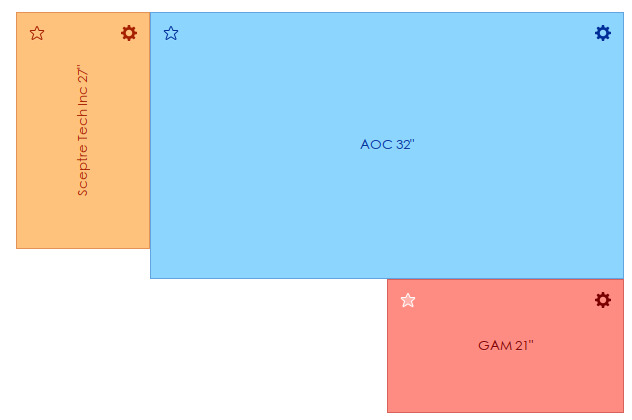
leftmost is 1080x1920 (oriented vertically/portrait)
middle display is 3840x2160
bottom display is 1920x1080
Screenshot from 2023-03-14 07-00-58

<!-- gh-comment-id:1468158047 --> @BloodyMess commented on GitHub (Mar 14, 2023): leftmost is 1080x1920 (oriented vertically/portrait) middle display is 3840x2160 bottom display is 1920x1080 ![Screenshot from 2023-03-14 07-00-58](https://user-images.githubusercontent.com/12903370/225025251-6f2606f6-6abd-41e4-a7cc-e3ad247384a9.png)
Author
Owner

@mirek-fidler commented on GitHub (Mar 15, 2023):

Nice. How is 4K vs 2K resolution handled BTW?

(I am not really experienced using multiple LCDs in Linux. I have taken some old LCD from the storage for testing so I am now trying to reproduce your scenario as best as possible).

<!-- gh-comment-id:1469552753 --> @mirek-fidler commented on GitHub (Mar 15, 2023): Nice. How is 4K vs 2K resolution handled BTW? (I am not really experienced using multiple LCDs in Linux. I have taken some old LCD from the storage for testing so I am now trying to reproduce your scenario as best as possible).
Author
Owner

@mirek-fidler commented on GitHub (Mar 15, 2023):

I have done some fixes in the code, can you please retry with current master or tomorrow's nightly build?

<!-- gh-comment-id:1470108584 --> @mirek-fidler commented on GitHub (Mar 15, 2023): I have done some fixes in the code, can you please retry with current master or tomorrow's nightly build?
Author
Owner

@BloodyMess commented on GitHub (Mar 15, 2023):

I've got the latest from master branch building. The window positioning is much better!

The other problems are still there though:

  • No window titlebars anywhere
  • No way to un-maximize the main window
  • The controls not getting mouse-clicks

I'm getting crashes (or maybe unexpected window closes?):

  • When I click on the file menu the IDE crashes/closes with no message.
  • When I click on a specific spot in the initial dialog, it just crashes/closes with no message.

I'm wondering if they are caused by the same underlying problem as the controls not receiving mouse clicks, and the missing window titlebars. I also note that the mouse cursor changes to the resize arrows at consistent distances from the edges of the windows, and moving the mouse further toward the desktop (as opposed to further into the window) is when/where mouse clicks start getting lost. It's like the system window manager thinks the dialogs and windows are smaller than they are.

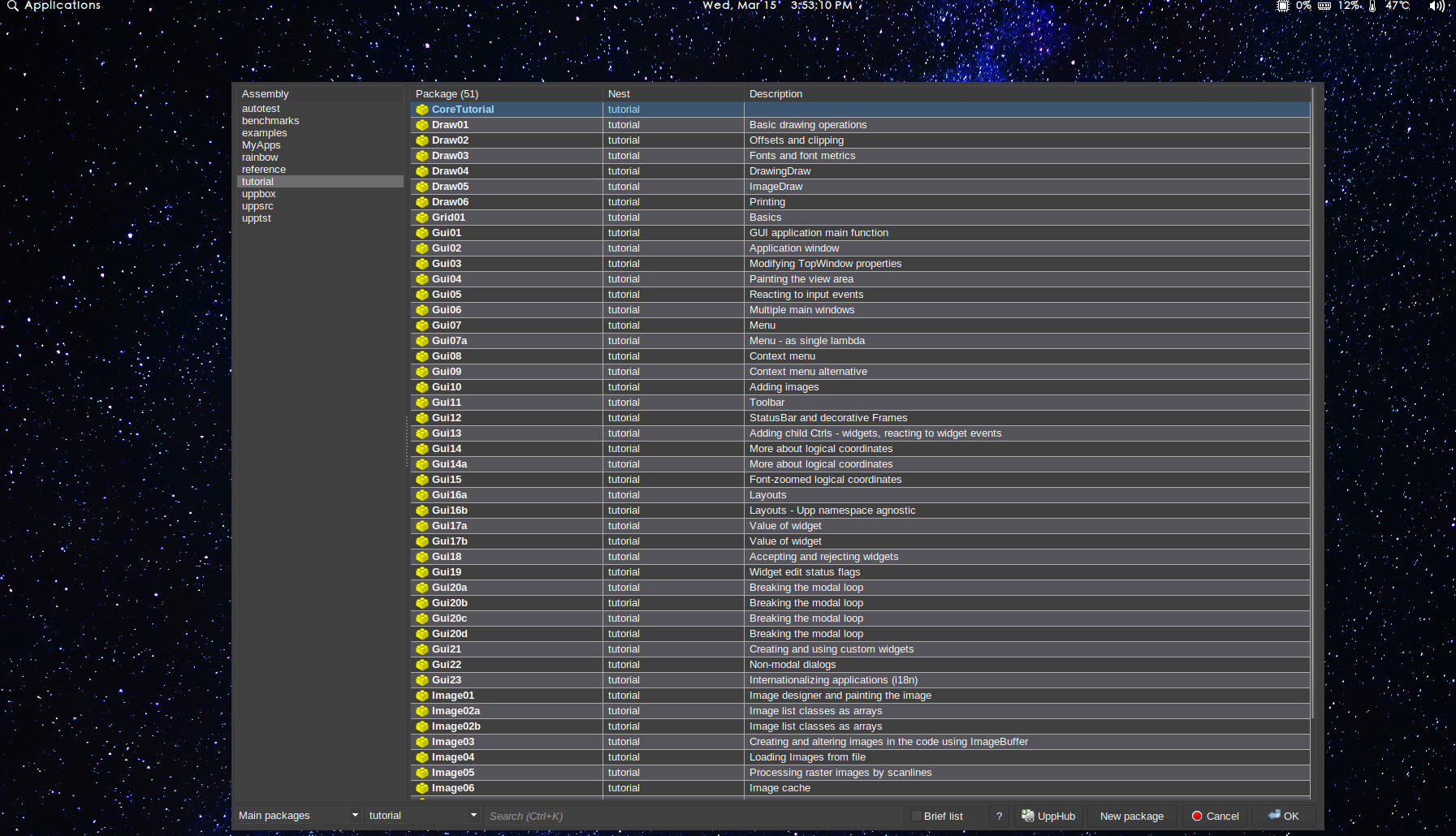
I'm attaching a screenshot showing the initial dialog. The spot where I can click to crash/close the dialog is roughly located vertically on the same row for "My Apps" and horizontally slightly to the right of the end of the text "benchmarks".
Screenshot from 2023-03-15 15-53-12b

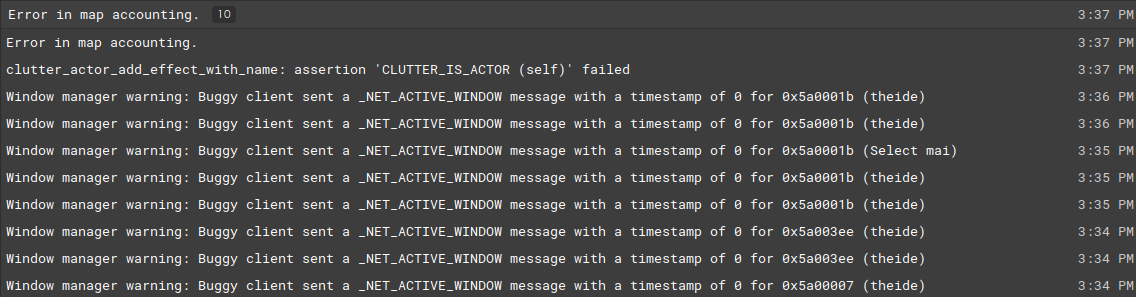
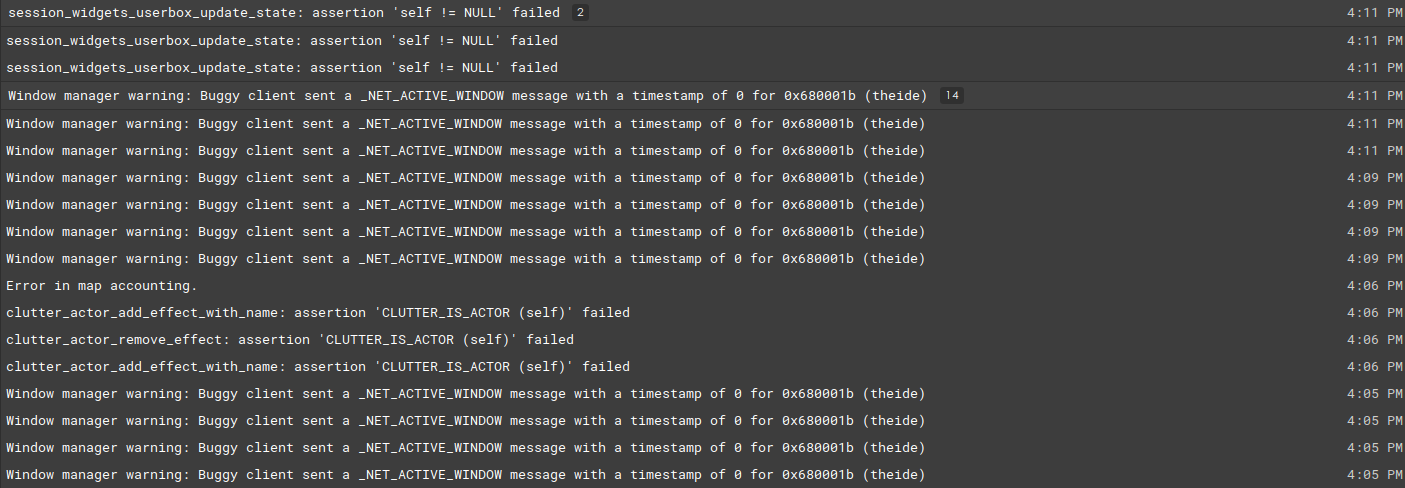
I'm also attaching screenshots of the messages from the log viewer produced for these same runs:
Screenshot from 2023-03-15 15-49-30
Screenshot from 2023-03-15 16-12-34

<!-- gh-comment-id:1470967871 --> @BloodyMess commented on GitHub (Mar 15, 2023): I've got the latest from master branch building. The window positioning is much better! The other problems are still there though: - No window titlebars anywhere - No way to un-maximize the main window - The controls not getting mouse-clicks I'm getting crashes (or maybe unexpected window closes?): - When I click on the file menu the IDE crashes/closes with no message. - When I click on a specific spot in the initial dialog, it just crashes/closes with no message. I'm wondering if they are caused by the same underlying problem as the controls not receiving mouse clicks, and the missing window titlebars. I also note that the mouse cursor changes to the resize arrows at consistent distances from the edges of the windows, and moving the mouse further toward the desktop (as opposed to further into the window) is when/where mouse clicks start getting lost. It's like the system window manager thinks the dialogs and windows are smaller than they are. I'm attaching a screenshot showing the initial dialog. The spot where I can click to crash/close the dialog is roughly located vertically on the same row for "My Apps" and horizontally slightly to the right of the end of the text "benchmarks". ![Screenshot from 2023-03-15 15-53-12b](https://user-images.githubusercontent.com/12903370/225464802-4cb76d5a-fe82-4806-acf7-53d99e1d79b5.png) I'm also attaching screenshots of the messages from the log viewer produced for these same runs: ![Screenshot from 2023-03-15 15-49-30](https://user-images.githubusercontent.com/12903370/225464836-4c9b1f48-79f6-4abe-ba51-449e03f0e7d8.png) ![Screenshot from 2023-03-15 16-12-34](https://user-images.githubusercontent.com/12903370/225464861-f0707634-96c9-4456-8e8c-763fb12326af.png)
Author
Owner

@BloodyMess commented on GitHub (Mar 16, 2023):

I'm wondering if they are caused by the same underlying problem as the controls not receiving mouse clicks, and the missing window titlebars. I also note that the mouse cursor changes to the resize arrows at consistent distances from the edges of the windows, and moving the mouse further toward the desktop (as opposed to further into the window) is when/where mouse clicks start getting lost. It's like the system window manager thinks the dialogs and windows are smaller than they are.

I'm pretty certain this is the case, because I've been able to hunt down and click the phantom minimize button and zoom button on the far right of the initial window. So it must be that I was clicking on the phantom close button. For some reason, the window manager must think the window is smaller than it is, so the titlebar and its close, minimize and zoom buttons are all "invisible".

<!-- gh-comment-id:1471350804 --> @BloodyMess commented on GitHub (Mar 16, 2023): > I'm wondering if they are caused by the same underlying problem as the controls not receiving mouse clicks, and the missing window titlebars. I also note that the mouse cursor changes to the resize arrows at consistent distances from the edges of the windows, and moving the mouse further toward the desktop (as opposed to further into the window) is when/where mouse clicks start getting lost. It's like the system window manager thinks the dialogs and windows are smaller than they are. I'm pretty certain this is the case, because I've been able to hunt down and click the phantom minimize button and zoom button on the far right of the initial window. So it must be that I was clicking on the phantom close button. For some reason, the window manager must think the window is smaller than it is, so the titlebar and its close, minimize and zoom buttons are all "invisible".
Author
Owner

@BloodyMess commented on GitHub (Mar 16, 2023):

How is 4K vs 2K resolution handled BTW?

What do you mean?

<!-- gh-comment-id:1471446161 --> @BloodyMess commented on GitHub (Mar 16, 2023): > How is 4K vs 2K resolution handled BTW? What do you mean?
Author
Owner

@mirek-fidler commented on GitHub (Mar 16, 2023):

4K vs 2K:

Well, normally I am running my main 4K display with 200% scaling, which results in superior smooth text rendered. However, your 2nd and 3rd LCDs are not UHD, so they would need something like downscaling from UHD, which is not readily available in my MATE desktop. Anyway, this is now unrelated to the bug, so...

<!-- gh-comment-id:1471670877 --> @mirek-fidler commented on GitHub (Mar 16, 2023): 4K vs 2K: Well, normally I am running my main 4K display with 200% scaling, which results in superior smooth text rendered. However, your 2nd and 3rd LCDs are not UHD, so they would need something like downscaling from UHD, which is not readily available in my MATE desktop. Anyway, this is now unrelated to the bug, so...
Author
Owner

@mirek-fidler commented on GitHub (Mar 16, 2023):

As for errors, U++ is using GTK as "rendering/window" backend, so those NET_ACTIVE_WINDOW messages are actually sent by GTK (but it is still possible that it is U++ fault, e.g. misusing GTK API somewhere).

Do normal GTK 3 apps work for you?

<!-- gh-comment-id:1471679430 --> @mirek-fidler commented on GitHub (Mar 16, 2023): As for errors, U++ is using GTK as "rendering/window" backend, so those NET_ACTIVE_WINDOW messages are actually sent by GTK (but it is still possible that it is U++ fault, e.g. misusing GTK API somewhere). Do normal GTK 3 apps work for you?
Author
Owner

@BloodyMess commented on GitHub (Mar 16, 2023):

As for errors, U++ is using GTK as "rendering/window" backend, so those NET_ACTIVE_WINDOW messages are actually sent by GTK (but it is still possible that it is U++ fault, e.g. misusing GTK API somewhere).

Do normal GTK 3 apps work for you?

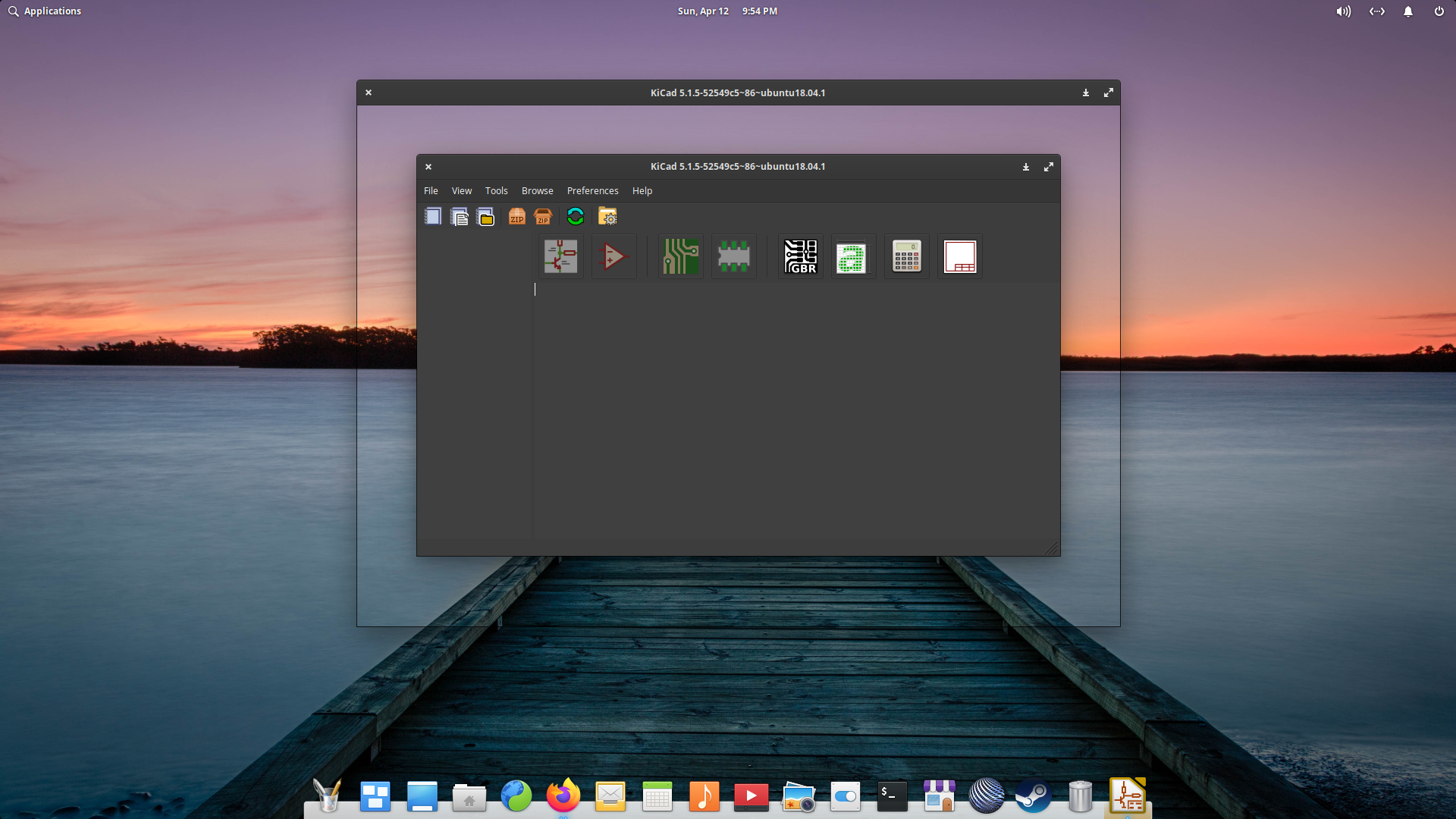
Yes, they run fine. I remember there was a similar bug in KiCAD a few years back where the windows were being drawn with the outer edge and titlebar offset outward from the correct window size. Same sort of problem, just going in the opposite direction from what U++ is doing.

Here's what it was doing:
Screenshot from 2020-04-12 21 54 37

<!-- gh-comment-id:1471692761 --> @BloodyMess commented on GitHub (Mar 16, 2023): > As for errors, U++ is using GTK as "rendering/window" backend, so those NET_ACTIVE_WINDOW messages are actually sent by GTK (but it is still possible that it is U++ fault, e.g. misusing GTK API somewhere). > > Do normal GTK 3 apps work for you? Yes, they run fine. I remember there was a similar bug in KiCAD a few years back where the windows were being drawn with the outer edge and titlebar offset outward from the correct window size. Same sort of problem, just going in the opposite direction from what U++ is doing. Here's what it was doing: ![Screenshot from 2020-04-12 21 54 37](https://user-images.githubusercontent.com/12903370/225589891-cfeeee91-25d2-4c82-9c0b-dc7f1b431579.png)
Author
Owner

@BloodyMess commented on GitHub (Mar 16, 2023):

I remember there was a similar bug in KiCAD a few years back where the windows were being drawn with the outer edge and titlebar offset outward from the correct window size. Same sort of problem, just going in the opposite direction from what U++ is doing.

Here is a link to the commit in KiCAD that fixed their issue. Maybe it will help you narrow down what's happening in U++ (and what GTK API's are involved).

<!-- gh-comment-id:1471770630 --> @BloodyMess commented on GitHub (Mar 16, 2023): > I remember there was a similar bug in KiCAD a few years back where the windows were being drawn with the outer edge and titlebar offset outward from the correct window size. Same sort of problem, just going in the opposite direction from what U++ is doing. [Here is a link to the commit in KiCAD that fixed their issue](https://gitlab.com/kicad/code/kicad/-/commit/c43122a45f60f2d3e0c7089d74e7b8a2150daa47). Maybe it will help you narrow down what's happening in U++ (and what GTK API's are involved).
Author
Owner

@mirek-fidler commented on GitHub (Mar 16, 2023):

Well, installed Elementary 5 in VM, can confirm that U++ works pretty badly there.

Then tried current Elementary 7, all works fine... (minus some small cosmetic issues).

<!-- gh-comment-id:1471952442 --> @mirek-fidler commented on GitHub (Mar 16, 2023): Well, installed Elementary 5 in VM, can confirm that U++ works pretty badly there. Then tried current Elementary 7, all works fine... (minus some small cosmetic issues).
Author
Owner

@mirek-fidler commented on GitHub (Mar 20, 2023):

Fixed some cosmetics in Elementary 7.... mostly wrong color is topmenu items (looks like el team does not care those about menu visuals, which is understandable given their's goal mimicking macos).

That said, it now feels like Elementary 5 has incomplete or buggy window manager, which seems to be fixed in subsequent versions. I am not sure it is worth investing time into workaround for 5 years / 2 versions old distro... (I can be wrong, can be U++ bug or maybe there is a simple workaround, but I do not see any).

<!-- gh-comment-id:1476086450 --> @mirek-fidler commented on GitHub (Mar 20, 2023): Fixed some cosmetics in Elementary 7.... mostly wrong color is topmenu items (looks like el team does not care those about menu visuals, which is understandable given their's goal mimicking macos). That said, it now feels like Elementary 5 has incomplete or buggy window manager, which seems to be fixed in subsequent versions. I am not sure it is worth investing time into workaround for 5 years / 2 versions old distro... (I can be wrong, can be U++ bug or maybe there is a simple workaround, but I do not see any).
Author
Owner

@BloodyMess commented on GitHub (Mar 20, 2023):

Fixed some cosmetics in Elementary 7.... mostly wrong color is topmenu items (looks like el team does not care those about menu visuals, which is understandable given their's goal mimicking macos).

That said, it now feels like Elementary 5 has incomplete or buggy window manager, which seems to be fixed in subsequent versions. I am not sure it is worth investing time into workaround for 5 years / 2 versions old distro... (I can be wrong, can be U++ bug or maybe there is a simple workaround, but I do not see any).

Since the only other time I've seen a program behave this way was when KiCAD had a bug that they fixed fairly quickly, and no other program has this problem, it has to be a bug in U++/TheIDE.

No other program is having this problem. It isn't the OS.

<!-- gh-comment-id:1476165959 --> @BloodyMess commented on GitHub (Mar 20, 2023): > Fixed some cosmetics in Elementary 7.... mostly wrong color is topmenu items (looks like el team does not care those about menu visuals, which is understandable given their's goal mimicking macos). > > That said, it now feels like Elementary 5 has incomplete or buggy window manager, which seems to be fixed in subsequent versions. I am not sure it is worth investing time into workaround for 5 years / 2 versions old distro... (I can be wrong, can be U++ bug or maybe there is a simple workaround, but I do not see any). Since the only other time I've seen a program behave this way was when KiCAD had a bug that they fixed fairly quickly, and no other program has this problem, it has to be a bug in U++/TheIDE. No other program is having this problem. It isn't the OS.
Sign in to join this conversation.
No labels
pull-request
No milestone
No project
No assignees
1 participant
Notifications
Due date
The due date is invalid or out of range. Please use the format "yyyy-mm-dd".

No due date set.

Dependencies

No dependencies set.

Reference: github-starred/ultimatepp#64
No description provided.