[GH-ISSUE #156] Multi-line text #129

Closed
opened 2026-05-05 11:44:26 -06:00 by gitea-mirror · 14 comments
Owner

Originally created by @RaFaeL-NN on GitHub (Mar 16, 2018).
Original GitHub issue: https://github.com/jmcnamara/libxlsxwriter/issues/156

Originally assigned to: @jmcnamara on GitHub.

I have a question from users of my wrapper
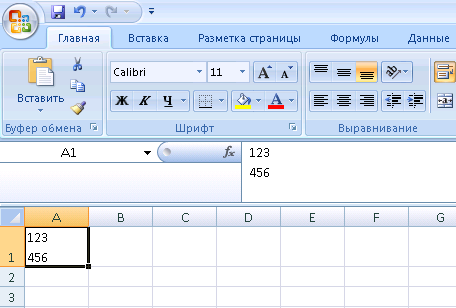
In Excel is possible to enter multi-line text
m1

In sharedStrings.xml linebreak writes as 0D 0A

m2

but if I try to do something like this by lib (write_string or another functions), 0D is replacing by lxw_escape_control_characters to some string and I get not what i want :(

Is it possible to delete changing 0D (hex) to string?

Originally created by @RaFaeL-NN on GitHub (Mar 16, 2018). Original GitHub issue: https://github.com/jmcnamara/libxlsxwriter/issues/156 Originally assigned to: @jmcnamara on GitHub. I have a question from users of my wrapper In Excel is possible to enter multi-line text ![m1](https://user-images.githubusercontent.com/34895749/37523551-5995f548-2938-11e8-9d4a-923b862bacef.PNG) In sharedStrings.xml linebreak writes as 0D 0A ![m2](https://user-images.githubusercontent.com/34895749/37523552-59b96e42-2938-11e8-920c-d1126effcfcb.PNG) but if I try to do something like this by lib (write_string or another functions), 0D is replacing by lxw_escape_control_characters to some string and I get not what i want :( Is it possible to delete changing 0D (hex) to string?
gitea-mirror 2026-05-05 11:44:26 -06:00
Author
Owner

@jmcnamara commented on GitHub (Mar 16, 2018):

In Excel is possible to enter multi-line text

It is possible to do that with libxlsxwriter by using a format with format_set_text_wrap() set: http://libxlsxwriter.github.io/format_8h.html#a56d55dd9257d8f0645c62b296d2c196d

If you want to control where the text wraps you can add "\n" to the string as shown in the example in that doc link.

In sharedStrings.xml linebreak writes as 0D 0A

Yes and no. Excel just uses "\n" 0x0A in the string to indicate a wrap (along with a format in the cell). However, this will be converted to "\r\n" 0x0D0A by the Windows C libraries when writing to a file, which is what you see in your hexdump. The "\r" is stripped when the file is read (by the same C libs) so Excel only ever sees the "\n".

So you should only use "\n" within your program/wrapper and not "\r\n".

<!-- gh-comment-id:373746238 --> @jmcnamara commented on GitHub (Mar 16, 2018): > In Excel is possible to enter multi-line text It is possible to do that with libxlsxwriter by using a format with `format_set_text_wrap()` set: http://libxlsxwriter.github.io/format_8h.html#a56d55dd9257d8f0645c62b296d2c196d If you want to control where the text wraps you can add "\n" to the string as shown in the example in that doc link. > In sharedStrings.xml linebreak writes as 0D 0A Yes and no. Excel just uses "\n" 0x0A in the string to indicate a wrap (along with a format in the cell). However, this will be converted to "\r\n" 0x0D0A by the Windows C libraries when writing to a file, which is what you see in your hexdump. The "\r" is stripped when the file is read (by the same C libs) so Excel only ever sees the "\n". So you should only use "\n" within your program/wrapper and not "\r\n".
Author
Owner

@RaFaeL-NN commented on GitHub (Mar 16, 2018):

What a problem to pass 0D to xml? Data already may be stored in some DB as a multiline text with "\r\n" or send by some protocol...

<!-- gh-comment-id:373806566 --> @RaFaeL-NN commented on GitHub (Mar 16, 2018): What a problem to pass 0D to xml? Data already may be stored in some DB as a multiline text with "\r\n" or send by some protocol...
Author
Owner

@jmcnamara commented on GitHub (Mar 16, 2018):

What a problem to pass 0D to xml? Data already may be stored in some DB as a multiline text with "\r\n" or send by some protocol...

In that case libxlsxwriter does the same thing that Excel would do and converts "\r" to the XML escape _x000D_.

You can test that yourself by inserting "\r" or "\r\n" into a cell in Excel and looking at the output XML.

<!-- gh-comment-id:373813560 --> @jmcnamara commented on GitHub (Mar 16, 2018): > What a problem to pass 0D to xml? Data already may be stored in some DB as a multiline text with "\r\n" or send by some protocol... In that case libxlsxwriter does the same thing that Excel would do and converts "\r" to the XML escape `_x000D_`. You can test that yourself by inserting "\r" or "\r\n" into a cell in Excel and looking at the output XML.
Author
Owner

@RaFaeL-NN commented on GitHub (Mar 16, 2018):

If I add linebreak in Excel, I see 0D 0A in XML. Why I can not do this with lib?...

<!-- gh-comment-id:373820183 --> @RaFaeL-NN commented on GitHub (Mar 16, 2018): If I add linebreak in Excel, I see 0D 0A in XML. Why I can not do this with lib?...
Author
Owner

@jmcnamara commented on GitHub (Mar 16, 2018):

If I add linebreak in Excel, I see 0D 0A in XML.

Please attach the file you created.

Here is a file from the test suite that was created in Excel and which contains all the characters from decimal 1 to 127: https://github.com/jmcnamara/libxlsxwriter/blob/master/test/functional/xlsx_files/shared_strings01.xlsx

Here is the XML file:

$ xmllint --format shared_strings01/xl/sharedStrings.xml | head -50
<?xml version="1.0" encoding="UTF-8" standalone="yes"?>
<sst xmlns="http://schemas.openxmlformats.org/spreadsheetml/2006/main" count="126" uniqueCount="126">
  <si>
    <t>_x0000_</t>
  </si>
  <si>
    <t>_x0001_</t>
  </si>
  <si>
    <t>_x0002_</t>
  </si>
  <si>
    <t>_x0003_</t>
  </si>
  <si>
    <t>_x0004_</t>
  </si>
  <si>
    <t>_x0005_</t>
  </si>
  <si>
    <t>_x0006_</t>
  </si>
  <si>
    <t>_x0007_</t>
  </si>
  <si>
    <t>_x0008_</t>
  </si>
  <si>
    <t xml:space="preserve">	</t>
  </si>
  <si>
    <t xml:space="preserve">
</t>
  </si>
  <si>
    <t>_x000B_</t>
  </si>
  <si>
    <t>_x000C_</t>
  </si>
  <si>
    <t>_x000D_</t>
  </si>
  <si>
    <t>_x000E_</t>
  </si>
  <si>
    <t>_x000F_</t>

And here is the hex:

$ xxd -l 512 shared_strings01/xl/sharedStrings.xml
0000000: 3c3f 786d 6c20 7665 7273 696f 6e3d 2231  <?xml version="1
0000010: 2e30 2220 656e 636f 6469 6e67 3d22 5554  .0" encoding="UT
0000020: 462d 3822 2073 7461 6e64 616c 6f6e 653d  F-8" standalone=
0000030: 2279 6573 223f 3e0d 0a3c 7373 7420 786d  "yes"?>..<sst xm
0000040: 6c6e 733d 2268 7474 703a 2f2f 7363 6865  lns="http://sche
0000050: 6d61 732e 6f70 656e 786d 6c66 6f72 6d61  mas.openxmlforma
0000060: 7473 2e6f 7267 2f73 7072 6561 6473 6865  ts.org/spreadshe
0000070: 6574 6d6c 2f32 3030 362f 6d61 696e 2220  etml/2006/main"
0000080: 636f 756e 743d 2231 3236 2220 756e 6971  count="126" uniq
0000090: 7565 436f 756e 743d 2231 3236 223e 3c73  ueCount="126"><s
00000a0: 693e 3c74 3e5f 7830 3030 305f 3c2f 743e  i><t>_x0000_</t>
00000b0: 3c2f 7369 3e3c 7369 3e3c 743e 5f78 3030  </si><si><t>_x00
00000c0: 3031 5f3c 2f74 3e3c 2f73 693e 3c73 693e  01_</t></si><si>
00000d0: 3c74 3e5f 7830 3030 325f 3c2f 743e 3c2f  <t>_x0002_</t></
00000e0: 7369 3e3c 7369 3e3c 743e 5f78 3030 3033  si><si><t>_x0003
00000f0: 5f3c 2f74 3e3c 2f73 693e 3c73 693e 3c74  _</t></si><si><t
0000100: 3e5f 7830 3030 345f 3c2f 743e 3c2f 7369  >_x0004_</t></si
0000110: 3e3c 7369 3e3c 743e 5f78 3030 3035 5f3c  ><si><t>_x0005_<
0000120: 2f74 3e3c 2f73 693e 3c73 693e 3c74 3e5f  /t></si><si><t>_
0000130: 7830 3030 365f 3c2f 743e 3c2f 7369 3e3c  x0006_</t></si><
0000140: 7369 3e3c 743e 5f78 3030 3037 5f3c 2f74  si><t>_x0007_</t
0000150: 3e3c 2f73 693e 3c73 693e 3c74 3e5f 7830  ></si><si><t>_x0
0000160: 3030 385f 3c2f 743e 3c2f 7369 3e3c 7369  008_</t></si><si
0000170: 3e3c 7420 786d 6c3a 7370 6163 653d 2270  ><t xml:space="p
0000180: 7265 7365 7276 6522 3e09 3c2f 743e 3c2f  reserve">.</t></
0000190: 7369 3e3c 7369 3e3c 7420 786d 6c3a 7370  si><si><t xml:sp
00001a0: 6163 653d 2270 7265 7365 7276 6522 3e0d  ace="preserve">.
00001b0: 0a3c 2f74 3e3c 2f73 693e 3c73 693e 3c74  .</t></si><si><t
00001c0: 3e5f 7830 3030 425f 3c2f 743e 3c2f 7369  >_x000B_</t></si
00001d0: 3e3c 7369 3e3c 743e 5f78 3030 3043 5f3c  ><si><t>_x000C_<
00001e0: 2f74 3e3c 2f73 693e 3c73 693e 3c74 3e5f  /t></si><si><t>_
00001f0: 7830 3030 445f 3c2f 743e 3c2f 7369 3e3c  x000D_</t></si><
<!-- gh-comment-id:373826516 --> @jmcnamara commented on GitHub (Mar 16, 2018): > If I add linebreak in Excel, I see 0D 0A in XML. Please attach the file you created. Here is a file from the test suite that was created in Excel and which contains all the characters from decimal 1 to 127: https://github.com/jmcnamara/libxlsxwriter/blob/master/test/functional/xlsx_files/shared_strings01.xlsx Here is the XML file: ```xml $ xmllint --format shared_strings01/xl/sharedStrings.xml | head -50 <?xml version="1.0" encoding="UTF-8" standalone="yes"?> <sst xmlns="http://schemas.openxmlformats.org/spreadsheetml/2006/main" count="126" uniqueCount="126"> <si> <t>_x0000_</t> </si> <si> <t>_x0001_</t> </si> <si> <t>_x0002_</t> </si> <si> <t>_x0003_</t> </si> <si> <t>_x0004_</t> </si> <si> <t>_x0005_</t> </si> <si> <t>_x0006_</t> </si> <si> <t>_x0007_</t> </si> <si> <t>_x0008_</t> </si> <si> <t xml:space="preserve"> </t> </si> <si> <t xml:space="preserve"> </t> </si> <si> <t>_x000B_</t> </si> <si> <t>_x000C_</t> </si> <si> <t>_x000D_</t> </si> <si> <t>_x000E_</t> </si> <si> <t>_x000F_</t> ``` And here is the hex: ``` $ xxd -l 512 shared_strings01/xl/sharedStrings.xml 0000000: 3c3f 786d 6c20 7665 7273 696f 6e3d 2231 <?xml version="1 0000010: 2e30 2220 656e 636f 6469 6e67 3d22 5554 .0" encoding="UT 0000020: 462d 3822 2073 7461 6e64 616c 6f6e 653d F-8" standalone= 0000030: 2279 6573 223f 3e0d 0a3c 7373 7420 786d "yes"?>..<sst xm 0000040: 6c6e 733d 2268 7474 703a 2f2f 7363 6865 lns="http://sche 0000050: 6d61 732e 6f70 656e 786d 6c66 6f72 6d61 mas.openxmlforma 0000060: 7473 2e6f 7267 2f73 7072 6561 6473 6865 ts.org/spreadshe 0000070: 6574 6d6c 2f32 3030 362f 6d61 696e 2220 etml/2006/main" 0000080: 636f 756e 743d 2231 3236 2220 756e 6971 count="126" uniq 0000090: 7565 436f 756e 743d 2231 3236 223e 3c73 ueCount="126"><s 00000a0: 693e 3c74 3e5f 7830 3030 305f 3c2f 743e i><t>_x0000_</t> 00000b0: 3c2f 7369 3e3c 7369 3e3c 743e 5f78 3030 </si><si><t>_x00 00000c0: 3031 5f3c 2f74 3e3c 2f73 693e 3c73 693e 01_</t></si><si> 00000d0: 3c74 3e5f 7830 3030 325f 3c2f 743e 3c2f <t>_x0002_</t></ 00000e0: 7369 3e3c 7369 3e3c 743e 5f78 3030 3033 si><si><t>_x0003 00000f0: 5f3c 2f74 3e3c 2f73 693e 3c73 693e 3c74 _</t></si><si><t 0000100: 3e5f 7830 3030 345f 3c2f 743e 3c2f 7369 >_x0004_</t></si 0000110: 3e3c 7369 3e3c 743e 5f78 3030 3035 5f3c ><si><t>_x0005_< 0000120: 2f74 3e3c 2f73 693e 3c73 693e 3c74 3e5f /t></si><si><t>_ 0000130: 7830 3030 365f 3c2f 743e 3c2f 7369 3e3c x0006_</t></si>< 0000140: 7369 3e3c 743e 5f78 3030 3037 5f3c 2f74 si><t>_x0007_</t 0000150: 3e3c 2f73 693e 3c73 693e 3c74 3e5f 7830 ></si><si><t>_x0 0000160: 3030 385f 3c2f 743e 3c2f 7369 3e3c 7369 008_</t></si><si 0000170: 3e3c 7420 786d 6c3a 7370 6163 653d 2270 ><t xml:space="p 0000180: 7265 7365 7276 6522 3e09 3c2f 743e 3c2f reserve">.</t></ 0000190: 7369 3e3c 7369 3e3c 7420 786d 6c3a 7370 si><si><t xml:sp 00001a0: 6163 653d 2270 7265 7365 7276 6522 3e0d ace="preserve">. 00001b0: 0a3c 2f74 3e3c 2f73 693e 3c73 693e 3c74 .</t></si><si><t 00001c0: 3e5f 7830 3030 425f 3c2f 743e 3c2f 7369 >_x000B_</t></si 00001d0: 3e3c 7369 3e3c 743e 5f78 3030 3043 5f3c ><si><t>_x000C_< 00001e0: 2f74 3e3c 2f73 693e 3c73 693e 3c74 3e5f /t></si><si><t>_ 00001f0: 7830 3030 445f 3c2f 743e 3c2f 7369 3e3c x000D_</t></si>< ```
Author
Owner

@RaFaeL-NN commented on GitHub (Mar 16, 2018):

test.xlsx
I think, your test with one character is bad and 0D as one character is bad in XML too. Try 0D 0A together

<!-- gh-comment-id:373832096 --> @RaFaeL-NN commented on GitHub (Mar 16, 2018): [test.xlsx](https://github.com/jmcnamara/libxlsxwriter/files/1820673/test.xlsx) I think, your test with one character is bad and 0D as one character is bad in XML too. Try 0D 0A **together**
Author
Owner

@RaFaeL-NN commented on GitHub (Mar 16, 2018):

And here is the hex:

$ xxd -l 512 shared_strings01/xl/sharedStrings.xml

0000140: 7369 3e3c 743e 5f78 3030 3037 5f3c 2f74  si><t>_x0007_</t
0000150: 3e3c 2f73 693e 3c73 693e 3c74 3e5f 7830  ></si><si><t>_x0
0000160: 3030 385f 3c2f 743e 3c2f 7369 3e3c 7369  008_</t></si><si
0000170: 3e3c 7420 786d 6c3a 7370 6163 653d 2270  ><t xml:space="p
0000180: 7265 7365 7276 6522 3e09 3c2f 743e 3c2f  reserve">.</t></
0000190: 7369 3e3c 7369 3e3c 7420 786d 6c3a 7370  si><si><t xml:sp
00001a0: 6163 653d 2270 7265 7365 7276 6522 3e**0d**  ace="preserve">.
00001b0: **0a**3c 2f74 3e3c 2f73 693e 3c73 693e 3c74  .</t></si><si><t
00001c0: 3e5f 7830 3030 425f 3c2f 743e 3c2f 7369  >_x000B_</t></si
00001d0: 3e3c 7369 3e3c 743e 5f78 3030 3043 5f3c  ><si><t>_x000C_<
00001e0: 2f74 3e3c 2f73 693e 3c73 693e 3c74 3e5f  /t></si><si><t>_
00001f0: 7830 3030 445f 3c2f 743e 3c2f 7369 3e3c  x000D_</t></si><
<!-- gh-comment-id:373836921 --> @RaFaeL-NN commented on GitHub (Mar 16, 2018): And here is the hex: ``` $ xxd -l 512 shared_strings01/xl/sharedStrings.xml 0000140: 7369 3e3c 743e 5f78 3030 3037 5f3c 2f74 si><t>_x0007_</t 0000150: 3e3c 2f73 693e 3c73 693e 3c74 3e5f 7830 ></si><si><t>_x0 0000160: 3030 385f 3c2f 743e 3c2f 7369 3e3c 7369 008_</t></si><si 0000170: 3e3c 7420 786d 6c3a 7370 6163 653d 2270 ><t xml:space="p 0000180: 7265 7365 7276 6522 3e09 3c2f 743e 3c2f reserve">.</t></ 0000190: 7369 3e3c 7369 3e3c 7420 786d 6c3a 7370 si><si><t xml:sp 00001a0: 6163 653d 2270 7265 7365 7276 6522 3e**0d** ace="preserve">. 00001b0: **0a**3c 2f74 3e3c 2f73 693e 3c73 693e 3c74 .</t></si><si><t 00001c0: 3e5f 7830 3030 425f 3c2f 743e 3c2f 7369 >_x000B_</t></si 00001d0: 3e3c 7369 3e3c 743e 5f78 3030 3043 5f3c ><si><t>_x000C_< 00001e0: 2f74 3e3c 2f73 693e 3c73 693e 3c74 3e5f /t></si><si><t>_ 00001f0: 7830 3030 445f 3c2f 743e 3c2f 7369 3e3c x000D_</t></si>< ```
Author
Owner

@jmcnamara commented on GitHub (Mar 16, 2018):

The file you attached doesn't contain "\r" in the cell. If I copy and paste the test into a hex editor this is what I get:

2231 3233 0a34 3536 22                   "123.456"

There is no "\r".

Also, if I view the file with a Microsoft tool for inspecting Open XML files that can reflect it back to code this is what it shows:

screen shot 2018-03-16 at 20 40 39

Again, no "\r".

As I said above the "\r" is added by the Windows C (io) libraries when the file is written.

However, I don't even know why we are arguing about this. If you want to wrap text just follow the example in the docs using "\n".

<!-- gh-comment-id:373840868 --> @jmcnamara commented on GitHub (Mar 16, 2018): The file you attached doesn't contain "\r" in the cell. If I copy and paste the test into a hex editor this is what I get: ``` 2231 3233 0a34 3536 22 "123.456" ``` There is no "\r". Also, if I view the file with a Microsoft tool for inspecting Open XML files that can reflect it back to code this is what it shows: ![screen shot 2018-03-16 at 20 40 39](https://user-images.githubusercontent.com/94267/37543725-6adee158-295a-11e8-9b95-543f1b8e94f9.png) Again, no "\r". As I said above the "\r" is added by the Windows C (io) libraries when the file is written. However, I don't even know why we are arguing about this. If you want to wrap text just follow the example in the docs using "\n".
Author
Owner

@RaFaeL-NN commented on GitHub (Mar 16, 2018):

0D is in hex in your test file... If, as you say, the "\r" is added by the Windows C (io) libraries when the file is written, why it's not added if file is written by lib?... Why I can not repeat test file (shared_strings01.xlsx) containg 0D 0A with lib? I think hex is more true than viewer, what replace hex characters with strings like "\n" and so on

<!-- gh-comment-id:373850686 --> @RaFaeL-NN commented on GitHub (Mar 16, 2018): 0D is in hex in your test file... If, as you say, the "\r" is added by the Windows C (io) libraries when the file is written, why it's not added if file is written by lib?... Why I can not repeat test file (shared_strings01.xlsx) containg 0D 0A with lib? I think hex is more true than viewer, what replace hex characters with strings like "\n" and so on
Author
Owner

@jmcnamara commented on GitHub (Mar 17, 2018):

Let's take a step back and look at this from a different point of view.

I created a small program like this:

#include "xlsxwriter.h"

int main() {

    lxw_workbook  *workbook  = workbook_new("wrap.xlsx");
    lxw_worksheet *worksheet = workbook_add_worksheet(workbook, NULL);

    lxw_format *wrap_format = workbook_add_format(workbook);
    format_set_text_wrap(wrap_format);

    worksheet_write_string(worksheet, 0, 0, "123\n456", wrap_format);

    workbook_close(workbook);

    return 0;
}

When I run it it creates the attached file:
wrap.xlsx

Which looks like this:

aa_image

What happens when you open it in your version of Excel?

<!-- gh-comment-id:373877266 --> @jmcnamara commented on GitHub (Mar 17, 2018): Let's take a step back and look at this from a different point of view. I created a small program like this: ```C #include "xlsxwriter.h" int main() { lxw_workbook *workbook = workbook_new("wrap.xlsx"); lxw_worksheet *worksheet = workbook_add_worksheet(workbook, NULL); lxw_format *wrap_format = workbook_add_format(workbook); format_set_text_wrap(wrap_format); worksheet_write_string(worksheet, 0, 0, "123\n456", wrap_format); workbook_close(workbook); return 0; } ``` When I run it it creates the attached file: [wrap.xlsx](https://github.com/jmcnamara/libxlsxwriter/files/1821077/wrap.xlsx) Which looks like this: ![aa_image](https://user-images.githubusercontent.com/94267/37549430-d0ea2b8e-2977-11e8-8837-3c7c941bc19a.png) What happens when you open it in your version of Excel?
Author
Owner

@RaFaeL-NN commented on GitHub (Mar 17, 2018):

It works just because it works, not because it must works. 0D 0A is a standard in Windows, so multi-line data is stored with this in many and many places and... can not be directly write on the fly with lib. Yes, I can replace 0D 0A with 0A before I send it to lib, but why I can not just write this directly to xlsx without replacing in situation, where original Excel do this? May be 0D does not present in runtime (I don't know), but Excel add it on saving file (not Windows IO libs) (like it replace ";" with "," in formulas). Excel store data with 0D 0A and lib, I think, must do this. So, 0D must be replaced by string if it presents as 1 char and must NOT be replaced in pair with 0A. In addition to something else, it saves more times: first for add replacing in code for any programmers who works with multi-line data, and second on replacing at exporting data

<!-- gh-comment-id:373903408 --> @RaFaeL-NN commented on GitHub (Mar 17, 2018): It works just because it works, not because it must works. 0D 0A is a standard in Windows, so multi-line data is stored with this in many and many places and... can not be directly write on the fly with lib. Yes, I can replace 0D 0A with 0A before I send it to lib, but why I can not just write this directly to xlsx without replacing in situation, where original Excel do this? May be 0D does not present in runtime (I don't know), but Excel add it on saving file (not Windows IO libs) (like it replace ";" with "," in formulas). Excel store data with 0D 0A and lib, I think, must do this. So, 0D must be replaced by string if it presents as 1 char and must NOT be replaced in pair with 0A. In addition to something else, it saves more times: first for add replacing in code for any programmers who works with multi-line data, and second on replacing at exporting data
Author
Owner

@jmcnamara commented on GitHub (Mar 17, 2018):

It works just because it works, not because it must works.

So the example file works for you?

0D 0A is a standard in Windows, so multi-line data is stored with this in many and many places and...

This is going around in circles and isn’t helpful. Let’s establish if there is an issue first and then fix that issue.

So first let’s look at if the above example works for you in Excel and then let’s look at if it works via you wrapper.

<!-- gh-comment-id:373904410 --> @jmcnamara commented on GitHub (Mar 17, 2018): >It works just because it works, not because it must works. So the example file works for you? > 0D 0A is a standard in Windows, so multi-line data is stored with this in many and many places and... This is going around in circles and isn’t helpful. Let’s establish if there is an issue first and then fix that issue. So first let’s look at if the above example works for you in Excel and then let’s look at if it works via you wrapper.
Author
Owner

@RaFaeL-NN commented on GitHub (Mar 18, 2018):

I add a few lines of code into wrapper for replacing 0D 0A with 0A on the fly. I think it's a kludge, but have no another way out in situation, where all multi-line text data is stored with 0D 0A and is logically corrupted in xlsx without this kludge. I hope, you'll test not only 1 characters like in https://github.com/jmcnamara/libxlsxwriter/blob/master/test/functional/xlsx_files/shared_strings01.xlsx but 2 characters in pairs too

<!-- gh-comment-id:374050957 --> @RaFaeL-NN commented on GitHub (Mar 18, 2018): I add a few lines of code into wrapper for replacing 0D 0A with 0A on the fly. I think it's a kludge, but have no another way out in situation, where all multi-line text data is stored with 0D 0A and is logically corrupted in xlsx without this kludge. I hope, you'll test not only 1 characters like in https://github.com/jmcnamara/libxlsxwriter/blob/master/test/functional/xlsx_files/shared_strings01.xlsx but 2 characters in pairs too
Author
Owner

@jmcnamara commented on GitHub (Mar 18, 2018):

I hope, you'll test not only 1 characters like in shared_strings01.xlsx but 2 characters in pairs too

I did check this. I create a file with "abc\r\ndef" in a cell using the following Excel macro:

Sub insert_some_text()

    Range("A1").Select
    ActiveCell.Value = "abc" & Chr(13) & Chr(10) & "def"

End Sub

Here is the file:
test-25.xlsx

And here is the output:

$ xmllint --format test-25/xl/sharedStrings.xml
<?xml version="1.0" encoding="UTF-8" standalone="yes"?>
<sst xmlns="http://schemas.openxmlformats.org/spreadsheetml/2006/main" count="1" uniqueCount="1">
  <si>
    <t>abc_x000D_
def</t>
  </si>
</sst>


$ xxd test-25/xl/sharedStrings.xml
0000000: 3c3f 786d 6c20 7665 7273 696f 6e3d 2231  <?xml version="1
0000010: 2e30 2220 656e 636f 6469 6e67 3d22 5554  .0" encoding="UT
0000020: 462d 3822 2073 7461 6e64 616c 6f6e 653d  F-8" standalone=
0000030: 2279 6573 223f 3e0d 0a3c 7373 7420 786d  "yes"?>..<sst xm
0000040: 6c6e 733d 2268 7474 703a 2f2f 7363 6865  lns="http://sche
0000050: 6d61 732e 6f70 656e 786d 6c66 6f72 6d61  mas.openxmlforma
0000060: 7473 2e6f 7267 2f73 7072 6561 6473 6865  ts.org/spreadshe
0000070: 6574 6d6c 2f32 3030 362f 6d61 696e 2220  etml/2006/main"
0000080: 636f 756e 743d 2231 2220 756e 6971 7565  count="1" unique
0000090: 436f 756e 743d 2231 223e 3c73 693e 3c74  Count="1"><si><t
00000a0: 3e61 6263 5f78 3030 3044 5f0d 0a64 6566  >abc_x000D_..def
00000b0: 3c2f 743e 3c2f 7369 3e3c 2f73 7374 3e    </t></si></sst>

So "\r" is converted to _x000D_ just like libxlsxwriter does, whether or not it precedes "\n".

This behaviour is mentioned a few places on the internet as well such as here or here or here.

The extra "\r" before the "\n" is a factor of the IO libs and isn't related to this issue. You could get the same behaviour from libxlsxwriter on Windows by changing the file open mode from w+b (binary) to w+ or w+t (text mode) (although that would break the image file handling).

So in summary I believe libxlsxwriter is behaving the same as Excel and there are tests that show that is the case.

So I'm closing this issue.

<!-- gh-comment-id:374067101 --> @jmcnamara commented on GitHub (Mar 18, 2018): > I hope, you'll test not only 1 characters like in shared_strings01.xlsx but 2 characters in pairs too I did check this. I create a file with "abc\r\ndef" in a cell using the following Excel macro: ``` Sub insert_some_text() Range("A1").Select ActiveCell.Value = "abc" & Chr(13) & Chr(10) & "def" End Sub ``` Here is the file: [test-25.xlsx](https://github.com/jmcnamara/libxlsxwriter/files/1823258/test-25.xlsx) And here is the output: ``` $ xmllint --format test-25/xl/sharedStrings.xml <?xml version="1.0" encoding="UTF-8" standalone="yes"?> <sst xmlns="http://schemas.openxmlformats.org/spreadsheetml/2006/main" count="1" uniqueCount="1"> <si> <t>abc_x000D_ def</t> </si> </sst> $ xxd test-25/xl/sharedStrings.xml 0000000: 3c3f 786d 6c20 7665 7273 696f 6e3d 2231 <?xml version="1 0000010: 2e30 2220 656e 636f 6469 6e67 3d22 5554 .0" encoding="UT 0000020: 462d 3822 2073 7461 6e64 616c 6f6e 653d F-8" standalone= 0000030: 2279 6573 223f 3e0d 0a3c 7373 7420 786d "yes"?>..<sst xm 0000040: 6c6e 733d 2268 7474 703a 2f2f 7363 6865 lns="http://sche 0000050: 6d61 732e 6f70 656e 786d 6c66 6f72 6d61 mas.openxmlforma 0000060: 7473 2e6f 7267 2f73 7072 6561 6473 6865 ts.org/spreadshe 0000070: 6574 6d6c 2f32 3030 362f 6d61 696e 2220 etml/2006/main" 0000080: 636f 756e 743d 2231 2220 756e 6971 7565 count="1" unique 0000090: 436f 756e 743d 2231 223e 3c73 693e 3c74 Count="1"><si><t 00000a0: 3e61 6263 5f78 3030 3044 5f0d 0a64 6566 >abc_x000D_..def 00000b0: 3c2f 743e 3c2f 7369 3e3c 2f73 7374 3e </t></si></sst> ``` So "\r" is converted to `_x000D_` just like libxlsxwriter does, whether or not it precedes "\n". This behaviour is mentioned a [few places on the internet as well](https://www.google.com/search?&q=_x000D_+excel) such as [here](https://stackoverflow.com/questions/36167807/access-newline-becoming-x000d) or [here](https://answers.microsoft.com/en-us/office/forum/office_2010-word/field-code-inserts-x000d-in-office-2010-word/9b384b43-89c0-4861-b359-858f0be3f694?auth=1) or [here](https://forum.opencart.com/viewtopic.php?t=103108). The extra "\r" before the "\n" is a factor of the IO libs and isn't related to this issue. You could get the same behaviour from libxlsxwriter on Windows by changing the file open mode from `w+b` (binary) to `w+` or `w+t` (text mode) (although that would break the image file handling). So in summary I believe libxlsxwriter is behaving the same as Excel and there are tests that show that is the case. So I'm closing this issue.
Sign in to join this conversation.
No milestone
No project
No assignees
1 participant
Notifications
Due date
The due date is invalid or out of range. Please use the format "yyyy-mm-dd".

No due date set.

Dependencies

No dependencies set.

Reference: github-starred/libxlsxwriter#129
No description provided.