[GH-ISSUE #944] Request: Arbitrary screen placement, and multi-screen support #756

Open
opened 2026-05-05 07:02:07 -06:00 by gitea-mirror · 3 comments
Owner

Originally created by @Sakata-MC on GitHub (Nov 11, 2020).
Original GitHub issue: https://github.com/debauchee/barrier/issues/944

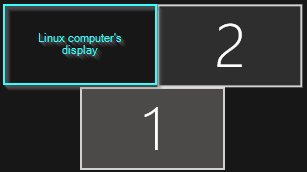
I have a layout with a larger display at the bottom, and two displays above, with the edge of the screens centered at the horizontal center of the bottom display. The server (windows) is using the bottom display, and the top right display. I have a linux machine using the top left display.
It would appear that the screen layout would work, except I think that the program is not able to understand the windows display is no longer square. Here is a snippet of windows' "display settings", with my likely horrible edit:
image
And this is the links section, attempting to get the mouse to act right:

section: links
	kdeneon:
		right(0,100)	=	SakataWin10Pro(0,50)
		down(50,100)	=	SakataWin10Pro(0,50)
	SakataWin10Pro:
		left(0,50)	=	kdeneon(0,100)
		up(0,50)	=	kdeneon(50,100)
end

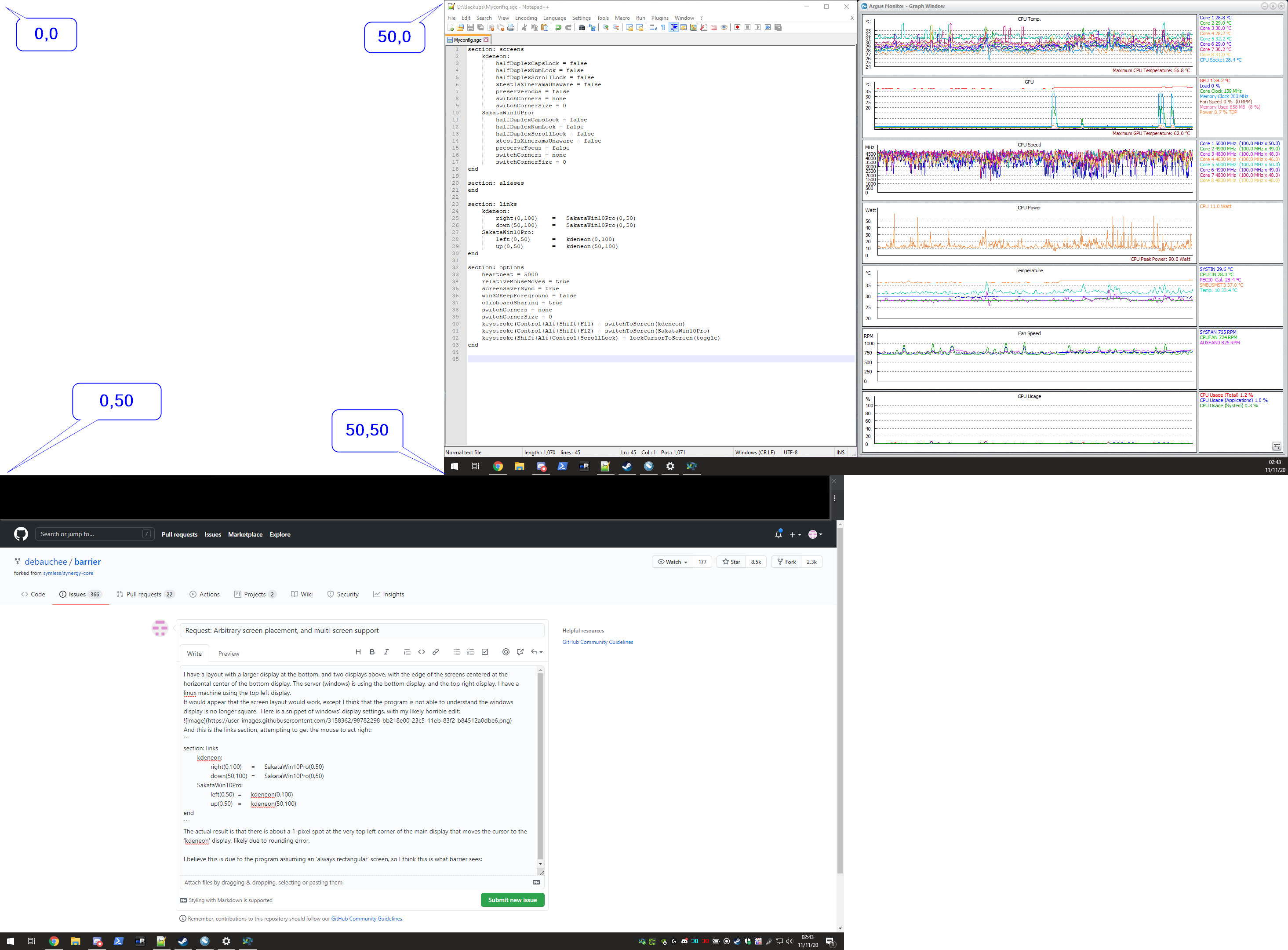
The actual result is that there is about a 1-pixel spot at the very top left corner of the main display that moves the cursor to the 'kdeneon' display, likely due to rounding error. Returning the mouse from kdeneon to the windows server goes back to the same spot regardless of where it 'exits' the linux machine's screen.

I believe this is due to the program assuming an 'always rectangular' screen, so I think this is what barrier sees, especially considering that a full screen capture also appears to as well:
image

I think perhaps the "easy" way to implement this would be to detect individual displays as separate entities, allowing for arbitrary screen placements -- I'd imagine the configuration might look something like this:

section: screens
	kdeneon:
	SakataWin10Pro_1:
	SakataWin10Pro_2:
end

section: aliases
end

section: links
	kdeneon:
		right		=	SakataWin10Pro_2
		down(50,100)	=	SakataWin10Pro_1(0,50)
	SakataWin10Pro_2:
		left			=	kdeneon
	SakataWin10Pro_1:
		up(0,50)		=	kdeneon(50,100)
end

If this is already possible and I just didn't find the correct options, that would be awesome; but I feel like that is wishful thinking, so here's the feature request.

If it's either not feasible, or would just plain be a royal PITA to implement, I might just switch Linux to use both top displays, or maybe shift the monitor arms to the left and end up with an odd layout that would allow the program to still function as desired but make my desk look a little weird XD

Originally created by @Sakata-MC on GitHub (Nov 11, 2020). Original GitHub issue: https://github.com/debauchee/barrier/issues/944 I have a layout with a larger display at the bottom, and two displays above, with the edge of the screens centered at the horizontal center of the bottom display. The server (windows) is using the bottom display, and the top right display. I have a linux machine using the top left display. It would appear that the screen layout would work, except I think that the program is not able to understand the windows display is no longer square. Here is a snippet of windows' "display settings", with my likely horrible edit: ![image](https://user-images.githubusercontent.com/3158362/98782298-bb218e00-23c5-11eb-83f2-b84512a0dbe6.png) And this is the links section, attempting to get the mouse to act right: ``` section: links kdeneon: right(0,100) = SakataWin10Pro(0,50) down(50,100) = SakataWin10Pro(0,50) SakataWin10Pro: left(0,50) = kdeneon(0,100) up(0,50) = kdeneon(50,100) end ``` The actual result is that there is about a 1-pixel spot at the very top left corner of the main display that moves the cursor to the 'kdeneon' display, likely due to rounding error. Returning the mouse from kdeneon to the windows server goes back to the same spot regardless of where it 'exits' the linux machine's screen. I believe this is due to the program assuming an 'always rectangular' screen, so I think this is what barrier sees, especially considering that a full screen capture also appears to as well: ![image](https://user-images.githubusercontent.com/3158362/98784232-cfb35580-23c8-11eb-9d9c-d2f303baf5df.png) I think perhaps the "easy" way to implement this would be to detect individual displays as separate entities, allowing for arbitrary screen placements -- I'd imagine the configuration might look something like this: ``` section: screens kdeneon: SakataWin10Pro_1: SakataWin10Pro_2: end section: aliases end section: links kdeneon: right = SakataWin10Pro_2 down(50,100) = SakataWin10Pro_1(0,50) SakataWin10Pro_2: left = kdeneon SakataWin10Pro_1: up(0,50) = kdeneon(50,100) end ``` If this is already possible and I just didn't find the correct options, that would be awesome; but I feel like that is wishful thinking, so here's the feature request. If it's either not feasible, or would just plain be a royal PITA to implement, I might just switch Linux to use both top displays, or maybe shift the monitor arms to the left and end up with an odd layout that would allow the program to still function as desired but make my desk look a little weird XD
Author
Owner

@neadlak commented on GitHub (Feb 3, 2021):

Hello, I'd also like to request an enhancement or a workaround for this issue. Treating each monitor as a separate entity seems like a good target.

Physically, my client monitor is directly above my center/main monitor '3' in the image. However, because it is linked by 'up' I can only access it via the tops of 1 or 2.

Moving 1 and 2 down to all share a top line with 3 fixes the problem, but creates a brain-melting disconnect between the actual physical positioning of screens and all of their transitions; it's not an acceptable solution.

There is third party software to adjust the transitions, and I may end up using it as a stopgap, but now I am layering different third-party software to kludge solutions on top of one another, and this house of cards will eventually fall down.

image

<!-- gh-comment-id:772878661 --> @neadlak commented on GitHub (Feb 3, 2021): Hello, I'd also like to request an enhancement or a workaround for this issue. Treating each monitor as a separate entity seems like a good target. Physically, my client monitor is directly above my center/main monitor '3' in the image. However, because it is linked by 'up' I can only access it via the tops of 1 or 2. Moving 1 and 2 down to all share a top line with 3 fixes the problem, but creates a brain-melting disconnect between the actual physical positioning of screens and all of their transitions; it's not an acceptable solution. There is third party software to adjust the transitions, and I may end up using it as a stopgap, but now I am layering different third-party software to kludge solutions on top of one another, and this house of cards will eventually fall down. ![image](https://user-images.githubusercontent.com/16522197/106819354-26c27280-6626-11eb-8832-c1885f90c319.png)
Author
Owner

@ekirchman commented on GitHub (Feb 18, 2021):

This is an issue commonly mentioned here. It looks like it was first documented in #127

<!-- gh-comment-id:780947163 --> @ekirchman commented on GitHub (Feb 18, 2021): This is an issue commonly mentioned here. It looks like it was first documented in #127
Author
Owner

@Delwin9999 commented on GitHub (Mar 11, 2021):

There is third party software to adjust the transitions

Can you post a link to this software?

<!-- gh-comment-id:797058830 --> @Delwin9999 commented on GitHub (Mar 11, 2021): > There is third party software to adjust the transitions Can you post a link to this software?
Sign in to join this conversation.
No milestone
No project
No assignees
1 participant
Notifications
Due date
The due date is invalid or out of range. Please use the format "yyyy-mm-dd".

No due date set.

Dependencies

No dependencies set.

Reference: github-starred/barrier#756
No description provided.