[GH-ISSUE #1718] Not connecting to the server / server not working #1272

Closed
opened 2026-05-05 07:41:18 -06:00 by gitea-mirror · 2 comments
Owner

Originally created by @Gamers11Perso on GitHub (Jul 13, 2022).
Original GitHub issue: https://github.com/debauchee/barrier/issues/1718

What happened?

I was going to use it as a bridge for my raspberry pi (client) to my pc (server), but it shows errors and I have no idea what to do or what not do, I just can't figure out what the hell is going on, even after 2-3 hours, I was hoping to get some help directly from people who go the same issue as mine, everything is a clean install, freshly installed on both machines

Version

v2.4.0

Git commit hash (if applicable)

No response

If applicable, where did you install Barrier from?

Snap

What OSes are you seeing the problem on? (Check all that apply)

Linux, Windows

What OS versions are you using?

Windows 10 21H2

Linux Ubuntu Mate 18.04.2 for raspberry pi

Relevant log output

Log from Linux's side : 

[2022-07-13T04:45:33] DEBUG: starting process

[2022-07-13T04:45:33] INFO: starting client
[2022-07-13T04:45:33] DEBUG: command: /snap/barrier/686/usr/bin/barrierc -f --no-tray --debug DEBUG --name raspi-desktop --log /var/log/barrier.log [10.42.0.169]:24800
[2022-07-13T04:45:33] INFO: config file: /tmp/Barrier.B30463
[2022-07-13T04:45:33] INFO: log level: DEBUG
[2022-07-13T04:45:33] INFO: log file: /var/log/barrier.log
[2022-07-13T04:45:33] DEBUG: XOpenDisplay(":0")
[2022-07-13T04:45:33] DEBUG: xscreensaver window: 0x00000000
[2022-07-13T04:45:33] DEBUG: screen shape: 0,0 1824x984
[2022-07-13T04:45:33] DEBUG: window is 0x04000004
[2022-07-13T04:45:33] DEBUG: adopting new buffer
[2022-07-13T04:45:33] DEBUG: opened display
[2022-07-13T04:45:33] NOTE: started client
[2022-07-13T04:45:33] NOTE: connecting to '10.42.0.169': 10.42.0.169:24800
[2022-07-13T04:45:33] DEBUG: Opening new socket: 00BD5460
[2022-07-13T04:45:33] INFO: OpenSSL 1.1.1  11 Sep 2018
[2022-07-13T04:45:33] DEBUG: event queue is ready
[2022-07-13T04:45:48] DEBUG: Closing socket: 00BD5460
[2022-07-13T04:45:48] DEBUG: retry in 1 seconds
[2022-07-13T04:45:48] WARNING: failed to connect to server: Timed out
[2022-07-13T04:45:49] NOTE: connecting to '10.42.0.169': 10.42.0.169:24800
[2022-07-13T04:45:49] DEBUG: Opening new socket: 00BD54D8
[2022-07-13T04:45:49] INFO: OpenSSL 1.1.1  11 Sep 2018
[2022-07-13T04:45:57] DEBUG: stopping process
[2022-07-13T04:45:57] INFO: stopping barrier desktop process
[2022-07-13T04:46:02] ERROR: process exited with error code: 9


Windows's side : 

[2022-07-13T04:49:54] INFO: starting server
[2022-07-13T04:49:54] INFO: config file: C:/Users/Kaëlig/AppData/Local/Temp/Barrier.DpDvPB
[2022-07-13T04:49:54] INFO: log level: INFO
[2022-07-13T04:49:54] INFO: service command updated
[2022-07-13T04:49:55] INFO: starting new process as privileged user
[2022-07-13T04:49:56] INFO: drag and drop enabled
barriers.exe: no configuration available
[2022-07-13T04:49:56] ERROR: failed to launch, error: process immediately stopped
[2022-07-13T04:49:56] INFO: backing off, wait=2s, failures=1
[2022-07-13T04:49:58] INFO: starting new process as privileged user
[2022-07-13T04:49:59] INFO: drag and drop enabled
barriers.exe: no configuration available
[2022-07-13T04:49:59] ERROR: failed to launch, error: process immediately stopped
[2022-07-13T04:49:59] INFO: backing off, wait=4s, failures=2
[2022-07-13T04:50:01] INFO: service command updated

Any other information

No response

Originally created by @Gamers11Perso on GitHub (Jul 13, 2022). Original GitHub issue: https://github.com/debauchee/barrier/issues/1718 ### What happened? I was going to use it as a bridge for my raspberry pi (client) to my pc (server), but it shows errors and I have no idea what to do or what not do, I just can't figure out what the hell is going on, even after 2-3 hours, I was hoping to get some help directly from people who go the same issue as mine, everything is a clean install, freshly installed on both machines ### Version v2.4.0 ### Git commit hash (if applicable) _No response_ ### If applicable, where did you install Barrier from? Snap ### What OSes are you seeing the problem on? (Check all that apply) Linux, Windows ### What OS versions are you using? Windows 10 21H2 Linux Ubuntu Mate 18.04.2 for raspberry pi ### Relevant log output ```shell Log from Linux's side : [2022-07-13T04:45:33] DEBUG: starting process [2022-07-13T04:45:33] INFO: starting client [2022-07-13T04:45:33] DEBUG: command: /snap/barrier/686/usr/bin/barrierc -f --no-tray --debug DEBUG --name raspi-desktop --log /var/log/barrier.log [10.42.0.169]:24800 [2022-07-13T04:45:33] INFO: config file: /tmp/Barrier.B30463 [2022-07-13T04:45:33] INFO: log level: DEBUG [2022-07-13T04:45:33] INFO: log file: /var/log/barrier.log [2022-07-13T04:45:33] DEBUG: XOpenDisplay(":0") [2022-07-13T04:45:33] DEBUG: xscreensaver window: 0x00000000 [2022-07-13T04:45:33] DEBUG: screen shape: 0,0 1824x984 [2022-07-13T04:45:33] DEBUG: window is 0x04000004 [2022-07-13T04:45:33] DEBUG: adopting new buffer [2022-07-13T04:45:33] DEBUG: opened display [2022-07-13T04:45:33] NOTE: started client [2022-07-13T04:45:33] NOTE: connecting to '10.42.0.169': 10.42.0.169:24800 [2022-07-13T04:45:33] DEBUG: Opening new socket: 00BD5460 [2022-07-13T04:45:33] INFO: OpenSSL 1.1.1 11 Sep 2018 [2022-07-13T04:45:33] DEBUG: event queue is ready [2022-07-13T04:45:48] DEBUG: Closing socket: 00BD5460 [2022-07-13T04:45:48] DEBUG: retry in 1 seconds [2022-07-13T04:45:48] WARNING: failed to connect to server: Timed out [2022-07-13T04:45:49] NOTE: connecting to '10.42.0.169': 10.42.0.169:24800 [2022-07-13T04:45:49] DEBUG: Opening new socket: 00BD54D8 [2022-07-13T04:45:49] INFO: OpenSSL 1.1.1 11 Sep 2018 [2022-07-13T04:45:57] DEBUG: stopping process [2022-07-13T04:45:57] INFO: stopping barrier desktop process [2022-07-13T04:46:02] ERROR: process exited with error code: 9 Windows's side : [2022-07-13T04:49:54] INFO: starting server [2022-07-13T04:49:54] INFO: config file: C:/Users/Kaëlig/AppData/Local/Temp/Barrier.DpDvPB [2022-07-13T04:49:54] INFO: log level: INFO [2022-07-13T04:49:54] INFO: service command updated [2022-07-13T04:49:55] INFO: starting new process as privileged user [2022-07-13T04:49:56] INFO: drag and drop enabled barriers.exe: no configuration available [2022-07-13T04:49:56] ERROR: failed to launch, error: process immediately stopped [2022-07-13T04:49:56] INFO: backing off, wait=2s, failures=1 [2022-07-13T04:49:58] INFO: starting new process as privileged user [2022-07-13T04:49:59] INFO: drag and drop enabled barriers.exe: no configuration available [2022-07-13T04:49:59] ERROR: failed to launch, error: process immediately stopped [2022-07-13T04:49:59] INFO: backing off, wait=4s, failures=2 [2022-07-13T04:50:01] INFO: service command updated ``` ### Any other information _No response_
Author
Owner

@p6002 commented on GitHub (Jul 15, 2022):

Dude this is never working for me. today i try with two new computers, and still on second display arrow locks on bottom right corner. Dev not fixing it for year or something. Unfortunately google still keeps it in first page.

<!-- gh-comment-id:1185749268 --> @p6002 commented on GitHub (Jul 15, 2022): Dude this is never working for me. today i try with two new computers, and still on second display arrow locks on bottom right corner. Dev not fixing it for year or something. Unfortunately google still keeps it in first page.
Author
Owner

@Gamers11Perso commented on GitHub (Jul 15, 2022):

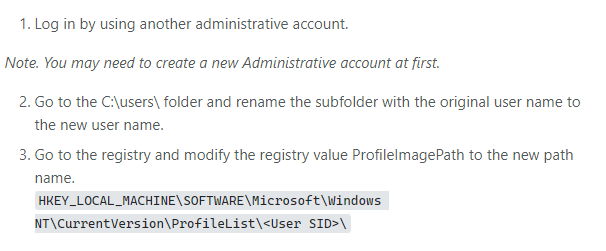
Just found why it didn't work, it's because my user name on windows is Kaëlig which contain a special letter "ë", basically it gives windows a hard time for whatever reason, here's the link to the page that helped me changing the username to another : https://superuser.com/questions/890812/how-to-rename-the-user-folder-in-windows-10#:~:text=Click%20on%20the%20Windows%20Button,name%20in%20the%20new%20window. and here's the screenshot of the actual answer that helped me :
Capture

<!-- gh-comment-id:1185779494 --> @Gamers11Perso commented on GitHub (Jul 15, 2022): Just found why it didn't work, it's because my user name on windows is Kaëlig which contain a special letter "ë", basically it gives windows a hard time for whatever reason, here's the link to the page that helped me changing the username to another : [https://superuser.com/questions/890812/how-to-rename-the-user-folder-in-windows-10#:~:text=Click%20on%20the%20Windows%20Button,name%20in%20the%20new%20window.](url) and here's the screenshot of the actual answer that helped me : ![Capture](https://user-images.githubusercontent.com/47450198/179284446-c8f911f1-ed5d-4f6a-b872-aa1dbd8d6c3b.PNG)
Sign in to join this conversation.
No milestone
No project
No assignees
1 participant
Notifications
Due date
The due date is invalid or out of range. Please use the format "yyyy-mm-dd".

No due date set.

Dependencies

No dependencies set.

Reference: github-starred/barrier#1272
No description provided.