mirror of
https://github.com/MonitorControl/MonitorControl.git
synced 2026-05-15 06:05:52 -06:00
 036a29d4bc
- Code rework
- Native OSD
- Change default shortcuts for problems with apps
- Codesign app

Signed-off-by: Guillaume Broder <iamnotheoneyouseek@gmail.com>
1.7 KiB
1.7 KiB
MonitorControl
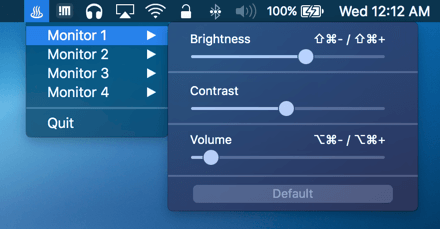
Control your external monitor brightness, contrast or volume directly from a menulet or with keyboard shortcuts :
- Brightness:
⇧+⌃+⌥+⌘+↑/↓(Shift + Control + Alt + Command + Up/Down arrows) - Volume:
⇧+⌃+⌥+⌘+←/→(Shift + Control + Alt + Command + Left/Right arrows) - Mute:
⇧+⌃+⌥+⌘+-(Shift + Control + Alt + Command + Minus)
(Ps. The keyboard shortcut only work for the default screen)
Download
Go to Release and download the latest .dmg
Brightness/Volume default key
You can use Karabiner Elements to use the default mac key (F1, F2 for brightness and F10, F11, F12 for volume) with this set of custom rules : Karabiner rules for MonitorControl
Bonus: Using keyboard shortcuts display the native osd :

TODO
- Hande multiple screen for keyboard shortcut (Possibly the choice to have all screen brightness/volume increase/decrease at the same time or separatly)
- Skip Karabiner use for keyboard shortcut
- Option to start app at login
- Add SwiftLint
Support
- macOS Sierra (
10.12) and up. - Works with monitors comptaible with @kfix/ddcctl
Thanks
- @bluejamesbond (Original developer)
- @Tyilo (Fork)
- @Bensge - (Used some code from his project NativeDisplayBrightness)