mirror of
https://github.com/MonitorControl/MonitorControl.git
synced 2026-06-30 06:02:00 -06:00
[GH-ISSUE #956] Add an 'enable/disable toggle' keyboard shortcut for quick restoration of a previous setting #583
Labels
No labels
Status: Abandoned
arm64
beta
beta
bug
done
duplicate
enhancement
feedback needed from reporter
in progress
invalid
investigating
known Issue
monitor Issue
pull-request
translation
unable to reproduce
unreleased
x86
No milestone
No project
No assignees
1 participant

Notifications
Due date
No due date set.
Dependencies
No dependencies set.
Reference: github-starred/MonitorControl#583
Loading…
Add table
Add a link
Reference in a new issue
No description provided.
Delete branch "%!s()"
Deleting a branch is permanent. Although the deleted branch may continue to exist for a short time before it actually gets removed, it CANNOT be undone in most cases. Continue?
Originally created by @godzfire on GitHub (Feb 21, 2022).
Original GitHub issue: https://github.com/MonitorControl/MonitorControl/issues/956
Before opening the issue, have you...?
Is your feature request related to a problem? Please describe
I have my computer hooked up to my TV as my monitor. At night as I'm getting ready for bed, I have flux to kill the blue light and also would like to 'darken' the screen, as often I am watching twitch streams to help me fall asleep.
My previous old LG LCD TV was very dark with the backlight and auto brightness turned on, where it would darken the screen at night time. Unfortunately, my new LG C1 OLED- even at basically 0 backlight- is still very bright, and I've had to find a program that will artificially darken the screen further.
I found QuickShade, which was very simple and did what I needed it to do mostly. However even at it's max darken setting, it didn't get the screen as dark as I wanted. So I searched and found MonitorControl. It's an excellent program with a huge amount of customization and advanced tweaking (I accidentally white static'd my TV because I don't think it likes the 'Allow zero brightness'; freaked me out I broke it, have to test more). It also seems to be able to get the screen very close to total black vs QuickShade.
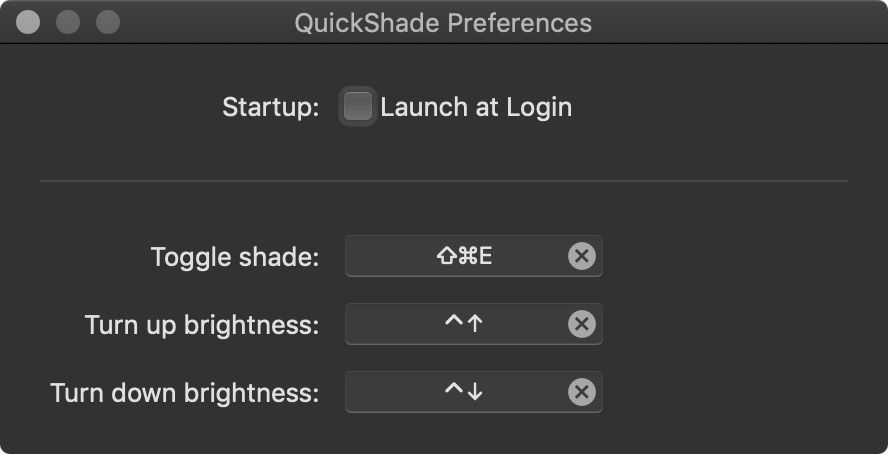
I was happy that I thought my perfect fit and set up the brightness up/down keyboard shortcuts just like QS. Unfortunately, that's when I discovered that there's one feature QS has that MC doesn't, there's no 'enable/disable toggle' keyboard shortcut for quick restoration back and forth/ off and on (unless I'm blind, please tell me if I'm just stupid). Below is a picture of what I mean what QS has:
Describe the solution you'd like
Simple solution: Just an added quick enable/disable keyboard shortcut setting like QS has.
Dream solution: In addition to the simple solution- and I don't even know if this is possible- but settings to automatically and dynamically control the darkness levels via what time of day it is, like what flux does essentially.
Describe alternatives you've considered
Sticking with QS, although it's definitely not my choice now that I found MC. Beyond that there's Shady, but that's long been abandoned.
Anything else?
I'd be glad to help do build testing/etc as I work in IT myself and will do whatever I can to assist.
@godzfire commented on GitHub (Mar 14, 2022):
Is this something that is already possible with MonitorControl?
@waydabber commented on GitHub (Mar 15, 2022):
@godzfire - no, there is no keyboard shortcut to disable the shade quickly. But adjusting brightness using the keyboard is super-easy, you just have to press and hold one of the brightness keys until the brightness is at the desired level so I am not sure how useful an addition like this would be (on QS the toggle is probably there to help making screenshots or do stuff quickly when a shade interferes - but on MC using a shade is not a primary solution, it's the third best thing after hardware and gamma control, so this might not be that much as a problem - but a toggle like this could be implemented anyway so I think we should leave this feature request open and implement it in the future).
@stale[bot] commented on GitHub (Mar 16, 2023):
Hey there, it looks like there has been no activity on this issue recently. Has the issue been fixed, or does it still require attention? This issue may be closed if no further activity occurs. Thank you for your contributions.