[GH-ISSUE #752] Black screen show up whenever I switch between desktops on my virtual monitor #492

Closed
opened 2026-05-05 06:07:36 -06:00 by gitea-mirror · 14 comments
Owner

Originally created by @sunnytranco on GitHub (Oct 31, 2021).
Original GitHub issue: https://github.com/MonitorControl/MonitorControl/issues/752

Originally assigned to: @waydabber on GitHub.

Before opening the issue, have you...?

  • Searched for existing issues
  • Looked through the wiki
  • Updated MonitorControl to the latest version (if applicable)

Describe the bug

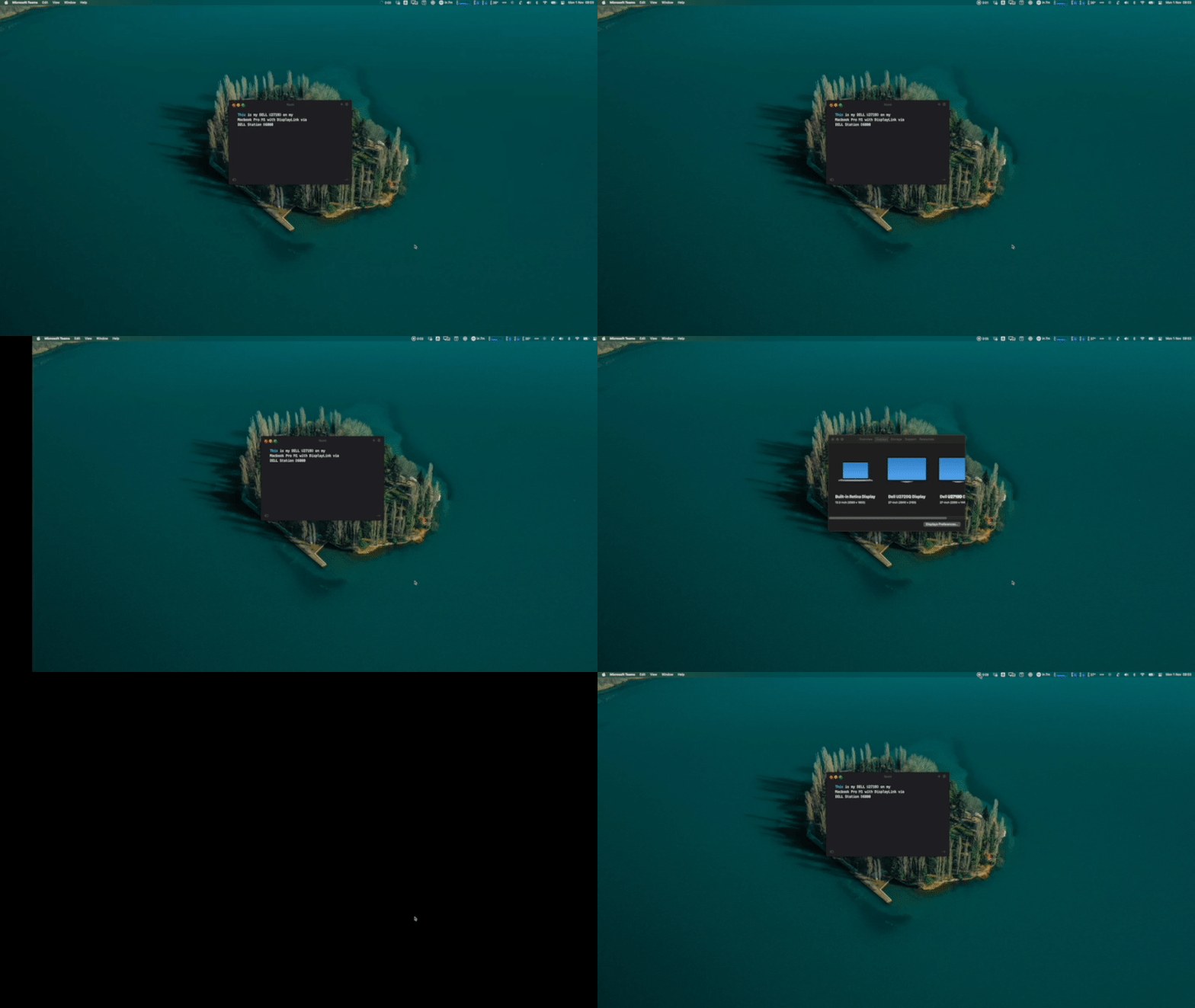
I'm using a Macbook Pro M1 with Monitor Control 4.0.0. I have a setup with 2 external monitors (Dell) via Dell Station D6000 as virtual monitors (due to limitation from Apple for M1). I've noticed that when switching between desktops in the virtual monitor, there is a black screen show up every time for half a second. It's really annoying for me. Could you take a look at this issue?

P/S: The app works just fine on the built-in-retina on my laptop. So I assume the virtual monitor is the cause of this. FYI: Another app, Luna, doesn't have this kind of bug

Steps to reproduce

Switch desktop on your virtual monitor

Expected behavior

The black screen between the switching process

Anything else?

No response

Environment Information (please complete the following information)

- macOS version: 12.0.1 Monterey
- Mac model: Macbook Pro M1 2020
- MonitorControl version: 4.0.0
- Monitor(s): Dell U2720Q & U2719D via Dell Station D6000
- Apple Silicon/M1 (yes or no): yes
Originally created by @sunnytranco on GitHub (Oct 31, 2021). Original GitHub issue: https://github.com/MonitorControl/MonitorControl/issues/752 Originally assigned to: @waydabber on GitHub. ### Before opening the issue, have you...? - [X] Searched for existing issues - [X] Looked through [the wiki](https://github.com/MonitorControl/MonitorControl/wiki) - [X] Updated MonitorControl to the latest version (if applicable) ### Describe the bug I'm using a Macbook Pro M1 with Monitor Control 4.0.0. I have a setup with 2 external monitors (Dell) via Dell Station D6000 as virtual monitors (due to limitation from Apple for M1). I've noticed that when switching between desktops in the virtual monitor, there is a black screen show up every time for half a second. It's really annoying for me. Could you take a look at this issue? P/S: The app works just fine on the built-in-retina on my laptop. So I assume the virtual monitor is the cause of this. FYI: Another app, Luna, doesn't have this kind of bug ### Steps to reproduce Switch desktop on your virtual monitor ### Expected behavior The black screen between the switching process ### Anything else? _No response_ ### Environment Information (please complete the following information) ```markdown - macOS version: 12.0.1 Monterey - Mac model: Macbook Pro M1 2020 - MonitorControl version: 4.0.0 - Monitor(s): Dell U2720Q & U2719D via Dell Station D6000 - Apple Silicon/M1 (yes or no): yes ```
gitea-mirror 2026-05-05 06:07:36 -06:00
  • closed this issue
  • added the
    bug
    done
    labels
Author
Owner

@waydabber commented on GitHub (Oct 31, 2021):

Hi, can you elaborate a bit on what kind of Virtual Monitors are you using? Maybe a video of some kind would help understanding the issue.

I have experience with BetterDummy and SideCar, AirPlay which all utilize virtual displays and did not experience any issue, but maybe I just don't understand what should I look for.

<!-- gh-comment-id:955802565 --> @waydabber commented on GitHub (Oct 31, 2021): Hi, can you elaborate a bit on what kind of Virtual Monitors are you using? Maybe a video of some kind would help understanding the issue. I have experience with [BetterDummy](https://github.com/waydabber/BetterDummy) and SideCar, AirPlay which all utilize virtual displays and did not experience any issue, but maybe I just don't understand what should I look for.
Author
Owner

@sunnytranco commented on GitHub (Nov 1, 2021):

Hi @waydabber,

Sidecar is still okay on my devices. Since Apple M1 only allows me to connect with 2 monitors (including built-in-retina) so if I wanna use 2 external displays with my Macbook Pro M1 then I have to use a Dock Station that supports DisplayLink technology. Here is my setup guideline

Basically, my virtual displays are generated by DIsplayLink via Dell Station D6000

You can check the black screen in my attachment below
bug with displaylink

Thanks for the reply

<!-- gh-comment-id:955869517 --> @sunnytranco commented on GitHub (Nov 1, 2021): Hi @waydabber, Sidecar is still okay on my devices. Since Apple M1 only allows me to connect with 2 monitors (including built-in-retina) so if I wanna use 2 external displays with my Macbook Pro M1 then I have to use a Dock Station that supports DisplayLink technology. Here is my setup [guideline](https://m1displays.com/docking-stations-for-m1-macbooks) Basically, my virtual displays are generated by [DIsplayLink](https://www.synaptics.com/products/displaylink-graphics) via Dell Station D6000 You can check the black screen in my attachment below ![bug with displaylink](https://user-images.githubusercontent.com/27778968/139611441-1d4b2d32-693d-45a3-ae24-2a5db8e2faf9.gif) Thanks for the reply
Author
Owner

@sunnytranco commented on GitHub (Nov 1, 2021):

@waydabber I have an update for you.

I tried your BetterDummy app on Dell U2720Q (using DisplayLink, as the main display) and the black screen was gone. The other monitor, Dell U2719D, still has the bug.

<!-- gh-comment-id:955978810 --> @sunnytranco commented on GitHub (Nov 1, 2021): @waydabber I have an update for you. I tried your **BetterDummy** app on Dell U2720Q (using DisplayLink, as the main display) and the black screen was gone. The other monitor, Dell U2719D, still has the bug.
Author
Owner

@waydabber commented on GitHub (Nov 1, 2021):

I see the issue. Honestly I am not entirely sure why this is happening, seems to be a DisplayLink related problem somehow (I don't have such a device to experiment with), maybe related to shade dimming which is the only option that can be used for DisplayLink devices at the moment. But SideCar uses that as well and it does not have this issue. Can you show me how the Displays tab under MonitorControl Preferences looks like?

Also, what is the app called Luna? Is that Luna Display?

<!-- gh-comment-id:955997453 --> @waydabber commented on GitHub (Nov 1, 2021): I see the issue. Honestly I am not entirely sure why this is happening, seems to be a DisplayLink related problem somehow (I don't have such a device to experiment with), maybe related to shade dimming which is the only option that can be used for DisplayLink devices at the moment. But SideCar uses that as well and it does not have this issue. Can you show me how the Displays tab under MonitorControl Preferences looks like? Also, what is the app called Luna? Is that Luna Display?
Author
Owner

@sunnytranco commented on GitHub (Nov 1, 2021):

Sorry. I double-checked again on Sidecar, it has the issue too (now I'm not sure, last time I'd checked which app was being used :-( )

And this is Luna. It's not Luna Display, it's a monitor control app just like yours.

displays-2

displays-1

<!-- gh-comment-id:956008553 --> @sunnytranco commented on GitHub (Nov 1, 2021): Sorry. I double-checked again on Sidecar, it has the issue too (now I'm not sure, last time I'd checked which app was being used :-( ) And this is [Luna](https://lunar.fyi). It's not Luna Display, it's a monitor control app just like yours. ![displays-2](https://user-images.githubusercontent.com/27778968/139639037-59c497d3-1769-4945-b7a1-c1410a111149.png) ![displays-1](https://user-images.githubusercontent.com/27778968/139639014-fe6a6d2a-907e-405e-b2e9-5cada03a8486.png)
Author
Owner

@waydabber commented on GitHub (Nov 1, 2021):

Ohh, yes, you mean Lunar by @alin23. :) Ok, I am familiar with it, it's really a great app, I highly recommend it!

Lunar has a completely different implementation when doing shade based control. I'll try to check out in depth what could be the difference. Thanks for the clarification!

@alin23 - as an unrelated sidenote, BetterDummy does not seem to work well with Lunar at default settings as Lunar does not figure out if a display is in a mirrored set and control based on mouse position does not work (it should control all displays in the mirrored set as all displays have the mouse). It is not a BetterDummy specific issue, but affects all mirrored setups. You might want to look at this. ;)

<!-- gh-comment-id:956074262 --> @waydabber commented on GitHub (Nov 1, 2021): Ohh, yes, you mean Lunar by @alin23. :) Ok, I am familiar with it, it's really a great app, I highly recommend it! Lunar has a completely different implementation when doing shade based control. I'll try to check out in depth what could be the difference. Thanks for the clarification! @alin23 - as an unrelated sidenote, [BetterDummy](https://github.com/waydabber/BetterDummy) does not seem to work well with Lunar at default settings as Lunar does not figure out if a display is in a mirrored set and control based on mouse position does not work (it should control all displays in the mirrored set as all displays have the mouse). It is not a BetterDummy specific issue, but affects all mirrored setups. You might want to look at this. ;)
Author
Owner

@waydabber commented on GitHub (Nov 1, 2021):

Btw. if you create an other Dummy using BetterDummy (you can have two dummies of the same aspect ratio at the same time) and mirror that to the other display, does the problem go away on that display as well? Thanks!

<!-- gh-comment-id:956075920 --> @waydabber commented on GitHub (Nov 1, 2021): Btw. if you create an other Dummy using BetterDummy (you can have two dummies of the same aspect ratio at the same time) and mirror that to the other display, does the problem go away on that display as well? Thanks!
Author
Owner

@alin23 commented on GitHub (Nov 1, 2021):

@alin23 - as an unrelated sidenote, BetterDummy does not seem to work well with Lunar at default settings as Lunar does not figure out if a display is in a mirrored set and control based on mouse position does not work (it should control all displays in the mirrored set as all displays have the mouse). It is not a BetterDummy specific issue, but affects all mirrored setups. You might want to look at this. ;)

Correct, I haven't thought of controlling all the monitors in a mirror set on the Display with Cursor option.

I'll fix that in the next version of Lunar, thanks for the heads up!

<!-- gh-comment-id:956087718 --> @alin23 commented on GitHub (Nov 1, 2021): > @alin23 - as an unrelated sidenote, [BetterDummy](https://github.com/waydabber/BetterDummy) does not seem to work well with Lunar at default settings as Lunar does not figure out if a display is in a mirrored set and control based on mouse position does not work (it should control all displays in the mirrored set as all displays have the mouse). It is not a BetterDummy specific issue, but affects all mirrored setups. You might want to look at this. ;) Correct, I haven't thought of controlling all the monitors in a mirror set on the Display with Cursor option. I'll fix that in the next version of Lunar, thanks for the heads up!
Author
Owner

@sunnytranco commented on GitHub (Nov 1, 2021):

@waydabber thanks for the tip. I successfully fix the bug of black screen with one more Dummy. But now I cannot control brightness using Monitor Control app lolx

Anw, thanks for your support

Edit: I just realize that I missed spell of Lunar (instead of Luna) :)

<!-- gh-comment-id:956115813 --> @sunnytranco commented on GitHub (Nov 1, 2021): @waydabber thanks for the tip. I successfully fix the bug of black screen with one more Dummy. But now I cannot control brightness using Monitor Control app lolx Anw, thanks for your support Edit: I just realize that I missed spell of **Lunar** (instead of Luna) :)
Author
Owner

@waydabber commented on GitHub (Nov 1, 2021):

Hahh great! An other scenario to test and possibly fix - control of a virtual display (BetterDummy) mirrored to an other virtual display (DisplayLink). ;) I like it!

<!-- gh-comment-id:956122399 --> @waydabber commented on GitHub (Nov 1, 2021): Hahh great! An other scenario to test and possibly fix - control of a virtual display (BetterDummy) mirrored to an other virtual display (DisplayLink). ;) I like it!
Author
Owner

@octavezero commented on GitHub (Nov 2, 2021):

This issue is not limited to only virtual monitors. I am able to reproduce with a single standard monitor (Dell UP2720Q) connected directly via USB-C to a M1 Air.

I am using the hardware ddc based brightness control instead of the software shade, and I can reproduce this reliably only on the external monitor, and never on the internal one.

Another thing I have observed is that this issue only persists while the app is running. If I change the brightness and then quit the app, the bug is gone, but comes back instantly if I start it again.

<!-- gh-comment-id:957852884 --> @octavezero commented on GitHub (Nov 2, 2021): This issue is not limited to only virtual monitors. I am able to reproduce with a single standard monitor (Dell UP2720Q) connected directly via USB-C to a M1 Air. I am using the hardware ddc based brightness control instead of the software shade, and I can reproduce this reliably only on the external monitor, and never on the internal one. Another thing I have observed is that this issue only persists while the app is running. If I change the brightness and then quit the app, the bug is gone, but comes back instantly if I start it again.
Author
Owner

@waydabber commented on GitHub (Nov 2, 2021):

Hi, yes this issue appears whenever shade control is enabled and at least one dimming has occured (on hardware DDC displays this happens with combined dimming enabled below 50% brightness), it has nothing to do with virtual displays actually.

To solve this issue, please uncheck Avoid gamma table manipulation under Displays for the given device and restart the app (disabled is the default setting).

I'll fix this issue as soon as I get to it! Thanks for the input and the patience!

<!-- gh-comment-id:957880029 --> @waydabber commented on GitHub (Nov 2, 2021): Hi, yes this issue appears whenever shade control is enabled and at least one dimming has occured (on hardware DDC displays this happens with combined dimming enabled below 50% brightness), it has nothing to do with virtual displays actually. To solve this issue, please uncheck `Avoid gamma table manipulation` under Displays for the given device and restart the app (disabled is the default setting). I'll fix this issue as soon as I get to it! Thanks for the input and the patience!
Author
Owner

@waydabber commented on GitHub (Nov 2, 2021):

So this issue will be about black bars, I opened an other for supporting BetterDummy mirrored Virtual Displays (like DisplayLink). https://github.com/MonitorControl/MonitorControl/issues/762

<!-- gh-comment-id:958178599 --> @waydabber commented on GitHub (Nov 2, 2021): So this issue will be about black bars, I opened an other for supporting [BetterDummy](https://github.com/waydabber/BetterDummy) mirrored Virtual Displays (like DisplayLink). https://github.com/MonitorControl/MonitorControl/issues/762
Author
Owner

@waydabber commented on GitHub (Nov 4, 2021):

All right, i found the issue and fixed it. It will be in 4.0.1

<!-- gh-comment-id:960994636 --> @waydabber commented on GitHub (Nov 4, 2021): All right, i found the issue and fixed it. It will be in 4.0.1
Sign in to join this conversation.
No milestone
No project
No assignees
1 participant
Notifications
Due date
The due date is invalid or out of range. Please use the format "yyyy-mm-dd".

No due date set.

Dependencies

No dependencies set.

Reference: github-starred/MonitorControl#492
No description provided.