mirror of
https://github.com/MonitorControl/MonitorControl.git
synced 2026-10-23 08:07:35 -06:00
[GH-ISSUE #620] Allow contrast to be adjusted along with brightness #445
Labels
No labels
Status: Abandoned
arm64
beta
beta
bug
done
duplicate
enhancement
feedback needed from reporter
in progress
information
invalid
investigating
known Issue
monitor Issue
pull-request
translation
unable to reproduce
unreleased
x86
No milestone
No project
No assignees
1 participant

Notifications
Due date
No due date set.
Dependencies
No dependencies set
Reference
github-starred/MonitorControl#445
Loading…
Reference in a new issue
No description provided.
Delete branch "%!s()"
Deleting a branch is permanent. Although the deleted branch may continue to exist for a short time before it actually gets removed, it CANNOT be undone in most cases. Continue?
Originally created by @professorwimpy on GitHub (Sep 24, 2021).
Original GitHub issue: https://github.com/MonitorControl/MonitorControl/issues/620
Originally assigned to: @waydabber on GitHub.
Before opening the issue, have you...?
Is your feature request related to a problem? Please describe
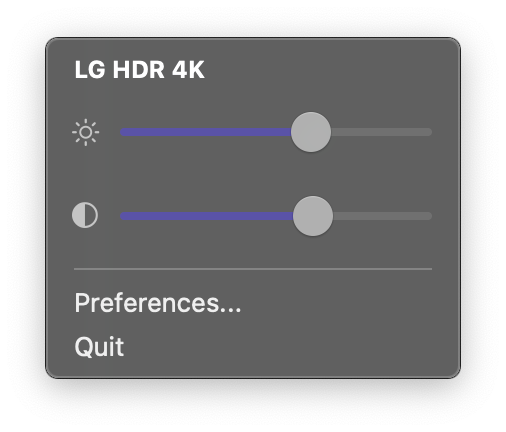
When I adjust only the brightness of my external monitor, at the dim and bright extremes it looks much more like what I would expect if I match the brightness percent with the contrast percent. I can only set the contrast manually with the menu option, but I would love to be able to control it with the brightness buttons as an option as well.
This is the manual setting for contrast that I'm referring to:
Describe the solution you'd like
I am requesting an option where the contrast is linked to brightness percentage when the user presses the brightness +/- buttons on the keyboard.
Describe alternatives you've considered
An alternative could be setting a min and max contrast and letting the app interpolate as you increase or decrease brightness.
Anything else?
No response
@JoniVR commented on GitHub (Sep 24, 2021):
I'm just going to put it out here already. I personally don't think we should adopt this as a feature. I can see wanting to be able to control contrast with shortcuts, that seems to be something lots of people want, but linking them seems a bit like a feature barely anyone benefits from, and adds yet another setting/option for us to maintain. At some point we have to start saying "no" to some of these requests for the sake of usability and maintainability.
We can definitely do shortcuts for contrast in the future though.
@JoniVR commented on GitHub (Sep 24, 2021):
Shortcuts for Contrast: #621
@JoniVR commented on GitHub (Sep 24, 2021):
@waydabber thoughts?
@professorwimpy commented on GitHub (Sep 24, 2021):
The goal was not to compromise usability, but more to match my mac's display properties. It appears when I adjust my mac's display with the brightness, some measure of contrast is being adjusted on there as well. I can produce the equivalent effect when I adjust my external monitor's brightness and contrast at the same time, but I can only do that manually (in two operations: button press, slider drag). I was suggesting this to make it be some sort of option to be able to move both values with one button press.
@JoniVR commented on GitHub (Sep 24, 2021):
I can see how that is pretty annoying, though my point still stands on maintainability, another option barely anyone is going to benefit from is still something we need to maintain long term, and it adds complexity. Perhaps some of the v4.0.0 advanced display options can provide a solution? #596
@professorwimpy commented on GitHub (Sep 24, 2021):
I don't know that I agree that barely anybody would benefit from this option. I have noticed this need with several external monitors that I tried. Just because requests aren't pouring in for a feature, doesn't mean the average user of the app wouldn't benefit from it. If it is out of scope for a release or there isn't a graceful way to add the feature where it would avoid becoming a maintenance nightmare, that is another thing, and I do totally understand that.
@waydabber commented on GitHub (Sep 25, 2021):
I agree with @JoniVR that this setting would not be useful for 99% of users.
On modern LCD displays, brightness virtually always controls backlighting and contrast controls the panel itself. Contrast is applied as a single linear curve to the intensity of the given color byte. If contrast is set above a certain treshold (usually 50, 70, 75% depending on panel) there is clipping happening (lighter grays and whites become the same - indistinguishable). Contrast was mostly useful on analog VGA connections when intensity was an analog signal and manual calibration was needed - on modern displays with digital connections it is best to leave contrast default or if the default is wrong, then calibrate it using a grayscale calibraiton tool to make both ends of the grayscale (dark and light) bar display separate colors.
Afaik, some Apple displays indeed did use software darkening to compensate for the lower limit of the backlight control to furter darken the dispaly. MC 4.0.0 has this function using gammatable manipulation (so you can reach 0-100% brightness control). MC 3.x.x has a similar thing in the form of "Further lower brightness via software dimming". It is better to use this than contrast adjustment on most displays.
With all this in mind, there might be some displays that don't work like the way I described as there are lots and lots of displays out there. Also, OLED and microLED displays will work differently (as they don't have a separate backlight hardware), as old CRT displays had different meanings for these controls . But since this is now a small minority, I would not add a setting to "Control both brightness and contrast" setting, instead I will add this option silently:
4.0.0 alreaddy has a setting to override the VCP code for the given command. I'll make this field a comma spearated list - if the user enters more than one hex value (10 is brightness, 12 is contrast) then the app will iterate through them and send both commands to the display with the same value. This way this special need can be addressed without adding any additional complexity to the already complex UI. We can then add this info away in a Q&A item in Discussion for future reference for users who have a display that needs this kind of hack.
@Muirium commented on GitHub (Sep 25, 2021):
I appreciate the various arguments being made in the discussion. For my Dell P2415Q, varying both Brightness and Contrast controls in unison is not much good. Instead, I often have to hand-tune the Contrast level after setting a desired Brightness. This is especially true for videos, which can vary widely; and the monitor's own Contrast control is profoundly more powerful than tweaking video settings in the player app, such as IINA in my case.
Is a (user definable) keyboard shortcut for Contrast up and down (#603) a significant maintenance burden? I'm not looking for anything "smart" at all, no heuristics, no user defined matrices of values! Just + and -, on a button each. These awkward outlier displays are all likely different in their own way. Just let the user (who cares) handle it with a keystroke. It's an edge case which needn't get in the way of the software's core design.
@JoniVR commented on GitHub (Sep 25, 2021):
@waydabber Seems like a great solution!
@Muirium Shortcuts for contrast are definitely something we can do. See #621 for this. The big question there will be what a "sensible default" is for it. In the future we also plan on adding fully custom shortcuts as well, see #118 for that.
No idea on when this will be added though, might possibly be for 4.1.0 already.
@waydabber commented on GitHub (Sep 27, 2021):
Hi @professorwimpy
The latest 4.0.0 has this option. You can download the unsigned preview build - see the bottom of the opening post of #596
You need to enter the codes
10, 12to control brightness and contrast at the same time as seen on the screenshot below.@micbblom commented on GitHub (Oct 15, 2022):
This is flawed unfortunately. It doesn't respect DDC max for brightness. My idea would be that you define an increment for each keyboard hit, like 1 Brightness up = +5 units brightness, +5 units contrast.
The implementation right now looks like it's setting brightness and contrast to the same value, which is a big mess on my side. Also you don't see the changes on the contrast anymore. You might also want to refer to ClickMonitorDDC for Windows for a cross reference. This has a perfect implementation on that (and other settings).
Thanks for the effort, great work so far, please continue developing. I'd be fine with a commercial solution.