mirror of
https://github.com/MonitorControl/MonitorControl.git
synced 2026-10-23 08:07:35 -06:00
[GH-ISSUE #323] MonitorControl not working on Apple Silicon (M1) Macs #253
Labels
No labels
Status: Abandoned
arm64
beta
beta
bug
done
duplicate
enhancement
feedback needed from reporter
in progress
information
invalid
investigating
known Issue
monitor Issue
pull-request
translation
unable to reproduce
unreleased
x86
No milestone
No project
No assignees
1 participant

Notifications
Due date
No due date set.
Dependencies
No dependencies set
Reference
github-starred/MonitorControl#253
Loading…
Reference in a new issue
No description provided.
Delete branch "%!s()"
Deleting a branch is permanent. Although the deleted branch may continue to exist for a short time before it actually gets removed, it CANNOT be undone in most cases. Continue?
Originally created by @htmlarson on GitHub (Nov 18, 2020).
Original GitHub issue: https://github.com/MonitorControl/MonitorControl/issues/323
Originally assigned to: @waydabber on GitHub.
Checklist
Describe the bug
Installing MonitorControl on a MacBook Air with Apple Silicon will show no monitors connected. I am using the same setup as I previously used with my intel-based system.
To Reproduce
Attempt normal use using a MacBook Air with an Apple M1 Processor
Expected behavior
Displays should register and allow for display controls
Environment Information (please complete the following information):
@ameetmadan commented on GitHub (Nov 18, 2020):
+1 on this, was working before I updated to Big Sur. Seems to be more of a Big Sur problem, as I have an Intel Mac where it was working before.
@alexclst commented on GitHub (Nov 18, 2020):
+1 with the M1 Mac mini. I have both USB-C to DisplayPort and HDMI monitors attached, neither shows in MonitorControl. May well be Big Sur problem, as my old Intel Mac is stuck at Catalina.
@htmlarson commented on GitHub (Nov 18, 2020):
When I updated my ‘16 MBP to Big Sur there was no issue, it might be no factor.
Sent from my iPhone
@uxduck commented on GitHub (Nov 18, 2020):
I have MacOS Big Sur 11.0.1 (20B28), and its working fine for me (hackintosh). Thanks again for working on this lovely project.
@fredeil commented on GitHub (Nov 19, 2020):
Working for me

@cgaff91 commented on GitHub (Nov 19, 2020):
+1 with MacBook Air M1, 8-core GPU model. Replaced my 2020 13" Intel MacBook Pro, using the exact same setup (LG UltraWide USB-C Monitor), MonitorControl now just says "No supported display found"
Everything works 100% when connecting my Intel MacBook Pro, both on the latest released version of Big Sur, 11.0.1
Love this app, keep up the great work!! Thank you!
@ameetmadan commented on GitHub (Nov 19, 2020):
@JoniVR commented on GitHub (Nov 19, 2020):
Yeah it's definitely an M1 issue, not Big Sur.
We haven't done any release officially supporting it yet either.
My guess is that Rosetta 2 either doesn't really work well on translating DDC.Swift or DDC.swift needs to get updated for it to work.
@davidkrmela commented on GitHub (Nov 20, 2020):
Yes, I can confirm that is M1 issue – it's working on my Intel macbook with Big Sur but not with M1 macbook.
Today I tried to compile MonitorControl on M1 (with removing OSD.framework - not compatible with arm) and successfully run it natively (activity monitor shows "Apple" architecture, not "Intel"), but get same result as Intel version running under Rosseta 2: "No supported display found"
So I guess that's not a problem with Rosetta 2.
@baumhoto commented on GitHub (Nov 21, 2020):
Seems to be a bug in AppKit Framework on M1. NSScreenNumber is set to 1 instead of the actual id
Following program outputs
on M1:

on Intel:

NSScreenNumber is 1 on M1 thus DDC Framework will set Monitor to be Not DDC Compatible.

.
@alexclst commented on GitHub (Nov 21, 2020):
@baumhoto, if this is indeed a bug in AppKit, and just testing the code on my M1 Mac gets the same output, you should report it to Apple using the Feedback Assistant app (where they want bug reports sent in these days). Attach a Playground that exhibits it for them. It seems this app will not be fixed until the OS itself gets that bug fixed. Indeed, the app isn't broken in all likelihood, just the API in AppKit is. Or if you're uncomfortable reporting it to Apple I could. But you're the one who pointed this out, so if you want to please do report it to Apple.
@baumhoto commented on GitHub (Nov 22, 2020):
@alexclst just reported it to Apple using the Feedback assistant: FB8912103
Tried to avoid the issue by hardcoding my monitor values but the DCC Framework doesn't find my monitor even if I pass in the correct displayid. So there seems to be an issue with that as well.
@Flipsoo commented on GitHub (Nov 22, 2020):
+1 for me, not to ignore that I love your app and normally everything works fine (on every other Big Sur system) !!!
@hstriepe commented on GitHub (Nov 23, 2020):
+1 for me MacBook Pro 12" M1 with USB-C Dell UW38 running 11.1b1
@ghost commented on GitHub (Nov 25, 2020):
Same issue here with the new MacBook Air running the M1 chip.
@ZeroPie commented on GitHub (Nov 25, 2020):
I can reproduce it.
Works on my MBP13(10th Intel) BigSur 11.0.1
Does not work on MBP13 M1 Big Sur 11.0.1
Does it make sense to submit additional Bug Reports or is @baumhoto report enough?
@aednichols commented on GitHub (Nov 25, 2020):
I think we’ve established the problem is legit and reproducible 😄 I suspect the most productive move would be to file dupes referencing FB8912103 to vote our issue up in Apple’s bug backlog.
@JoniVR commented on GitHub (Nov 25, 2020):
I agree with @aednichols, I'd also like to remind everyone to please avoid just "+1" comments, if you're going to add a comment, try to add value to the discussion so we don't all get spammed with "+1" comments, in that case just give a 👍 , I know everyone does this with the best intentions but it doesn't add much value to the discussion and actually makes it harder to find important information.
Personally I'm not planning on upgrading to an M1 machine soon (just bought a 16" a year ago) but I'd be happy to move the project forward through merging PRs and doing what I can to help.
@alexclst commented on GitHub (Nov 25, 2020):
I just reported it: FB8917354. I attached to it the following playground that illustrates the problem:
M1MonitorBug.playground.zip. I also referenced @baumhoto feedback ID, as well as this issue.
@aednichols commented on GitHub (Nov 26, 2020):
I submitted another Feedback duping FB8912103.
@JoniVR I'm a developer with an M1 so if we hear from Apple about a fix I can test on my machine.
Thanks for the great app!
@ghost commented on GitHub (Nov 27, 2020):
Is there a time frame for removing this issue?
@dschuler commented on GitHub (Nov 30, 2020):
On 11.0.1 (20B29) with an M1 Mac mini,
.localizedNameisn't nil for me and returns the correct monitor string: "DELL U2718Q". That's what should be happening, right? The main project calls.displayName, which does return nil, becauseIOIteratorNext(servicePortIterator)doesn't return anything. That seems to be a problem, but I could live without the name being populated.. so then I tried to see if I can get a DDC object, but that always returns nil here.That would be required to make this work, right? Does it make sense to file a separate issue for this, or are the name and the DDC object being nil related @alexclst?
@alexclst commented on GitHub (Dec 2, 2020):
Honestly I don't know, @dschuler. I've never helped write this, or any other, app that handles monitors. I just ran into this problem as a user, and being a developer could test the possible AppKit bug in a Playground. So I'm not knowledgeable enough to answer your questions.
@aednichols commented on GitHub (Dec 2, 2020):
@dschuler it seems to me that the problem is with the numerical ID always returning
1. Rather than any of the strings, which are used cosmetically.@sergeyfilimonov commented on GitHub (Dec 3, 2020):
MBA M1, Big Sur 11.0, LG27UL550 — not working. On an Intel MBP16 it's working.
@ATG1209 commented on GitHub (Dec 3, 2020):
Please fix M1 compatibility issues! Pease
@CyberTx95 commented on GitHub (Dec 3, 2020):
Also doesn't work on Mac Mini M1, Big Sur 11.0.1
@aednichols commented on GitHub (Dec 3, 2020):
@sergeyfilimonov @ATG1209 @CyberTx95 please file Feedbacks with Apple referencing this comment and FB8912103.
If you had read the rest of the thread you would know the problem is in Apple’s court, not this app.
@sergeyfilimonov commented on GitHub (Dec 3, 2020):
Thanks, sorry.
Done: FB8927087
@ATG1209 commented on GitHub (Dec 4, 2020):
I just did it. Thanks. Meanwhile, do you know if there is another way to achieve controlling external displays? Another app or guide?
@JoniVR commented on GitHub (Dec 4, 2020):
I'm not sure if the virtual audio loopback device approach works, but it might be worth taking a look at those projects.
If I recall Soundflower (very outdated) is one, SoundSource might be another one. Not sure if they work though.
Obviously only works for volume.
@ghost commented on GitHub (Dec 4, 2020):
HI Guys,
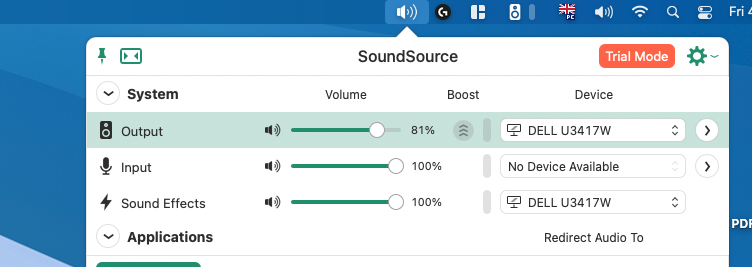
After days of looking to control my external monitor over my keyboard, finally I have managed to find it. The issue has been solved by Soundsource app, you should download beta version which is compatible with Apple Silicon, and need change some security settings. It is all working for me now. Please see for beta version https://rogueamoeba.com/tmp/betas/SoundSource_AppleSilicon_Beta.zip
@acousticbiker commented on GitHub (Dec 4, 2020):
In case this helps anyone else who no longer has control of brightness for an external monitor, QuickShade partially works for my Phiilps 329P9H connected via USB C. I say partially because, at least for me, the slider only allows me to turn down the brightness from the default (which works for me because the default I am otherwise unable to change, even from the monitor itself, is too bright) but not up
@markhealey commented on GitHub (Dec 4, 2020):
Thanks! Works for me on my LG32UD89W (M1 macbook pro). No volume though 😏
@CyberTx95 commented on GitHub (Dec 4, 2020):
@acousticbiker @markhealey QuickShade is a good temporary solution
@lukestringer90 commented on GitHub (Dec 4, 2020):
+1 for me. I have a Mac mini M1 running macOS 11.0.1 into Dell U2720Q 27" using HDMI. I'm using 2.1.0 of MonitorControl.
@CyberTx95 commented on GitHub (Dec 4, 2020):
@lukestringer90 Dell U2720Q 27 looks like a solid 4K monitor, how's it with your personal experience? I have the LG 27UL850-W
@JoniVR commented on GitHub (Dec 4, 2020):
Can I please remind everyone to keep non-useful comments (general chatting, +1,...) to a minimum? I'd love to keep this issue open for important information related to finding a fix.
Everyone who is subscribed to this issue for important information/updates will get a notification for each comment.
Please move them to a more relevant discussion forum or open a different issue.
@cgaff91 commented on GitHub (Dec 14, 2020):
Looks like no improvements made in today's public release of macOS 11.1 unfortunately.
@NotTheReindeer commented on GitHub (Dec 15, 2020):
Before macOS 11.1, the Mac mini (M1) had some display bugs. The most annoying bug was with dual displays. After every boot or wake, you'd have to rearrange/reset your monitors, the settings would never save. I'm not sure if this had the same root cause as what is going on with this app, but I thought it might be helpful to know that they did fix some issues relating to displays.
@dariushaendel commented on GitHub (Dec 21, 2020):
Are there any news regarding the m1 problem? I still have the issues, as told before, with macos 11.1. Do you think its fixable or an apple-side only problem?
@sergeyfilimonov commented on GitHub (Dec 25, 2020):
@sovon It's not working for all: https://github.com/MonitorControl/MonitorControl/issues/323#issuecomment-739081633
To fix this, you need to create an issue in Apple Feedback system: https://github.com/MonitorControl/MonitorControl/issues/323#issuecomment-731572780
@asetyde commented on GitHub (Dec 26, 2020):
Same BUG no device find with Philips 499p9
Mac Mini M1 16b ram 1tb
Philips 499p9 adapter USB C to DP 1.4
( necessary to set 60hz and HDR , USBC to USBC only 30hz )
Also remember issues with wide and ultra wide monitor Big sur 11.0/1
Audio is working bug not control
Also in italian translate Advanced -> "Avanzate" ( seems not change it )
@m15079hn commented on GitHub (Dec 27, 2020):
I have the same problem on my M1 Mac Mini.
I'd love the team to fix this issue.
@Netcortex commented on GitHub (Dec 28, 2020):
+1 Macbook Air M1 -> USB-C -> LG Ergo 32UN880-B "no monitors connected"
@JoniVR commented on GitHub (Dec 28, 2020):
Reminder of my reminder:
Please don't make me lock this thread.. I wish I could pin comments.
Read the thread if you want to know all the info and file Feedback with Apple if you want it fixed.
@antonyRock commented on GitHub (Jan 2, 2021):
macOS version: 11.1
MonitorControl version: 2.1.0, Build 721
Monitor(s): LG 27UL850-W 27
not work
@LinusU commented on GitHub (Jan 12, 2021):
When compiling this as an Apple Silicon binary and running macOS Big Sur 11.1 on my M1 MacBook Air I get what I think (since it's not
1as previously reported) is the right id fromscreen.deviceDescription[NSDeviceDescriptionKey(rawValue: "NSScreenNumber")]:However, I'm now stuck on getting the iterator to return a handle to the device:
It seems like this issue discusses the same/a similar problem: https://github.com/kfix/ddcctl/issues/86
This comment also makes it seem like this maybe isn't possible right now: https://github.com/alin23/Lunar/issues/210#issuecomment-752405561
I would recommend following those two issues to get updates...
@mattefabb commented on GitHub (Jan 16, 2021):
Apple Cinema display LED with M1 silicon macbook pro 13: I don't know how exactly, but I've solved the problem, in order I've done:
the strange thing is that I can't find the combination anymore, but thankfully: the M1 save some sort of preference and everytime i restart the macbook pro, the external monitor keep the max brightness which I luckly set
@tonilampela commented on GitHub (Jan 16, 2021):
As this sounds to be a bug in Big Sur, has anyone tested if 11.2 betas have fixed it? Beta 2 was released just this week.
@flyingImer commented on GitHub (Jan 16, 2021):
I don't think so, just tried on my DTK with 11.2 beta
@mattefabb commented on GitHub (Jan 17, 2021):
UPDATE:
Ok I found the issue: if I keep the usb-alimentation of Led Cinema display in the right port I have total mac-native control of my external monitor with my M1 silicon through the normal Mac Monitor Preference panel (they just split in 2 window with 2 different scrolls, one per monitor!
my life is back to normal thank god, now I can work in peace... still wait in the future for the MonitorControl update just for smart control through the mac topbar icon :)
@tomwoerner commented on GitHub (Jan 19, 2021):
Chiming in here - 1st time using this app and doesn't work out of the box -sorry my only experience here.
Using M1 Mac mini w/ two Dell S2721QS - HDMI & USB-C to HDMI
Monitors support DDC/CI
"No supported display found"
@baumhoto commented on GitHub (Jan 20, 2021):
Hi, my bug report to Apple which I filed back in November got updated and basically they are saying that it works as expected.
As I don't have that much knowledge of the MonitorControl/DCC-Framework Codebase don't know what the best path forward is
@JoniVR Any thoughts?
@jeffreychuuu commented on GitHub (Jan 24, 2021):
+1 on this. I'm using apple silicon macbook air.
Environment Information (please complete the following information):
macOS version: 11.1
MonitorControl version: 2.1.0, Build 921
Monitor(s): ASUS ProArt PA238Q
@alin23 commented on GitHub (Jan 25, 2021):
Hi, I'm the developer of Lunar!
I'm just chiming in to let you know that M1 support is not possible for the moment because of system limitations.
You can read a more detailed answer here: https://github.com/alin23/Lunar/issues/210#issuecomment-766174204
Basically, there's no I2C controller through which an app could send DDC requests to a monitor.
A technical explanation
An I2C controller is an IOKit service which was provided by the macOS kernel under each
IOFramebuffercorresponding to a monitor.On Intel and AMD GPUs we were able to call the
IOI2CSendRequest()method on it to send arbitrary DDC requests.The M1 GPU uses an
IOMobileFramebufferinstead and doesn't provide any such I2C Controller. This is Apple's design choice and it will never be considered a bug that has to be fixed (just like removing the iPhone audio jack and all the useful ports on the Macbook)So until Apple decides to offer us a way to send DDC requests, all we can do is wait.
@josemera commented on GitHub (Jan 25, 2021):
Just curious, with an M1 mac and an apple monitor (or the LG monitor designed for the Mac), do the keyboard controls for brightness and volume still work ? Anybody ?
@REOS471 commented on GitHub (Jan 25, 2021):
My mac mini 2020 w/M1 and the LG 27UL850-W does not work at all using my keyboard key for controlling brightness or sound normally, but I have recently installed a Brightness Slider and sound control 3rd party apps that gives me
back my normal sound control keys from the keyboard and for Brightness I had to record some key strokes so the keyboard now works using the recorded keys for brightness.
Russ
@wndrbuster commented on GitHub (Jan 25, 2021):
Which sound control app is working? I am running Mac Mini 2020 w/M1 and a Dell U3818DW and dying without volume control on the keyboard.
@dakotagroup commented on GitHub (Jan 25, 2021):
Yes, the M1 mac can control the LG UltraFine monitors released from Apple. I have the 24" and the brightness works as expected.
@REOS471 commented on GitHub (Jan 25, 2021):
Its Called eqMac ( https://eqmac.app https://eqmac.app/ ) the only issue is when waking up from sleep or turning on the computer you have to chose the Monitor speakers each time by clicking on the app icon and at the bottom of the app screen is the speaker play options. I think most sound apps that you can get off the App store will also work but I am happy with this one so far.
@norenjr commented on GitHub (Jan 25, 2021):
Thanks for the tip about eqmac, but it doesn't work well with airpod switching (defaults to the mic-on mode where sound quality is terrible).
Really frustrated by all this, using janky work arounds for something that just worked find pre-ARM.
@htmlarson commented on GitHub (Jan 25, 2021):
I’ll add on to the (admittedly terrible) list of compounding bandaids going on here: if you’re having trouble with the audio quality defaulting like that, you might want to try ToothFairy in the Mac App Store.
Sent from my iPhone
@norenjr commented on GitHub (Jan 25, 2021):
I bought that app last year, but ran into connection issues there too. Now I run Alfred scripts to switch back and forth, and using a physical volume knob for my main speakers connected via usb-c.
@JoniVR commented on GitHub (Jan 25, 2021):
Alright, I'm going to lock this issue as there's currently no news and I'd like to keep this issue so people can subscribe for when actual changes are happening without getting notified for each comment.
Does this issue still get updates?
Where can I discuss technicals, workarounds, alternatives, testing,...?
How do I subscribe for updates?
Important parts of this thread
eqMac, SoundFlower (outdated), SoundSource, QuickShade
@JoniVR commented on GitHub (May 10, 2021):
Note to M1 users
Apple seems to have added a survey for M1 users in the Feedback Assistant application asking them what applications, frameworks etc they'd like to see.
I'd like to encourage everyone who wants to see this fixed to please fill this information out and ask for DDC support. You can use this link to go directly to the survey:
https://feedbackassistant.apple.com/survey-feedback/225051
Below is an easy copy-paste:
Sourced and adapted from this Lunar issue comment.
I'm still monitoring this myself while also looking into alternative solutions (such as virtual audio drivers) as fallbacks. As always, pull requests for these are also welcome.
Thanks to @photovirus for sending this to me through Twitter.
Thanks to @Smallmedium for sending the survey link to me through Twitter.
Edit:
Some people have reported the feedback link as not working. It could be the case that this only works when you're on beta, but please look for it anyways. Would be great if someone on beta could report if it's working for them or not.
@JoniVR commented on GitHub (Jul 6, 2021):
Update regarding support for M1 / Apple Silicon Macs
Recently, due to some great work by @zhuowei, @tao-j, @alin23 and a bunch of other people, in this issue of Lunar, a possible solution for M1 users has been discovered.
In short, the solution uses a private I2C api to control the display. You can read more about it here and in the original thread. This would allow us (with some rewriting) to control displays on M1 macs.
I will hereby reopen this issue for further discussion.
Please be respectful towards anyone contributing here, and remember that this is Free and Open-Source Software, nobody working on this is getting paid for it, we're all doing this for fun, passion or personal use.
When can we expect an update?
It will be ready when it's ready. We can't provide an ETA. It all depends on if/when someone contributes the changes. Keep in mind most people contributing here have personal lives and a primary job, so time is usually pretty limited. Contributions are always welcome.
What are the first steps towards support?
Probably adding support inside DDC.swift, We'll also need to change the way we detect the display list, as pointed out by @alin23 here. IIRC we'll probably also need to disable the
OSD.frameworkprivate api on Apple Silicon since some people mentioned it wasn't working on M1 previously.How can I help?
You can in the following ways:
Contribute fixes, discussion, code or testing.
Please try to keep posts on topic, comments about timeframes etc will be removed.
Thanks to those who helped discover the solution, I'm sorry if I missed anyone. Be sure to check out Lunar, which is an awesome alternative to MonitorControl if you want more advanced control.
@MaikD77 commented on GitHub (Jul 8, 2021):
Hello,
I can offer my support and test a M1 MacBook Pro with a DELL U3219Q!
Greetings
@glefand commented on GitHub (Jul 8, 2021):
Hello,
I have a macbook Air M1 + LG 32UN880-B display (USB-C)
@rsiuda commented on GitHub (Jul 8, 2021):
Hi,
I can offer my support and test a M1 MacBook Air with a LG 27UN880-B USB-C (27”, 4k)
Greetings
@jpawlowski commented on GitHub (Jul 8, 2021):
I can only offer testing as well, no code contribution sadly.
MacBook Air and Mac mini M1 both on a 5K2K Dell display U4021QW
@xarbit commented on GitHub (Jul 8, 2021):
I am sure everyone following this ticket can offer testing. Lets not ping-pong post it here. ;-)
@beshkenadze commented on GitHub (Jul 8, 2021):
Please, stop posting comments about hardware testing, it doesn't help at all.
@JoniVR maybe should mute the issue for now?
@waydabber commented on GitHub (Jul 25, 2021):
Hey everybody, there is now an experimental version with Apple Silicon support here:
https://github.com/MonitorControl/MonitorControl/tree/experimental/apple-silicon
Please feel free to build it and test it. There is no binary release yet but surely that will change.
Please note that control through the HDMI port of the M1 Mac Mini will not work! Please don't report about this as this is a known issue which has no solution yet! Multi monitor setup for M1 Mini might not work properly yet (but the display connected via USB-C will probably be controlled in this case).
Here are the steps you need to take in order to build the test version:
git clone --single-branch --branch experimental/apple-silicon https://github.com/MonitorControl/MonitorControl.gitMonitorControl.xcodeprojfile with Xcode by double clicking on itFile > Swift Packages > Resolve Package Versions(if you have XCode 13 it will be underFile > Packages)Product > BuildProduct > Reveal Build Products FolderMonitorControlapp from the folderYou'll need to install XCode for all this from the App Store beforehand.
Please note that there might be some warnings (about things not installed) during build which is normal (as there are some other requirements, but for testing those are not mission critical and will not affect results).
@hstriepe commented on GitHub (Jul 26, 2021):
You can also “Archive” a Release build and then Copy to distribute.
It works, but when I plug in my monitor after loading the app the liners are on minimum and dimmed. I can use the brightness control keys to adjust.
@hstriepe commented on GitHub (Jul 26, 2021):
Loading MonitorControl after the monitor is plugged in removes the slider wonkiness. But the pull down is dimmed when it is active.
@fbirlik commented on GitHub (Jul 26, 2021):
Macbook Pro M1
USB-C -> Hub -> Displayport
Philips 328E
experimental/apple-silicon v2.1.0-16-g384b8cf
When the monitor first connected, correct brightness level is shown on the brightness slider, I can slide around and change the brightness as expected, it works!
However if I change the brightness through slider first, then disconnect the monitor and then reconnect it, slider shows '0' as soon as monitor is detected. If I try to move the slider, only possible value is 0 and after I touch the slider, 0-brightness value is sent to monitor as well.
In this situation, if I close the lid of the laptop, leaving only the external monitor connected, then the brightness slider starts to function again.
I can reproduce the issue quite easily, so if you need any additional info, let me know.
@waydabber commented on GitHub (Jul 26, 2021):
Hey @hstriepe @fbirlik - thanks for the info! I'll look into it as soon as I can. I feel stupid, I didn't test connecting/reconnecting the display properly (I use my MBA as a desktop machine basically and rarely disconnect it). I'll post when there is an update!
@ArthurClune commented on GitHub (Jul 26, 2021):
Apple M1 Macbook Pro -> Belkin USB-C Hub -> Dell P2721Q
macOS 11.3.1
It works! Thanks!
Unplugging and plugging the USB-C hub works correctly as well for me
@jeinwag commented on GitHub (Jul 26, 2021):
M1 Mac Mini with LG 27UL850-W connected via USB-C.
Unfortunately it's not working for me, looks like the DDC support is not detected? Sliders are greyed out and the DDC checkbox in the settings is unchecked. According to the specs, the display supports DDC.
@nazgu1 commented on GitHub (Jul 26, 2021):
Hello, I've tested this beta on Monterey 12.0 Beta (21A5284e). It looks like it not working for my LG 27UD59-W 4K. Connected with Baseus usb-c Hub with HDMI to MacBookAir M1.
I wanted to blame something in setup, but looks like Lunar works.
Is there anything I can do to help in debbuging?
Looks identical to what @jeinwag described.
@waydabber commented on GitHub (Jul 26, 2021):
@jeinwag - are you sure you are using the new version and not the old one by accident? Under preferences do you see "Version 3.0.0"?
@waydabber commented on GitHub (Jul 26, 2021):
@nazgu1 - can you be a little bit more specific on what is not working? Does the OSD show up if you change brightness via the keyboard? Can you move the sliders? Or is the display simply not detected? Thanks!
Also, HDMI displays will probably work only if the USB-C - HDMI adapter uses DisplayPort Alt Mode internally (which is the case for most HDMI adapters), not HDMI Alt Mode as DDC control doesn't seem to work via HDMI on M1. Lunar has a software mode for HDMI displays (but that is not DDC control).
@jeinwag commented on GitHub (Jul 26, 2021):
Yes I'm sure, I built it from source. I double checked and it says 3.0.0 in the preferences.
@nazgu1 commented on GitHub (Jul 26, 2021):
Sliders are grayed out, OSD shows up, display is detected, but DCC checkbox is not checked.
Compiled commit
384b8cf@waydabber commented on GitHub (Jul 26, 2021):
@nazgu1 @jeinwag - thanks for the info. This is strange as DDC mode should now always be force-enabled for M1 if MonitorControl detects at least one external display (even if it is HDMI). I'll look into it though!
Are you sure you are not compiling or running as Intel (via Rosetta)? Product/Destination should be set to "My Mac" in XCode.
@florianbuerger commented on GitHub (Jul 26, 2021):
Another setup report:
384b8cfb90with Xcode 12.4 on 11.5Tried starting the app after connecting the dock, same result. Sliders are greyed out. Clicking the brighness slider lowers the display brightness to0but no changes possible afterwards; It least something is happening :)For some reason it is working now via the brightness keys 🥳 Slider are still greyed out though.
@mav808 commented on GitHub (Jul 26, 2021):
I am seeing similar behaviour on an M1 MacBook Air with a Dell P2415Q going via a VIA Labs hub. Sliders are ghosted, keys don't work. DDC/CI definitely enabled on the monitor.
@waydabber commented on GitHub (Jul 26, 2021):
Yeah, these probably are the same issues as earlier. I'll try to reproduce this behavior and test the next version more thoroughly. Also I'll add an indicator so it will be obvious is the app runs in Arm64 mode or Rosetta and add more console debug info to help infer better what is happening inside the app.
Since we now have enough feedback for this round of testing, in order to avoid too much traffic, please don't post further issues until there is a new version. I'll let you know! :) Thank you all for the contribution!
@DimaZava commented on GitHub (Jul 26, 2021):
M1 Pro + LG 27UL850, DIRECT connection works as good as it can be. Thanks!
@f4z3k4s commented on GitHub (Jul 26, 2021):
Adjusting brightness/volume with keyboard works well on M1 Macbook Pro with LG38WK95C. Thanks.
@jeinwag commented on GitHub (Jul 26, 2021):
Checked again - it's an Apple Silicon binary.
@waydabber commented on GitHub (Jul 26, 2021):
Ok, thanks for the confirmation! I'll try to figure out what is happening and recreate the issue as several testers have similar experience. I think it has to do with the way displays are detected upon reconnect or configuration change especially when DDC read fails and/or maybe it has to do something with the way properties are restored if previous versions of the app were present. Hopefully I'll have the time to dive into it soon. Until then, patience! :)
@gonzo-t-durden commented on GitHub (Jul 26, 2021):
Hi @waydabber, first of all thanks for your additional effort on this M1 update, much appreciated!
And of course to everyone participating to this great tool!
I can offer to also test M1 MBP, with monitor LG 32UL950W (Thunderbolt, DP alt). But as I am not coding myself, would appreciate if someone can provide dmg package if possible. If this is should be too early, I will be happy to wait for installation package to come later.
@waydabber commented on GitHub (Jul 26, 2021):
Sure! As soon as these first sets of issues are resolved and things are stable we'll post a pre-release package. Until then it's better to have the testing limited to more tech-savvy users who can deal with serious bugs (bad ddc control can blank out the display etc).
@rudelm commented on GitHub (Jul 26, 2021):
I've tested on my Macbook Pro 13" with M1 and macOS 11.5. Compiled the code from commit
384b8cfin Xcode 12.5.1 and its working fine with my Dell U3421WE. Its connected only using an USB-C cable. Separation of screen is no problem. I can just plug it back in and the screen will dim to its original value.@waydabber commented on GitHub (Jul 26, 2021):
Yeah, I found the bug, it was just a silly mistake. I'll push the fixes after some further testing. The bug affects only displays which has problems with ddc read support. That's the reason for the disparaging results (works fine for some and for others the slider just stuck at zero while they can still change the brightness via the Apple media keys).
@waydabber commented on GitHub (Jul 26, 2021):
I made some changes. For those who had the "slider stuck at zero" issue - could you please check if things now work better?
Also, please let me know if you know for sure that your display should be able to properly report DDC values to the app (with the Intel version it did) but the Apple Silicon version is just using the last saved values upon startup instead of updating the brightness levels by reading it from your display.
ps. If there is a typical issue in a test round, it is enough for one or two people reports it, no need for 10 people to report the exact same thing ;). If you find that you face the same issue as somebody else who already commented about it, just put a thumbs up on that comment to add emphasis and show the prevalence of the problem! Thank you!
@cryptoDevTrader commented on GitHub (Jul 26, 2021):
I built and ran the latest version. The brightness slider and keys work flawlessly. The volume slider and keys also work, but when my monitor's sound is set as output videos do no play properly. It's as if the audio/video are trying to sync but can't. The video stutters or doesn't play at all while the audio stutters as well.
Commit:
69d665dMac: MacBook Air M1
MacOS Version: 11.4
Monitor: LG 49WL95C-WE
Connection: USB-C
@florianbuerger commented on GitHub (Jul 26, 2021):
Using this setup, the slider now works as well, great work 👍
Sidenote: When using the slider the brightness setting isn't synched across displays, it only affects the external one. Using the brightness keys, it works for both displays.
@waydabber commented on GitHub (Jul 26, 2021):
I think this is how the existing Intel version behaves as well. Let me know if this is not the case (as I don't have an Intel Mac anymore to try it out :)).
@hstriepe commented on GitHub (Jul 26, 2021):
Build 1000
Dell DW3818, M1 MacBook Pro, BS 11.5
Launch app with USB-C connected - everything works except that the dropdown looks disabled (dimmed.) Sliders respond, keys work with HUD.
2021-07-26 09:36:02.696800-0700 MonitorControl[7585:473991] [plugin] AddInstanceForFactory: No factory registered for id <CFUUID 0x600000cb3ee0> F8BB1C28-BAE8-11D6-9C31-00039315CD46
2021-07-26 09:36:02.781938-0700 MonitorControl[7585:473991] Reading Accessibility privileges - Current access status true
2021-07-26 09:36:02.788579-0700 MonitorControl[7585:473991] Supported display found: DELL U3818DW (Vendor: 4268, Model: 41204)
2021-07-26 09:36:02.790718-0700 MonitorControl[7585:473991] Polling 10 times
2021-07-26 09:36:02.887617-0700 MonitorControl[7585:473991] DELL U3818DW (DDC.DDC.Command.audioSpeakerVolume):
2021-07-26 09:36:02.887658-0700 MonitorControl[7585:473991] - current ddc value: 36 - from display? true
2021-07-26 09:36:02.887680-0700 MonitorControl[7585:473991] - maximum ddc value: 100 - from display? true
2021-07-26 09:36:02.887691-0700 MonitorControl[7585:473991] Polling 10 times
2021-07-26 09:36:02.887703-0700 MonitorControl[7585:473991] DELL U3818DW (DDC.DDC.Command.audioMuteScreenBlank):
2021-07-26 09:36:02.925354-0700 MonitorControl[7585:473991] - current ddc value: 36
2021-07-26 09:36:02.925374-0700 MonitorControl[7585:473991] - maximum ddc value: 100
2021-07-26 09:36:02.930784-0700 MonitorControl[7585:473991] Polling 10 times
2021-07-26 09:36:02.969833-0700 MonitorControl[7585:473991] DELL U3818DW (DDC.DDC.Command.luminance):
2021-07-26 09:36:02.969885-0700 MonitorControl[7585:473991] - current ddc value: 88 - from display? true
2021-07-26 09:36:02.969907-0700 MonitorControl[7585:473991] - maximum ddc value: 100 - from display? true
2021-07-26 09:36:11.072410-0700 MonitorControl[7585:473991] Metal API Validation Enabled
2021-07-26 09:36:11.109413-0700 MonitorControl[7585:473991] +[MTLIOAccelDevice registerDevices]: Zero Metal services found
Launchapp without it connected and then plug in - still dimmed, It does see the monitor after plugging in, but there is no response. But there is a large delay for slider response and also HUD (first thought, it was not working!
2021-07-26 09:37:51.687009-0700 MonitorControl[7638:477712] [plugin] AddInstanceForFactory: No factory registered for id <CFUUID 0x6000000ec7e0> F8BB1C28-BAE8-11D6-9C31-00039315CD46
2021-07-26 09:37:51.742420-0700 MonitorControl[7638:477712] Reading Accessibility privileges - Current access status true
2021-07-26 09:37:59.047436-0700 MonitorControl[7638:478582] Default output device changed to “DELL U3818DW”.
2021-07-26 09:37:59.048197-0700 MonitorControl[7638:478582] Can device set its own volume? false
2021-07-26 09:37:59.808112-0700 MonitorControl[7638:477712] Supported display found: DELL U3818DW (Vendor: 4268, Model: 41204)
2021-07-26 09:37:59.813083-0700 MonitorControl[7638:477712] Polling 10 times
2021-07-26 09:38:00.021722-0700 MonitorControl[7638:477712] DDC read was unsuccessful.
2021-07-26 09:38:00.024865-0700 MonitorControl[7638:477712] DELL U3818DW (DDC.DDC.Command.audioSpeakerVolume):
2021-07-26 09:38:00.024922-0700 MonitorControl[7638:477712] - current ddc value: 36 - from display? false
2021-07-26 09:38:00.024954-0700 MonitorControl[7638:477712] - maximum ddc value: 100 - from display? false
2021-07-26 09:38:00.024969-0700 MonitorControl[7638:477712] Polling 10 times
2021-07-26 09:38:00.024986-0700 MonitorControl[7638:477712] DELL U3818DW (DDC.DDC.Command.audioMuteScreenBlank):
2021-07-26 09:38:00.208463-0700 MonitorControl[7638:477712] DDC read was unsuccessful.
2021-07-26 09:38:00.208492-0700 MonitorControl[7638:477712] - current ddc value: unknown
2021-07-26 09:38:00.208533-0700 MonitorControl[7638:477712] - stored maximum ddc value: 100
2021-07-26 09:38:00.214718-0700 MonitorControl[7638:477712] Polling 10 times
2021-07-26 09:38:00.389477-0700 MonitorControl[7638:477712] DDC read was unsuccessful.
2021-07-26 09:38:00.390221-0700 MonitorControl[7638:477712] DELL U3818DW (DDC.DDC.Command.luminance):
2021-07-26 09:38:00.390257-0700 MonitorControl[7638:477712] - current ddc value: 88 - from display? false
2021-07-26 09:38:00.390273-0700 MonitorControl[7638:477712] - maximum ddc value: 100 - from display? false
2021-07-26 09:38:00.396929-0700 MonitorControl[7638:477712] Supported display found: DELL U3818DW (Vendor: 4268, Model: 41204)
2021-07-26 09:38:00.402245-0700 MonitorControl[7638:477712] Polling 10 times
2021-07-26 09:38:00.581605-0700 MonitorControl[7638:477712] DDC read was unsuccessful.
2021-07-26 09:38:00.581733-0700 MonitorControl[7638:477712] DELL U3818DW (DDC.DDC.Command.audioSpeakerVolume):
2021-07-26 09:38:00.581755-0700 MonitorControl[7638:477712] - current ddc value: 36 - from display? false
2021-07-26 09:38:00.581768-0700 MonitorControl[7638:477712] - maximum ddc value: 100 - from display? false
2021-07-26 09:38:00.581778-0700 MonitorControl[7638:477712] Polling 10 times
2021-07-26 09:38:00.581791-0700 MonitorControl[7638:477712] DELL U3818DW (DDC.DDC.Command.audioMuteScreenBlank):
2021-07-26 09:38:00.785773-0700 MonitorControl[7638:477712] DDC read was unsuccessful.
2021-07-26 09:38:00.785820-0700 MonitorControl[7638:477712] - current ddc value: unknown
2021-07-26 09:38:00.785872-0700 MonitorControl[7638:477712] - stored maximum ddc value: 100
2021-07-26 09:38:00.795675-0700 MonitorControl[7638:477712] Polling 10 times
2021-07-26 09:38:00.974792-0700 MonitorControl[7638:477712] DDC read was unsuccessful.
2021-07-26 09:38:00.974909-0700 MonitorControl[7638:477712] DELL U3818DW (DDC.DDC.Command.luminance):
2021-07-26 09:38:00.974935-0700 MonitorControl[7638:477712] - current ddc value: 88 - from display? false
2021-07-26 09:38:00.974949-0700 MonitorControl[7638:477712] - maximum ddc value: 100 - from display? false
2021-07-26 09:38:06.821795-0700 MonitorControl[7638:477712] Metal API Validation Enabled
2021-07-26 09:38:06.844350-0700 MonitorControl[7638:477712] +[MTLIOAccelDevice registerDevices]: Zero Metal services found
2021-07-26 09:38:24.157561-0700 MonitorControl[7638:477712] next: .value 88/100.0, .osd 14.0/16.0
@waydabber commented on GitHub (Jul 26, 2021):
Is this happening only when MonitorControl is running? This might be an entirely different issue.
@waydabber commented on GitHub (Jul 26, 2021):
Hmm. I thought this is the normal look, but you are right, this might be a bug. :) I'll look into it!
@hstriepe commented on GitHub (Jul 26, 2021):
If it is normal, it does not follow UX standards,
@cryptoDevTrader commented on GitHub (Jul 26, 2021):
It seems as though it is also happening when MonitorControl is not running. I haven't seen this issue in the past so I assumed it was due to MonitorControl running. I'll reboot and try again with and without MonitorControl running.
@hstriepe commented on GitHub (Jul 26, 2021):
You are correct. The original Intel version behaves the same. Should be an easy fix. 😉
Here are the examples:
@waydabber commented on GitHub (Jul 26, 2021):
Yeah... I combed through the code quickly but did not find anything that intentionally makes these menu items look gray though.
For those, who previously had the 0 slider issue, it means that the Apple Silicon version does not read initial DDC values upon app startup as intended. This now does not cause the 0 slider issue, but this circumstance did not change. You can also test this by manually changing brightness and volume on your display while MonitorControl is not running and then launch the app and check if the sliders represent the correct current setting or it is just the saved setting from previously. If you find that this is the case and you have an Intel Mac around, it would be great if you could try whether the Intel version can read your display better. If so, then I might have to relax on the checksum checks that are performed upon reading DDC values.
Thank you!
@hstriepe commented on GitHub (Jul 26, 2021):
On first run the Intel version also messes up the display.
@waydabber commented on GitHub (Jul 26, 2021):
Ok, thanks! This might indicate that both versions have trouble reading DDC values from the display so it is not an Apple Silicon version specific issue in this case.
@nazgu1 commented on GitHub (Jul 26, 2021):
I don't have access to intel macbook at the moment, but before it works without problem on my old intel MBA with the same monitor. It also works fine with intel mac pro connected to this monitor by HDMI and DP.
I looked into code and (also) see checksums mismatch, but don't have more time to read through code and understand where is the problem.
@hstriepe commented on GitHub (Jul 26, 2021):
This is the look on my MacPro running Catalina. The monitor is always connected and the standard MonitorConotrol loads at login.
The dimming behavior on this is correct.
@waydabber commented on GitHub (Jul 26, 2021):
@nazgu1 - If you want you can check if despite the checksum mismatch the read is done correctly, just change
falsetotruethis line:github.com/MonitorControl/MonitorControl@69d665d5d4/MonitorControl/Model/ExternalDisplay.swift (L259)It might be that this checksum check is too restricting and should be lifted.
@hstriepe - unfortunatelly I don't see the images you upload it seems. But as for the other issue, the menus are in fact black (I played with them by making them explicitly black, red, bold etc via using NSAttributedString). The problem is that these menu items have no target specified so macOS thinks they are disabled and adds a lighter tint to them. If I manually set them to enabled, things don't change for whatever reason. Some say this is a bug and a fake target must be added in order to fix the issue but since this is not my main focus right now I leave it at that. You might want to add an issue for this though. :)
@waydabber commented on GitHub (Jul 26, 2021):
@hstriepe - ahh I found the solution, I had to disable autoenablesItems for the menu otherwise I can't manually enable these items. I'll fix it in the next push. But I think this behavior is not related to the Apple Silicon version at all but was a change in Big Sur. :) But well, at least it is now fixed as well.
UPDATE: sorry @hstriepe, this is no good, this solution makes these menu items selectable which is not what we want. This can be circumvented with some additional effort by overriding how these menu items work (needs a custom NSView) but this is starting to be too much. I think I like gray. :) Since these are not real menu items and should not be clicked, apparently the convention since Big Sur is that these should look gray and never black - this actually conforms to the UI design guidelines which is reassuring to know. :)
But to make things better I changed the menu design a little bit to conform to the system menu subheading sizes (they are dark gray with a font size of 12) and also made the sliders be centered (they were a bit off to the right).
@hstriepe commented on GitHub (Jul 26, 2021):
👍
@cryptoDevTrader commented on GitHub (Jul 26, 2021):
@waydabber Rebooting fixed this issue. It worked properly with and without MonitorControl running. It's likely unrelated.
@waydabber commented on GitHub (Jul 26, 2021):
Great! Current code seems to be working quite well so far, this might be a good candidate for a pre-release version.
@cryptoDevTrader commented on GitHub (Jul 26, 2021):
I found an issue where if MonitorControl is active in the MenuBar and the brightness or volume keys are used, no change will occur until MonitorControl is no longer active. At that point the changes to brightness/volume are made. It's almost as if the commands are queued until MonitorControl is no longer active.
@irvin commented on GitHub (Jul 26, 2021):
3.0.0 build 1044
M1 MBP, macOS 11.5 (20G71)
Dell U2718Q with FW M2B105
connected with ADAM CASA H180 Type-C to HDMI + PD cable
The slide is not stuck anymore (like in the version before yesterday) and it has successfully shown the monitor's name. Keyboard can also bring OSD up, but either keyboard or slider change the brightness of the monitor.
update: works well when connected with mini-dp to type-c cable!
@waydabber commented on GitHub (Jul 26, 2021):
Yes, I found this one as well. But this is not Apple Silicon related, I think it works the same in the older versions. We can fix it in the future though, you should create an issue for it.
@waydabber commented on GitHub (Jul 26, 2021):
Yes, unfortunatelly DDC fails on M1 macs when using HDMI. You need a cable/dongle which uses DisplayPort Alt mode over USB-C.
@cryptoDevTrader commented on GitHub (Jul 26, 2021):
Done. #475
@fbirlik commented on GitHub (Jul 26, 2021):
experimental/apple-silicon (v2.1.0-19-g69d665d) fixes slider stuck at 0 issue for me. I disconnected, reconnected, did these while lid was open and closed. In all cases sliders are usable.
Regarding reading the brightness value from the monitor over DDC, from the logs I understand it can't be read from the monitor and the last remembered value is used with M1.
I couldn't build the branch on my Intel MBP yet (looks like it needs some updates), but with latest available release of MonitorControl, behavior is similar. I change the monitor brightness using slider, disconnected the monitor, changed the brightness value through OSD, reconnected monitor. Old slider value is shown, instead of the updated one.
M1 and Intel work similarly at this point.
@JoniVR commented on GitHub (Jul 26, 2021):
Hi all
2 new versions have been released:
Again huge shoutout to @waydabber for implementing it!
Please provide your feedback in this discussion:
https://github.com/MonitorControl/MonitorControl/discussions/477
@kevinlsk commented on GitHub (Jul 26, 2021):
Hats off to @waydabber and @JoniVR for the amazing work in v3.0.0-beta1. Adjusting brightness/volume works flawlessly on my M1 Macbook Pro and LG 27UN83A connecting via USB-C.
@fbirlik commented on GitHub (Jul 26, 2021):
Intel Macbook Pro 15", (mid-2015)
Philips 328E, over HDMI
3.0.0-beta1 release
When I try to change the brightness with slider, it is set to '1' (I checked from OSD)
On M1, 3.0.0-beta1 works perfectly
On Intel, 2.2.0 works perfectly, 3.0.0-beta1 fails with the '1' issue
I'm still updating intel machine, it will take some time, but afterwards I'll be able to share some logs as well.
@Dosiara commented on GitHub (Jul 27, 2021):
HP Z27 does not work either on m1 air.
It works in Lunar.
Андрей Коломытов
@burdandrei commented on GitHub (Jul 27, 2021):
MacBookPro M1 - 3.0.0-beta1 - DELL U3421WE
Both Volume and Brightness work from the MonitorControl menu(🥇 )
Volume is adjustable from external keyboard buttons.
Touchbar volume is grayed out.
Thanks to everyone who made this possible!
@michalcerny commented on GitHub (Jul 27, 2021):
MacBookPro M1 - 3.0.0-beta1 - Philips 346B1C
@jeinwag commented on GitHub (Jul 27, 2021):
Tested 3.0.0-beta1 - the volume slider is now usable, but does not actually change the volume (also no OSD is showing up on the monitor). The slider is also kind of jerky.
@Dosiara Lunar is not actually changing the monitor brightness, only faking it via software (at least when I last checked).
EDIT: I stand corrected, apparently Lunar has M1 support now, too.
@Dosiara commented on GitHub (Jul 27, 2021):
Nah, current version changes both brightness and contrast via DDC.
Андрей Коломытов
@simonmcl commented on GitHub (Jul 27, 2021):
M1 Mac mini connected to lg-49WL95C-W, via USB-C now working for brightness and volume. Thank you!
I had installed
eqMacandBlackholein an attempt to try fix the volume. I had weird issues with MonitorControl while these were installed. After a restart was able to control brightness, but not volume. I removed these and restarted the mac and everything worked fine.Only hiccup I noticed was my brightness was maybe ~50% on startup. I pressed brightness up and it jumped down to 10%. Pressing up/down after that worked as expected. So it doesn't get the initial value on launch i'm guessing. Very minor issue though
@waydabber commented on GitHub (Jul 27, 2021):
Hello Everyone,
from the feedback it seems that both Thunderbolt 3 and DisplayPort works. But for some it doesn't. For these testers other alternatives like m1ddc mostly works though. Since m1ddc fundamentally does things the same way as MonitorControl (unless you use the
display nargument for display selection which part is now missing from MonitorControl), the differences arise from different wait times between i2c communications. I'll adjust these in the future for more compatibility.If somebody who has issues with MonitorControl (but has success with m1ddc or Lunar hardware mode) is willing to experiment, you can change the default wait times in this line:
github.com/MonitorControl/MonitorControl@7459c6d885/MonitorControl/Model/ExternalDisplay.swift (L231)The property
writeSleepTimeprobably should be at least20000or30000instead of the current5000(I intended to increase this value but forgot about it... sorry.) - you have to modify that part of the line to look like this:writeSleepTime: UInt32 = 30000Here are the steps you need to take in order to make your own changes and build the test version:
git clone --single-branch --branch experimental/apple-silicon https://github.com/MonitorControl/MonitorControl.git
For those of you who had issues but by increasing the wait times you have success, let us know!
Please remember that control through the HDMI port of the M1 Mac Mini or control through an USB-C dongle that uses HDMI Alt Mode internally (this is rare and is difficult to figure out which one the dongle uses) does not work and there is no known way to circumvent this issue as of now.
Thanks for all the feedback! I might not be able to answer to each comment but I read them. :)
@mav808 commented on GitHub (Jul 27, 2021):
I seem to be able to change my monitor brightness using m1ddc, but when I plug the same timings in to IOAVServiceWriteI2C in MonitorControl it doesn't work, although I can see the line is being called and returning true in debug. Dell P2415Q going via USB-C to HDMI.
@benstettler commented on GitHub (Jul 27, 2021):
Increasing the writeSleepTime does not work for me unfortunately. The osd works (as well as the slider), but the brightness does not change.
@waydabber commented on GitHub (Jul 27, 2021):
You mean plug the same timings into
arm64ddcComm, right? You can play with the timings further (try variouswriteSleepTimesettings and you also can changenumofWriteCycles- this is set to 3 in MonitorControl but 2 in m1ddc - higher value should make the write more secure). If nothing works, then as of now I don't have a clear answer why it does work with m1ddc and not MonitorControl (especially if you use m1ddc without thedisplayparameter as that omits the display matching logic - which is implemented in m1ddc to some degree - and uses the default IOAVService just like MonitorControl).If you debug that part of the code, please be aware that these actions might be time sensitive and debugging may interfere with that a bit.
@waydabber commented on GitHub (Jul 27, 2021):
Does it work with m1ddc though?
@mav808 commented on GitHub (Jul 27, 2021):
The checksum on the checkedsend var seems to be wrong for me in MonitorControl. For example, setting a brightness of 100% works with this (I manually overrode the values MonitorControl was calculating)...
[0] = 132
[1] = 3
[2] = 16
[3] = 0
[4] = 100
[5] = 204
However, looking at what MonitorControl is doing it seems to be trying to send this...
[0] = 132
[1] = 3
[2] = 16
[3] = 0
[4] = 100
[5] = 163
Thus, MonitorControl is failing to set because that last element is wrong. However, by manually overriding I do seem to be able to successfully set any brightness.
@mav808 commented on GitHub (Jul 27, 2021):
Yes, it does work with m1ddc. I think it's actually the checksum rather than the timing as in my post above.
@waydabber commented on GitHub (Jul 27, 2021):
oO, you are right. the checksum function I made when ported over to Swift is not correct in case of writes and some displays seem to be sensitive to this. :) Mine does not care so I didn't catch this. Sorry about it + great find!
Thank you, I'll definitely fix this!
@benstettler commented on GitHub (Jul 27, 2021):
I also found another weird behaviour (don't know, if it's a separate issue).
When I turn the option "Start Monitor Control at Login" on and restart my computer, it seems that the mac doesn't recognize the monitor anymore. I have to turn the display off and on, then it works again.
But when i want to change the brightness via M1DDC in this status (after the reboot), it returns the following error:
"I2C communication failure: (iokit/?) unknown subsystem error"
Also the osd does not appear anymore, when I press a button.
Edit: I think I might found the problem: The display is in this status identified as another display (2):
@waydabber commented on GitHub (Jul 27, 2021):
Does it work better if you first list the attached monitors
m1ddc display listand then specify which display you want to controlm1ddc display 1 set brightness 50?@benstettler commented on GitHub (Jul 27, 2021):
m1ddc display list shows just 1 display (which ist correct) but yes, it works👍🏻
xxxx@Mac-mini m1ddc % ./m1ddc display list 1 - HP Z32 (220E3334-0000-0000-2A1E-0104B5462778) xxxx@Mac-mini m1ddc % ./m1ddc display 1 set b 50@waydabber commented on GitHub (Jul 27, 2021):
ist means isn't or is? It's kinda in between :). m1ddc will only show external displays. Do you have more than one?
But I see that you are on a mini so you must not have an internal display.
@benstettler commented on GitHub (Jul 27, 2021):
Yes, but i have to define that i want to adjust display "1", even if i just have one display attached.
The repro steps are as follows:
Build app -> start app -> turn option to start MonitorControl at login on -> test dimming the screen with m1ddc (./m1ddc set b 'n') -> this works
now reboot the mac (do not turn the monitor off) -> mac does not find the display after the reboot (the monitor is still of) -> turn the monitor off and on again -> the monitor shows now the desktop
now open terminal again and try to dim the screen with m1ddc (./m1ddc set b 'n') results in the error "I2C communication failure: (iokit/?) unknown subsystem error".
@benstettler commented on GitHub (Jul 27, 2021):
ah and sorry, ist is "is" - that was a "german" typo😂
@waydabber commented on GitHub (Jul 27, 2021):
Yes, that is because it seems that the default display matching logic (which assigns an IOAVService for a display - which is needed for DDC communication) is not working well in your case, somehow it returns a service to a non-existing display until you replug your display after reboot. I'll try to experiment with this later since I have an M1 Mini laying around as well. Unlike MonitorControl, m1ddc does a proper display matching when you explicitly use the
displayargument but I did not transplant that logic to MonitorControl yet. I thought it is not that relevant for current gen M1 macs but it seems I was wrong and this job must be done as well.@qfettes commented on GitHub (Jul 27, 2021):
M1 Macbook Pro 13" 8Gb RAM 256GB Storage
AOC AGON AG493UCX
The monitor is recognized correctly when plugging in the first time. The sliders appear not greyed out but have no effect on brightness or volume.
However, after I unplugged then plugged in again, my Macbook can no longer connect to my external monitor. I tried uninstalling MonitorControl, rebooting, and turning off my monitor and turning it back on, but I can no longer connect to my external monitor. Any help would be appreciated; it appears the beta still has a dangerous bug.
EDIT: I physically unplugged my monitor and plugged it back in, then I was able to connect to it with my macbook again. I've never had anything like this happen in the 1+ year I've had the monitor or 3 months I've had the macbook, so I'm certain MonitorControl was the issue. I'm just glad it resolved itself.
@waydabber commented on GitHub (Jul 27, 2021):
Sorry about that!
Yes, erroneus DDC commands might cause such issues for displays with not well protected firmwares (this is a security issue though - this is why most enterprise displays have an option to disable DDC). A full reset fixes this display since these settings are usually not stored in a permanent memory (if it does, a factory reset is needed).
I pushed some updates that fix the DDC checksum issue discovered eariler but there is no updated DMG release yet.
@waydabber commented on GitHub (Jul 27, 2021):
For those who had the issue that MonitorControl is not working but m1ddc does, you can pull the code from the latest version from the experimental branch. This now should fix that issue.
Here are the steps you need to take in order to make your own changes and build the test version:
git clone --single-branch --branch experimental/apple-silicon https://github.com/MonitorControl/MonitorControl.gitFile > Swift Packages > Resolve PackageVersions (if you have XCode 13 it will be underFile > Packages)Product > BuildProduct > Reveal Build Products FolderI'd appreciate a feedback if this fixed the problem or not.
@benstettler commented on GitHub (Jul 27, 2021):
@waydabber I can confirm from my side, that it fixed the issue - now it works like a charm🎉 Thank you so much😊
@mav808 commented on GitHub (Jul 27, 2021):
Setting brightness now works perfectly for me @waydabber. Thanks for fixing that so quickly!
@waydabber commented on GitHub (Jul 27, 2021):
Amazing! Thanks again for pointing out that checksum bug @mav808 !
@fbirlik commented on GitHub (Jul 27, 2021):
Intel Macbook Pro 15", mid-2015
v3.0.0-beta1-1-g048ac96
Philips 328E, HDMI
xcode_intel_v3.0.0-beta1-1-g048ac96.txt
I finally managed to update my Intel MBP and compile the latest code.
Sadly, brightness is still stuck at '1' and in the logs I see tons of Checksum related lines as follows, full trace attached.
Still works with M1 like a charm.
2021-07-27 10:50:41.153758-0500 MonitorControl[12614:352503] [] Response was: 00 00 00 00 00 00 00 00 00 00 00
2021-07-27 10:50:41.197628-0500 MonitorControl[12614:352503] [] Checksum of reply does not match. Expected 0, got 80.
2021-07-27 10:50:41.197766-0500 MonitorControl[12614:352503] [] Response was: 00 00 00 00 00 00 00 00 00 00 00
2021-07-27 10:50:41.242378-0500 MonitorControl[12614:352503] [] Checksum of reply does not match. Expected 0, got 80.
2021-07-27 10:50:41.242523-0500 MonitorControl[12614:352503] [] Response was: 00 00 00 00 00 00 00 00 00 00 00
2021-07-27 10:50:41.242560-0500 MonitorControl[12614:352503] [] Reading 141 failed.
2021-07-27 10:50:41.242598-0500 MonitorControl[12614:352503] - current ddc value: unknown
2021-07-27 10:50:41.242626-0500 MonitorControl[12614:352503] - stored maximum ddc value: 100
2021-07-27 10:50:41.247480-0500 MonitorControl[12614:352503] Polling 10 times
2021-07-27 10:50:41.288166-0500 MonitorControl[12614:352503] [] Checksum of reply does not match. Expected 0, got 97.
2021-07-27 10:50:41.288279-0500 MonitorControl[12614:352503] [] Response was: 31 00 00
2021-07-27 10:50:41.288294-0500 MonitorControl[12614:352503] Display does not support DDC.
2021-07-27 10:50:41.344718-0500 MonitorControl[12614:352503] Display supports enabling DDC application report.
2021-07-27 10:50:41.488418-0500 MonitorControl[12614:352503] [] Checksum of reply does not match. Expected 0, got 80.
2021-07-27 10:50:41.488613-0500 MonitorControl[12614:352503] [] Response was: 00 00 00 00 00 00 00 00 00 00 00
2021-07-27 10:50:41.531691-0500 MonitorControl[12614:352503] [] Checksum of reply does not match. Expected 0, got 80.
@LeZuse commented on GitHub (Jul 27, 2021):
Following the steps from https://github.com/MonitorControl/MonitorControl/issues/323#issuecomment-887459489
I can verify that my setup works perfectly.
Specs:
MacBook Pro (13-inch, M1, 2020)
Big Sur 11.4 (20F71)
DELL U2715H
Using a USB-C to DisplayPort cable
@JoniVR commented on GitHub (Jul 27, 2021):
@LeZuse beta 2 is out now, which includes the fix for this, so no need for these steps anymore ;)
@Dosiara commented on GitHub (Jul 27, 2021):
Great! Both contrast and brightness works for HP z27 now!
Андрей Коломытов
@qfettes commented on GitHub (Jul 27, 2021):
M1 Macbook Pro 13" 8Gb RAM 256GB Storage
AOC AGON AG493UCX
The brightness settings work. The volume setting adjusts the volume in the monitor settings, but the change doesn't affect the volume until I modify with the monitor controls. Example:
Edit: The notable exception is reducing the volume to 0 in MonitorControl. This does instantly change the volume, unlike every other setting.
Edit2: This is on beta2
@JoniVR commented on GitHub (Jul 27, 2021):
Also, please log beta 2 related stuff in #481
@hstriepe commented on GitHub (Jul 27, 2021):
MacBook Pro 16GB/2TB Dell U3818 working perfectly now with r1066.
DropDown looks nice as it should on Big Sur 11..5.1
Congratulations!
Cheers,
-- Harald
@jeinwag commented on GitHub (Jul 27, 2021):
Unfortunately I still can't get it to work on my M1 Mac Mini with my LG display. Volume slider is usable but has no effect, brightness is greyed out.
@iDrops commented on GitHub (Jul 27, 2021):
I have a M1 Mac mini with LG 4K display too and it works just fine for me. After building r1066 I copied MonitorControl to the Application directory and rebooted the Mac.
@alexsmartens commented on GitHub (Jul 27, 2021):
+1 👀
@mattray commented on GitHub (Jul 28, 2021):
2020 M1 Macbook Air
VAVA USB C 8-in-1 Hub
4k HDMI and Dell 32" Curved 4K UHD Monitor - S3221QS connected via HDMI connection on USB Hub
Everything works great, sound and brightness. Thanks so much!
@esusatyo commented on GitHub (Jul 28, 2021):
Ah no way, the fix is not for HDMI connected monitors? 😭
I was hoping we could crack that as well!
@trbtm commented on GitHub (Jul 28, 2021):
2020 M1 MacBook Air
OWC THUNDERBOLT 4 HUB
Dell S2721QS
I tried the beta2 version and it freezes the whole time even when I just want to change something in the settings. The monitor gets recognised correctly but I can't control anything. Even after several reboots and fiddling with the settings.
When I hook the monitor to the MBA directly without the hub, everything works properly, so I guess the hub is the problem here.
@hbbeytur commented on GitHub (Jul 28, 2021):
MacBook Air M1
Anker 7-IN-1 USB C Hub + DELL S2319HS monitor
With beta2 both brightness and contrast control worked for me.
Thank you very much.
@brycematheson commented on GitHub (Jul 28, 2021):
Wahoo! Confirmed that Beta2 is working (both brightness and volume) for me with a 2020 M1 Air, and an LG34UC80-B Ultrawide. Thanks so so much! This has been the only thing I've missed since switching from Intel to M1.
@voxpelli commented on GitHub (Jul 28, 2021):
@hbbeytur Works for me with that setup, but I have a different Dell monitor than you. (Extra info: I use a USB-C to HDMI cable connected to the hub, do you use that or a displayport one?)
@hbbeytur commented on GitHub (Jul 30, 2021):
@voxpelli If you are asking to me, I connected my monitor to USB C hub with HDMI.
@hbbeytur commented on GitHub (Jul 30, 2021):
MacBook Air M1
Anker 7-IN-1 USB C Hub + DELL S2319HS monitor
MonitorControl Beta2
As I said brightness control works for this setting. However, I realized an issue. When I am not connected to the external monitor and if the app is open, the brightness steps of the MacBook screen are not as in default. When I increase the brightness it doesn't increase as smooth as it does when the app is closed.
@irvin commented on GitHub (Jul 30, 2021):
Confirm build 1066 working on my settings too, super!!
@waydabber commented on GitHub (Jul 30, 2021):
Yes, I noticed it as well. Even though I updated the Apple Silicon build to be able to control the internal display brightness, but things are not as smooth as when the OS is doing it. I think this is the case for the Intel version as well. When only the internal display is present it does not make much sense to route brightness control through MonitorControl - MonitorControl should simply detach from listening to the keyboard. Also, if
Change Brightness/Volume for all screensis not enabled in Preferences, it would be better to stop listening to keyboard events and let the system handle brightness whenever the built-in display is the currently active screen (MonitorControl changes the active screen to the one where you last did a mouseclick). You might want to add an Issue for that.@pharwood commented on GitHub (Jul 30, 2021):
3.0.0 (Build 1043)
Mac mini M1
Dell U2715H
Just switched from an HDMI cable to this USB-C to DP cable:
https://www.amazon.co.uk/dp/B081VK1KHV/?coliid=I2ZW6FFNS3DWUL&colid=5PNZ7E9XTIQD&psc=1&ref_=lv_ov_lig_dp_it
Monitor detected and contrast and brightness controls (via keyboard) working fine. Monitor has no speakers.
@palm369 commented on GitHub (Jul 30, 2021):
3.0.0 (Build 1065)
Macbook Air M1
Dell S2719DC via USB C
Can adjust Brightness, sound not adjustable (I think this monitor can't do that)
On the darkest setting macbook display goes off, but monitor is still on. Then when I increase one klick macbook is on and dell is brighter than minimum. Also brighness is different on the levels. (maybe include a DIY exponential curve to adjust this to ones monitor?)
@donaldguy commented on GitHub (Jul 30, 2021):
Setup
048ac9610d2020 M1 Macbook Air
macOS Monterey beta 3 (12.0 Beta (21A5294g)) (Bolded to emphasize, since I didn't see anybody else giving a shot in here yet)
LG 49WL95C-W (technically LG 49BL95C-W; but I believe hardware is identical, just warranty differs)
Preference pane screenshot
CalDigit TS3 Plus dock
Building using Xcode 13 beta 4 (13A5201i)
connected through CalDigit, both cables, DisplayPort active for video:
first run
subsequent runs while connected
connected through CalDigit, both cables, "USB-C" active for video
(unplugged and replugged Laptop from CalDigit twice):
If this didn't work, I was gonna continue to test cases with either cable unplugged from TS3 and finally with USB-C plugged in directly; but since this does, I suspect those likely do too (or the USB-C ones anyway)
EDIT: If you are particularly interested in direct connection case, USB-C cable only through TS3, or DisplayPort cable only through TS3 case, let me know
EDIT 2: Contrast slider, when enabled, seems to also work
@waydabber commented on GitHub (Jul 31, 2021):
Yes, this is an issue but MonitorControl has no way to standardize the brightness levels of various displays automatically. Also, the default linear brightness curve do not feel subjectively linear on most displays which could also be compensated if the user had the option to customize the brightness curve. This could be be added as a feature request (if not added yet).
@waydabber commented on GitHub (Jul 31, 2021):
Hey @donaldguy thanks for fixing https://github.com/rnine/SimplyCoreAudio/issues/42.
Does direct connection (without the dock) work? Does m1ddc work when you explicitly specify the display to be controlled (via the
displayargument)?@hqweay commented on GitHub (Aug 2, 2021):
beta2 works fine on my M1 Big Sur 11.4 with LG27UL850-W(both volume and brightness), thanks for your work!
@SebastianoBertani commented on GitHub (Aug 2, 2021):
hello everyone,
I could not read all the messages, but I could test on 11.5 if needed. I'd
just need to learn where the compiled file is.
Thanks
Sebastiano
On Mon, Aug 2, 2021 at 5:11 PM hqweay @.***> wrote:
@waydabber commented on GitHub (Aug 3, 2021):
Hey all,
there is a new beta3 version. Your feedback would be appreciated! Thank you!
Download the .dmg here!
The experimental repository is still found here if you want to build it yourself or change something.
@nowcodingaway commented on GitHub (Aug 3, 2021):
Are there plans to support HDMI at some point?
I did a test with this beta 3 just for kicks.
While the brightnes and volume do not adjust (no surprise) the on screen
events work as expected and my monitor model is being detected.
Mac Mini M1
Red Eagle Ultra Wide Monitor
On Tue, 3 Aug 2021 at 20:15, waydabber @.***> wrote:
@waydabber commented on GitHub (Aug 3, 2021):
We would be super happy to support HDMI. Actually we do support it as the app tires to send the right DDC commands. But for whatever reason these seem to be blocked. Some kind of communication is surely possible as the OS is initially able to retrieve EDID data which happens through a very similar i2c communication (but through a different chip address). There are signs that there might be some hope (as there are reports that some commands sometimes make HDMI displays do weird things - I experienced such an event during testing myself - which means that something is at least happening) and I heard anecdotal reports that right after connecting a HDMI display DDC commands seem to go through (you can try to test this btw!). We are working with @alin23 (the developer of Lunar) to figure out what is happening, but it is going rather slowly (right now on my part unfortunatelly) and we don't actually have much idea what to do. But maybe by trial&error we or somebody else might figure something out or an Apple engineer might leak something useful... :) There is however the discouraging fact that the 2018+ Intel Mini which has a similar issue with its HDMI port and nobody was able figure that out.
@josemera commented on GitHub (Aug 3, 2021):
just downloaded the beta3 dmg and installed it, and it crashes when I try running it.
I'm on a mac air M1 and connected by usb-c to a "LG 27UK850-W 27" 4K UHD IPS Monitor with HDR10 with USB Type-C Connectivity and FreeSync" monitor.
Crash report
Process: MonitorControl [5496] Path: /Applications/MonitorControl.app/Contents/MacOS/MonitorControl Identifier: me.guillaumeb.MonitorControl Version: 3.0.0 (1228) Code Type: ARM-64 (Native) Parent Process: ??? [1] Responsible: MonitorControl [5496] User ID: 502Date/Time: 2021-08-03 13:07:21.788 -0700
OS Version: macOS 11.4 (20F71)
Report Version: 12
Anonymous UUID: DA23E03D-40D2-F088-27F3-21EE1ED2EF5F
Sleep/Wake UUID: D602A754-27EE-4A68-902D-14F4E6B9D344
Time Awake Since Boot: 1800000 seconds
Time Since Wake: 40000 seconds
System Integrity Protection: enabled
Crashed Thread: 0 Dispatch queue: com.apple.main-thread
Exception Type: EXC_BREAKPOINT (SIGTRAP)
Exception Codes: EXC_ARM_BREAKPOINT at 0x00000001040d0f28 (brk 1)
Exception Note: EXC_CORPSE_NOTIFY
Termination Signal: Trace/BPT trap: 5
Termination Reason: Namespace SIGNAL, Code 0x5
Terminating Process: exc handler [5496]
Thread 0 Crashed:: Dispatch queue: com.apple.main-thread
0 me.guillaumeb.MonitorControl 0x00000001040d0f28 0x1040b4000 + 118568
1 me.guillaumeb.MonitorControl 0x00000001040d060c 0x1040b4000 + 116236
2 me.guillaumeb.MonitorControl 0x00000001040b8278 0x1040b4000 + 17016
3 me.guillaumeb.MonitorControl 0x00000001040b7d88 0x1040b4000 + 15752
4 me.guillaumeb.MonitorControl 0x00000001040b667c 0x1040b4000 + 9852
5 me.guillaumeb.MonitorControl 0x00000001040b6bf0 0x1040b4000 + 11248
6 com.apple.CoreFoundation 0x00000001858ab348 CFNOTIFICATIONCENTER_IS_CALLING_OUT_TO_AN_OBSERVER + 28
7 com.apple.CoreFoundation 0x000000018594d28c ___CFXRegistrationPost_block_invoke + 52
8 com.apple.CoreFoundation 0x000000018594d1f8 _CFXRegistrationPost + 440
9 com.apple.CoreFoundation 0x0000000185879e10 _CFXNotificationPost + 720
10 com.apple.Foundation 0x0000000186603620 -[NSNotificationCenter postNotificationName:object:userInfo:] + 64
11 com.apple.AppKit 0x00000001880acb84 -[NSApplication _postDidFinishNotification] + 340
12 com.apple.AppKit 0x00000001880ac89c -[NSApplication _sendFinishLaunchingNotification] + 236
13 com.apple.AppKit 0x00000001880a9988 -[NSApplication(NSAppleEventHandling) _handleAEOpenEvent:] + 580
14 com.apple.AppKit 0x00000001880a9570 -[NSApplication(NSAppleEventHandling) _handleCoreEvent:withReplyEvent:] + 780
15 com.apple.Foundation 0x0000000186630464 -[NSAppleEventManager dispatchRawAppleEvent:withRawReply:handlerRefCon:] + 344
16 com.apple.Foundation 0x000000018663029c _NSAppleEventManagerGenericHandler + 96
17 com.apple.AE 0x000000018b54785c 0x18b53b000 + 51292
18 com.apple.AE 0x000000018b5470d8 0x18b53b000 + 49368
19 com.apple.AE 0x000000018b53fb8c aeProcessAppleEvent + 520
20 com.apple.HIToolbox 0x000000018d7e0d8c AEProcessAppleEvent + 68
21 com.apple.AppKit 0x00000001880a3868 _DPSNextEvent + 1836
22 com.apple.AppKit 0x00000001880a1e20 -[NSApplication(NSEvent) _nextEventMatchingEventMask:untilDate:inMode:dequeue:] + 1292
23 com.apple.AppKit 0x0000000188093cac -[NSApplication run] + 596
24 com.apple.AppKit 0x000000018806571c NSApplicationMain + 1064
25 me.guillaumeb.MonitorControl 0x00000001040ba490 0x1040b4000 + 25744
26 libdyld.dylib 0x00000001857d5450 start + 4
Thread 1:
0 libsystem_pthread.dylib 0x00000001857b25cc start_wqthread + 0
Thread 2:
0 libsystem_pthread.dylib 0x00000001857b25cc start_wqthread + 0
Thread 3:
0 libsystem_pthread.dylib 0x00000001857b25cc start_wqthread + 0
Thread 4:: Dispatch queue: MediaKeyTap Runloop
0 libsystem_kernel.dylib 0x000000018577cdd4 mach_msg_trap + 8
1 libsystem_kernel.dylib 0x000000018577d184 mach_msg + 76
2 com.apple.CoreFoundation 0x00000001858b6d50 __CFRunLoopServiceMachPort + 372
3 com.apple.CoreFoundation 0x00000001858b521c __CFRunLoopRun + 1212
4 com.apple.CoreFoundation 0x00000001858b45e8 CFRunLoopRunSpecific + 600
5 com.apple.CoreFoundation 0x000000018593f614 CFRunLoopRun + 64
6 me.guillaumeb.MonitorControl 0x00000001040f23bc 0x1040b4000 + 254908
7 me.guillaumeb.MonitorControl 0x00000001040ef154 0x1040b4000 + 242004
8 libdispatch.dylib 0x0000000185606128 _dispatch_call_block_and_release + 32
9 libdispatch.dylib 0x0000000185607ec0 _dispatch_client_callout + 20
10 libdispatch.dylib 0x000000018560f6a8 _dispatch_lane_serial_drain + 620
11 libdispatch.dylib 0x00000001856102a4 _dispatch_lane_invoke + 404
12 libdispatch.dylib 0x000000018561ab74 _dispatch_workloop_worker_thread + 764
13 libsystem_pthread.dylib 0x00000001857b389c _pthread_wqthread + 276
14 libsystem_pthread.dylib 0x00000001857b25d4 start_wqthread + 8
Thread 5:: AMCP Logging Spool
0 libsystem_kernel.dylib 0x000000018577ce10 semaphore_wait_trap + 8
1 com.apple.audio.caulk 0x000000018d546934 caulk::mach::semaphore::wait_or_error() + 28
2 com.apple.audio.caulk 0x000000018d5306e0 caulk::semaphore::timed_wait(double) + 168
3 com.apple.audio.caulk 0x000000018d5305cc caulk::concurrent::details::worker_thread::run() + 44
4 com.apple.audio.caulk 0x000000018d53030c void* caulk::thread_proxy<std::__1::tuple<caulk:🧵:attributes, void (caulk::concurrent::details::worker_thread::)(), std::__1::tuplecaulk::concurrent::details::worker_thread* > >(void) + 96
5 libsystem_pthread.dylib 0x00000001857b7878 _pthread_start + 320
6 libsystem_pthread.dylib 0x00000001857b25e0 thread_start + 8
Thread 6:
0 libsystem_kernel.dylib 0x000000018577ce28 semaphore_timedwait_trap + 8
1 libdispatch.dylib 0x00000001856084a4 _dispatch_sema4_timedwait + 64
2 libdispatch.dylib 0x0000000185608ab4 _dispatch_semaphore_wait_slow + 76
3 libdispatch.dylib 0x0000000185619460 _dispatch_worker_thread + 304
4 libsystem_pthread.dylib 0x00000001857b7878 _pthread_start + 320
5 libsystem_pthread.dylib 0x00000001857b25e0 thread_start + 8
Thread 0 crashed with ARM Thread State (64-bit):
x0: 0x00006000038c2c40 x1: 0x00000001917caa20 x2: 0x000000016bd49c80 x3: 0x000000016bd49c00
x4: 0x0000000000000010 x5: 0x0000000000000004 x6: 0x0000000000000032 x7: 0x0000000000000000
x8: 0x00006000038c2c48 x9: 0x0000000200000003 x10: 0xfffffffe00000000 x11: 0x0000000200000003
x12: 0x0000000000000003 x13: 0x0000600000a95040 x14: 0x0000000000000000 x15: 0x00000001f04bcfa0
x16: 0x0000000185650370 x17: 0x5c7d8001858eba20 x18: 0x0000000000000000 x19: 0x800000010411ed40
x20: 0x000000010413c000 x21: 0x00006000038c2c40 x22: 0x0000000000000000 x23: 0x00006000023bc440
x24: 0x000000010413c000 x25: 0x74736172746e6f43 x26: 0x0000000000000068 x27: 0x000000012e268a20
x28: 0x000000012e263f90 fp: 0x000000016bd49f80 lr: 0x00000001040d060c
sp: 0x000000016bd49e10 pc: 0x00000001040d0f28 cpsr: 0x60000000
far: 0x00006000034a8000 esr: 0xf2000001
Binary Images:
0x1040b4000 - 0x10412ffff +me.guillaumeb.MonitorControl (3.0.0 - 1228) <5F0F7CF4-CB43-3E55-8899-6240E6476988> /Applications/MonitorControl.app/Contents/MacOS/MonitorControl
0x104370000 - 0x10437bfff libobjc-trampolines.dylib (824) <3358BF92-85AC-3174-9344-C99A5EA74E6B> /usr/lib/libobjc-trampolines.dylib
0x1044c8000 - 0x104547fff dyld (852) /usr/lib/dyld
0x185512000 - 0x185513fff libsystem_blocks.dylib (79) /usr/lib/system/libsystem_blocks.dylib
0x185514000 - 0x18554bfff libxpc.dylib (2038.120.1) /usr/lib/system/libxpc.dylib
0x18554c000 - 0x185563fff libsystem_trace.dylib (1277.120.1) <43C2510E-8316-3BEF-8AA5-7FD377B8E517> /usr/lib/system/libsystem_trace.dylib
0x185564000 - 0x1855d7fff libcorecrypto.dylib (1000.120.2) /usr/lib/system/libcorecrypto.dylib
0x1855d8000 - 0x185603fff libsystem_malloc.dylib (317.121.1) <009D3C3B-E487-36BE-83FC-6EAB61DAA5EC> /usr/lib/system/libsystem_malloc.dylib
0x185604000 - 0x185648fff libdispatch.dylib (1271.120.2) /usr/lib/system/libdispatch.dylib
0x185649000 - 0x185682fff libobjc.A.dylib (824) <60D3BBDD-A4B2-353B-8BCD-57F133BB66FC> /usr/lib/libobjc.A.dylib
0x185683000 - 0x185685fff libsystem_featureflags.dylib (28.60.1) <1901A100-8004-3B64-8B22-1A77D944C60E> /usr/lib/system/libsystem_featureflags.dylib
0x185686000 - 0x185707fff libsystem_c.dylib (1439.100.3) /usr/lib/system/libsystem_c.dylib
0x185708000 - 0x185763fff libc++.1.dylib (905.6) <3937F450-366C-3790-99CB-5F8AF80C33B0> /usr/lib/libc++.1.dylib
0x185764000 - 0x18577bfff libc++abi.dylib (905.6) /usr/lib/libc++abi.dylib
0x18577c000 - 0x1857affff libsystem_kernel.dylib (7195.121.3) /usr/lib/system/libsystem_kernel.dylib
0x1857b0000 - 0x1857bcfff libsystem_pthread.dylib (454.120.2) /usr/lib/system/libsystem_pthread.dylib
0x1857bd000 - 0x1857fefff libdyld.dylib (852) /usr/lib/system/libdyld.dylib
0x1857ff000 - 0x185805fff libsystem_platform.dylib (254.80.2) <9E692E15-B0B4-313D-A7A1-C713845AE9BF> /usr/lib/system/libsystem_platform.dylib
0x185806000 - 0x185831fff libsystem_info.dylib (542.40.3) <9A2DB28F-34B6-3833-AFBB-425138321913> /usr/lib/system/libsystem_info.dylib
0x185832000 - 0x185ce0fff com.apple.CoreFoundation (6.9 - 1776.103) /System/Library/Frameworks/CoreFoundation.framework/Versions/A/CoreFoundation
0x185ce1000 - 0x185f19fff com.apple.LaunchServices (1122.38 - 1122.38) <0EAD05ED-7EA4-3073-928F-504DF4DCA622> /System/Library/Frameworks/CoreServices.framework/Versions/A/Frameworks/LaunchServices.framework/Versions/A/LaunchServices
0x185f1a000 - 0x185ff3fff com.apple.gpusw.MetalTools (1.0 - 1) /System/Library/PrivateFrameworks/MetalTools.framework/Versions/A/MetalTools
0x185ff4000 - 0x18625efff libBLAS.dylib (1336.120.1) <22BE8ACF-31D7-33C0-A07F-590873C12790> /System/Library/Frameworks/Accelerate.framework/Versions/A/Frameworks/vecLib.framework/Versions/A/libBLAS.dylib
0x18625f000 - 0x1862a9fff com.apple.Lexicon-framework (1.0 - 86.2) <453E1EF4-F486-3987-BBBD-C1A1BF66781C> /System/Library/PrivateFrameworks/Lexicon.framework/Versions/A/Lexicon
0x1862aa000 - 0x18630dfff libSparse.dylib (106) /System/Library/Frameworks/Accelerate.framework/Versions/A/Frameworks/vecLib.framework/Versions/A/libSparse.dylib
0x18630e000 - 0x186395fff com.apple.SystemConfiguration (1.20 - 1.20) <695BF33B-3116-36B0-AAA2-7A78C4C28DCD> /System/Library/Frameworks/SystemConfiguration.framework/Versions/A/SystemConfiguration
0x186396000 - 0x1863c9fff libCRFSuite.dylib (50) <0A82E81D-DE39-3540-9A9A-EE3A9B0D8BD1> /usr/lib/libCRFSuite.dylib
0x1863ca000 - 0x1865f8fff libmecabra.dylib (929.10) <26FCB126-4699-3BD2-BC8C-21E32685AF39> /usr/lib/libmecabra.dylib
0x1865f9000 - 0x186985fff com.apple.Foundation (6.9 - 1776.103) <627F45C2-8555-3C1D-AC95-205872E4524C> /System/Library/Frameworks/Foundation.framework/Versions/C/Foundation
0x186986000 - 0x186a75fff com.apple.LanguageModeling (1.0 - 247.3) <37F5B558-5EF8-3CE8-B022-A17E424E33B2> /System/Library/PrivateFrameworks/LanguageModeling.framework/Versions/A/LanguageModeling
0x186a76000 - 0x186b98fff com.apple.CoreDisplay (237.3 - 237.3) /System/Library/Frameworks/CoreDisplay.framework/Versions/A/CoreDisplay
0x186b99000 - 0x186e02fff com.apple.audio.AudioToolboxCore (1.0 - 1181.68) /System/Library/PrivateFrameworks/AudioToolboxCore.framework/Versions/A/AudioToolboxCore
0x186e03000 - 0x186fd2fff com.apple.CoreText (677.5.0.5 - 677.5.0.5) <5C2F0182-0034-3A1D-BAFF-78E43B8CFED6> /System/Library/Frameworks/CoreText.framework/Versions/A/CoreText
0x186fd3000 - 0x1875edfff com.apple.audio.CoreAudio (5.0 - 5.0) <98E38ACF-285C-3A3F-9F1D-3302C506ACDE> /System/Library/Frameworks/CoreAudio.framework/Versions/A/CoreAudio
0x1875ee000 - 0x187952fff com.apple.security (7.0 - 59754.120.12) /System/Library/Frameworks/Security.framework/Versions/A/Security
0x187953000 - 0x187bc4fff libicucore.A.dylib (66112) <79817011-23B8-343F-BE08-F43F41B4CE70> /usr/lib/libicucore.A.dylib
0x187bc5000 - 0x187bcffff libsystem_darwin.dylib (1439.100.3) <193EC794-972E-3A94-857E-78621A7845F7> /usr/lib/system/libsystem_darwin.dylib
0x187bd0000 - 0x187ec3fff com.apple.CoreServices.CarbonCore (1307.3 - 1307.3) /System/Library/Frameworks/CoreServices.framework/Versions/A/Frameworks/CarbonCore.framework/Versions/A/CarbonCore
0x187ec4000 - 0x187efffff com.apple.CoreServicesInternal (476.1.1 - 476.1.1) <38C18470-C07D-39DA-9498-0E24242F7DC8> /System/Library/PrivateFrameworks/CoreServicesInternal.framework/Versions/A/CoreServicesInternal
0x187f00000 - 0x187f3bfff com.apple.CSStore (1122.38 - 1122.38) <3B80278F-890D-383B-A77B-DAF0B54AC7E8> /System/Library/PrivateFrameworks/CoreServicesStore.framework/Versions/A/CoreServicesStore
0x187f3c000 - 0x188007fff com.apple.framework.IOKit (2.0.2 - 1845.120.6) <962CB4C0-6CC8-3AEC-BEE6-8CAF46010E08> /System/Library/Frameworks/IOKit.framework/Versions/A/IOKit
0x188008000 - 0x188013fff libsystem_notify.dylib (279.40.4) <40EB921B-26F6-381F-A09D-2C81AC4FDD2D> /usr/lib/system/libsystem_notify.dylib
0x188014000 - 0x188061fff libsandbox.1.dylib (1441.120.5) <11546C48-C774-3D04-AC5D-9C158B84E305> /usr/lib/libsandbox.1.dylib
0x188062000 - 0x188da1fff com.apple.AppKit (6.9 - 2022.50.114) <51D53749-2744-3CF3-9B1D-3F1EA9E3CBC9> /System/Library/Frameworks/AppKit.framework/Versions/C/AppKit
0x188da2000 - 0x188fc8fff com.apple.UIFoundation (1.0 - 728.8) /System/Library/PrivateFrameworks/UIFoundation.framework/Versions/A/UIFoundation
0x188fc9000 - 0x188fdbfff com.apple.UniformTypeIdentifiers (637 - 637) /System/Library/Frameworks/UniformTypeIdentifiers.framework/Versions/A/UniformTypeIdentifiers
0x188fdc000 - 0x189146fff com.apple.desktopservices (1.20 - 1346.5.1) <0AF8D5E0-7501-3362-80CF-7D418E411D0E> /System/Library/PrivateFrameworks/DesktopServicesPriv.framework/Versions/A/DesktopServicesPriv
0x189413000 - 0x189b5bfff libnetwork.dylib (2288.121.1) /usr/lib/libnetwork.dylib
0x189b5c000 - 0x189fe4fff com.apple.CFNetwork (1240.0.4 - 1240.0.4) <4E2B6353-5529-390C-9103-36EF9D88BD16> /System/Library/Frameworks/CFNetwork.framework/Versions/A/CFNetwork
0x189fe5000 - 0x189ff4fff libsystem_networkextension.dylib (1295.120.5) <87BBED5B-50E1-3EB9-AE9F-DC634054217C> /usr/lib/system/libsystem_networkextension.dylib
0x189ff5000 - 0x189ff6fff libenergytrace.dylib (22.100.1) /usr/lib/libenergytrace.dylib
0x189ff7000 - 0x18a049fff libMobileGestalt.dylib (978.120.1) /usr/lib/libMobileGestalt.dylib
0x18a04a000 - 0x18a061fff libsystem_asl.dylib (385) /usr/lib/system/libsystem_asl.dylib
0x18a062000 - 0x18a07bfff com.apple.TCC (1.0 - 1) /System/Library/PrivateFrameworks/TCC.framework/Versions/A/TCC
0x18a07c000 - 0x18a3e6fff com.apple.SkyLight (1.600.0 - 588.1) /System/Library/PrivateFrameworks/SkyLight.framework/Versions/A/SkyLight
0x18a3e7000 - 0x18a9d4fff com.apple.CoreGraphics (2.0 - 1463.14.2) /System/Library/Frameworks/CoreGraphics.framework/Versions/A/CoreGraphics
0x18a9d5000 - 0x18aacafff com.apple.ColorSync (4.13.0 - 3473.4.3) <678D10E7-E8AB-303A-A806-FC10F3EF756C> /System/Library/Frameworks/ColorSync.framework/Versions/A/ColorSync
0x18aacb000 - 0x18ab26fff com.apple.HIServices (1.22 - 716) /System/Library/Frameworks/ApplicationServices.framework/Versions/A/Frameworks/HIServices.framework/Versions/A/HIServices
0x18ab27000 - 0x18ab66fff libAWDSupport.dylib (951) <7FAD7A33-1319-3D8F-99F2-F44AF6F7696E> /System/Library/PrivateFrameworks/WirelessDiagnostics.framework/Versions/A/Libraries/libAWDSupport.dylib
0x18ab67000 - 0x18abc8fff libprotobuf.dylib (4205) /System/Library/PrivateFrameworks/WirelessDiagnostics.framework/Versions/A/Libraries/libprotobuf.dylib
0x18abc9000 - 0x18abdbfff libprotobuf-lite.dylib (4205) /System/Library/PrivateFrameworks/WirelessDiagnostics.framework/Versions/A/Libraries/libprotobuf-lite.dylib
0x18abdc000 - 0x18ac23fff com.apple.awd (1.0 - 951) /System/Library/PrivateFrameworks/WirelessDiagnostics.framework/Versions/A/WirelessDiagnostics
0x18ae80000 - 0x18b228fff com.apple.CoreData (120 - 1048) <319FB1FA-3FFA-36E9-9C0B-5D4A724BD0D2> /System/Library/Frameworks/CoreData.framework/Versions/A/CoreData
0x18b229000 - 0x18b23ffff com.apple.ProtocolBuffer (1 - 285.24.10.20.1) /System/Library/PrivateFrameworks/ProtocolBuffer.framework/Versions/A/ProtocolBuffer
0x18b240000 - 0x18b3ddfff libsqlite3.dylib (321.3) <07C3F53F-D865-3B3A-A328-E895BF127203> /usr/lib/libsqlite3.dylib
0x18b3de000 - 0x18b452fff com.apple.Accounts (113 - 113) <007FAB53-3003-3A4E-B4C0-4F96D7026310> /System/Library/Frameworks/Accounts.framework/Versions/A/Accounts
0x18b453000 - 0x18b469fff com.apple.commonutilities (8.0 - 900) /System/Library/PrivateFrameworks/CommonUtilities.framework/Versions/A/CommonUtilities
0x18b46a000 - 0x18b4ecfff com.apple.BaseBoard (526 - 526) /System/Library/PrivateFrameworks/BaseBoard.framework/Versions/A/BaseBoard
0x18b4ed000 - 0x18b53afff com.apple.RunningBoardServices (1.0 - 505.100.8) /System/Library/PrivateFrameworks/RunningBoardServices.framework/Versions/A/RunningBoardServices
0x18b53b000 - 0x18b5aefff com.apple.AE (918.6 - 918.6) <0EA795EA-6652-376A-A39E-48705B4A893F> /System/Library/Frameworks/CoreServices.framework/Versions/A/Frameworks/AE.framework/Versions/A/AE
0x18b5af000 - 0x18b5b6fff libdns_services.dylib (1310.120.71) <0EE7A6D5-F5CE-3101-9D5F-709D656095C1> /usr/lib/libdns_services.dylib
0x18b5b7000 - 0x18b5befff libsystem_symptoms.dylib (1431.120.1) /usr/lib/system/libsystem_symptoms.dylib
0x18b5bf000 - 0x18b71afff com.apple.Network (1.0 - 1) /System/Library/Frameworks/Network.framework/Versions/A/Network
0x18b71b000 - 0x18b74dfff com.apple.analyticsd (1.0 - 1) /System/Library/PrivateFrameworks/CoreAnalytics.framework/Versions/A/CoreAnalytics
0x18b74e000 - 0x18b750fff libDiagnosticMessagesClient.dylib (112) <17B78BEE-8D88-32AF-BDE7-F89B6C008ECA> /usr/lib/libDiagnosticMessagesClient.dylib
0x18b751000 - 0x18b79cfff com.apple.spotlight.metadata.utilities (1.0 - 2150.21) <1566CC62-B8B8-3951-84A4-908664CC114B> /System/Library/PrivateFrameworks/MetadataUtilities.framework/Versions/A/MetadataUtilities
0x18b79d000 - 0x18b836fff com.apple.Metadata (10.7.0 - 2150.21) /System/Library/Frameworks/CoreServices.framework/Versions/A/Frameworks/Metadata.framework/Versions/A/Metadata
0x18b837000 - 0x18b83dfff com.apple.DiskArbitration (2.7 - 2.7) <3D8CA46B-1702-382C-9C3D-DADF5462684D> /System/Library/Frameworks/DiskArbitration.framework/Versions/A/DiskArbitration
0x18b83e000 - 0x18bb48fff com.apple.vImage (8.1 - 544.4) <013E48F1-D88D-3A70-9794-F2CF3035B034> /System/Library/Frameworks/Accelerate.framework/Versions/A/Frameworks/vImage.framework/Versions/A/vImage
0x18bb49000 - 0x18be05fff com.apple.QuartzCore (1.11 - 927.21) /System/Library/Frameworks/QuartzCore.framework/Versions/A/QuartzCore
0x18be06000 - 0x18be47fff libFontRegistry.dylib (309) /System/Library/Frameworks/ApplicationServices.framework/Versions/A/Frameworks/ATS.framework/Versions/A/Resources/libFontRegistry.dylib
0x18be48000 - 0x18bf5ffff com.apple.coreui (2.1 - 692.1) <9D9C6A33-DD1F-347C-83C3-83F50DED8688> /System/Library/PrivateFrameworks/CoreUI.framework/Versions/A/CoreUI
0x18bf60000 - 0x18c03ffff com.apple.ViewBridge (553.1 - 553.1) <3CEAC96D-58DA-3FC5-9C92-3BE8A4519C02> /System/Library/PrivateFrameworks/ViewBridge.framework/Versions/A/ViewBridge
0x18c040000 - 0x18c04afff com.apple.PerformanceAnalysis (1.278.3 - 278.3) /System/Library/PrivateFrameworks/PerformanceAnalysis.framework/Versions/A/PerformanceAnalysis
0x18c04b000 - 0x18c058fff com.apple.OpenDirectory (11.4 - 230.40.1) /System/Library/Frameworks/OpenDirectory.framework/Versions/A/OpenDirectory
0x18c059000 - 0x18c078fff com.apple.CFOpenDirectory (11.4 - 230.40.1) <4792275D-C5CA-336D-A34E-1FBB8FDEDB1C> /System/Library/Frameworks/OpenDirectory.framework/Versions/A/Frameworks/CFOpenDirectory.framework/Versions/A/CFOpenDirectory
0x18c079000 - 0x18c085fff com.apple.CoreServices.FSEvents (1290.120.5 - 1290.120.5) <607EB874-DDB9-3C97-9271-3515F2AA145F> /System/Library/Frameworks/CoreServices.framework/Versions/A/Frameworks/FSEvents.framework/Versions/A/FSEvents
0x18c086000 - 0x18c0a9fff com.apple.coreservices.SharedFileList (144 - 144) /System/Library/Frameworks/CoreServices.framework/Versions/A/Frameworks/SharedFileList.framework/Versions/A/SharedFileList
0x18c0aa000 - 0x18c0acfff libapp_launch_measurement.dylib (14.1) /usr/lib/libapp_launch_measurement.dylib
0x18c0ad000 - 0x18c0effff com.apple.CoreAutoLayout (1.0 - 21.10.1) /System/Library/PrivateFrameworks/CoreAutoLayout.framework/Versions/A/CoreAutoLayout
0x18c0f0000 - 0x18c1dcfff libxml2.2.dylib (34.9) <445C54EA-5166-3649-A708-56090CF474F2> /usr/lib/libxml2.2.dylib
0x18c1dd000 - 0x18c230fff com.apple.CoreVideo (1.8 - 414.7) <2226B593-6E35-36CB-AA4F-06601176978B> /System/Library/Frameworks/CoreVideo.framework/Versions/A/CoreVideo
0x18c231000 - 0x18c233fff com.apple.loginsupport (1.0 - 1) <204588EA-8C0B-3E74-A840-14569862E9DF> /System/Library/PrivateFrameworks/login.framework/Versions/A/Frameworks/loginsupport.framework/Versions/A/loginsupport
0x18c234000 - 0x18c25afff com.apple.aps.framework (4.0 - 4.0) <044A565D-4256-349E-9BF9-2F1633BEBD38> /System/Library/PrivateFrameworks/ApplePushService.framework/Versions/A/ApplePushService
0x18c25b000 - 0x18c279fff com.apple.UserManagement (1.0 - 1) /System/Library/PrivateFrameworks/UserManagement.framework/Versions/A/UserManagement
0x18c27a000 - 0x18c41afff com.apple.cloudkit.CloudKit (985 - 985) /System/Library/Frameworks/CloudKit.framework/Versions/A/CloudKit
0x18cc51000 - 0x18d39afff libwebrtc.dylib (7611.2.7.1.4) <6920963E-EF7B-3DEB-B8CE-5565346A94EB> /System/Library/Frameworks/WebKit.framework/Versions/A/Frameworks/WebCore.framework/Versions/A/Frameworks/libwebrtc.dylib
0x18d39b000 - 0x18d410fff com.apple.corelocation (2420.19.23 - 2420.19.23) <6C73DC95-8C2C-3552-B3C5-3CA7845457F3> /System/Library/Frameworks/CoreLocation.framework/Versions/A/CoreLocation
0x18d411000 - 0x18d422fff libsystem_containermanager.dylib (318.100.4) <1FFA0A3E-EF38-314A-BE28-5348FF274778> /usr/lib/system/libsystem_containermanager.dylib
0x18d423000 - 0x18d434fff com.apple.IOSurface (290.8.1 - 290.8.1) /System/Library/Frameworks/IOSurface.framework/Versions/A/IOSurface
0x18d435000 - 0x18d43efff com.apple.IOAccelerator (442.9 - 442.9) /System/Library/PrivateFrameworks/IOAccelerator.framework/Versions/A/IOAccelerator
0x18d43f000 - 0x18d52dfff com.apple.Metal (244.201 - 244.201) /System/Library/Frameworks/Metal.framework/Versions/A/Metal
0x18d52e000 - 0x18d54dfff com.apple.audio.caulk (1.0 - 70) /System/Library/PrivateFrameworks/caulk.framework/Versions/A/caulk
0x18d54e000 - 0x18d645fff com.apple.CoreMedia (1.0 - 2775.22) <7D81F817-6653-3ADE-B4B1-B689EBD87B01> /System/Library/Frameworks/CoreMedia.framework/Versions/A/CoreMedia
0x18d646000 - 0x18d79efff libFontParser.dylib (305.5.0.1) <8DBEB4AD-665D-390F-AA93-85AF6F571A2D> /System/Library/PrivateFrameworks/FontServices.framework/libFontParser.dylib
0x18d79f000 - 0x18daa9fff com.apple.HIToolbox (2.1.1 - 1061.11) /System/Library/Frameworks/Carbon.framework/Versions/A/Frameworks/HIToolbox.framework/Versions/A/HIToolbox
0x18daaa000 - 0x18dac1fff com.apple.framework.DFRFoundation (1.0 - 266) /System/Library/PrivateFrameworks/DFRFoundation.framework/Versions/A/DFRFoundation
0x18dac2000 - 0x18dac5fff com.apple.dt.XCTTargetBootstrap (1.0 - 18119.1) <0C3128EC-6270-3E41-BFA2-D95C849C50DE> /System/Library/PrivateFrameworks/XCTTargetBootstrap.framework/Versions/A/XCTTargetBootstrap
0x18dac6000 - 0x18daf0fff com.apple.CoreSVG (1.0 - 149) <8029B17F-1EBF-34E6-9F17-4493638F6907> /System/Library/PrivateFrameworks/CoreSVG.framework/Versions/A/CoreSVG
0x18daf1000 - 0x18dd0ffff com.apple.ImageIO (3.3.0 - 2130.5.4) <87559992-EF7B-3CB5-B092-E0B30DAA2089> /System/Library/Frameworks/ImageIO.framework/Versions/A/ImageIO
0x18dd10000 - 0x18e028fff com.apple.CoreImage (16.3.0 - 1140.2) <017F82D4-913A-33FB-BDAA-29D86ADE9CC7> /System/Library/Frameworks/CoreImage.framework/Versions/A/CoreImage
0x18e029000 - 0x18e08dfff com.apple.MetalPerformanceShaders.MPSCore (1.0 - 1) <63903899-590B-39AC-8EA4-8A62624BA39F> /System/Library/Frameworks/MetalPerformanceShaders.framework/Versions/A/Frameworks/MPSCore.framework/Versions/A/MPSCore
0x18e08e000 - 0x18e092fff libsystem_configuration.dylib (1109.120.1) /usr/lib/system/libsystem_configuration.dylib
0x18e093000 - 0x18e097fff libsystem_sandbox.dylib (1441.120.5) <0D01ECDE-9F24-30DE-9F37-6A980752BE0B> /usr/lib/system/libsystem_sandbox.dylib
0x18e098000 - 0x18e099fff com.apple.AggregateDictionary (1.0 - 1) <734D7933-5330-342B-B81C-88EF925285A5> /System/Library/PrivateFrameworks/AggregateDictionary.framework/Versions/A/AggregateDictionary
0x18e09a000 - 0x18e09dfff com.apple.AppleSystemInfo (3.1.5 - 3.1.5) <47DAA1C9-F865-3706-9664-8EB42F5686B3> /System/Library/PrivateFrameworks/AppleSystemInfo.framework/Versions/A/AppleSystemInfo
0x18e09e000 - 0x18e09ffff liblangid.dylib (136) <0F600FAA-939D-3E2F-81C6-009803D8ACCC> /usr/lib/liblangid.dylib
0x18e0a0000 - 0x18e12dfff com.apple.CoreNLP (1.0 - 245.2) /System/Library/PrivateFrameworks/CoreNLP.framework/Versions/A/CoreNLP
0x18e12e000 - 0x18e135fff com.apple.LinguisticData (1.0 - 399) <36A69960-0CAA-3153-9A6E-DFA1D75BAC4C> /System/Library/PrivateFrameworks/LinguisticData.framework/Versions/A/LinguisticData
0x18e136000 - 0x18e5f4fff libBNNS.dylib (288.100.5) <27FBC95C-6051-3BD6-B487-9BCECA8195BD> /System/Library/Frameworks/Accelerate.framework/Versions/A/Frameworks/vecLib.framework/Versions/A/libBNNS.dylib
0x18e5f5000 - 0x18e6a3fff libvDSP.dylib (760.100.3) /System/Library/Frameworks/Accelerate.framework/Versions/A/Frameworks/vecLib.framework/Versions/A/libvDSP.dylib
0x18e6a4000 - 0x18e6b6fff com.apple.CoreEmoji (1.0 - 128.4) <8ADF11D8-2785-36BF-A3AC-CCB16496DCD0> /System/Library/PrivateFrameworks/CoreEmoji.framework/Versions/A/CoreEmoji
0x18e6b7000 - 0x18e6c1fff com.apple.IOMobileFramebuffer (343.0.0 - 343.0.0) /System/Library/PrivateFrameworks/IOMobileFramebuffer.framework/Versions/A/IOMobileFramebuffer
0x18e6c2000 - 0x18e78afff com.apple.framework.CoreWLAN (16.0 - 1657) /System/Library/Frameworks/CoreWLAN.framework/Versions/A/CoreWLAN
0x18e78b000 - 0x18e98cfff com.apple.CoreUtils (6.6 - 660.37) <901E25CB-3B69-37F4-8684-57D4506303C6> /System/Library/PrivateFrameworks/CoreUtils.framework/Versions/A/CoreUtils
0x18e98d000 - 0x18e9affff com.apple.MobileKeyBag (2.0 - 1.0) /System/Library/PrivateFrameworks/MobileKeyBag.framework/Versions/A/MobileKeyBag
0x18e9b0000 - 0x18e9bffff com.apple.AssertionServices (1.0 - 505.100.8) <9ECE7357-2BCD-3985-B69C-C42CAB5CF1BE> /System/Library/PrivateFrameworks/AssertionServices.framework/Versions/A/AssertionServices
0x18e9c0000 - 0x18ea43fff com.apple.securityfoundation (6.0 - 55240.40.4) /System/Library/Frameworks/SecurityFoundation.framework/Versions/A/SecurityFoundation
0x18ea44000 - 0x18ea4dfff com.apple.coreservices.BackgroundTaskManagement (1.0 - 104) <9E329D35-C7C6-3FB7-A0DB-0225FA1A9E1E> /System/Library/PrivateFrameworks/BackgroundTaskManagement.framework/Versions/A/BackgroundTaskManagement
0x18ea4e000 - 0x18ea53fff com.apple.xpc.ServiceManagement (1.0 - 1) <95BC36C3-95EA-3075-9246-E4F3D2F4CF39> /System/Library/Frameworks/ServiceManagement.framework/Versions/A/ServiceManagement
0x18ea54000 - 0x18ea56fff libquarantine.dylib (119.40.2) /usr/lib/system/libquarantine.dylib
0x18ea57000 - 0x18ea66fff libCheckFix.dylib (31) /usr/lib/libCheckFix.dylib
0x18ea67000 - 0x18ea7dfff libcoretls.dylib (169.100.1) /usr/lib/libcoretls.dylib
0x18ea7e000 - 0x18ea8efff libbsm.0.dylib (68.40.1) <0B8846E1-789E-3250-8D6B-EA1348B980D9> /usr/lib/libbsm.0.dylib
0x18ea8f000 - 0x18ead4fff libmecab.dylib (929.10) /usr/lib/libmecab.dylib
0x18ead5000 - 0x18ead9fff libgermantok.dylib (24) <27C69CE2-8A1D-3A81-9424-41B2D8772E92> /usr/lib/libgermantok.dylib
0x18eada000 - 0x18eaeefff libLinearAlgebra.dylib (1336.120.1) /System/Library/Frameworks/Accelerate.framework/Versions/A/Frameworks/vecLib.framework/Versions/A/libLinearAlgebra.dylib
0x18eaef000 - 0x18ecf2fff com.apple.MetalPerformanceShaders.MPSNeuralNetwork (1.0 - 1) /System/Library/Frameworks/MetalPerformanceShaders.framework/Versions/A/Frameworks/MPSNeuralNetwork.framework/Versions/A/MPSNeuralNetwork
0x18ecf3000 - 0x18ed3cfff com.apple.MetalPerformanceShaders.MPSRayIntersector (1.0 - 1) <6AF64B4D-A66D-3A4C-B657-1B1112D4D06F> /System/Library/Frameworks/MetalPerformanceShaders.framework/Versions/A/Frameworks/MPSRayIntersector.framework/Versions/A/MPSRayIntersector
0x18ed3d000 - 0x18ee8ffff com.apple.MLCompute (1.0 - 1) <1FCD2394-2A2C-3A03-AA1F-61915485CA22> /System/Library/Frameworks/MLCompute.framework/Versions/A/MLCompute
0x18ee90000 - 0x18eebefff com.apple.MetalPerformanceShaders.MPSMatrix (1.0 - 1) <4704349A-ABFF-33AA-8811-989B3EF89208> /System/Library/Frameworks/MetalPerformanceShaders.framework/Versions/A/Frameworks/MPSMatrix.framework/Versions/A/MPSMatrix
0x18eebf000 - 0x18ef11fff com.apple.MetalPerformanceShaders.MPSNDArray (1.0 - 1) <34FE7C99-3826-3864-A736-602F6DC4944A> /System/Library/Frameworks/MetalPerformanceShaders.framework/Versions/A/Frameworks/MPSNDArray.framework/Versions/A/MPSNDArray
0x18ef12000 - 0x18ef99fff com.apple.MetalPerformanceShaders.MPSImage (1.0 - 1) <881FC282-4FF2-3DB7-A3AF-2A482D98FA58> /System/Library/Frameworks/MetalPerformanceShaders.framework/Versions/A/Frameworks/MPSImage.framework/Versions/A/MPSImage
0x18ef9a000 - 0x18efa9fff com.apple.AppleFSCompression (125 - 1.0) /System/Library/PrivateFrameworks/AppleFSCompression.framework/Versions/A/AppleFSCompression
0x18efaa000 - 0x18efb6fff libbz2.1.0.dylib (44) <34B7ADEF-D622-3ADA-897E-76F7CF1935C4> /usr/lib/libbz2.1.0.dylib
0x18efb7000 - 0x18efbbfff libsystem_coreservices.dylib (127.1) /usr/lib/system/libsystem_coreservices.dylib
0x18efbc000 - 0x18efecfff com.apple.CoreServices.OSServices (1122.38 - 1122.38) /System/Library/Frameworks/CoreServices.framework/Versions/A/Frameworks/OSServices.framework/Versions/A/OSServices
0x18efed000 - 0x18f0fdfff com.apple.AuthKit (1.0 - 1) /System/Library/PrivateFrameworks/AuthKit.framework/Versions/A/AuthKit
0x18f1a1000 - 0x18f1b2fff libz.1.dylib (76) /usr/lib/libz.1.dylib
0x18f1b3000 - 0x18f1e0fff libsystem_m.dylib (3186.100.3) <62AE5ECE-F59B-36CC-BE4F-935C4AAA5A50> /usr/lib/system/libsystem_m.dylib
0x18f1e1000 - 0x18f1e1fff libcharset.1.dylib (59) /usr/lib/libcharset.1.dylib
0x18f1e2000 - 0x18f1e7fff libmacho.dylib (980) /usr/lib/system/libmacho.dylib
0x18f1e8000 - 0x18f1fffff libkxld.dylib (7195.121.3) /usr/lib/system/libkxld.dylib
0x18f200000 - 0x18f20dfff libcommonCrypto.dylib (60178.120.3) <4F46EA59-019E-34AA-8EFA-44534DC4321F> /usr/lib/system/libcommonCrypto.dylib
0x18f20e000 - 0x18f218fff libunwind.dylib (201) <241E3D3F-802A-39EA-8F5F-2F03137BE8D3> /usr/lib/system/libunwind.dylib
0x18f219000 - 0x18f220fff liboah.dylib (203.46) /usr/lib/liboah.dylib
0x18f221000 - 0x18f229fff libcopyfile.dylib (173.40.2) <54BE801A-ACD8-32B4-9462-215F6E28BE34> /usr/lib/system/libcopyfile.dylib
0x18f22a000 - 0x18f22dfff libcompiler_rt.dylib (102.2) /usr/lib/system/libcompiler_rt.dylib
0x18f22e000 - 0x18f230fff libsystem_collections.dylib (1439.100.3) /usr/lib/system/libsystem_collections.dylib
0x18f231000 - 0x18f233fff libsystem_secinit.dylib (87.60.1) <87E4EC68-41CF-31FF-BE03-1F281BEB2CDE> /usr/lib/system/libsystem_secinit.dylib
0x18f234000 - 0x18f236fff libremovefile.dylib (49.120.1) <890BF916-C32E-37CA-8469-155E62F7E8EC> /usr/lib/system/libremovefile.dylib
0x18f237000 - 0x18f237fff libkeymgr.dylib (31) /usr/lib/system/libkeymgr.dylib
0x18f238000 - 0x18f240fff libsystem_dnssd.dylib (1310.120.71) <89358F53-4E2F-39C9-A55C-FFA55B27BA1A> /usr/lib/system/libsystem_dnssd.dylib
0x18f241000 - 0x18f246fff libcache.dylib (83) <776133A5-A09C-310F-B0FE-4CA311433D94> /usr/lib/system/libcache.dylib
0x18f247000 - 0x18f248fff libSystem.B.dylib (1292.120.1) <1ADA647F-F493-3C49-AD69-C24F0D76F491> /usr/lib/libSystem.B.dylib
0x18f249000 - 0x18f24cfff libfakelink.dylib (3) <2DA3D2FC-1021-3A10-9C63-A84C90509076> /usr/lib/libfakelink.dylib
0x18f24d000 - 0x18f24dfff com.apple.SoftLinking (1.0 - 1) <3DC6F566-FF09-36AD-9333-2D4AABFE0453> /System/Library/PrivateFrameworks/SoftLinking.framework/Versions/A/SoftLinking
0x18f24e000 - 0x18f289fff libpcap.A.dylib (98.100.3) <7114A7A0-C84C-3C99-987B-D6124582A393> /usr/lib/libpcap.A.dylib
0x18f28a000 - 0x18f37ffff libiconv.2.dylib (59) <786CC1ED-EF4D-3895-A12C-49FC686A829E> /usr/lib/libiconv.2.dylib
0x18f380000 - 0x18f392fff libcmph.dylib (8) /usr/lib/libcmph.dylib
0x18f393000 - 0x18f403fff libarchive.2.dylib (83.100.2) <4E2A1F50-D628-3AF5-8BB5-3FF2EE08292C> /usr/lib/libarchive.2.dylib
0x18f404000 - 0x18f474fff com.apple.SearchKit (1.4.1 - 1.4.1) <267E00D9-BDD6-30BB-882A-432209EEDD6F> /System/Library/Frameworks/CoreServices.framework/Versions/A/Frameworks/SearchKit.framework/Versions/A/SearchKit
0x18f475000 - 0x18f476fff libThaiTokenizer.dylib (3) <7A8D922E-8B5A-31A2-A2CF-1C946FDB2B2E> /usr/lib/libThaiTokenizer.dylib
0x18f477000 - 0x18f49bfff com.apple.applesauce (1.0 - 16.28) /System/Library/PrivateFrameworks/AppleSauce.framework/Versions/A/AppleSauce
0x18f49c000 - 0x18f4b2fff libapple_nghttp2.dylib (1.41) /usr/lib/libapple_nghttp2.dylib
0x18f4b3000 - 0x18f4c5fff libSparseBLAS.dylib (1336.120.1) <6DC81B37-ABEA-3C5B-A250-C7DF06BADE96> /System/Library/Frameworks/Accelerate.framework/Versions/A/Frameworks/vecLib.framework/Versions/A/libSparseBLAS.dylib
0x18f4c6000 - 0x18f4c7fff com.apple.MetalPerformanceShaders.MetalPerformanceShaders (1.0 - 1) <3554A169-AC05-3325-A1C8-ED12CF5DCD37> /System/Library/Frameworks/MetalPerformanceShaders.framework/Versions/A/MetalPerformanceShaders
0x18f4c8000 - 0x18f4ccfff libpam.2.dylib (28.40.1) <718B663D-5669-3648-A553-7D16C8A28375> /usr/lib/libpam.2.dylib
0x18f4cd000 - 0x18f4ebfff libcompression.dylib (96.120.1) <37EFD63D-14F8-3875-843B-3B1EDDCB40F4> /usr/lib/libcompression.dylib
0x18f4ec000 - 0x18f4f0fff libQuadrature.dylib (7) <7634E4F5-D4ED-31E2-9434-2549505616D1> /System/Library/Frameworks/Accelerate.framework/Versions/A/Frameworks/vecLib.framework/Versions/A/libQuadrature.dylib
0x18f4f1000 - 0x18f9adfff libLAPACK.dylib (1336.120.1) <7EDB616F-10A0-3F2E-A79A-74DD5F25288A> /System/Library/Frameworks/Accelerate.framework/Versions/A/Frameworks/vecLib.framework/Versions/A/libLAPACK.dylib
0x18f9ae000 - 0x18fa00fff com.apple.DictionaryServices (1.2 - 341) <3025D64A-5CA8-3BF9-8D53-06B731CDE7F7> /System/Library/Frameworks/CoreServices.framework/Versions/A/Frameworks/DictionaryServices.framework/Versions/A/DictionaryServices
0x18fa01000 - 0x18fa19fff liblzma.5.dylib (16) /usr/lib/liblzma.5.dylib
0x18fa1a000 - 0x18fa1bfff libcoretls_cfhelpers.dylib (169.100.1) /usr/lib/libcoretls_cfhelpers.dylib
0x18fa1c000 - 0x18fb00fff com.apple.APFS (1677.120.9 - 1677.120.9) /System/Library/PrivateFrameworks/APFS.framework/Versions/A/APFS
0x18fb01000 - 0x18fb0efff libxar.1.dylib (452) <9550EE69-6008-34E5-BA02-C3D9B1B63339> /usr/lib/libxar.1.dylib
0x18fb0f000 - 0x18fb12fff libutil.dylib (58.40.2) <27C12BE3-F01D-3787-827E-C1E70B0F1456> /usr/lib/libutil.dylib
0x18fb13000 - 0x18fb3cfff libxslt.1.dylib (17.4) /usr/lib/libxslt.1.dylib
0x18fb3d000 - 0x18fb47fff libChineseTokenizer.dylib (37.1) /usr/lib/libChineseTokenizer.dylib
0x18fb48000 - 0x18fbb7fff libvMisc.dylib (760.100.3) <74A30320-EE4C-33CA-A153-5C66AB7D8418> /System/Library/Frameworks/Accelerate.framework/Versions/A/Frameworks/vecLib.framework/Versions/A/libvMisc.dylib
0x18fbb8000 - 0x18fc49fff libate.dylib (3.0.6) <7CAECF39-55D1-3B33-9FDF-930CB1039A83> /usr/lib/libate.dylib
0x18fc4a000 - 0x18fc51fff libIOReport.dylib (64.100.1) /usr/lib/libIOReport.dylib
0x18fc52000 - 0x18fc66fff com.apple.CrashReporterSupport (10.13 - 15053) <8DF1936D-CDA3-300B-9159-EDB45D03CD28> /System/Library/PrivateFrameworks/CrashReporterSupport.framework/Versions/A/CrashReporterSupport
0x18fd4d000 - 0x18fd54fff libMatch.1.dylib (38) /usr/lib/libMatch.1.dylib
0x18fd55000 - 0x18fdd8fff libCoreStorage.dylib (554) <255AA0CC-671A-30A6-B247-2FF39250DE09> /usr/lib/libCoreStorage.dylib
0x18fdd9000 - 0x18fe24fff com.apple.AppleVAFramework (6.1.3 - 6.1.3) <81A9F673-402F-34DC-BC12-8DD62EED6F91> /System/Library/PrivateFrameworks/AppleVA.framework/Versions/A/AppleVA
0x18fe25000 - 0x18fe3efff libexpat.1.dylib (26) /usr/lib/libexpat.1.dylib
0x18fe3f000 - 0x18fe47fff libheimdal-asn1.dylib (597.121.1) /usr/lib/libheimdal-asn1.dylib
0x18fe48000 - 0x18fe5afff com.apple.IconFoundation (479.4 - 479.4) <3A050EBC-E3B2-3738-B41D-68051B1C5830> /System/Library/PrivateFrameworks/IconFoundation.framework/Versions/A/IconFoundation
0x18fe5b000 - 0x18febefff com.apple.IconServices (479.4 - 479.4) /System/Library/PrivateFrameworks/IconServices.framework/Versions/A/IconServices
0x18febf000 - 0x18ff61fff com.apple.MediaExperience (1.0 - 1) <58FEB028-E2DD-3A32-839F-D82C53C4BD01> /System/Library/PrivateFrameworks/MediaExperience.framework/Versions/A/MediaExperience
0x18ff62000 - 0x18ff88fff com.apple.persistentconnection (1.0 - 1.0) <8FA98467-4D4B-3A2D-AEA3-7AAE9DDFA6B6> /System/Library/PrivateFrameworks/PersistentConnection.framework/Versions/A/PersistentConnection
0x18ff89000 - 0x18ff96fff com.apple.GraphVisualizer (1.0 - 100.1) <66E6C7E0-95A9-3250-9539-EDDBF9F991F5> /System/Library/PrivateFrameworks/GraphVisualizer.framework/Versions/A/GraphVisualizer
0x18ff97000 - 0x1903a9fff com.apple.vision.FaceCore (4.3.2 - 4.3.2) <016BC413-A782-30F0-B5DD-D9574B995862> /System/Library/PrivateFrameworks/FaceCore.framework/Versions/A/FaceCore
0x1903aa000 - 0x1903e9fff com.apple.OTSVG (1.0 - 677.5.0.5) /System/Library/PrivateFrameworks/OTSVG.framework/Versions/A/OTSVG
0x1903ea000 - 0x1903f1fff com.apple.xpc.AppServerSupport (1.0 - 2038.120.1) /System/Library/PrivateFrameworks/AppServerSupport.framework/Versions/A/AppServerSupport
0x1903f2000 - 0x190400fff libhvf.dylib (1.0 - $[CURRENT_PROJECT_VERSION]) <809B4FD4-CDB3-30E7-B3D3-4C5513DD3C69> /System/Library/PrivateFrameworks/FontServices.framework/libhvf.dylib
0x190401000 - 0x190407fff libspindump.dylib (295.2) <48864B10-7BC6-351F-84D2-F59DE85E9D96> /usr/lib/libspindump.dylib
0x190408000 - 0x1904bafff com.apple.Heimdal (4.0 - 2.0) /System/Library/PrivateFrameworks/Heimdal.framework/Versions/A/Heimdal
0x1904bb000 - 0x1904d5fff com.apple.login (3.0 - 3.0) <06043B71-F572-3065-B710-2F947C5A7113> /System/Library/PrivateFrameworks/login.framework/Versions/A/login
0x19064b000 - 0x19064efff libodfde.dylib (26) /usr/lib/libodfde.dylib
0x19064f000 - 0x190689fff com.apple.bom (14.0 - 235) <651C578A-3CE4-3664-AB43-0534FDCDF980> /System/Library/PrivateFrameworks/Bom.framework/Versions/A/Bom
0x19068a000 - 0x1906cdfff com.apple.AppleJPEG (1.0 - 1) /System/Library/PrivateFrameworks/AppleJPEG.framework/Versions/A/AppleJPEG
0x1906ce000 - 0x1907affff libJP2.dylib (2130.5.4) /System/Library/Frameworks/ImageIO.framework/Versions/A/Resources/libJP2.dylib
0x1907b0000 - 0x1907b3fff com.apple.WatchdogClient.framework (1.0 - 98.120.2) <282995C7-306F-37FE-9CC0-3F58F0938407> /System/Library/PrivateFrameworks/WatchdogClient.framework/Versions/A/WatchdogClient
0x1907b4000 - 0x1907ecfff com.apple.MultitouchSupport.framework (4440.3 - 4440.3) /System/Library/PrivateFrameworks/MultitouchSupport.framework/Versions/A/MultitouchSupport
0x1907ed000 - 0x19091dfff com.apple.VideoToolbox (1.0 - 2775.22) /System/Library/Frameworks/VideoToolbox.framework/Versions/A/VideoToolbox
0x19091e000 - 0x190950fff libAudioToolboxUtility.dylib (1181.68) /usr/lib/libAudioToolboxUtility.dylib
0x190951000 - 0x190977fff libPng.dylib (2130.5.4) /System/Library/Frameworks/ImageIO.framework/Versions/A/Resources/libPng.dylib
0x190978000 - 0x1909d4fff libTIFF.dylib (2130.5.4) <72CC8464-9A23-3EAA-8A75-4F01255F4E78> /System/Library/Frameworks/ImageIO.framework/Versions/A/Resources/libTIFF.dylib
0x1909d5000 - 0x1909f3fff com.apple.IOPresentment (58 - 37) <9E12564E-98DF-3647-91F9-FFC998EF8004> /System/Library/PrivateFrameworks/IOPresentment.framework/Versions/A/IOPresentment
0x1909f4000 - 0x1909f8fff com.apple.GPUWrangler (6.3.3 - 6.3.3) <39E5B0D8-68FD-3BE1-B6CF-F635F0F88C3D> /System/Library/PrivateFrameworks/GPUWrangler.framework/Versions/A/GPUWrangler
0x1909f9000 - 0x1909fbfff libRadiance.dylib (2130.5.4) <094641D4-1897-3916-B668-80909D7E394B> /System/Library/Frameworks/ImageIO.framework/Versions/A/Resources/libRadiance.dylib
0x1909fc000 - 0x190a01fff com.apple.DSExternalDisplay (3.1 - 380) <1F162E65-13D1-3EA0-AA67-1E7E14FCE771> /System/Library/PrivateFrameworks/DSExternalDisplay.framework/Versions/A/DSExternalDisplay
0x190a02000 - 0x190a22fff libJPEG.dylib (2130.5.4) <0666E6AC-0ECE-3849-A97E-A6E4EF86BE95> /System/Library/Frameworks/ImageIO.framework/Versions/A/Resources/libJPEG.dylib
0x190a23000 - 0x190a52fff com.apple.ATSUI (1.0 - 1) /System/Library/Frameworks/ApplicationServices.framework/Versions/A/Frameworks/ATSUI.framework/Versions/A/ATSUI
0x190a53000 - 0x190a57fff libGIF.dylib (2130.5.4) /System/Library/Frameworks/ImageIO.framework/Versions/A/Resources/libGIF.dylib
0x190a58000 - 0x190a61fff com.apple.CMCaptureCore (1.0 - 82.6) /System/Library/PrivateFrameworks/CMCaptureCore.framework/Versions/A/CMCaptureCore
0x190a62000 - 0x190aa9fff com.apple.print.framework.PrintCore (16.1 - 531.1) <86B415D3-8765-33BC-B0A0-6FC56220EE36> /System/Library/Frameworks/ApplicationServices.framework/Versions/A/Frameworks/PrintCore.framework/Versions/A/PrintCore
0x190aaa000 - 0x190b5dfff com.apple.TextureIO (3.10.9 - 3.10.9) <703D9913-1B5E-37F0-AE84-D2DEA74AC05D> /System/Library/PrivateFrameworks/TextureIO.framework/Versions/A/TextureIO
0x190b5e000 - 0x190b66fff com.apple.InternationalSupport (1.0 - 61.1) /System/Library/PrivateFrameworks/InternationalSupport.framework/Versions/A/InternationalSupport
0x190b67000 - 0x190bdbfff com.apple.datadetectorscore (8.0 - 674) <2F89EFFE-5014-3FE5-8693-66821AC55FC8> /System/Library/PrivateFrameworks/DataDetectorsCore.framework/Versions/A/DataDetectorsCore
0x190bdc000 - 0x190c3bfff com.apple.UserActivity (439 - 439) <0E926B52-0E73-36F2-A7D7-099E8998DCE8> /System/Library/PrivateFrameworks/UserActivity.framework/Versions/A/UserActivity
0x190c3c000 - 0x1913d9fff com.apple.MediaToolbox (1.0 - 2775.22) /System/Library/Frameworks/MediaToolbox.framework/Versions/A/MediaToolbox
0x191443000 - 0x191888fff libswiftCore.dylib (5.4 - 1205.0.24.15) <98916006-2A73-3E9C-8ABD-A07B28336614> /usr/lib/swift/libswiftCore.dylib
0x1918f4000 - 0x19191bfff com.apple.locationsupport (2420.19.23 - 2420.19.23) <12A30A97-9AF0-3C00-9914-01F93B0DDA9D> /System/Library/PrivateFrameworks/LocationSupport.framework/Versions/A/LocationSupport
0x19191c000 - 0x191951fff libSessionUtility.dylib (76.69) <99F56F22-891F-3FFC-A1C7-71CF621E2DD7> /System/Library/PrivateFrameworks/AudioSession.framework/libSessionUtility.dylib
0x191952000 - 0x191a7afff com.apple.audio.toolbox.AudioToolbox (1.14 - 1.14) /System/Library/Frameworks/AudioToolbox.framework/Versions/A/AudioToolbox
0x191a7b000 - 0x191ae2fff com.apple.audio.AudioSession (1.0 - 76.69) /System/Library/PrivateFrameworks/AudioSession.framework/Versions/A/AudioSession
0x191ae3000 - 0x191af5fff libAudioStatistics.dylib (27.64) <0FBD676E-50B3-33EF-95B9-CBFE54ECAD16> /usr/lib/libAudioStatistics.dylib
0x191af6000 - 0x191b09fff com.apple.speech.synthesis.framework (9.0.65 - 9.0.65) <20007D73-80A6-3879-8162-A16405844353> /System/Library/Frameworks/ApplicationServices.framework/Versions/A/Frameworks/SpeechSynthesis.framework/Versions/A/SpeechSynthesis
0x191b0a000 - 0x191b78fff com.apple.ApplicationServices.ATS (377 - 516) <4D585E4B-7BD2-32E0-82A4-94AA8411A5AA> /System/Library/Frameworks/ApplicationServices.framework/Versions/A/Frameworks/ATS.framework/Versions/A/ATS
0x191b79000 - 0x191b91fff libresolv.9.dylib (68) /usr/lib/libresolv.9.dylib
0x191b92000 - 0x191ba5fff libsasl2.2.dylib (214) <0996C03D-89F1-3FA1-85AA-E712AFB0EBE8> /usr/lib/libsasl2.2.dylib
0x191c0f000 - 0x191c3ffff com.apple.securityinterface (10.0 - 55149.120.1) <1A106ABB-81B1-3A7F-98F1-C8C80DB9F34B> /System/Library/Frameworks/SecurityInterface.framework/Versions/A/SecurityInterface
0x191c59000 - 0x191cbdfff com.apple.CoreMediaIO (1000.0 - 5325) <7003ED6F-109C-3ECD-B1A3-B3546794D31B> /System/Library/Frameworks/CoreMediaIO.framework/Versions/A/CoreMediaIO
0x191cbe000 - 0x191d9dfff libSMC.dylib (20) <51C99B4A-1CA6-3FC5-A506-33E9BED00745> /usr/lib/libSMC.dylib
0x191d9e000 - 0x191dfbfff libcups.2.dylib (494.1) <25B83D68-0370-3622-BAFC-DE51206825D3> /usr/lib/libcups.2.dylib
0x191dfc000 - 0x191e0ffff com.apple.LangAnalysis (1.7.0 - 254) /System/Library/Frameworks/ApplicationServices.framework/Versions/A/Frameworks/LangAnalysis.framework/Versions/A/LangAnalysis
0x191e10000 - 0x191e1cfff com.apple.NetAuth (6.2 - 6.2) <212DF4E0-3F00-3F0D-BD4F-F1C4B1EE7950> /System/Library/PrivateFrameworks/NetAuth.framework/Versions/A/NetAuth
0x191e1d000 - 0x191e24fff com.apple.ColorSyncLegacy (4.13.0 - 1) <898B8161-C57B-3903-9683-36CB9B31BECE> /System/Library/Frameworks/ApplicationServices.framework/Versions/A/Frameworks/ColorSyncLegacy.framework/Versions/A/ColorSyncLegacy
0x191e25000 - 0x191e30fff com.apple.QD (4.0 - 416) /System/Library/Frameworks/ApplicationServices.framework/Versions/A/Frameworks/QD.framework/Versions/A/QD
0x191e31000 - 0x192421fff com.apple.audio.AudioResourceArbitration (1.0 - 1) <5D5F959D-33DF-3086-9B39-2C932A8E2901> /System/Library/PrivateFrameworks/AudioResourceArbitration.framework/Versions/A/AudioResourceArbitration
0x192422000 - 0x19242dfff com.apple.perfdata (1.0 - 67.40.1) /System/Library/PrivateFrameworks/perfdata.framework/Versions/A/perfdata
0x19242e000 - 0x19243bfff libperfcheck.dylib (41) <30D32B51-A34B-33C8-8149-5D0A63B948A0> /usr/lib/libperfcheck.dylib
0x19243c000 - 0x19244cfff com.apple.Kerberos (3.0 - 1) <0C5C27D2-1E2A-33A5-92BA-6F75414277D6> /System/Library/Frameworks/Kerberos.framework/Versions/A/Kerberos
0x19244d000 - 0x192494fff com.apple.GSS (4.0 - 2.0) /System/Library/Frameworks/GSS.framework/Versions/A/GSS
0x192495000 - 0x1924a4fff com.apple.CommonAuth (4.0 - 2.0) /System/Library/PrivateFrameworks/CommonAuth.framework/Versions/A/CommonAuth
0x1924f8000 - 0x192515fff com.apple.security.KeychainCircle.KeychainCircle (1.0 - 1) <46084158-4AE2-32C4-8BF9-5E60FC6B2ACD> /System/Library/PrivateFrameworks/KeychainCircle.framework/Versions/A/KeychainCircle
0x192516000 - 0x19251efff com.apple.CorePhoneNumbers (1.0 - 1) /System/Library/PrivateFrameworks/CorePhoneNumbers.framework/Versions/A/CorePhoneNumbers
0x19251f000 - 0x1925aefff libTelephonyUtilDynamic.dylib (5359.1) /usr/lib/libTelephonyUtilDynamic.dylib
0x192668000 - 0x192668fff liblaunch.dylib (2038.120.1) <477FFDB4-6279-3B73-ADF7-933CD1E9491E> /usr/lib/system/liblaunch.dylib
0x19296c000 - 0x192bc1fff com.apple.NetworkExtension (1.0 - 1) <1BB03A95-FF87-318E-B657-AFCE2F751231> /System/Library/Frameworks/NetworkExtension.framework/Versions/A/NetworkExtension
0x192e17000 - 0x192f53fff com.apple.Sharing (1622.1 - 1622.1) /System/Library/PrivateFrameworks/Sharing.framework/Versions/A/Sharing
0x192f54000 - 0x19303efff com.apple.Bluetooth (8.0.5 - 8.0.5d7) <5A55E3D7-7547-3B2A-AC67-6E3A59B42E85> /System/Library/Frameworks/IOBluetooth.framework/Versions/A/IOBluetooth
0x193057000 - 0x1930affff com.apple.ProtectedCloudStorage (1.0 - 1) /System/Library/PrivateFrameworks/ProtectedCloudStorage.framework/Versions/A/ProtectedCloudStorage
0x193214000 - 0x19334ffff com.apple.combine (1.0 - 252.158) <12B5B4FD-7629-35A7-9E65-3BC5CECF627D> /System/Library/Frameworks/Combine.framework/Versions/A/Combine
0x193350000 - 0x19489bfff com.apple.GeoServices (1.0 - 1757.25.3.15.4) <6F3BD590-8E1A-3880-8E69-D94392EEC3AB> /System/Library/PrivateFrameworks/GeoServices.framework/Versions/A/GeoServices
0x19489c000 - 0x1948a7fff com.apple.DirectoryService.Framework (11.4 - 230.40.1) <23B1A715-E0AB-3800-B0E1-B675A5DE500E> /System/Library/Frameworks/DirectoryService.framework/Versions/A/DirectoryService
0x1948a8000 - 0x1948cffff com.apple.RemoteViewServices (2.0 - 163) /System/Library/PrivateFrameworks/RemoteViewServices.framework/Versions/A/RemoteViewServices
0x1948d0000 - 0x1948dffff com.apple.SpeechRecognitionCore (6.1.24 - 6.1.24) /System/Library/PrivateFrameworks/SpeechRecognitionCore.framework/Versions/A/SpeechRecognitionCore
0x1948e0000 - 0x1948e7fff com.apple.speech.recognition.framework (6.0.3 - 6.0.3) <98CEA8CD-0125-3916-95DA-294153B3BED7> /System/Library/Frameworks/Carbon.framework/Versions/A/Frameworks/SpeechRecognition.framework/Versions/A/SpeechRecognition
0x194b16000 - 0x194b16fff libsystem_product_info_filter.dylib (8.40.1) <188B6361-3ABE-3320-AFF7-C4C6A0F316EC> /usr/lib/system/libsystem_product_info_filter.dylib
0x194b8e000 - 0x194ba4fff libnetworkextension.dylib (1295.120.5) /usr/lib/libnetworkextension.dylib
0x194be9000 - 0x194be9fff com.apple.Accelerate.vecLib (3.11 - vecLib 3.11) <31320A8A-4011-3A35-9960-3C22B56578D1> /System/Library/Frameworks/Accelerate.framework/Versions/A/Frameworks/vecLib.framework/Versions/A/vecLib
0x194c0b000 - 0x194c0bfff com.apple.CoreServices (1122.38 - 1122.38) <2AF9A4B7-CA2C-38CC-A6CB-951E6DD3F2A3> /System/Library/Frameworks/CoreServices.framework/Versions/A/CoreServices
0x194dc8000 - 0x194dc8fff com.apple.Accelerate (1.11 - Accelerate 1.11) <71EB3025-AFEA-3D12-8403-18A582480B45> /System/Library/Frameworks/Accelerate.framework/Versions/A/Accelerate
0x194e0b000 - 0x194e17fff com.apple.MediaAccessibility (1.0 - 130) <97F667BF-A463-32C1-9A11-A92A6C636697> /System/Library/Frameworks/MediaAccessibility.framework/Versions/A/MediaAccessibility
0x194e18000 - 0x194e37fff com.apple.networking.AlgosScoreFramework (1.0 - 1) /System/Library/PrivateFrameworks/AlgosScoreFramework.framework/Versions/A/AlgosScoreFramework
0x194e38000 - 0x194e3dfff com.apple.AppleSRP (5.0 - 1) /System/Library/PrivateFrameworks/AppleSRP.framework/Versions/A/AppleSRP
0x194e3e000 - 0x194e48fff com.apple.frameworks.CoreDaemon (1.3 - 1.3) /System/Library/PrivateFrameworks/CoreDaemon.framework/Versions/B/CoreDaemon
0x194e49000 - 0x194e7dfff com.apple.framework.SystemAdministration (1.0 - 1.0) <25E897BA-C748-3471-801A-25FD56BF989B> /System/Library/PrivateFrameworks/SystemAdministration.framework/Versions/A/SystemAdministration
0x195131000 - 0x195293fff libswiftFoundation.dylib (25.103) /usr/lib/swift/libswiftFoundation.dylib
0x195625000 - 0x195680fff com.apple.CoreBluetooth (1.0 - 1) /System/Library/Frameworks/CoreBluetooth.framework/Versions/A/CoreBluetooth
0x195681000 - 0x19568bfff com.apple.SymptomDiagnosticReporter (1.0 - 79.120.1) <8BDA662C-2488-3D12-8E5D-E07CAD43B1D1> /System/Library/PrivateFrameworks/SymptomDiagnosticReporter.framework/Versions/A/SymptomDiagnosticReporter
0x1956a0000 - 0x1956abfff com.apple.AppleIDAuthSupport (1.0 - 1) <7E9E45E1-1ABD-3DD3-ABB0-C53283D51A0C> /System/Library/PrivateFrameworks/AppleIDAuthSupport.framework/Versions/A/AppleIDAuthSupport
0x1956ac000 - 0x195760fff com.apple.DiscRecording (9.0.3 - 9030.4.5) /System/Library/Frameworks/DiscRecording.framework/Versions/A/DiscRecording
0x195761000 - 0x195794fff com.apple.MediaKit (16 - 927.40.2) <67D3BA75-CF79-335F-9EFB-1808C42E28A9> /System/Library/PrivateFrameworks/MediaKit.framework/Versions/A/MediaKit
0x195795000 - 0x195875fff com.apple.DiskManagement (14.0 - 1733.100.4) /System/Library/PrivateFrameworks/DiskManagement.framework/Versions/A/DiskManagement
0x195876000 - 0x195881fff com.apple.CoreAUC (326.2.0 - 326.2.0) /System/Library/PrivateFrameworks/CoreAUC.framework/Versions/A/CoreAUC
0x195882000 - 0x195885fff com.apple.Mangrove (1.0 - 25) <1200BD3C-FF69-365E-9B8D-BAC2B34D15E9> /System/Library/PrivateFrameworks/Mangrove.framework/Versions/A/Mangrove
0x195886000 - 0x1958b5fff com.apple.CoreAVCHD (6.1.0 - 6100.4.1) <49895A3B-16AC-3A27-8230-E57D58D0A1E2> /System/Library/PrivateFrameworks/CoreAVCHD.framework/Versions/A/CoreAVCHD
0x1958b6000 - 0x195a0cfff com.apple.FileProvider (348.8 - 348.8) /System/Library/Frameworks/FileProvider.framework/Versions/A/FileProvider
0x195a0d000 - 0x195a2ffff com.apple.GenerationalStorage (2.0 - 323) /System/Library/PrivateFrameworks/GenerationalStorage.framework/Versions/A/GenerationalStorage
0x195eb5000 - 0x195ecdfff libswiftDispatch.dylib (4.100.1) /usr/lib/swift/libswiftDispatch.dylib
0x195ece000 - 0x196085fff com.apple.AVFCore (1.0 - 2015.22.4.1) /System/Library/PrivateFrameworks/AVFCore.framework/Versions/A/AVFCore
0x196086000 - 0x1960fcfff com.apple.FrontBoardServices (703.16 - 703.16) /System/Library/PrivateFrameworks/FrontBoardServices.framework/Versions/A/FrontBoardServices
0x1960fd000 - 0x196126fff com.apple.BoardServices (1.0 - 526) <4A1E64CA-55D0-3AE9-9808-CD6553E8DA21> /System/Library/PrivateFrameworks/BoardServices.framework/Versions/A/BoardServices
0x196392000 - 0x1963ccfff com.apple.DebugSymbols (195.1 - 195.1) <01B43774-03A6-307C-996E-2DB5CA66E19A> /System/Library/PrivateFrameworks/DebugSymbols.framework/Versions/A/DebugSymbols
0x1963cd000 - 0x19647efff com.apple.CoreSymbolication (12.5 - 64544.69.1) /System/Library/PrivateFrameworks/CoreSymbolication.framework/Versions/A/CoreSymbolication
0x19647f000 - 0x19648cfff com.apple.CoreTime (284.0.4) <9C8FE9A2-4C61-395B-9FBF-4E2CB1914DE6> /System/Library/PrivateFrameworks/CoreTime.framework/Versions/A/CoreTime
0x19736b000 - 0x1973cafff com.apple.framework.Apple80211 (17.0 - 1728) <706345E3-28F6-30A7-9DC2-8D8A7A684BC8> /System/Library/PrivateFrameworks/Apple80211.framework/Versions/A/Apple80211
0x1973cb000 - 0x1974f6fff com.apple.CoreWiFi (3.0 - 341) <40AC4512-DDCF-3BDF-AAEA-1941685102A9> /System/Library/PrivateFrameworks/CoreWiFi.framework/Versions/A/CoreWiFi
0x1974f7000 - 0x197513fff com.apple.BackBoardServices (1.0 - 1.0) <53B4DABA-0D94-37C1-AB96-B7E6A304D2A8> /System/Library/PrivateFrameworks/BackBoardServices.framework/Versions/A/BackBoardServices
0x197514000 - 0x19754ffff com.apple.LDAPFramework (2.4.28 - 194.5) <8DB06063-766B-3288-B0ED-6A925B91C2D1> /System/Library/Frameworks/LDAP.framework/Versions/A/LDAP
0x197550000 - 0x197551fff com.apple.TrustEvaluationAgent (2.0 - 35) <8D1A6475-8427-329A-8A01-ABD9AB7BB703> /System/Library/PrivateFrameworks/TrustEvaluationAgent.framework/Versions/A/TrustEvaluationAgent
0x197552000 - 0x19764dfff libcrypto.44.dylib (56.60.2) <3891BE9E-8DF5-3AE1-89B0-EDD5FFB2C852> /usr/lib/libcrypto.44.dylib
0x19764e000 - 0x19767afff libssl.46.dylib (56.60.2) <18563134-E3F4-3DAC-A243-C9A0291CE42A> /usr/lib/libssl.46.dylib
0x19767b000 - 0x19772efff com.apple.DiskImagesFramework (595.120.2 - 595.120.2) <650F550C-65B8-3CD5-8CA3-C8CF3F89A098> /System/Library/PrivateFrameworks/DiskImages.framework/Versions/A/DiskImages
0x19772f000 - 0x197764fff com.apple.SystemConfiguration.EAP8021X (14.0.0 - 14.0) <70DD08BC-8FA1-388A-AEA8-86FACBA98B1C> /System/Library/PrivateFrameworks/EAP8021X.framework/Versions/A/EAP8021X
0x197765000 - 0x197774fff com.apple.RemoteServiceDiscovery (1.0 - 1.120.1) /System/Library/PrivateFrameworks/RemoteServiceDiscovery.framework/Versions/A/RemoteServiceDiscovery
0x1977cf000 - 0x1977d2fff com.apple.help (1.3.8 - 71) <4C7655E0-469D-3082-A601-1CACAA39897D> /System/Library/Frameworks/Carbon.framework/Versions/A/Frameworks/Help.framework/Versions/A/Help
0x1977d3000 - 0x1977dafff com.apple.EFILogin (2.0 - 2) /System/Library/PrivateFrameworks/EFILogin.framework/Versions/A/EFILogin
0x1977db000 - 0x1977e6fff libcsfde.dylib (554) <870FFC0C-9830-3C13-9A76-5CAE9C530001> /usr/lib/libcsfde.dylib
0x1977e7000 - 0x197847fff libcurl.4.dylib (121.100.3) <46AADD1E-4F4E-3E34-B9E7-966AC5F67F2E> /usr/lib/libcurl.4.dylib
0x197848000 - 0x19784ffff com.apple.LoginUICore (4.0 - 4.0) /System/Library/PrivateFrameworks/LoginUIKit.framework/Versions/A/Frameworks/LoginUICore.framework/Versions/A/LoginUICore
0x197a19000 - 0x197a19fff com.apple.ApplicationServices (48 - 50) <5916ADD6-E4F5-36B8-87C1-D6C4B2F88135> /System/Library/Frameworks/ApplicationServices.framework/Versions/A/ApplicationServices
0x197bf2000 - 0x197c48fff com.apple.CorePrediction (1.0 - 1) <7124B8AD-EC59-3EED-8225-1436020FB09C> /System/Library/PrivateFrameworks/CorePrediction.framework/Versions/A/CorePrediction
0x197d09000 - 0x197d09fff libHeimdalProxy.dylib (79) <6BF8928C-CF16-3268-943D-685C2E2E0221> /System/Library/Frameworks/Kerberos.framework/Versions/A/Libraries/libHeimdalProxy.dylib
0x197db0000 - 0x197db0fff com.apple.audio.units.AudioUnit (1.14 - 1.14) <1F2FB144-A9B5-3875-92C4-F2BF5102AAEA> /System/Library/Frameworks/AudioUnit.framework/Versions/A/AudioUnit
0x197e3c000 - 0x197e3efff libswiftObjectiveC.dylib (3) <9662187A-DCF6-3981-8521-0F0858484EE9> /usr/lib/swift/libswiftObjectiveC.dylib
0x197e3f000 - 0x197e51fff libswiftos.dylib (1000.120.2) /usr/lib/swift/libswiftos.dylib
0x197e60000 - 0x197e66fff com.apple.PushKit (1.0 - 1) <913B41BD-67C1-303E-8573-C0677FD11E82> /System/Library/Frameworks/PushKit.framework/Versions/A/PushKit
0x197e67000 - 0x197e9cfff com.apple.C2 (1.3 - 573) /System/Library/PrivateFrameworks/C2.framework/Versions/A/C2
0x197ed0000 - 0x1985d4fff com.apple.vision.EspressoFramework (1.0 - 256.4.4) /System/Library/PrivateFrameworks/Espresso.framework/Versions/A/Espresso
0x1985d5000 - 0x1985ecfff com.apple.ANEServices (4.75 - 4.75) /System/Library/PrivateFrameworks/ANEServices.framework/Versions/A/ANEServices
0x19871e000 - 0x198724fff com.apple.ASEProcessing (1.26.0 - 1.26.0) <717A5157-744C-3044-A211-D11134AA4056> /System/Library/PrivateFrameworks/ASEProcessing.framework/Versions/A/ASEProcessing
0x19937a000 - 0x19951cfff com.apple.WebKitLegacy (16611 - 16611.2.7.1.4) /System/Library/Frameworks/WebKit.framework/Versions/A/Frameworks/WebKitLegacy.framework/Versions/A/WebKitLegacy
0x19953c000 - 0x199551fff com.apple.CoreML.AppleNeuralEngine (1.0 - 1) <60B946E8-DBA6-3DAB-9ECE-EF1F23F6C5AC> /System/Library/PrivateFrameworks/AppleNeuralEngine.framework/Versions/A/AppleNeuralEngine
0x1995a7000 - 0x199613fff com.apple.audio.midi.CoreMIDI (2.0 - 88) <2E175156-3EDA-3E07-8BEA-D2C37F3E0E4F> /System/Library/Frameworks/CoreMIDI.framework/Versions/A/CoreMIDI
0x1996ab000 - 0x1996aefff com.apple.Cocoa (6.11 - 23) <72158147-592E-31AB-A1D5-800AC618735D> /System/Library/Frameworks/Cocoa.framework/Versions/A/Cocoa
0x199bda000 - 0x199bddfff com.apple.IOSurfaceAccelerator (1.0.0 - 1.0.0) <9A04B608-EAFA-3E6D-BCC6-CF5572F88260> /System/Library/PrivateFrameworks/IOSurfaceAccelerator.framework/Versions/A/IOSurfaceAccelerator
0x19a871000 - 0x19ab5afff libAWDSupportFramework.dylib (4205) <848D267A-3FAC-3F55-A304-CFEF97FEC561> /System/Library/PrivateFrameworks/WirelessDiagnostics.framework/Versions/A/Libraries/libAWDSupportFramework.dylib
0x19ac33000 - 0x19ac5afff com.apple.openscripting (1.7 - 190) <6833A542-0CD6-3F94-8F5D-3DF8D96183F3> /System/Library/Frameworks/Carbon.framework/Versions/A/Frameworks/OpenScripting.framework/Versions/A/OpenScripting
0x19ac5b000 - 0x19ac5efff com.apple.securityhi (9.0 - 55008) <5FC33A97-A99D-3FF5-BD92-4626B43B1678> /System/Library/Frameworks/Carbon.framework/Versions/A/Frameworks/SecurityHI.framework/Versions/A/SecurityHI
0x19ac5f000 - 0x19ac62fff com.apple.ink.framework (10.15 - 227) <72A0FB66-2ABF-302D-8A93-18BFAA0974A2> /System/Library/Frameworks/Carbon.framework/Versions/A/Frameworks/Ink.framework/Versions/A/Ink
0x19ac63000 - 0x19ac66fff com.apple.CommonPanels (1.2.6 - 101) <1D35ED67-719E-3992-B117-03415914FE12> /System/Library/Frameworks/Carbon.framework/Versions/A/Frameworks/CommonPanels.framework/Versions/A/CommonPanels
0x19ac67000 - 0x19ac6efff com.apple.ImageCapture (1711.5.2 - 1711.5.2) /System/Library/Frameworks/Carbon.framework/Versions/A/Frameworks/ImageCapture.framework/Versions/A/ImageCapture
0x19ac6f000 - 0x19bd43fff com.apple.JavaScriptCore (16611 - 16611.2.7.1.4) <32CF7F72-E2E4-3D61-B18B-8797E05C7416> /System/Library/Frameworks/JavaScriptCore.framework/Versions/A/JavaScriptCore
0x19bdb1000 - 0x19bec5fff com.apple.AVFCapture (1.0 - 82.6) /System/Library/PrivateFrameworks/AVFCapture.framework/Versions/A/AVFCapture
0x19bec6000 - 0x19bf57fff com.apple.Quagga (47 - 47) /System/Library/PrivateFrameworks/Quagga.framework/Versions/A/Quagga
0x19bf58000 - 0x19c18efff com.apple.CMCapture (1.0 - 82.6) /System/Library/PrivateFrameworks/CMCapture.framework/Versions/A/CMCapture
0x19c18f000 - 0x19c1f6fff com.apple.RenderBox (77 - 77) /System/Library/PrivateFrameworks/RenderBox.framework/Versions/A/RenderBox
0x19d978000 - 0x19d97ffff com.apple.URLFormatting (146 - 146.22) <2D17C796-4E77-3DA5-871E-474D153E049E> /System/Library/PrivateFrameworks/URLFormatting.framework/Versions/A/URLFormatting
0x19d980000 - 0x19d991fff com.apple.accessibility.AXCoreUtilities (1.0 - 1) /System/Library/PrivateFrameworks/AXCoreUtilities.framework/Versions/A/AXCoreUtilities
0x19d992000 - 0x19d9acfff libAccessibility.dylib (2885.46) <75D921BA-5916-3C83-8E37-48FE6FE344ED> /usr/lib/libAccessibility.dylib
0x19d9ad000 - 0x19ff4bfff com.apple.WebCore (16611 - 16611.2.7.1.4) /System/Library/Frameworks/WebKit.framework/Versions/A/Frameworks/WebCore.framework/Versions/A/WebCore
0x1a0253000 - 0x1a02e6fff com.apple.AirPlaySync (1.0 - 2775.22) <8ECD7270-42F0-39D5-9BD9-9C01C3B90612> /System/Library/PrivateFrameworks/AirPlaySync.framework/Versions/A/AirPlaySync
0x1a04c9000 - 0x1a04d3fff libswiftCoreGraphics.dylib (2) /usr/lib/swift/libswiftCoreGraphics.dylib
0x1a04d4000 - 0x1a04ddfff libswiftDarwin.dylib (??? - ???) /usr/lib/swift/libswiftDarwin.dylib
0x1a052c000 - 0x1a0577fff com.apple.Safari.SafeBrowsing (16611 - 16611.2.7.1.4) <4A1439F7-9C12-3F41-94D8-6EEECE7EF2B3> /System/Library/PrivateFrameworks/SafariSafeBrowsing.framework/Versions/A/SafariSafeBrowsing
0x1a0578000 - 0x1a0d5ffff com.apple.WebKit (16611 - 16611.2.7.1.4) /System/Library/Frameworks/WebKit.framework/Versions/A/WebKit
0x1a0f22000 - 0x1a0f25fff com.apple.print.framework.Print (15 - 271) <6B807A02-ADD0-3004-9218-86AA15A0E638> /System/Library/Frameworks/Carbon.framework/Versions/A/Frameworks/Print.framework/Versions/A/Print
0x1a0f26000 - 0x1a0f29fff com.apple.Carbon (160 - 164) <233C018F-FF8E-36B5-805F-759D590EF578> /System/Library/Frameworks/Carbon.framework/Versions/A/Carbon
0x1a102a000 - 0x1a102afff com.apple.avfoundation (2.0 - 2015.22.4.1) <71F8266A-5DAA-341E-91C5-2EEB4F9B3440> /System/Library/Frameworks/AVFoundation.framework/Versions/A/AVFoundation
0x1a11f0000 - 0x1a120cfff com.apple.private.SystemPolicy (1.0 - 1) <32A303BB-8CD1-3DB5-BAA4-32A6DDF99558> /System/Library/PrivateFrameworks/SystemPolicy.framework/Versions/A/SystemPolicy
0x1a1805000 - 0x1a1809fff com.apple.CoreOptimization (1.0 - 1) <2F3CB0F4-1D6D-39B3-8644-6DC113930780> /System/Library/PrivateFrameworks/CoreOptimization.framework/Versions/A/CoreOptimization
0x1a1af2000 - 0x1a1b54fff com.apple.LoggingSupport (1.0 - 1277.120.1) /System/Library/PrivateFrameworks/LoggingSupport.framework/Versions/A/LoggingSupport
0x1a1b55000 - 0x1a1b60fff com.apple.MallocStackLogging (1.0 - 1) /System/Library/PrivateFrameworks/MallocStackLogging.framework/Versions/A/MallocStackLogging
0x1a1b75000 - 0x1a1b87fff libmis.dylib (274.120.2) <3FE2F455-62BC-346E-B085-5FC871758BC6> /usr/lib/libmis.dylib
0x1a1b8c000 - 0x1a1b94fff libswiftCoreAudio.dylib (1.1) <7572E390-C871-3094-8735-E4B0692CD93B> /usr/lib/swift/libswiftCoreAudio.dylib
0x1a1b95000 - 0x1a1b95fff libswiftCoreFoundation.dylib (1.6) /usr/lib/swift/libswiftCoreFoundation.dylib
0x1a1ba2000 - 0x1a1ba2fff libswiftXPC.dylib (1.1) /usr/lib/swift/libswiftXPC.dylib
0x1a1ba3000 - 0x1a1ba3fff libswiftCoreImage.dylib (1) <637DB73D-9875-37E6-875C-16F682E49423> /usr/lib/swift/libswiftCoreImage.dylib
0x1a1ba4000 - 0x1a1ba4fff libswiftIOKit.dylib (1) <809EFAD5-D1DA-333F-A286-D579521D7DE1> /usr/lib/swift/libswiftIOKit.dylib
0x1a2009000 - 0x1a200cfff com.apple.WebInspectorUI (16611 - 16611.2.7.1.4) /System/Library/PrivateFrameworks/WebInspectorUI.framework/Versions/A/WebInspectorUI
0x1a26d1000 - 0x1a26fdfff com.apple.IntlPreferences (2.0 - 332.3) <5F13B979-7C45-33AD-8DF4-015DCADEE8C3> /System/Library/PrivateFrameworks/IntlPreferences.framework/Versions/A/IntlPreferences
0x1a40fe000 - 0x1a4110fff libswiftsimd.dylib (1.3) /usr/lib/swift/libswiftsimd.dylib
0x1a4dea000 - 0x1a4df6fff com.apple.CaptiveNetworkSupport (13.0 - 1) <347CE1D2-88AB-3E4E-893C-7A29272808C5> /System/Library/PrivateFrameworks/CaptiveNetwork.framework/Versions/A/CaptiveNetwork
0x1a5555000 - 0x1a556efff libCGInterfaces.dylib (544.4) <8FF0F487-9137-38C4-ADB9-AAAC66E299F7> /System/Library/Frameworks/Accelerate.framework/Versions/A/Frameworks/vImage.framework/Versions/A/Libraries/libCGInterfaces.dylib
0x1a556f000 - 0x1a5570fff libswiftCoreLocation.dylib (5) <7860A647-1743-3400-9665-11CC3D2D1A6C> /usr/lib/swift/libswiftCoreLocation.dylib
0x1a5571000 - 0x1a557afff libswiftCoreMIDI.dylib (2) <5271DC6A-FCB9-3874-B81E-5D36EE0BF612> /usr/lib/swift/libswiftCoreMIDI.dylib
0x1a5e63000 - 0x1a5e67fff libswiftCoreData.dylib (3) <9ADC9C57-A4B5-32B3-BE8E-4E55B678FCC6> /usr/lib/swift/libswiftCoreData.dylib
0x1a5fe5000 - 0x1a6b6cfff com.apple.SwiftUI (134 - 134) /System/Library/Frameworks/SwiftUI.framework/Versions/A/SwiftUI
0x1a6b6d000 - 0x1a6b9cfff com.apple.AttributeGraph (81 - 81) /System/Library/PrivateFrameworks/AttributeGraph.framework/Versions/A/AttributeGraph
0x1a9d99000 - 0x1a9d9efff libswiftMetal.dylib (1.3.1) <8A0F801B-B627-3916-BB74-716DD5AC7C3C> /usr/lib/swift/libswiftMetal.dylib
0x1a9da6000 - 0x1a9db2fff libswiftCloudKit.dylib (985) <6D3EA09C-6EC2-35F0-B9DA-7B2A6B797E06> /usr/lib/swift/libswiftCloudKit.dylib
0x1aba25000 - 0x1aba60fff com.apple.osanalytics.OSAnalytics (1.0 - 1) <80B58300-0731-3ABC-B285-1DA1BAF8CD5F> /System/Library/PrivateFrameworks/OSAnalytics.framework/Versions/A/OSAnalytics
0x1ac291000 - 0x1ac2a6fff libswiftAppKit.dylib (104) <58E2E650-EE1B-3347-B8B9-746CC78E3EB5> /usr/lib/swift/libswiftAppKit.dylib
0x1ac2a7000 - 0x1ac2a8fff libswiftQuartzCore.dylib (1) <8043B840-A1BC-3797-BF9E-CEBDD5E3D576> /usr/lib/swift/libswiftQuartzCore.dylib
0x1ae3b4000 - 0x1ae3b7fff com.apple.OSD (1.0 - 34) <69271AA4-17DB-3928-9400-BF79E65848C4> /System/Library/PrivateFrameworks/OSD.framework/Versions/A/OSD
0x1af9ed000 - 0x1afa03fff libswiftUniformTypeIdentifiers.dylib (637) /usr/lib/swift/libswiftUniformTypeIdentifiers.dylib
0x1afa04000 - 0x1afa6ffff libswiftAccelerate.dylib (10.40.1) <181FE79B-7A58-384E-88C0-E20E364515F4> /usr/lib/swift/libswiftAccelerate.dylib
0x1b21c3000 - 0x1b21fffff libswiftCoreMedia.dylib (1) /usr/lib/swift/libswiftCoreMedia.dylib
0x1b2af5000 - 0x1b2af6fff libswiftOSLog.dylib (1) /usr/lib/swift/libswiftOSLog.dylib
0x1b2bae000 - 0x1b2bb4fff libswiftAVFoundation.dylib (2015.22.4.1) /usr/lib/swift/libswiftAVFoundation.dylib
0x1b5317000 - 0x1b53b5fff com.apple.Symbolication (12.5 - 64544.70.1) <3A17A013-EDA4-37C3-97F8-D0BA3B774A48> /System/Library/PrivateFrameworks/Symbolication.framework/Versions/A/Symbolication
0x1b770b000 - 0x1b7717fff com.apple.OSLog (1.0 - 1277.120.1) /System/Library/Frameworks/OSLog.framework/Versions/A/OSLog
0x1c779f000 - 0x1c77a5fff libCoreFSCache.dylib (200.9) /System/Library/Frameworks/OpenGL.framework/Versions/A/Libraries/libCoreFSCache.dylib
0x1c77a6000 - 0x1c77abfff libCoreVMClient.dylib (200.9) <9FCB6CF9-9E74-30C5-B1EF-6DC91F8538BC> /System/Library/Frameworks/OpenGL.framework/Versions/A/Libraries/libCoreVMClient.dylib
0x1c77ac000 - 0x1c77bbfff com.apple.opengl (18.5.9 - 18.5.9) <46C8A36B-04AF-3B2B-A07B-81F18DC38A08> /System/Library/Frameworks/OpenGL.framework/Versions/A/OpenGL
0x1c77bc000 - 0x1c77befff libCVMSPluginSupport.dylib (18.5.9) /System/Library/Frameworks/OpenGL.framework/Versions/A/Libraries/libCVMSPluginSupport.dylib
0x1c77bf000 - 0x1c77c7fff libGFXShared.dylib (18.5.9) <5DC8E881-0092-37CE-945E-43392DC84245> /System/Library/Frameworks/OpenGL.framework/Versions/A/Libraries/libGFXShared.dylib
0x1c77c8000 - 0x1c7800fff libGLImage.dylib (18.5.9) <46B15C22-B004-3BE3-BE18-B070FBDCF2CF> /System/Library/Frameworks/OpenGL.framework/Versions/A/Libraries/libGLImage.dylib
0x1c7801000 - 0x1c7839fff libGLU.dylib (18.5.9) /System/Library/Frameworks/OpenGL.framework/Versions/A/Libraries/libGLU.dylib
0x1c79a7000 - 0x1c79b1fff libGL.dylib (18.5.9) <320BE048-A77E-3495-B42D-5E5B1ED6C035> /System/Library/Frameworks/OpenGL.framework/Versions/A/Libraries/libGL.dylib
0x1c7b42000 - 0x1c7ba1fff com.apple.opencl (4.6 - 4.6) <947BA746-7E16-3B41-A718-16A09A8033C1> /System/Library/Frameworks/OpenCL.framework/Versions/A/OpenCL
0x1c8627000 - 0x1c870dfff com.apple.audio.AVFAudio (1.0 - 477.87) /System/Library/Frameworks/AVFAudio.framework/Versions/A/AVFAudio
0x1cabeb000 - 0x1cabf6fff com.apple.CMImaging (1.0 - 82.6) /System/Library/PrivateFrameworks/CMImaging.framework/Versions/A/CMImaging
0x1d8be4000 - 0x1d8bebfff libRosetta.dylib (203.46) /usr/lib/libRosetta.dylib
External Modification Summary:
Calls made by other processes targeting this process:
task_for_pid: 0
thread_create: 0
thread_set_state: 0
Calls made by this process:
task_for_pid: 0
thread_create: 0
thread_set_state: 0
Calls made by all processes on this machine:
task_for_pid: 0
thread_create: 0
thread_set_state: 0
VM Region Summary:
ReadOnly portion of Libraries: Total=820.8M resident=0K(0%) swapped_out_or_unallocated=820.8M(100%)
Writable regions: Total=845.1M written=0K(0%) resident=0K(0%) swapped_out=0K(0%) unallocated=845.1M(100%)
REGION TYPE SIZE COUNT (non-coalesced)
=========== ======= =======
Activity Tracing 256K 1
CoreGraphics 48K 3
Foundation 16K 1
Kernel Alloc Once 32K 1
MALLOC 209.3M 32
MALLOC guard page 192K 10
MALLOC_MEDIUM (reserved) 240.0M 2 reserved VM address space (unallocated)
MALLOC_NANO (reserved) 384.0M 1 reserved VM address space (unallocated)
STACK GUARD 56.1M 7
Stack 11.2M 7
VM_ALLOCATE 1.0G 7
__AUTH 929K 198
__AUTH_CONST 15.2M 379
__DATA 7550K 366
__DATA_CONST 12.2M 380
__DATA_DIRTY 1352K 143
__FONT_DATA 4K 1
__LINKEDIT 489.9M 6
__OBJC_CONST 1943K 162
__OBJC_RO 75.0M 1
__OBJC_RW 2576K 1
__TEXT 330.9M 400
__UNICODE 588K 1
mapped file 224.9M 17
shared memory 832K 11
=========== ======= =======
TOTAL 3.0G 2138
TOTAL, minus reserved VM space 2.4G 2138
@waydabber commented on GitHub (Aug 3, 2021):
Whoops! Does beta2 work? Is it always crashing?
@markhealey commented on GitHub (Aug 3, 2021):
Installed and working like a charm on M1 MBP with LG 32UD89-W 4K ... thank you so much! 🙌
@JoniVR commented on GitHub (Aug 3, 2021):
I'm pretty sure it's due to the contrast icon not being supported on their macOS version. We had the same issue with the brightness icon causing a crash. I just tested by enabling the contrast slider on beta 3 and the app crashed (and failed to relaunch) until I used v2.2.0 to disable the slider again.
@waydabber commented on GitHub (Aug 3, 2021):
Interesting. Contrast icon should be available in 11.0+ though.
(btw. this is why I should not have upgraded to Monterey... :))
@JoniVR commented on GitHub (Aug 3, 2021):
I think they renamed it from
circle.lefthalf.filltocircle.lefthalf.filled, which is why it crashes. I'm on 11.4 btw, which crashes onfilledbut not onfill.@jeremyckahn commented on GitHub (Aug 3, 2021):
This is working well on my M1 MBP connected to a Dell U2720Q via USB-C. Thank you for the hard work on this!
@waydabber commented on GitHub (Aug 3, 2021):
Argh you are right!
But why would they do such a thing? Apple...Strange thing though is that it works with Monterey. Monterey seems to accept both filled and fill. :)
Can we post an updated release that fixes this?
@JoniVR commented on GitHub (Aug 3, 2021):
Yes it's pretty absurd, I honestly think we should probably avoid SFIcons (no matter how useful they might be) and just include the icons themselves in assets. This way it's going to be backwards compatible with every version without risk of breakage due to Apple deciding they dislike their naming :D
@waydabber commented on GitHub (Aug 3, 2021):
UPDATE: Sorry, my mistake,
filledis for Monterey only.fillis both for both Big Sur and Monterey:Don't know why Apple felt the need to change the name. Maybe there is an Apple Advanced Linguistics Deparmtent that deals with such arcane details as icon names. :)
@JoniVR commented on GitHub (Aug 3, 2021):
Pushed the fix and working on beta 4 release as we speak :)
@waydabber commented on GitHub (Aug 3, 2021):
Thanks! I promise I learned my lesson and will scrutinize the details of every SFIcon from now on to be super sure that I use only compatible ones! :)
@JoniVR commented on GitHub (Aug 3, 2021):
Beta 4 is out now, please use the beta 4 discussion as it's easier to work with imo #500
On a side note, we really need to get #5 going, all these releases always require manual updates from everyone 😅
@michaelignacio commented on GitHub (Aug 5, 2021):
Just wanted to report that I was having volume control issues with my usb-c displayport monitor yesterday.
After downloading the beta version today, I can control the volume again via MonitorControl. Really love this app, thank you.
@JoniVR commented on GitHub (Aug 8, 2021):
Hi everyone, beta 5 is out now, link:
v3.0.0-beta5
Make sure to read through the release notes.
We'd like a lot of feedback on this release since a lot of stuff has changed under the hood, you can provide it in #506
Big thanks to @waydabber for all the great work!
@Twiederh commented on GitHub (Aug 9, 2021):
Hi,
I installed the beta5 on a Macbook Air with M1 connected to a Philipps 346B1 widescreen monitor. Both brightness and volume work flawlessly. Thank you very much!
@brunon commented on GitHub (Aug 9, 2021):
I tried Beta 5 also with a BenQ PD3220U monitor connected via Thunderbolt.
I also have a second external monitor connected through HDMI.
Beta 5 is the first release that actually works, all previous betas did not
work (changing brightness had no effect on the monitor before beta5),
despite the HDMI-based monitor being unchecked in the settings.
With beta5 it works and the brightness setting of that monitor is changed
correctly by the app / function keys.
The brightness of the HDMI monitor is of course unchanged, that is expected
and fine, I kept this one disabled in the settings.
However I did notice one problem: after the Mac Mini went to Sleep, the
next day on Waking up the app was no longer able to control brightness on
the USB-connected monitor.
Closing the app and restarting it did restore functionality, so it seems to
be related to handling Sleep/Wake somehow
-Bruno
@waydabber commented on GitHub (Aug 9, 2021):
Yes, I
Yes, I had a brief time testing the version on a Mac Mini and I experienced similar issues. I'll try to get to the bottom of this and fix it.
@hstriepe commented on GitHub (Aug 9, 2021):
Beta 5 on Dell U3818DW. Contrast and Brightness work, but volume does not.
MBP Big Sur 11.5.1
@waydabber commented on GitHub (Aug 9, 2021):
hey @brunon,
I added a logic which prevents any DDC communication and display reconfiguration during and shortly after display or system sleep. Then after the system is fully sober again (about 5 sec after wake) the system reconfigures the display and re-enables communication. If you are able to build the app from the source (use the experimental branch), you might try if it works better.
Thanks!
@JoniVR commented on GitHub (Aug 11, 2021):
Hi everyone, beta 6 is released, again, with lots of changes which we'd love you to test.
Please add your feedback in #509 :)
@waydabber commented on GitHub (Aug 12, 2021):
Beta7 is now out (sorry for the bugs in beta6).
https://github.com/MonitorControl/MonitorControl/releases/tag/v3.0.0-beta7
@waydabber commented on GitHub (Aug 15, 2021):
Beta8 is now out.
https://github.com/MonitorControl/MonitorControl/releases/tag/v3.0.0-beta8
@hstriepe commented on GitHub (Aug 15, 2021):
Volume control of U3818DW not working on Intel and M1.
Cheers,
-- Harald
@simonmcl commented on GitHub (Aug 16, 2021):
Beta 8:
Initially the volume slider was hidden. Had to enable it via the menu, started working once I closed the menu. Brightness and volume work as expected using keyboard controls.
If I put my mac to sleep, when it re-opens I loose all functionality from MonitorControl. I have to close and reopen the app to get it back working
@MaikD77 commented on GitHub (Aug 16, 2021):
Beta 8:
The volume control is displayed on the on-screen display, but it does not work. The brightness, on the other hand, works flawlessly - on both displays.
@waydabber commented on GitHub (Aug 16, 2021):
Hi,
was it like this with previous betas as well?
There is about a 5 second waiting period after sleep until things start to work after sleep. Are you sure it doesn't work afterwards?
@simonmcl commented on GitHub (Aug 16, 2021):
@waydabber ah didn't know about the initial delay. Did some testing and yes you are correct, if I wait long enough it does wake back up by itself. Seems to be all fine on my setup then, thanks!
@waydabber commented on GitHub (Aug 16, 2021):
Ok, thanks. The delay is there for displays that very long time to recover. I might decrease it a bit but that might cause issues with some units (like those which have CCFL backlights or slow firmwares).
@simonmcl commented on GitHub (Aug 16, 2021):
Configurable in an advanced menu might be good too. I'd be fine with playing around with it once to figure out what my monitor needs and then just leaving the setting like that forever
@waydabber commented on GitHub (Aug 21, 2021):
Hi all, we released 3.0.0 RC1 with Apple Silicon support. Please let us know if you have any issues by opening a new issue or share your feedback under the release discussion. I'll close this issue now. Thank you all for the help, testing and feedback during the betas!
https://github.com/MonitorControl/MonitorControl/releases/tag/v3.0.0-rc1
@Blackspell01 commented on GitHub (Sep 15, 2021):
Unfortunately my benq monitor (HDMI) is still not recognized, while my secondary screen (Displayport) works now...
@waydabber commented on GitHub (Sep 15, 2021):
H @Blackspell01i, if you are trying to control a display using the HDMI port of the M1 mini, it won't work as for some reason DDC communication is blocked on the HDMI port (both on the 2018 Intel mini and the M1 mini). There is no known way to get around this limitation. You can use software mode on such a display to control brightness.
@Blackspell01 commented on GitHub (Sep 15, 2021):
why is it blocked? On my older Mac mini which I sold recently it worked flawlessly via HDMI...
@waydabber commented on GitHub (Sep 15, 2021):
On older macs it works. There is probably no real valid reason behind it, it might simply be a bug either in hardware or software design, but Apple does not regard DDC communication as a supported feature so they don't care and offer zero support regarding this. :(
@jordanwan commented on GitHub (Sep 15, 2021):
I have an M1 Mac Mini and drive two external monitors, both Dell U2713H. Unfortunately the monitors while capable of displaying a 2560x1440 resolution will always downscale the output to 1080 when using HDMI rather than DisplayPort.
Of course, the M1 Mac Mini will only support up to a single monitor from a USB-C > DisplayPort adapter, but a practical workaround for me has been to also connect an active HDMI > DisplayPort adapter that I have (Cable Matters to DisplayPort Adapter) which manages to feed a DisplayPort signal (from the Mac Mini HDMI output) to my secondary monitor while supporting its full 2560x1440 resolution.
However, despite this monitor receiving a DisplayPort signal its control method from MonitorControl is limited to software only mode.
Is this a real limitation of my configuration, where a DDC signal is simply not capable of being sent through the HDMI > DisplayPort adapter path?
Thank you.
@jordanwan commented on GitHub (Sep 15, 2021):
I had previously reported an issue with an active HDMI > DisplayPort adapter which I suspect may not be solvable. I have another issue regarding volume control of the other monitor (direct USB-C > DisplayPort) and am entering it here as a separate issue since it does not involve the HDMI > DisplayPort adapter.
My primary monitor is a Dell U2713H connected via DisplayPort. This monitor does not have built-in speakers from the factory but Dell sells a soundbar add-on separately which connects to a power output on the back of the monitor as well as a 3.5mm analogue audio output also provided by the monitor.
The way that MacOS sees this is that the monitor is a DisplayPort audio device and can be selected. With my previous Intel MacBook Pro, Monitor control was able to adjust the volume of this device using the keyboard volume buttons and the OSD would reflect any volume change.
With my new M1 Mac Mini and Monitor Control 3.0 this no longer works. What occurs instead is that the OSD display indicates a volume change but the actual volume level output from the speaker remains unchanged. In addition to this the native MacOS volume slider (available from the menubar) remains unchanged and in "locked" mode at 100%.
Thank you.
@waydabber commented on GitHub (Sep 15, 2021):
You can try m1ddc to see if it can control the display as it has no any artificial block. Also you can simply remove lines 275-277 here and build the app:
github.com/MonitorControl/MonitorControl@6bba2f6ed7/MonitorControl/Support/Arm64DDC.swift (L275)@Blackspell01 commented on GitHub (Sep 15, 2021):
Ok i understand, very sad, why would apple do this?
Can someone tell me if this adapter would solve my problem? So I would connect both monitors to the adapter and can use ddc?
@jordanwan commented on GitHub (Sep 15, 2021):
Thanks for the suggestion @waydabber but unfortunately it wasn't successful. Removing lines 275-277 and then disabling software only mode simply results in the display not changing brightness at all.
This wasn't completely unexpected, as I assume if DDC is not being sent to the HDMI port on a hardware level then an active HDMI > DisplayPort adapter won't make it appear from nothing.
@waydabber commented on GitHub (Sep 15, 2021):
@Blackspell01 - if this adapter can handle multiple displays connected at the same time then internally it uses DisplayLink which is not supported. :( . If not, then you won't be able to use more than one port at the same time I am afraid.
@waydabber commented on GitHub (Sep 15, 2021):
https://www.delock.com/produkt/63929/pdf.html?sprache=en
"Only one monitor can be used on the adapter."
@YiquanGu commented on GitHub (Oct 25, 2021):
Same problem here. Have you found a solution? Thanks.
@korzhan commented on GitHub (Oct 25, 2021):
No. The error was never corrected.
@YiquanGu commented on GitHub (Oct 27, 2021):
Thanks for the update!
Is the difficulty due to DELL's implementation of the technology and hence a hardware issue?
@nick-sturrock commented on GitHub (Mar 7, 2022):
Same issue:
MonitorControl v4.02
Machine: MacBook Pro M1
Monitor: DELL S2719DC
Cable: USB-C
@kitsudog commented on GitHub (Mar 25, 2022):
Same issue:
MonitorControl v4.02 - 6965
Machine: MacBook Pro M1 MAX
Monitor: LG 27UN880
Cable: USB-C is ok
Cable: HDMI - buildin not work
Cable: UBC-C dock + HDMI is ok