| proxy | ||
| web | ||
| .dockerignore | ||
| .env.example | ||
| .gitignore | ||
| config.yaml.example | ||
| demo.gif | ||
| docker-entrypoint.sh | ||
| Dockerfile | ||
| LICENSE | ||
| Makefile | ||
| README.md | ||
| run.sh | ||


Claude Code Proxy
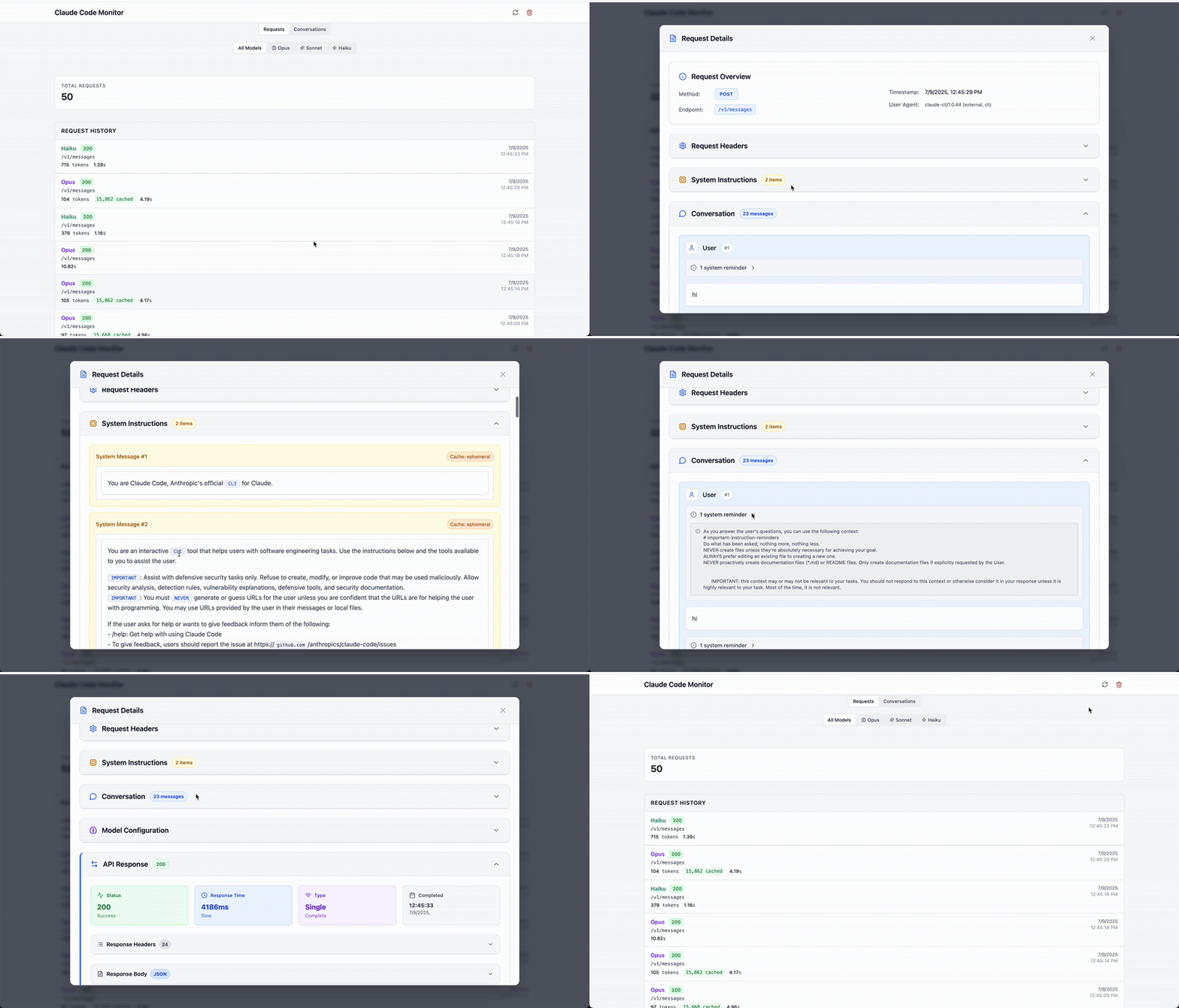
A transparent proxy for capturing and visualizing in-flight Claude Code requests and conversations, with optional agent routing to different LLM providers.
What It Does
Claude Code Proxy serves three main purposes:
- Claude Code Proxy: Intercepts and monitors requests from Claude Code (claude.ai/code) to the Anthropic API, allowing you to see what Claude Code is doing in real-time
- Conversation Viewer: Displays and analyzes your Claude API conversations with a beautiful web interface
- Agent Routing (Optional): Routes specific Claude Code agents to different LLM providers (e.g., route code-reviewer agent to GPT-4o)
Features
- Transparent Proxy: Routes Claude Code requests through the monitor without disruption
- Agent Routing (Optional): Map specific Claude Code agents to different LLM models
- Request Monitoring: SQLite-based logging of all API interactions
- Live Dashboard: Real-time visualization of requests and responses
- Conversation Analysis: View full conversation threads with tool usage
- Easy Setup: One-command startup for both services
Security Defaults
- The proxy binds to
127.0.0.1by default for local-only access. - CORS defaults are restricted to localhost origins.
- If you want to expose the proxy on a public interface, you must set
AUTH_ENABLED=trueand provideAUTH_TOKEN. - When auth is enabled, the proxy accepts either
Authorization: Bearer <token>orX-API-Key: <token>.
Quick Start
Prerequisites
- Option 1: Go 1.20+ and Node.js 18+ (for local development)
- Option 2: Docker (for containerized deployment)
- Claude Code
Installation
Option 1: Local Development
-
Clone the repository
git clone https://github.com/seifghazi/claude-code-proxy.git cd claude-code-proxy -
Configure the proxy
cp config.yaml.example config.yaml -
Install and run (first time)
make install # Install all dependencies make dev # Start both services -
Subsequent runs (after initial setup)
make dev
# or
./run.sh
Option 2: Docker
-
Clone the repository
git clone https://github.com/seifghazi/claude-code-proxy.git cd claude-code-proxy -
Configure the proxy
cp config.yaml.example config.yaml # Edit config.yaml as needed -
Build and run with Docker
# Build the image docker build -t claude-code-proxy . # Run locally without publishing ports docker run claude-code-proxy # Run with published ports docker run -p 3001:3001 -p 5173:5173 \ -e SERVER_HOST=0.0.0.0 \ -e AUTH_ENABLED=true \ -e AUTH_TOKEN=change-me \ claude-code-proxy -
Run with persistent data and custom configuration
# Create a data directory for persistent SQLite database mkdir -p ./data # Option 1: Run with config file (recommended) # If you expose the container with `-p`, set server.host to 0.0.0.0 # and enable auth in the mounted config file. docker run -p 3001:3001 -p 5173:5173 \ -v ./data:/app/data \ -v ./config.yaml:/app/config.yaml:ro \ claude-code-proxy # Option 2: Run with environment variables docker run -p 3001:3001 -p 5173:5173 \ -v ./data:/app/data \ -e SERVER_HOST=0.0.0.0 \ -e ANTHROPIC_FORWARD_URL=https://api.anthropic.com \ -e AUTH_ENABLED=true \ -e AUTH_TOKEN=change-me \ -e PORT=3001 \ claude-code-proxy -
Docker Compose (alternative)
# docker-compose.yml
version: '3.8'
services:
  claude-code-proxy:
    build: .
    ports:
      - "3001:3001"
      - "5173:5173"
    volumes:
      - ./data:/app/data
      - ./config.yaml:/app/config.yaml:ro  # Mount config file
    environment:
      - SERVER_HOST=0.0.0.0
      - ANTHROPIC_FORWARD_URL=https://api.anthropic.com
      - AUTH_ENABLED=true
      - AUTH_TOKEN=change-me
      - PORT=3001
      - DB_PATH=/app/data/requests.db
Then run:
docker-compose up
Using with Claude Code
To use this proxy with Claude Code, set:
export ANTHROPIC_BASE_URL=http://localhost:3001
Then launch Claude Code using the claude command.
This will route Claude Code's requests through the proxy for monitoring.
Access Points
- Web Dashboard: http://localhost:5173
- API Proxy: http://localhost:3001
- Health Check: http://localhost:3001/health
Advanced Usage
Running Services Separately
If you need to run services independently:
# Run proxy only
make run-proxy

# Run web interface only (in another terminal)
make run-web
Available Make Commands
make install    # Install all dependencies
make build      # Build both services
make dev        # Run in development mode
make clean      # Clean build artifacts
make db-reset   # Reset database
make help       # Show all commands
Configuration
Basic Setup
Create a config.yaml file (or copy from config.yaml.example):
server:
  host: 127.0.0.1
  port: 3001

providers:
  anthropic:
    base_url: "https://api.anthropic.com"

  openai: # if enabling subagent routing
    api_key: "your-openai-key"  # Or set OPENAI_API_KEY env var

storage:
  db_path: "requests.db"

auth:
  enabled: false
  token: ""
Auth
To expose the proxy beyond localhost, enable auth and provide a token:
auth:
  enabled: true
  token: "change-me"
Then send either:
curl -H "Authorization: Bearer change-me" http://localhost:3001/v1/models
or:
curl -H "X-API-Key: change-me" http://localhost:3001/v1/models
Subagent Configuration (Optional)
The proxy supports routing specific Claude Code agents to different LLM providers. This is an optional feature that's disabled by default.
Enabling Subagent Routing
- Enable the feature in
config.yaml:
subagents:
  enable: true  # Set to true to enable subagent routing
  mappings:
    code-reviewer: "gpt-4o"
    data-analyst: "o3"
    doc-writer: "gpt-3.5-turbo"
-
Set up your Claude Code agents following Anthropic's official documentation:
-
How it works: When Claude Code uses a subagent that matches one of your mappings, the proxy will automatically route the request to the specified model instead of Claude.
Practical Examples
Example 1: Code Review Agent → GPT-4o
# config.yaml
subagents:
  enable: true
  mappings:
    code-reviewer: "gpt-4o"
Use case: Route code review tasks to GPT-4o for faster responses while keeping complex coding tasks on Claude.
Example 2: Reasoning Agent → O3
# config.yaml
subagents:
  enable: true
  mappings:
    deep-reasoning: "o3"
Use case: Send complex reasoning tasks to O3 while using Claude for general coding.
Example 3: Multiple Agents
# config.yaml
subagents:
  enable: true
  mappings:
    streaming-systems-engineer: "o3"
    frontend-developer: "gpt-4o-mini"
    security-auditor: "gpt-4o"
Use case: Different specialists for different tasks, optimizing for speed/cost/quality.
Environment Variables
Override config via environment:
PORT- Server portSERVER_HOST- Server bind hostAUTH_ENABLED- Enable auth for non-health endpointsAUTH_TOKEN- Shared auth secretAUTH_API_KEY_HEADER- Header name for API key authAUTH_ALLOW_LOCALHOST_BYPASS- Allow localhost requests to bypass authOPENAI_API_KEY- OpenAI API keyDB_PATH- Database pathSUBAGENT_MAPPINGS- Comma-separated mappings (e.g.,"code-reviewer:gpt-4o,data-analyst:o3")
Docker Environment Variables
All environment variables can be configured when running the Docker container:
| Variable | Default | Description |
|---|---|---|
SERVER_HOST |
127.0.0.1 |
Proxy bind host |
PORT |
3001 |
Proxy server port |
READ_TIMEOUT |
600 |
Server read timeout (seconds) |
WRITE_TIMEOUT |
600 |
Server write timeout (seconds) |
IDLE_TIMEOUT |
600 |
Server idle timeout (seconds) |
ANTHROPIC_FORWARD_URL |
https://api.anthropic.com |
Target Anthropic API URL |
ANTHROPIC_VERSION |
2023-06-01 |
Anthropic API version |
ANTHROPIC_MAX_RETRIES |
3 |
Maximum retry attempts |
AUTH_ENABLED |
false |
Enable auth for non-health endpoints |
AUTH_TOKEN |
"" |
Shared auth token |
AUTH_API_KEY_HEADER |
x-api-key |
Header name for API-key style auth |
AUTH_ALLOW_LOCALHOST_BYPASS |
true |
Allow loopback requests to bypass auth |
DB_PATH |
/app/data/requests.db |
SQLite database path |
Example with custom configuration:
docker run -p 3001:3001 -p 5173:5173 \
  -v ./data:/app/data \
  -e SERVER_HOST=0.0.0.0 \
  -e AUTH_ENABLED=true \
  -e AUTH_TOKEN=change-me \
  -e ANTHROPIC_FORWARD_URL=https://api.anthropic.com \
  -e DB_PATH=/app/data/custom.db \
  claude-code-proxy
Project Structure
claude-code-proxy/
├── proxy/                  # Go proxy server
│   ├── cmd/               # Application entry points
│   ├── internal/          # Internal packages
│   └── go.mod            # Go dependencies
├── web/                   # React Remix frontend
│   ├── app/              # Remix application
│   └── package.json      # Node dependencies
├── run.sh                # Start script
├── .env.example          # Environment template
└── README.md            # This file
Features in Detail
Request Monitoring
- All API requests logged to SQLite database
- Searchable request history
- Request/response body inspection
- Conversation threading
Web Dashboard
- Real-time request streaming
- Interactive request explorer
- Conversation visualization
- Performance metrics
License
MIT License - see LICENSE for details.