|
|
||
|---|---|---|
| proxy | ||
| web | ||
| .dockerignore | ||
| .env.example | ||
| .gitignore | ||
| demo.gif | ||
| docker-entrypoint.sh | ||
| Dockerfile | ||
| LICENSE | ||
| Makefile | ||
| README.md | ||
| run.sh | ||


Claude Code Proxy
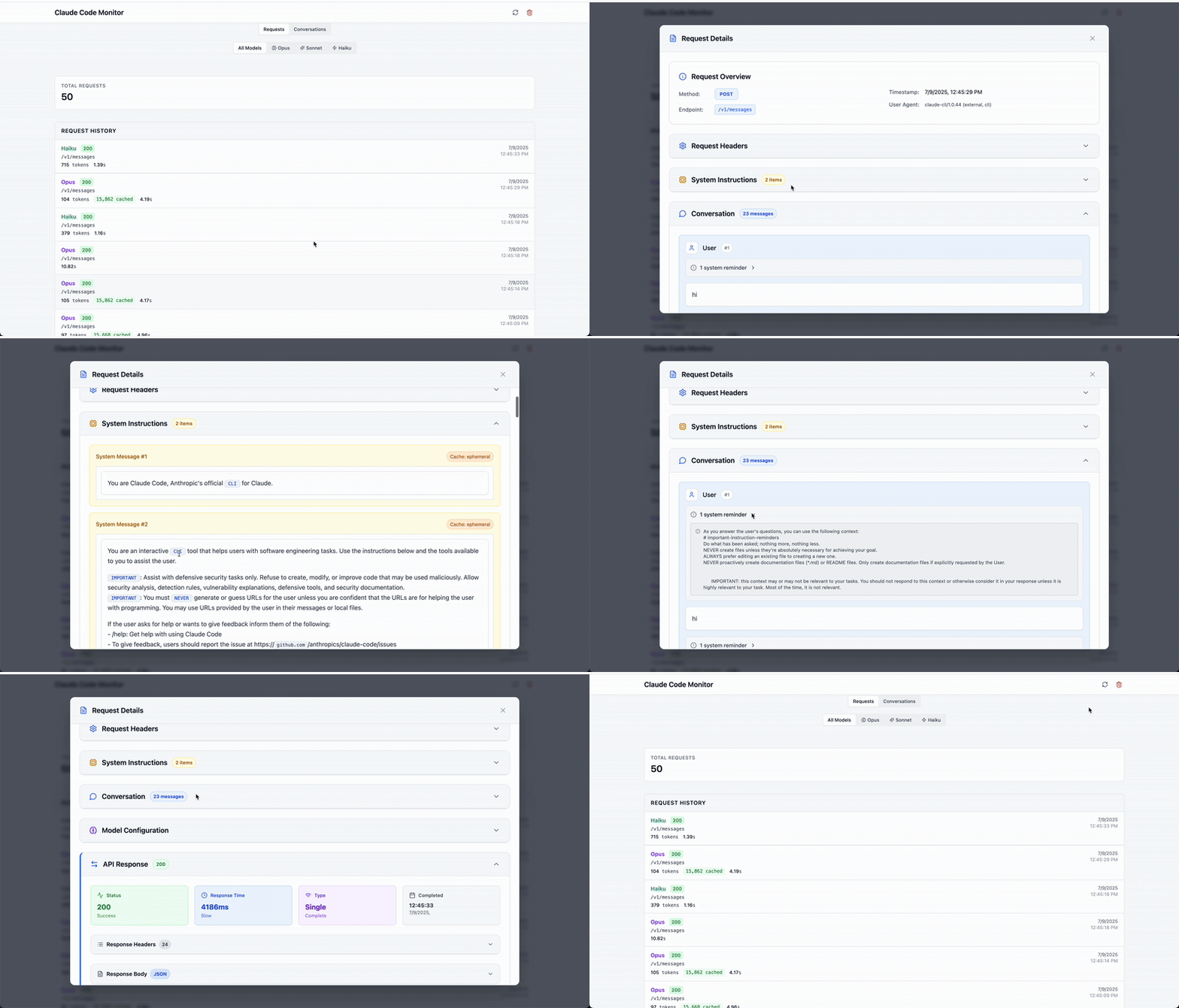
A dual-purpose monitoring solution that serves as both a proxy for Claude Code requests and a visualization dashboard for your Claude API conversations.
What It Does
Claude Code Proxy serves two main purposes:
- Claude Code Proxy: Intercepts and monitors requests from Claude Code (claude.ai/code) to the Anthropic API, allowing you to see what Claude Code is doing in real-time
- Conversation Viewer: Displays and analyzes your Claude API conversations with a beautiful web interface
Features
- Transparent Proxy: Routes Claude Code requests through the monitor without disruption
- Request Monitoring: SQLite-based logging of all API interactions
- Live Dashboard: Real-time visualization of requests and responses
- Conversation Analysis: View full conversation threads with tool usage
- Easy Setup: One-command startup for both services
Quick Start
Prerequisites
- Option 1: Go 1.20+ and Node.js 18+ (for local development)
- Option 2: Docker (for containerized deployment)
- Claude Code
Installation
Option 1: Local Development
-
Clone the repository
git clone https://github.com/seifghazi/claude-code-proxy.git cd claude-code-proxy -
Set up your environment variables
cp .env.example .env -
Install and run (first time)
make install  # Install all dependencies
make dev      # Start both services
Or use the script that does both:
./run.sh -
Subsequent runs (after initial setup)
make dev
# or
./run.sh
Option 2: Docker
-
Clone the repository
git clone https://github.com/seifghazi/claude-code-proxy.git cd claude-code-proxy -
Build and run with Docker
# Build the image docker build -t claude-code-proxy . # Run with default settings docker run -p 3001:3001 -p 5173:5173 claude-code-proxy -
Run with persistent data and custom configuration
# Create a data directory for persistent SQLite database mkdir -p ./data # Run with volume mount and custom environment variables docker run -p 3001:3001 -p 5173:5173 \ -v ./data:/app/data \ -e ANTHROPIC_FORWARD_URL=https://api.anthropic.com \ -e PORT=3001 \ -e WEB_PORT=5173 \ claude-code-proxy -
Docker Compose (alternative)
# docker-compose.yml
version: '3.8'
services:
  claude-code-proxy:
    build: .
    ports:
      - "3001:3001"
      - "5173:5173"
    volumes:
      - ./data:/app/data
    environment:
      - ANTHROPIC_FORWARD_URL=https://api.anthropic.com
      - PORT=3001
      - WEB_PORT=5173
      - DB_PATH=/app/data/requests.db
Then run:
docker-compose up
Using with Claude Code
To use this proxy with Claude Code, set:
export ANTHROPIC_BASE_URL=http://localhost:3001
Then launch Claude Code using the claude command.
This will route Claude Code's requests through the proxy for monitoring.
Access Points
- Web Dashboard: http://localhost:5173
- API Proxy: http://localhost:3001
- Health Check: http://localhost:3001/health
Advanced Usage
Running Services Separately
If you need to run services independently:
# Run proxy only
make run-proxy

# Run web interface only (in another terminal)
make run-web
Available Make Commands
make install    # Install all dependencies
make build      # Build both services
make dev        # Run in development mode
make clean      # Clean build artifacts
make db-reset   # Reset database
make help       # Show all commands
Configuration
Local Development
Create a .env file with:
PORT=3001
DB_PATH=requests.db
ANTHROPIC_FORWARD_URL=https://api.anthropic.com
See .env.example for all available options.
Docker Environment Variables
All environment variables can be configured when running the Docker container:
| Variable | Default | Description |
|---|---|---|
PORT |
3001 |
Proxy server port |
WEB_PORT |
5173 |
Web dashboard port |
READ_TIMEOUT |
600 |
Server read timeout (seconds) |
WRITE_TIMEOUT |
600 |
Server write timeout (seconds) |
IDLE_TIMEOUT |
600 |
Server idle timeout (seconds) |
ANTHROPIC_FORWARD_URL |
https://api.anthropic.com |
Target Anthropic API URL |
ANTHROPIC_VERSION |
2023-06-01 |
Anthropic API version |
ANTHROPIC_MAX_RETRIES |
3 |
Maximum retry attempts |
DB_PATH |
/app/data/requests.db |
SQLite database path |
Example with custom configuration:
docker run -p 3001:3001 -p 5173:5173 \
  -v ./data:/app/data \
  -e PORT=8080 \
  -e WEB_PORT=3000 \
  -e ANTHROPIC_FORWARD_URL=https://api.anthropic.com \
  -e DB_PATH=/app/data/custom.db \
  claude-code-proxy
Project Structure
claude-code-proxy/
├── proxy/                  # Go proxy server
│   ├── cmd/               # Application entry points
│   ├── internal/          # Internal packages
│   └── go.mod            # Go dependencies
├── web/                   # React Remix frontend
│   ├── app/              # Remix application
│   └── package.json      # Node dependencies
├── run.sh                # Start script
├── .env.example          # Environment template
└── README.md            # This file
Features in Detail
Request Monitoring
- All API requests logged to SQLite database
- Searchable request history
- Request/response body inspection
- Conversation threading
Prompt Analysis
- Automatic prompt grading
- Best practices evaluation
- Complexity assessment
- Response quality metrics
Web Dashboard
- Real-time request streaming
- Interactive request explorer
- Conversation visualization
- Performance metrics
License
MIT License - see LICENSE for details.