mirror of
https://github.com/qmlnet/qmlnet.git
synced 2026-10-23 08:07:54 -06:00
[GH-ISSUE #159] How to set application icon in .net #101
Labels
No labels
bug
enhancement
help wanted
help wanted
pull-request
question
todo
No milestone
No project
No assignees
1 participant

Notifications
Due date
No due date set.
Dependencies
No dependencies set
Reference
github-starred/qmlnet#101
Loading…
Reference in a new issue
No description provided.
Delete branch "%!s()"
Deleting a branch is permanent. Although the deleted branch may continue to exist for a short time before it actually gets removed, it CANNOT be undone in most cases. Continue?
Originally created by @542353921 on GitHub (Aug 19, 2019).
Original GitHub issue: https://github.com/qmlnet/qmlnet/issues/159
hi,
How to set application icon like this
int main(int argc, char *argv[])
{
QCoreApplication::setAttribute(Qt::AA_EnableHighDpiScaling);
QGuiApplication app(argc, argv);
app.setWindowIcon(QIcon(":/favicon.ico"));
}
thanks
@MosiQt commented on GitHub (Sep 19, 2019):
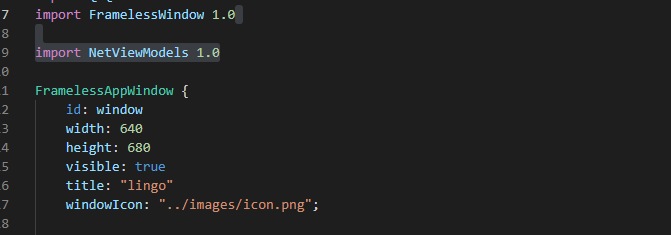
I had similar issue and solved it by writing my own plugin by overwriting QQuickWindow. I've used the plugin instead of ApplicationWindow in qml. In the plugin class, you can easily set the windowIcon.

After that you can set the icon path in qml:
@nyashabryan commented on GitHub (Jul 14, 2020):
@MosiQt do you mind going in a bit more detail about the process? Newbie here.
@vadi2 commented on GitHub (May 17, 2021):
An upcoming version of QML.net will have
app.SetWindowIcon(png path)method that makes this simpler.