[GH-ISSUE #150] Problem Windows 8.1 #91

Closed
opened 2026-05-05 11:40:42 -06:00 by gitea-mirror · 11 comments
Owner

Originally created by @Angelk90 on GitHub (May 30, 2018).
Original GitHub issue: https://github.com/kusti8/proton-native/issues/150

@kingvagabond , @parro-it , @mischnic , @kusti8 , @albe-rosado :
Hi, I've been trying for days to run it on window 8.1, but I can not.
Can someone help me?
Has anyone ever tried to run it on windows?
I would like to understand if only one of my problems or not.
Package.json

{
  "name": "my-app",
  "version": "0.0.1",
  "private": true,
  "scripts": {
    "start": "node_modules/.bin/babel-node index.js",
    "build": "node_modules/.bin/babel index.js -d bin/",
    "pack": "electron-builder --dir",
    "dist": "electron-builder"
  },
  "dependencies": {
    "proton-native": "latest"
  },
  "devDependencies": {
    "electron-builder": "latest",
    "babel-cli": "latest",
    "babel-preset-env": "latest",
    "babel-preset-stage-0": "latest",
    "babel-preset-react": "latest"
  },
  "build": {
    "protonNodeVersion": "current",
    "mac": {
      "identity": null
    }
  }
}

Project creation: makeproj

Run of the project: runproj

Originally created by @Angelk90 on GitHub (May 30, 2018). Original GitHub issue: https://github.com/kusti8/proton-native/issues/150 @kingvagabond , @parro-it , @mischnic , @kusti8 , @albe-rosado : Hi, I've been trying for days to run it on window 8.1, but I can not. Can someone help me? Has anyone ever tried to run it on windows? I would like to understand if only one of my problems or not. Package.json ``` { "name": "my-app", "version": "0.0.1", "private": true, "scripts": { "start": "node_modules/.bin/babel-node index.js", "build": "node_modules/.bin/babel index.js -d bin/", "pack": "electron-builder --dir", "dist": "electron-builder" }, "dependencies": { "proton-native": "latest" }, "devDependencies": { "electron-builder": "latest", "babel-cli": "latest", "babel-preset-env": "latest", "babel-preset-stage-0": "latest", "babel-preset-react": "latest" }, "build": { "protonNodeVersion": "current", "mac": { "identity": null } } } ``` `Project creation: `![makeproj](https://user-images.githubusercontent.com/20476002/40750204-cc78af6a-6466-11e8-867c-05eb60588dee.png) `Run of the project: `![runproj](https://user-images.githubusercontent.com/20476002/40750205-ccf005e2-6466-11e8-815d-ea39138b7d1a.png)
Author
Owner

@mischnic commented on GitHub (May 30, 2018):

Again, I think it has something to do without your Visual Studio installation. It says it can't find CL.exe, the compiler. I have no problem on Windows 10 with windows-build-tools.

<!-- gh-comment-id:393336988 --> @mischnic commented on GitHub (May 30, 2018): Again, I think it has something to do without your Visual Studio installation. It says it can't find `CL.exe`, the compiler. I have no problem on Windows 10 with `windows-build-tools`.
Author
Owner

@Angelk90 commented on GitHub (May 30, 2018):

@mischnic : Could you please kindly tell me all the steps I have to do to avoid problems with other programs using visual studio?

<!-- gh-comment-id:393337479 --> @Angelk90 commented on GitHub (May 30, 2018): @mischnic : Could you please kindly tell me all the steps I have to do to avoid problems with other programs using visual studio?
Author
Owner

@kusti8 commented on GitHub (May 30, 2018):

It works fine on Windows, but it seems something with your toolchain is messed up, which is more of a general issue. See stuff like this. https://stackoverflow.com/questions/8800361/cl-is-not-recognized-as-an-internal-or-external-command

<!-- gh-comment-id:393337614 --> @kusti8 commented on GitHub (May 30, 2018): It works fine on Windows, but it seems something with your toolchain is messed up, which is more of a general issue. See stuff like this. https://stackoverflow.com/questions/8800361/cl-is-not-recognized-as-an-internal-or-external-command
Author
Owner

@Angelk90 commented on GitHub (May 30, 2018):

@mischnic , @kusti8 : I am not able to figure out how to solve the problem.
But it is normal that when the project is created in the node_modules folder, there is no proton-native folder?

<!-- gh-comment-id:393339329 --> @Angelk90 commented on GitHub (May 30, 2018): @mischnic , @kusti8 : I am not able to figure out how to solve the problem. But it is normal that when the project is created in the node_modules folder, there is no proton-native folder?
Author
Owner

@mischnic commented on GitHub (May 30, 2018):

Could you please kindly tell me all the steps I have to do to avoid problems with other programs using visual studio?

If I knew what's wrong I could tell you.

But it is normal that when the project is created in the node_modules folder, there is no proton-native folder?

I don't quite understand what you mean.
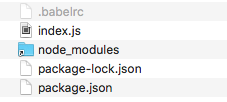
Running npx create-proton-app test should create a folder called test which contains these files:
bildschirmfoto 2018-05-31 um 00 31 01

<!-- gh-comment-id:393341134 --> @mischnic commented on GitHub (May 30, 2018): > Could you please kindly tell me all the steps I have to do to avoid problems with other programs using visual studio? If I knew what's wrong I could tell you. > But it is normal that when the project is created in the node_modules folder, there is no proton-native folder? I don't quite understand what you mean. Running `npx create-proton-app test` should create a folder called `test` which contains these files: ![bildschirmfoto 2018-05-31 um 00 31 01](https://user-images.githubusercontent.com/4586894/40751107-136fde5e-646a-11e8-825c-9557bafb3d1c.png)
Author
Owner

@Angelk90 commented on GitHub (May 30, 2018):

@mischnic : One npm instead of npx.
The only file not generated is the package-lock.json, all the others are generated.

In the node_modules folder, there is a folder called native-proton, because I do not have it.

<!-- gh-comment-id:393342393 --> @Angelk90 commented on GitHub (May 30, 2018): @mischnic : One npm instead of npx. The only file not generated is the package-lock.json, all the others are generated. In the node_modules folder, there is a folder called native-proton, because I do not have it.
Author
Owner

@albe-rosado commented on GitHub (May 31, 2018):

@Angelk90 What version of VS you have installed?

<!-- gh-comment-id:393375504 --> @albe-rosado commented on GitHub (May 31, 2018): @Angelk90 What version of VS you have installed?
Author
Owner

@Angelk90 commented on GitHub (May 31, 2018):

@albe-rosado :
stud

<!-- gh-comment-id:393419729 --> @Angelk90 commented on GitHub (May 31, 2018): @albe-rosado : ![stud](https://user-images.githubusercontent.com/20476002/40575271-4b0b1cc4-60e2-11e8-9556-482cf92f979d.png)
Author
Owner

@mischnic commented on GitHub (May 31, 2018):

@Angelk90 Found this on StackOverflow:

Visual Studio 2015 doesn't install C++ by default. You have to rerun the setup, select Modify and then check Programming Language -> C++

<!-- gh-comment-id:393477730 --> @mischnic commented on GitHub (May 31, 2018): @Angelk90 Found this on StackOverflow: > Visual Studio 2015 doesn't install C++ by default. You have to rerun the setup, select Modify and then check Programming Language -> C++
Author
Owner

@joshi-ankur commented on GitHub (Jun 23, 2018):

@kingvagabond , @parro-it , @mischnic , @kusti8 , @albe-rosado

Hi , i am also facing this issue when running the command create-proton-app desktop-app.

I tried running this command even from administrator.

Prior to running this command i ran npm install --global --production windows-build-tools and it successfully installed ( ran this command as administrator ).

Then i ran a command npm install -g create-proton-app , this also completed successfully (not as administrator ).

When i ran this create-proton-app desktop-app, i got the same error as mentioned by @Angelk90 .

0 info it worked if it ends with ok
1 verbose cli [ 'C:\Program Files\nodejs\node.exe',
1 verbose cli 'C:\Program Files\nodejs\node_modules\npm\bin\npm-cli.js',
1 verbose cli 'run',
1 verbose cli 'build' ]
2 info using npm@5.6.0
3 info using node@v8.11.2
4 verbose run-script [ 'prebuild', 'build', 'postbuild' ]
5 info lifecycle libui-node@0.2.1prebuild: libui-node@0.2.1
6 info lifecycle libui-node@0.2.1
build: libui-node@0.2.1
7 verbose lifecycle libui-node@0.2.1build: unsafe-perm in lifecycle true
8 verbose lifecycle libui-node@0.2.1
build: PATH: C:\Program Files\nodejs\node_modules\npm\node_modules\npm-lifecycle\node-gyp-bin;C:\structural_design\desktop-app\node_modules\libui-node\node_modules.bin;C:\structural_design\desktop-app\node_modules.bin;C:\Program Files\nodejs\node_modules\npm\node_modules\npm-lifecycle\node-gyp-bin;C:\structural_design\desktop-app\node_modules\libui-node\node_modules.bin;C:\structural_design\desktop-app\node_modules.bin;C:\Program Files\Java\jdk1.8.0_171\bin;C:\windows\system32;C:\windows;C:\windows\System32\Wbem;C:\windows\System32\WindowsPowerShell\v1.0;C:\Program Files\Google\Google Apps Sync;C:\Program Files\Google\Google Apps Migration;C:\Program Files\Git\cmd;C:\Program Files\apache-maven-3.5.3\bin;C:\Program Files\nodejs;C:\Program Files (x86)\Common Files\Oracle\Java\javapath;C:\ProgramData\Oracle\Java\javapath;C:\Program Files (x86)\CineForm\Tools;C:\Program Files (x86)\GoPro\Tools;C:\Ruby25-x64\bin;C:\Users\ajoshi\AppData\Local\Microsoft\WindowsApps;C:\Users\ajoshi\AppData\Local\GitHubDesktop\bin;C:\Users\ajoshi\AppData\Roaming\npm;C:\Program Files\Microsoft VS Code\bin
9 verbose lifecycle libui-node@0.2.1build: CWD: C:\structural_design\desktop-app\node_modules\libui-node
10 silly lifecycle libui-node@0.2.1
build: Args: [ '/d /s /c', 'node-gyp configure build' ]
11 silly lifecycle libui-node@0.2.1build: Returned: code: 1 signal: null
12 info lifecycle libui-node@0.2.1
build: Failed to exec build script
13 verbose stack Error: libui-node@0.2.1 build: node-gyp configure build
13 verbose stack Exit status 1
13 verbose stack at EventEmitter. (C:\Program Files\nodejs\node_modules\npm\node_modules\npm-lifecycle\index.js:285:16)
13 verbose stack at emitTwo (events.js:126:13)
13 verbose stack at EventEmitter.emit (events.js:214:7)
13 verbose stack at ChildProcess. (C:\Program Files\nodejs\node_modules\npm\node_modules\npm-lifecycle\lib\spawn.js:55:14)
13 verbose stack at emitTwo (events.js:126:13)
13 verbose stack at ChildProcess.emit (events.js:214:7)
13 verbose stack at maybeClose (internal/child_process.js:925:16)
13 verbose stack at Process.ChildProcess._handle.onexit (internal/child_process.js:209:5)
14 verbose pkgid libui-node@0.2.1
15 verbose cwd C:\structural_design\desktop-app\node_modules\libui-node
16 verbose Windows_NT 10.0.14393
17 verbose argv "C:\Program Files\nodejs\node.exe" "C:\Program Files\nodejs\node_modules\npm\bin\npm-cli.js" "run" "build"
18 verbose node v8.11.2
19 verbose npm v5.6.0
20 error code ELIFECYCLE
21 error errno 1
22 error libui-node@0.2.1 build: node-gyp configure build
22 error Exit status 1
23 error Failed at the libui-node@0.2.1 build script.
23 error This is probably not a problem with npm. There is likely additional logging output above.
24 verbose exit [ 1, true ]

Attached above is the log file.

<!-- gh-comment-id:399670526 --> @joshi-ankur commented on GitHub (Jun 23, 2018): @kingvagabond , @parro-it , @mischnic , @kusti8 , @albe-rosado Hi , i am also facing this issue when running the command `create-proton-app desktop-app`. I tried running this command even from administrator. Prior to running this command i ran `npm install --global --production windows-build-tools` and it successfully installed ( ran this command as administrator ). Then i ran a command `npm install -g create-proton-app` , this also completed successfully (not as administrator ). When i ran this `create-proton-app desktop-app`, i got the same error as mentioned by @Angelk90 . 0 info it worked if it ends with ok 1 verbose cli [ 'C:\\Program Files\\nodejs\\node.exe', 1 verbose cli 'C:\\Program Files\\nodejs\\node_modules\\npm\\bin\\npm-cli.js', 1 verbose cli 'run', 1 verbose cli 'build' ] 2 info using npm@5.6.0 3 info using node@v8.11.2 4 verbose run-script [ 'prebuild', 'build', 'postbuild' ] 5 info lifecycle libui-node@0.2.1~prebuild: libui-node@0.2.1 6 info lifecycle libui-node@0.2.1~build: libui-node@0.2.1 7 verbose lifecycle libui-node@0.2.1~build: unsafe-perm in lifecycle true 8 verbose lifecycle libui-node@0.2.1~build: PATH: C:\Program Files\nodejs\node_modules\npm\node_modules\npm-lifecycle\node-gyp-bin;C:\structural_design\desktop-app\node_modules\libui-node\node_modules\.bin;C:\structural_design\desktop-app\node_modules\.bin;C:\Program Files\nodejs\node_modules\npm\node_modules\npm-lifecycle\node-gyp-bin;C:\structural_design\desktop-app\node_modules\libui-node\node_modules\.bin;C:\structural_design\desktop-app\node_modules\.bin;C:\Program Files\Java\jdk1.8.0_171\bin;C:\windows\system32;C:\windows;C:\windows\System32\Wbem;C:\windows\System32\WindowsPowerShell\v1.0\;C:\Program Files\Google\Google Apps Sync\;C:\Program Files\Google\Google Apps Migration\;C:\Program Files\Git\cmd;C:\Program Files\apache-maven-3.5.3\bin;C:\Program Files\nodejs\;C:\Program Files (x86)\Common Files\Oracle\Java\javapath;C:\ProgramData\Oracle\Java\javapath;C:\Program Files (x86)\CineForm\Tools;C:\Program Files (x86)\GoPro\Tools;C:\Ruby25-x64\bin;C:\Users\ajoshi\AppData\Local\Microsoft\WindowsApps;C:\Users\ajoshi\AppData\Local\GitHubDesktop\bin;C:\Users\ajoshi\AppData\Roaming\npm;C:\Program Files\Microsoft VS Code\bin 9 verbose lifecycle libui-node@0.2.1~build: CWD: C:\structural_design\desktop-app\node_modules\libui-node 10 silly lifecycle libui-node@0.2.1~build: Args: [ '/d /s /c', 'node-gyp configure build' ] 11 silly lifecycle libui-node@0.2.1~build: Returned: code: 1 signal: null 12 info lifecycle libui-node@0.2.1~build: Failed to exec build script 13 verbose stack Error: libui-node@0.2.1 build: `node-gyp configure build` 13 verbose stack Exit status 1 13 verbose stack at EventEmitter.<anonymous> (C:\Program Files\nodejs\node_modules\npm\node_modules\npm-lifecycle\index.js:285:16) 13 verbose stack at emitTwo (events.js:126:13) 13 verbose stack at EventEmitter.emit (events.js:214:7) 13 verbose stack at ChildProcess.<anonymous> (C:\Program Files\nodejs\node_modules\npm\node_modules\npm-lifecycle\lib\spawn.js:55:14) 13 verbose stack at emitTwo (events.js:126:13) 13 verbose stack at ChildProcess.emit (events.js:214:7) 13 verbose stack at maybeClose (internal/child_process.js:925:16) 13 verbose stack at Process.ChildProcess._handle.onexit (internal/child_process.js:209:5) 14 verbose pkgid libui-node@0.2.1 15 verbose cwd C:\structural_design\desktop-app\node_modules\libui-node 16 verbose Windows_NT 10.0.14393 17 verbose argv "C:\\Program Files\\nodejs\\node.exe" "C:\\Program Files\\nodejs\\node_modules\\npm\\bin\\npm-cli.js" "run" "build" 18 verbose node v8.11.2 19 verbose npm v5.6.0 20 error code ELIFECYCLE 21 error errno 1 22 error libui-node@0.2.1 build: `node-gyp configure build` 22 error Exit status 1 23 error Failed at the libui-node@0.2.1 build script. 23 error This is probably not a problem with npm. There is likely additional logging output above. 24 verbose exit [ 1, true ] Attached above is the log file.
Author
Owner

@joshi-ankur commented on GitHub (Jun 23, 2018):

@parro-it
My issue is now resolved. Thanks to you comment in issue 95.

Could you try installing Visual C++ Redistributable Package per Visual Studio 2013 for your platform?

Also i am working on Windows 10 Pro.

Thanks again.

<!-- gh-comment-id:399677448 --> @joshi-ankur commented on GitHub (Jun 23, 2018): @parro-it My issue is now resolved. Thanks to you comment in issue [95](https://github.com/kusti8/proton-native/issues/95). > Could you try installing Visual C++ Redistributable Package per Visual Studio 2013 for your platform? Also i am working on Windows 10 Pro. Thanks again.
Sign in to join this conversation.
No milestone
No project
No assignees
1 participant
Notifications
Due date
The due date is invalid or out of range. Please use the format "yyyy-mm-dd".

No due date set.

Dependencies

No dependencies set.

Reference: github-starred/proton-native#91
No description provided.