mirror of
https://github.com/jmcnamara/libxlsxwriter.git
synced 2026-05-21 06:45:21 -06:00
A C library for creating Excel XLSX files.
 f111c60ff7
Fix format objects so that they are written to the file in the order of used rather than the order the of creation. This bug caused incorrect formats in cells. Issue #3 |
||
|---|---|---|
| dev/release | ||
| docs | ||
| examples | ||
| include | ||
| lib | ||
| src | ||
| test | ||
| third_party/minizip | ||
| .gitignore | ||
| .indent.pro | ||
| .travis.yml | ||
| Changes.txt | ||
| LICENSE.txt | ||
| Makefile | ||
| Readme.md | ||
libxlsxwriter
A C library for creating Excel XLSX files.
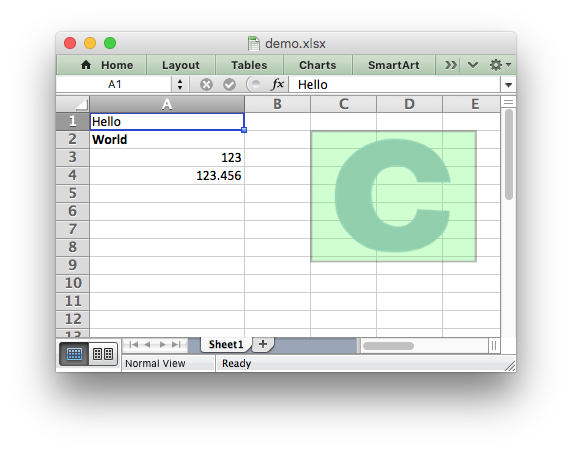
The libxlsxwriter library
Libxlsxwriter is a C library that can be used to write text, numbers and formulas to multiple worksheets in an Excel 2007+ XLSX file.
It supports features such as:
- 100% compatible Excel XLSX files
- Full Excel formatting
- Memory optimisation mode for writing large files
- Source code available on GitHub
- FreeBSD license
- ANSI C
- Works with GCC 4.4, 4.6, 4.7, 4.8, tcc and clang
- Works on Linux, FreeBSD and OS X.
- The only dependency is on
zlib
Here is an example that was used to create the spreadsheet shown above:
#include "xlsxwriter.h"

int main() {

    /* Create a new workbook and add a worksheet. */
    lxw_workbook  *workbook  = new_workbook("demo.xlsx");
    lxw_worksheet *worksheet = workbook_add_worksheet(workbook, NULL);

    /* Add a format. */
    lxw_format    *format    = workbook_add_format(workbook);

    /* Set the bold property for the format */
    format_set_bold(format);

    /* Widen the first column to make the text clearer. */
    worksheet_set_column(worksheet, 0, 0, 20, NULL, NULL);

    /* Write some simple text. */
    worksheet_write_string(worksheet, 0, 0, "Hello", NULL);

    /* Text with formatting. */
    worksheet_write_string(worksheet, 1, 0, "World", format);

    /* Writer some numbers. */
    worksheet_write_number(worksheet, 2, 0, 123,     NULL);
    worksheet_write_number(worksheet, 3, 0, 123.456, NULL);

    workbook_close(workbook);

    return 0;
}
See the full documentation for the getting started guide, a tutorial, the main API documentation and examples.