mirror of
https://github.com/jmcnamara/libxlsxwriter.git
synced 2026-05-21 06:45:21 -06:00
A C library for creating Excel XLSX files.
| dev/release | ||
| docs | ||
| examples | ||
| include | ||
| lib | ||
| src | ||
| test | ||
| third_party/minizip | ||
| .gitignore | ||
| .indent.pro | ||
| .travis.yml | ||
| Changes.txt | ||
| CONTRIBUTING.md | ||
| libxlsxwriter.podspec | ||
| LICENSE.txt | ||
| Makefile | ||
| Readme.md | ||

libxlsxwriter
Libxlsxwriter: A C library for creating Excel XLSX files.
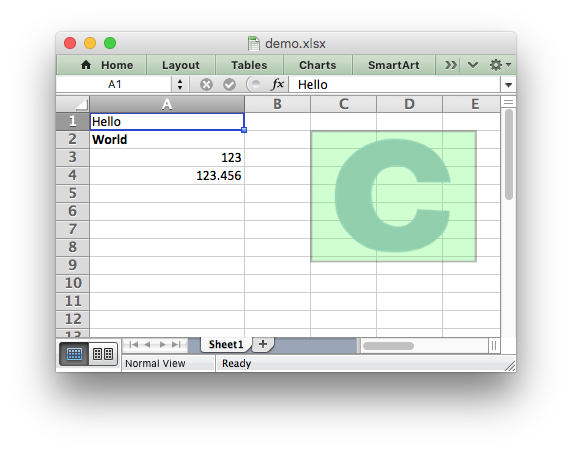
The libxlsxwriter library
Libxlsxwriter is a C library that can be used to write text, numbers, formulas and hyperlinks to multiple worksheets in an Excel 2007+ XLSX file.
It supports features such as:
- 100% compatible Excel XLSX files.
- Full Excel formatting.
- Merged cells.
- Defined names.
- Autofilters.
- Charts.
- Worksheet PNG/JPEG images.
- Memory optimization mode for writing large files.
- Source code available on GitHub.
- FreeBSD ref license.
- ANSI C.
- Works with GCC 4.x, GCC 5.x, Clang, Xcode, MSVC 2015, ICC and TCC.
- Works on Linux, FreeBSD, OS X, iOS and Windows.
- The only dependency is on
zlib.
Here is an example that was used to create the spreadsheet shown above:
#include "xlsxwriter.h"

int main() {

    /* Create a new workbook and add a worksheet. */
    lxw_workbook  *workbook  = workbook_new("demo.xlsx");
    lxw_worksheet *worksheet = workbook_add_worksheet(workbook, NULL);

    /* Add a format. */
    lxw_format *format = workbook_add_format(workbook);

    /* Set the bold property for the format */
    format_set_bold(format);

    /* Change the column width for clarity. */
    worksheet_set_column(worksheet, 0, 0, 20, NULL);

    /* Write some simple text. */
    worksheet_write_string(worksheet, 0, 0, "Hello", NULL);

    /* Text with formatting. */
    worksheet_write_string(worksheet, 1, 0, "World", format);

    /* Writer some numbers. */
    worksheet_write_number(worksheet, 2, 0, 123,     NULL);
    worksheet_write_number(worksheet, 3, 0, 123.456, NULL);

    /* Insert an image. */
    worksheet_insert_image(worksheet, 1, 2, "logo.png");

    workbook_close(workbook);

    return 0;
}
See the full documentation for the getting started guide, a tutorial, the main API documentation and examples.