mirror of
https://github.com/jmcnamara/libxlsxwriter.git
synced 2026-05-15 14:15:54 -06:00
A C library for creating Excel XLSX files.
 1dfd55bf17
This checks the lengths of the file name, extra field, and comment that would be put in the zip headers, and rejects them if they are too long. They are each limited to 65535 bytes in length by the zip format. This also avoids possible buffer overflows if the provided fields are too long. (cherry picked from commit 73331a6a0481067628f065ffe87bb1d8f787d10c) |
||
|---|---|---|
| .github | ||
| cmake | ||
| cocoapods | ||
| dev/release | ||
| docs | ||
| examples | ||
| include | ||
| lib | ||
| src | ||
| test | ||
| third_party | ||
| .gitignore | ||
| .indent.pro | ||
| build.zig | ||
| build.zig.zon | ||
| Changes.txt | ||
| CMakeLists.txt | ||
| CONTRIBUTING.md | ||
| libxlsxwriter.podspec | ||
| License.txt | ||
| Makefile | ||
| Package.swift | ||
| Readme.md | ||
libxlsxwriter
Libxlsxwriter: A C library for creating Excel XLSX files.
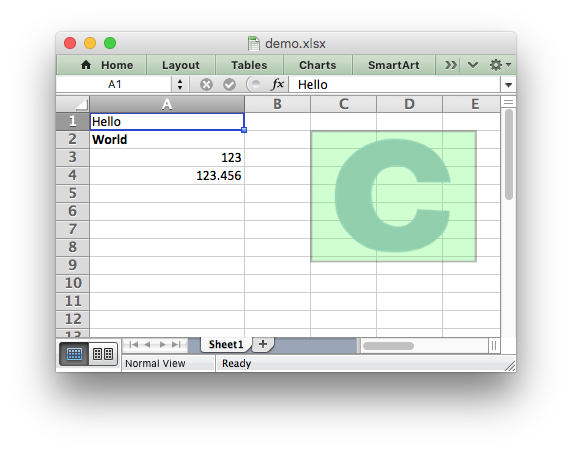
The libxlsxwriter library
Libxlsxwriter is a C library that can be used to write text, numbers, formulas and hyperlinks to multiple worksheets in an Excel 2007+ XLSX file.
It supports features such as:
- 100% compatible Excel XLSX files.
- Full Excel formatting.
- Merged cells.
- Defined names.
- Autofilters.
- Charts.
- Data validation and drop down lists.
- Conditional formatting.
- Worksheet PNG/JPEG/GIF images.
- Cell comments.
- Support for adding Macros.
- Memory optimization mode for writing large files.
- Source code available on GitHub.
- FreeBSD license.
- ANSI C.
- Works with GCC, Clang, Xcode, MSVC 2015, ICC, TCC, MinGW, MingGW-w64/32.
- Works on Linux, FreeBSD, OpenBSD, OS X, iOS and Windows. Also works on MSYS/MSYS2 and Cygwin.
- Compiles for 32 and 64 bit.
- Compiles and works on big and little endian systems.
- The only dependency is on
zlib.
Here is an example that was used to create the spreadsheet shown above:
#include "xlsxwriter.h"

int main() {

    /* Create a new workbook and add a worksheet. */
    lxw_workbook  *workbook  = workbook_new("demo.xlsx");
    lxw_worksheet *worksheet = workbook_add_worksheet(workbook, NULL);

    /* Add a format. */
    lxw_format *format = workbook_add_format(workbook);

    /* Set the bold property for the format */
    format_set_bold(format);

    /* Change the column width for clarity. */
    worksheet_set_column(worksheet, 0, 0, 20, NULL);

    /* Write some simple text. */
    worksheet_write_string(worksheet, 0, 0, "Hello", NULL);

    /* Text with formatting. */
    worksheet_write_string(worksheet, 1, 0, "World", format);

    /* Write some numbers. */
    worksheet_write_number(worksheet, 2, 0, 123,     NULL);
    worksheet_write_number(worksheet, 3, 0, 123.456, NULL);

    /* Insert an image. */
    worksheet_insert_image(worksheet, 1, 2, "logo.png");

    workbook_close(workbook);

    return 0;
}
See the full documentation for the getting started guide, a tutorial, the main API documentation and examples.