[GH-ISSUE #283] Outline not collapsed #228

Closed
opened 2026-05-05 11:59:29 -06:00 by gitea-mirror · 10 comments
Owner

Originally created by @znakeeye on GitHub (Apr 16, 2020).
Original GitHub issue: https://github.com/jmcnamara/libxlsxwriter/issues/283

Originally assigned to: @jmcnamara on GitHub.

I'm not able to create collapsed outlines. Is this a bug or am I using the API incorrectly?

#include "xlsxwriter.h"

int main()
{
	auto wb = workbook_new("foo.xlsx");
	auto ws = workbook_add_worksheet(wb, "Sheet1");

	int row = 0;
	worksheet_write_string(ws, row++, 0, "A", NULL);
	worksheet_write_string(ws, row++, 0, "B", NULL);

	lxw_row_col_options options = { LXW_FALSE, 1, LXW_TRUE }; // collapsed = true
	worksheet_set_row_opt(ws, row, LXW_DEF_ROW_HEIGHT, NULL, &options);
	worksheet_write_string(ws, row++, 0, "C", NULL);

	worksheet_set_row_opt(ws, row, LXW_DEF_ROW_HEIGHT, NULL, &options);
	worksheet_write_string(ws, row++, 0, "D", NULL);

	workbook_close(wb);

	return 0;
}

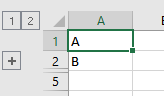
Expected:
image

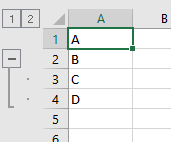
Actual:
image

Originally created by @znakeeye on GitHub (Apr 16, 2020). Original GitHub issue: https://github.com/jmcnamara/libxlsxwriter/issues/283 Originally assigned to: @jmcnamara on GitHub. I'm not able to create collapsed outlines. Is this a bug or am I using the API incorrectly? ```c #include "xlsxwriter.h" int main() { auto wb = workbook_new("foo.xlsx"); auto ws = workbook_add_worksheet(wb, "Sheet1"); int row = 0; worksheet_write_string(ws, row++, 0, "A", NULL); worksheet_write_string(ws, row++, 0, "B", NULL); lxw_row_col_options options = { LXW_FALSE, 1, LXW_TRUE }; // collapsed = true worksheet_set_row_opt(ws, row, LXW_DEF_ROW_HEIGHT, NULL, &options); worksheet_write_string(ws, row++, 0, "C", NULL); worksheet_set_row_opt(ws, row, LXW_DEF_ROW_HEIGHT, NULL, &options); worksheet_write_string(ws, row++, 0, "D", NULL); workbook_close(wb); return 0; } ``` **Expected:** ![image](https://user-images.githubusercontent.com/958469/79455303-f523e080-7fec-11ea-987b-44020d9df80a.png) **Actual:** ![image](https://user-images.githubusercontent.com/958469/79455341-010fa280-7fed-11ea-98aa-ff069f2386f5.png)
gitea-mirror 2026-05-05 11:59:29 -06:00
  • closed this issue
  • added the
    question
    label
Author
Owner

@jmcnamara commented on GitHub (Apr 17, 2020):

I haven't had a chance to look at this but there are lots of examples in the docs, and the repo, where rows are collapsed. https://libxlsxwriter.github.io/working_with_outlines.html

Maybe start with one of those first and reduce it down to what you are trying to do.

<!-- gh-comment-id:615105828 --> @jmcnamara commented on GitHub (Apr 17, 2020): I haven't had a chance to look at this but there are lots of examples in the docs, and the repo, where rows are collapsed. https://libxlsxwriter.github.io/working_with_outlines.html Maybe start with one of those first and reduce it down to what you are trying to do.
Author
Owner

@znakeeye commented on GitHub (Apr 17, 2020):

I found the problem. You need to set both hidden and collapsed to true. Not sure why we have two flags when they do nothing on their own (just tried all combinations). Why?

<!-- gh-comment-id:615276069 --> @znakeeye commented on GitHub (Apr 17, 2020): I found the problem. You need to set **both** `hidden` and `collapsed` to true. Not sure why we have two flags when they do nothing on their own (just tried all combinations). Why?
Author
Owner

@jmcnamara commented on GitHub (Apr 18, 2020):

You need to set both hidden and collapsed to true.

Yes correct. That's what the doc say:

Rows and columns can be collapsed by setting the hidden member for the hidden rows/columns and setting the collapsed member for the row/column that has the collapsed '+' symbol

Why?

That is what is required by Excel.

<!-- gh-comment-id:615889703 --> @jmcnamara commented on GitHub (Apr 18, 2020): > You need to set both hidden and collapsed to true. Yes correct. That's what the [doc](https://libxlsxwriter.github.io/working_with_outlines.html) say: Rows and columns can be collapsed by setting the hidden member for the hidden rows/columns and setting the collapsed member for the row/column that has the collapsed `'+'` symbol > Why? That is what is required by Excel.
Author
Owner

@znakeeye commented on GitHub (Apr 20, 2020):

There is one edge case that is not covered by the documentation. Or I'm actually facing a bug.

Note that I'm setting symbols_below to false. Then I try setting row options, according to the docs. However, none of the combinations will work for the top row (where the plus sign is). Only NULL will work (or setting levelto 0). Bug or documentation fix needed?

int main()
{
	auto wb = workbook_new("foo.xlsx");
	auto ws = workbook_add_worksheet(wb, "Sheet1");

	worksheet_outline_settings(ws, LXW_TRUE,
             LXW_FALSE /* non-standard */,
             LXW_FALSE, LXW_FALSE);

	lxw_row_col_options options = { LXW_TRUE, 1, LXW_FALSE }; 

	lxw_row_col_options rco1 = { LXW_FALSE, 1, LXW_FALSE };
	lxw_row_col_options rco2 = { LXW_FALSE, 1, LXW_TRUE };
	lxw_row_col_options rco3 = { LXW_TRUE, 1, LXW_FALSE };
	lxw_row_col_options rco4 = { LXW_TRUE, 1, LXW_TRUE };

        // You can try rco1, rco2, rco3, rco4. None will work.
	lxw_row_col_options* pPlusSymbolOptions = NULL; // NULL works!

	worksheet_write_string(ws, 0, 0, "a", NULL);
	worksheet_set_row_opt(ws, 0, 26.0, NULL, pPlusSymbolOptions);

	worksheet_write_string(ws, 1, 0, "b", NULL);
	worksheet_set_row_opt(ws, 1, 18.0, NULL, &options);

	worksheet_write_string(ws, 2, 0, "c", NULL);

	workbook_close(wb);
	
	return 0;
}

When top row has NULL options it looks correct:

image

<!-- gh-comment-id:616414436 --> @znakeeye commented on GitHub (Apr 20, 2020): There is one edge case that is not covered by the documentation. Or I'm actually facing a bug. Note that I'm setting `symbols_below` to **false**. Then I try setting row options, according to the [docs](https://libxlsxwriter.github.io/working_with_outlines.html). However, **none** of the combinations will work for the _top_ row (where the plus sign is). Only `NULL` will work (or setting `level`to **0**). Bug or documentation fix needed? ```c int main() { auto wb = workbook_new("foo.xlsx"); auto ws = workbook_add_worksheet(wb, "Sheet1"); worksheet_outline_settings(ws, LXW_TRUE, LXW_FALSE /* non-standard */, LXW_FALSE, LXW_FALSE); lxw_row_col_options options = { LXW_TRUE, 1, LXW_FALSE }; lxw_row_col_options rco1 = { LXW_FALSE, 1, LXW_FALSE }; lxw_row_col_options rco2 = { LXW_FALSE, 1, LXW_TRUE }; lxw_row_col_options rco3 = { LXW_TRUE, 1, LXW_FALSE }; lxw_row_col_options rco4 = { LXW_TRUE, 1, LXW_TRUE }; // You can try rco1, rco2, rco3, rco4. None will work. lxw_row_col_options* pPlusSymbolOptions = NULL; // NULL works! worksheet_write_string(ws, 0, 0, "a", NULL); worksheet_set_row_opt(ws, 0, 26.0, NULL, pPlusSymbolOptions); worksheet_write_string(ws, 1, 0, "b", NULL); worksheet_set_row_opt(ws, 1, 18.0, NULL, &options); worksheet_write_string(ws, 2, 0, "c", NULL); workbook_close(wb); return 0; } ``` When top row has `NULL` options it looks **correct**: ![image](https://user-images.githubusercontent.com/958469/79734355-de380380-82f6-11ea-8568-fe79d10b94a9.png)
Author
Owner

@znakeeye commented on GitHub (Apr 20, 2020):

Also, this weirdness only seem to apply the first outline I create (on row 0). After that, a NULL value makes it misbehave. So my code is getting a bit hacky here...

<!-- gh-comment-id:616530094 --> @znakeeye commented on GitHub (Apr 20, 2020): Also, this weirdness only seem to apply the _first_ outline I create (on row 0). After that, a `NULL` value makes it misbehave. So my code is getting a bit hacky here...
Author
Owner

@jmcnamara commented on GitHub (May 3, 2020):

There is one edge case that is not covered by the documentation. Or I'm actually facing a bug.

I don't understand the issue. Could you open a new GitHub issue with a simple example that should work but doesn't. Please don't use auto in the example.

Also, could you show 2 screenshots from Excel with the uncollapsed and collapsed groups that you are trying to achieve. Make the output match your code example but start it from scratch in Excel.

I'll look into it then.

<!-- gh-comment-id:623097257 --> @jmcnamara commented on GitHub (May 3, 2020): > There is one edge case that is not covered by the documentation. Or I'm actually facing a bug. I don't understand the issue. Could you open a new GitHub issue with a simple example that should work but doesn't. Please don't use `auto` in the example. Also, could you show 2 screenshots from Excel with the uncollapsed and collapsed groups that you are trying to achieve. Make the output match your code example but start it from scratch in Excel. I'll look into it then.
Author
Owner

@znakeeye commented on GitHub (May 4, 2020):

Hm. I might have misunderstood the documentation.

It works, as long as the "expander row" is not part of the outline level (e.g. level=1) and all collapsed rows are marked as hidden (not collapsed). I still don't understand what the use of "collapsed" is.

<!-- gh-comment-id:623545412 --> @znakeeye commented on GitHub (May 4, 2020): Hm. I might have misunderstood the documentation. It works, as long as the "expander row" is **not** part of the outline level (e.g. level=1) and all collapsed rows are marked as **hidden** (not collapsed). I still don't understand what the use of "collapsed" is.
Author
Owner

@evanmiller commented on GitHub (May 6, 2020):

@znakeeye My understanding is that collapsed applies only to the expander row. The level=1 rows are "hidden" whereas the level=0 row (above or below) is "collapsed".

<!-- gh-comment-id:624702141 --> @evanmiller commented on GitHub (May 6, 2020): @znakeeye My understanding is that `collapsed` applies only to the expander row. The level=1 rows are "hidden" whereas the level=0 row (above or below) is "collapsed".
Author
Owner

@znakeeye commented on GitHub (May 6, 2020):

@evanmiller Sure, but when and why would you want to set lxw_row_col_options.collapsed = LXW_TRUE? My latest attempt showed that this flag was not required. In previous attempts I had to set it for the expander row (and level=1). So I'm quite confused now :P

<!-- gh-comment-id:624728816 --> @znakeeye commented on GitHub (May 6, 2020): @evanmiller Sure, but when and why would you want to set `lxw_row_col_options.collapsed = LXW_TRUE`? My latest attempt showed that this flag was not required. In previous attempts I had to set it for the expander row (and level=**1**). So I'm quite confused now :P
Author
Owner

@evanmiller commented on GitHub (May 6, 2020):

@znakeeye Columns can be hidden without being collapsed. So (I think) the collapsed flag indicates whether the rows above/below are hidden due to collapsing or due to regular hiding.

If the flag doesn't look necessary, then it's possible Excel is doing some extra inference.

<!-- gh-comment-id:624735001 --> @evanmiller commented on GitHub (May 6, 2020): @znakeeye Columns can be hidden without being collapsed. So (I think) the collapsed flag indicates whether the rows above/below are hidden due to collapsing or due to regular hiding. If the flag doesn't look necessary, then it's possible Excel is doing some extra inference.
Sign in to join this conversation.
No milestone
No project
No assignees
1 participant
Notifications
Due date
The due date is invalid or out of range. Please use the format "yyyy-mm-dd".

No due date set.

Dependencies

No dependencies set.

Reference: github-starred/libxlsxwriter#228
No description provided.