[GH-ISSUE #284] worksheet_set_row_opt scales inserted image vertically? #227

Closed
opened 2026-05-05 11:59:28 -06:00 by gitea-mirror · 15 comments
Owner

Originally created by @znakeeye on GitHub (Apr 16, 2020).
Original GitHub issue: https://github.com/jmcnamara/libxlsxwriter/issues/284

Originally assigned to: @jmcnamara on GitHub.

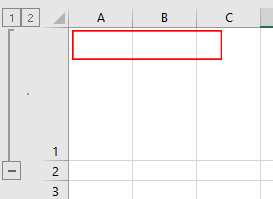
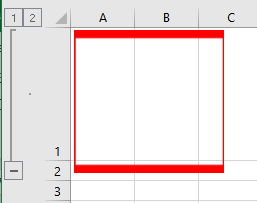
When inserting an image (constant_memory = true) it is somehow scaled by the outline row height. Is this expected behavior?

The 349x70 image
foo349x70

Expected:
image

Actual:
image

#include "xlsxwriter.h"

int main()
{
    lxw_workbook_options wb_options = { LXW_TRUE, NULL, LXW_FALSE };

    auto wb = workbook_new_opt("foo.xlsx", &wb_options);
    auto ws = workbook_add_worksheet(wb, "Sheet1");

    lxw_image_options img_options {
        4, 3,
        0.43, 0.43,
        LXW_OBJECT_POSITION_DEFAULT,
        NULL, NULL, NULL
    };

    lxw_row_col_options options = { LXW_FALSE, 1, LXW_TRUE };
    worksheet_set_row_opt(ws, 0, 100.0, NULL, &options); // This scales image vertically?!

    worksheet_insert_image_opt(ws, 0, 0, "foo349x70.png", &img_options);
    workbook_close(wb);
    
    return 0;
}
Originally created by @znakeeye on GitHub (Apr 16, 2020). Original GitHub issue: https://github.com/jmcnamara/libxlsxwriter/issues/284 Originally assigned to: @jmcnamara on GitHub. When inserting an image (`constant_memory = true`) it is somehow scaled by the outline row height. Is this expected behavior? **The 349x70 image** ![foo349x70](https://user-images.githubusercontent.com/958469/79473212-1f819800-8005-11ea-9684-6d31b9962c53.png) **Expected:** ![image](https://user-images.githubusercontent.com/958469/79473252-2c05f080-8005-11ea-99d3-4238731b1586.png) **Actual:** ![image](https://user-images.githubusercontent.com/958469/79473280-332cfe80-8005-11ea-9bff-2a2d998f51e8.png) ```c #include "xlsxwriter.h" int main() { lxw_workbook_options wb_options = { LXW_TRUE, NULL, LXW_FALSE }; auto wb = workbook_new_opt("foo.xlsx", &wb_options); auto ws = workbook_add_worksheet(wb, "Sheet1"); lxw_image_options img_options { 4, 3, 0.43, 0.43, LXW_OBJECT_POSITION_DEFAULT, NULL, NULL, NULL }; lxw_row_col_options options = { LXW_FALSE, 1, LXW_TRUE }; worksheet_set_row_opt(ws, 0, 100.0, NULL, &options); // This scales image vertically?! worksheet_insert_image_opt(ws, 0, 0, "foo349x70.png", &img_options); workbook_close(wb); return 0; } ```
gitea-mirror 2026-05-05 11:59:28 -06:00
  • closed this issue
  • added the
    bug
    label
Author
Owner

@znakeeye commented on GitHub (Apr 16, 2020):

Shouldn't lxw_worksheet_find_row() consider optimize_row? I.e.:

lxw_row *
lxw_worksheet_find_row(lxw_worksheet *self, lxw_row_t row_num)
{
    lxw_row tmp_row;

    if (self->optimize && row_num == self->optimize_row->row_num) {
        return self->optimize_row;
    }
<!-- gh-comment-id:614788645 --> @znakeeye commented on GitHub (Apr 16, 2020): Shouldn't `lxw_worksheet_find_row()` consider `optimize_row`? I.e.: ```c lxw_row * lxw_worksheet_find_row(lxw_worksheet *self, lxw_row_t row_num) { lxw_row tmp_row; if (self->optimize && row_num == self->optimize_row->row_num) { return self->optimize_row; } ```
Author
Owner

@znakeeye commented on GitHub (Apr 16, 2020):

I can confirm that the above seems to fix this problem. Can you please verify that this patch is valid and consider pushing it to master?

<!-- gh-comment-id:614797461 --> @znakeeye commented on GitHub (Apr 16, 2020): I can confirm that the above seems to fix this problem. Can you please verify that this patch is valid and consider pushing it to master?
Author
Owner

@znakeeye commented on GitHub (Apr 17, 2020):

Update: My suggested fix does not work if adding text on any other row. E.g. before closing the workbook:

worksheet_write_string(ws, 1, 0, ":(", NULL);

Obviously, the "optimize_row" is updated to row 1 before the image is written to row 0. This is bad :(

Ideas?

<!-- gh-comment-id:615101623 --> @znakeeye commented on GitHub (Apr 17, 2020): **Update:** My suggested fix **does not work** if adding text on any other row. E.g. before closing the workbook: ```c worksheet_write_string(ws, 1, 0, ":(", NULL); ``` Obviously, the "optimize_row" is updated to row 1 before the image is written to row 0. This is bad :( Ideas?
Author
Owner

@jmcnamara commented on GitHub (Apr 17, 2020):

I haven't had a chance to look at this yet. Just to be clear, does this happen when you set .constant_memory = LXW_FALSE in the workbook_new_opt() constructor?

<!-- gh-comment-id:615105178 --> @jmcnamara commented on GitHub (Apr 17, 2020): I haven't had a chance to look at this yet. Just to be clear, does this happen when you set `.constant_memory = LXW_FALSE` in the `workbook_new_opt()` constructor?
Author
Owner

@znakeeye commented on GitHub (Apr 17, 2020):

It does not happen when I set .constant_memory = LXW_FALSE. I investigated this a bit further, and my latest idea is the following:

/* Subtract the underlying cell heights to find the end cell. */
if (!self->optimize) { // <---- HERE!
    while (height >= _worksheet_size_row(self, row_end, anchor)) {
        height -= _worksheet_size_row(self, row_end, anchor);
        row_end++;
    }
}

Thus, no fiddling with the height when using constant_memory. Makes sense?

<!-- gh-comment-id:615116346 --> @znakeeye commented on GitHub (Apr 17, 2020): It does **not** happen when I set `.constant_memory = LXW_FALSE`. I investigated this a bit further, and my latest idea is the following: ```c /* Subtract the underlying cell heights to find the end cell. */ if (!self->optimize) { // <---- HERE! while (height >= _worksheet_size_row(self, row_end, anchor)) { height -= _worksheet_size_row(self, row_end, anchor); row_end++; } } ``` Thus, no fiddling with the height when using `constant_memory`. Makes sense?
Author
Owner

@jmcnamara commented on GitHub (Apr 17, 2020):

It does not happen when I set .constant_memory = LXW_FALSE

Okay. In that case it is a bug.

Makes sense?

I don't know. I'll have to write some test cases and then fix it. I'll look into it.

<!-- gh-comment-id:615117127 --> @jmcnamara commented on GitHub (Apr 17, 2020): > It does **not** happen when I set `.constant_memory = LXW_FALSE` Okay. In that case it is a bug. > Makes sense? I don't know. I'll have to write some test cases and then fix it. I'll look into it.
Author
Owner

@znakeeye commented on GitHub (Apr 20, 2020):

Please, also have a look at this other issue. There seems to be a generic problem with the first outline when symbols_below is false.

<!-- gh-comment-id:616707688 --> @znakeeye commented on GitHub (Apr 20, 2020): Please, also have a look at this [other issue](https://github.com/jmcnamara/libxlsxwriter/issues/283). There seems to be a generic problem with the first outline when `symbols_below` is **false**.
Author
Owner

@znakeeye commented on GitHub (Jan 25, 2021):

No news regarding this bug?

<!-- gh-comment-id:766639410 --> @znakeeye commented on GitHub (Jan 25, 2021): No news regarding this bug?
Author
Owner

@jmcnamara commented on GitHub (Jan 25, 2021):

No news regarding this bug?

As far as I remember a fix for this turned out to be too complicated. So, realistically, it is probably a "won't fix". I fill probably document that image scaling with modified row heights doesn't work in "constant_memory" mode.

<!-- gh-comment-id:766655359 --> @jmcnamara commented on GitHub (Jan 25, 2021): > No news regarding this bug? As far as I remember a fix for this turned out to be too complicated. So, realistically, it is probably a "won't fix". I fill probably document that image scaling with modified row heights doesn't work in "constant_memory" mode.
Author
Owner

@znakeeye commented on GitHub (Jan 25, 2021):

Too bad :/

Please recall my suggested fix:

/* Subtract the underlying cell heights to find the end cell. */
if (!self->optimize) { // <---- HERE!
    while (height >= _worksheet_size_row(self, row_end, anchor)) {
        height -= _worksheet_size_row(self, row_end, anchor);
        row_end++;
    }
}

I've been using this patch for a while now. It seems to work quite well. Not sure when and why it would break. Perhaps we could add some #define ENABLE_SHAKY_IMAGE_SCALING_PATCH to allow for this "weak" patch?

<!-- gh-comment-id:766659558 --> @znakeeye commented on GitHub (Jan 25, 2021): Too bad :/ Please recall my suggested fix: > ```c > /* Subtract the underlying cell heights to find the end cell. */ > if (!self->optimize) { // <---- HERE! > while (height >= _worksheet_size_row(self, row_end, anchor)) { > height -= _worksheet_size_row(self, row_end, anchor); > row_end++; > } > } > ``` I've been using this patch for a while now. It seems to work quite well. Not sure when and why it would break. Perhaps we could add some `#define ENABLE_SHAKY_IMAGE_SCALING_PATCH` to allow for this "weak" patch?
Author
Owner

@jmcnamara commented on GitHub (Jan 25, 2021):

Please recall my suggested fix:

Unfortunately, some of the test cases fail if that patch is applied.

I'll keep the issue open and see if there is anything that can be done.

<!-- gh-comment-id:766672596 --> @jmcnamara commented on GitHub (Jan 25, 2021): > Please recall my suggested fix: Unfortunately, some of the test cases fail if that patch is applied. I'll keep the issue open and see if there is anything that can be done.
Author
Owner

@jmcnamara commented on GitHub (Mar 23, 2021):

I don't think this is easily fixed, and currently it isn't worth the effort since it seems to be a bit of an edge case. So for now I'm just going to document it and leave it as a "won't fix". Sorry.

<!-- gh-comment-id:805169403 --> @jmcnamara commented on GitHub (Mar 23, 2021): I don't think this is easily fixed, and currently it isn't worth the effort since it seems to be a bit of an edge case. So for now I'm just going to [document it](https://libxlsxwriter.github.io/working_with_memory.html#ww_mem_constant) and leave it as a "won't fix". Sorry.
Author
Owner

@znakeeye commented on GitHub (Jun 29, 2021):

Too bad. Having a logo at the top of generated reports is not uncommon. So I would expect this bug to re-appear.

If I get time, I could try to find a better fix. Or perhaps, the existing tests are not bullet-proof in this case?

<!-- gh-comment-id:870640787 --> @znakeeye commented on GitHub (Jun 29, 2021): Too bad. Having a logo at the top of generated reports is not uncommon. So I would expect this bug to re-appear. If I get time, I could try to find a better fix. Or perhaps, the existing tests are not bullet-proof in this case?
Author
Owner

@jmcnamara commented on GitHub (Jun 29, 2021):

Having a logo at the top of generated reports is not uncommon.

Some users use header images for this (which is why I added that feature). See: https://libxlsxwriter.github.io/headers_footers_8c-example.html

Also this only affects constant_memory mode which is primarily meant for large files or raw data conversions so hopefully it won't affect too many people.

Or perhaps, the existing tests are not bullet-proof in this case?

The test cases are based on files created by Excel so they need to remain the same. The code can change if the tests still pass.

<!-- gh-comment-id:870656956 --> @jmcnamara commented on GitHub (Jun 29, 2021): > Having a logo at the top of generated reports is not uncommon. Some users use header images for this (which is why I added that feature). See: https://libxlsxwriter.github.io/headers_footers_8c-example.html Also this only affects `constant_memory` mode which is primarily meant for large files or raw data conversions so hopefully it won't affect too many people. > Or perhaps, the existing tests are not bullet-proof in this case? The test cases are based on files created by Excel so they need to remain the same. The code can change if the tests still pass.
Author
Owner

@Michoels commented on GitHub (May 30, 2024):

Just encountered this behavior and it took me a few hours of pulling my hair out before I found this thread 😥

Can you add an additional note to the README here specifying that constant_memory mode can break image scaling in certain situations?

<!-- gh-comment-id:2139772590 --> @Michoels commented on GitHub (May 30, 2024): Just encountered this behavior and it took me a few hours of pulling my hair out before I found this thread 😥 Can you add an additional note to the `README` [here](https://github.com/Paxa/fast_excel#create-document) specifying that `constant_memory` mode can break image scaling in certain situations?
Sign in to join this conversation.
No milestone
No project
No assignees
1 participant
Notifications
Due date
The due date is invalid or out of range. Please use the format "yyyy-mm-dd".

No due date set.

Dependencies

No dependencies set.

Reference: github-starred/libxlsxwriter#227
No description provided.