mirror of
https://github.com/keycastr/keycastr.git
synced 2026-10-23 08:07:30 -06:00
[GH-ISSUE #242] Displaying non-latin keystrokes while selected input source is non-latin #204
Labels
No labels
bug
compatibility
discussion
documentation
enhancement
help wanted
help wanted
investigation needed
pull-request
release
visualizer
No milestone
No project
No assignees
1 participant

Notifications
Due date
No due date set.
Dependencies
No dependencies set
Reference
github-starred/keycastr#204
Loading…
Reference in a new issue
No description provided.
Delete branch "%!s()"
Deleting a branch is permanent. Although the deleted branch may continue to exist for a short time before it actually gets removed, it CANNOT be undone in most cases. Continue?
Originally created by @pxlfall on GitHub (Jul 6, 2022).
Original GitHub issue: https://github.com/keycastr/keycastr/issues/242
Title says it all, there are some languages which are not using letters similar to English. For example, Japanese Kana keyboard uses symbols and KeyCastr displays something like this for command + shift + s: command + shift + と
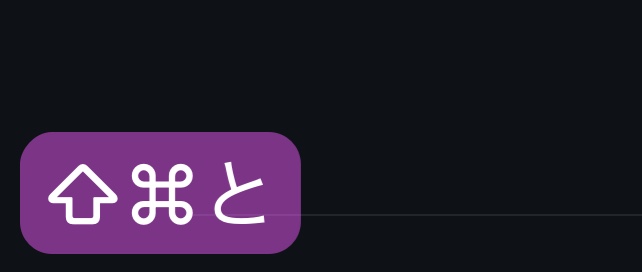
Quick Google search shows that there are in fact many non-latin languages and keyboards as well. It honestly diminishes the key point of this app, when I can't quickly read and recognise what this keystroke is, because many non-English speakers are still learning shortcut keystrokes for english letters. Sorry for bad english.
@pxlfall commented on GitHub (Jul 6, 2022):
Maybe add a rule to sanitise input when parsing command keystrokes? I'm not good at writing code, but something like "if input key is command key then do some black magic" should work?
Desired way to work:
checkmark in preferences to sanitise command keystrokes to english layout;
cmd+shift+s displays cmd+shift+s even when japanese kana or any other language is selected.
@akitchen commented on GitHub (Oct 2, 2022):
Thanks for opening an issue about this, and sorry for the frustration here; this topic is a tricky one to get right for all cases, and also tricky to test.
I believe this is the spirit of #187 -- linking these two for now and I'll see what we can do in a future release, no guarantees of timing though.
@akitchen commented on GitHub (Aug 30, 2024):
You may want to try this again; changes since this issue was opened should do a better job displaying keycaps and there is an option to display key events with modifiers applied. It should also display according to your selected input source if it doesn't match your physical keyboard.
@pxlfall commented on GitHub (Aug 30, 2024):
replying to the notification email from github, i will try it out when i
get to my laptop
On Fri, 30 Aug 2024 at 11:33, Andrew Kitchen @.***>
wrote:
@akitchen commented on GitHub (Mar 28, 2025):
Hello, have you managed to test this? Since version 0.10, KeyCastr has improved control for showing keycaps vs. the results of applying modifiers, and should do a better job of displaying in the user's current input locale. Since so much has changed since this was opened, I am closing it under the assumption that it is fixed, but please open a new issue if things still aren't working as expected.