[GH-ISSUE #175] Only works for first few keystrokes #147

Closed
opened 2026-05-05 05:00:44 -06:00 by gitea-mirror · 14 comments
Owner

Originally created by @maxbatt22 on GitHub (Aug 4, 2020).
Original GitHub issue: https://github.com/keycastr/keycastr/issues/175

Not sure why, but I installed, and this consistently only works for the first roughly five keystrokes for me, and then turns blank. I'm using an external monitor, if helpful.

Originally created by @maxbatt22 on GitHub (Aug 4, 2020). Original GitHub issue: https://github.com/keycastr/keycastr/issues/175 Not sure why, but I installed, and this consistently only works for the first roughly five keystrokes for me, and then turns blank. I'm using an external monitor, if helpful.
gitea-mirror 2026-05-05 05:00:44 -06:00
  • closed this issue
  • added the
    bug
    label
Author
Owner

@rundezv commented on GitHub (Aug 11, 2020):

same issue😥

<!-- gh-comment-id:671969113 --> @rundezv commented on GitHub (Aug 11, 2020): same issue😥
Author
Owner

@akitchen commented on GitHub (Aug 11, 2020):

Out of curiosity, how did you install the app? And are the Accessibility or Input Monitoring permissions still enabled within the Security & Privacy settings pane?

If KeyCastr mysteriously stops casting your keystrokes, this usually means it is no longer receiving key events. Unless the bezel happens to be offscreen. Changing to the Svelte visualizer might help you determine which problem it is.

If it is no longer receiving key events, my advice would be to double-check the permissions within Security & Privacy, restart the app, and possibly even restart the computer.

<!-- gh-comment-id:672320142 --> @akitchen commented on GitHub (Aug 11, 2020): Out of curiosity, how did you install the app? And are the Accessibility or Input Monitoring permissions still enabled within the Security & Privacy settings pane? If KeyCastr mysteriously stops casting your keystrokes, this usually means it is no longer receiving key events. Unless the bezel happens to be offscreen. Changing to the Svelte visualizer might help you determine which problem it is. If it is no longer receiving key events, my advice would be to double-check the permissions within Security & Privacy, restart the app, and possibly even restart the computer.
Author
Owner

@rtgoodwin commented on GitHub (Sep 11, 2020):

Same problem here. Works with Svelte, after repositioning. For Default theme, works in default location but if I move it stops getting keystrokes. External monitor, installed via brew today (Sep 11).

<!-- gh-comment-id:691297027 --> @rtgoodwin commented on GitHub (Sep 11, 2020): Same problem here. Works with Svelte, after repositioning. For Default theme, works in default location but if I move it stops getting keystrokes. External monitor, installed via brew today (Sep 11).
Author
Owner

@rtgoodwin commented on GitHub (Sep 11, 2020):

Also the "Toggle casting" in the menu changes in this fail scenario. The label stays but the dropdown disappears. I do have a few other apps installed like Typinator and Keyboard Maestro that, so far, haven't caused any conflicts.

<!-- gh-comment-id:691297396 --> @rtgoodwin commented on GitHub (Sep 11, 2020): Also the "Toggle casting" in the menu changes in this fail scenario. The label stays but the dropdown disappears. I do have a few other apps installed like Typinator and Keyboard Maestro that, so far, haven't caused any conflicts.
Author
Owner

@akitchen commented on GitHub (Sep 11, 2020):

Same problem here. Works with Svelte, after repositioning. For Default theme, works in default location but if I move it stops getting keystrokes. External monitor, installed via brew today (Sep 11).

Thanks for the comment @rtgoodwin -- I was able to reproduce this on an external monitor as well. I think it may have to do with your monitor layout and where you've dragged it to, which definitely is a bug. If you unplug and reconnect your monitor does the default visualizer reappear on the left side?

Also the "Toggle casting" in the menu changes in this fail scenario. The label stays but the dropdown disappears. I do have a few other apps installed like Typinator and Keyboard Maestro that, so far, haven't caused any conflicts.

I don't quite understand this one, I wasn't able to see any difference with the "Toggle casting" menu behavior. 🤔 any more info that might help?

<!-- gh-comment-id:691351262 --> @akitchen commented on GitHub (Sep 11, 2020): > Same problem here. Works with Svelte, after repositioning. For Default theme, works in default location but if I move it stops getting keystrokes. External monitor, installed via brew today (Sep 11). Thanks for the comment @rtgoodwin -- I was able to reproduce this on an external monitor as well. I think it may have to do with your monitor layout and *where* you've dragged it to, which definitely is a bug. If you unplug and reconnect your monitor does the default visualizer reappear on the left side? > Also the "Toggle casting" in the menu changes in this fail scenario. The label stays but the dropdown disappears. I do have a few other apps installed like Typinator and Keyboard Maestro that, so far, haven't caused any conflicts. I don't quite understand this one, I wasn't able to see any difference with the "Toggle casting" menu behavior. 🤔 any more info that might help?
Author
Owner

@akitchen commented on GitHub (Sep 12, 2020):

I'll guess that folks having this problem are using a smaller or medium size external monitor (possibly in portrait orientation), and/or trying to position the bezel on the right side of the screen. and there's another display positioned to the right of it.

I believe what's happening here is the default visualizer's backing view is wide enough that it fools macOS into thinking it's on a different display. Older versions of OS X might have handled this slightly differently.

I have a decent guess as to what's going on here; will target fixing this in the next release. Thanks for the feedback!

<!-- gh-comment-id:691374879 --> @akitchen commented on GitHub (Sep 12, 2020): I'll guess that folks having this problem are using a smaller or medium size external monitor (possibly in portrait orientation), and/or trying to position the bezel on the right side of the screen. and there's another display positioned to the right of it. I believe what's happening here is the default visualizer's backing view is wide enough that it fools macOS into thinking it's on a different display. Older versions of OS X might have handled this slightly differently. I have a decent guess as to what's going on here; will target fixing this in the next release. Thanks for the feedback!
Author
Owner

@rtgoodwin commented on GitHub (Sep 14, 2020):

You’re right on about the layout! LCD->monitor->monitor left to right. And
I was absolutely putting it on the upper right side of the middle monitor.
Still landscape but both are 1920x1080.

I’ll try to get a screenshot of the missing menu item. Basically where it
shows the hot key to toggle casting literally disappears; seemingly at the
same time as the main bug.

On Fri, Sep 11, 2020 at 8:22 PM Andrew Kitchen notifications@github.com
wrote:

I'll guess that folks having this problem are using a smaller or medium
size external monitor (possibly in portrait orientation), and/or trying to
position the bezel on the right side of the screen. and there's another
display positioned to the right of it.

I believe what's happening here is the default visualizer's backing view
is wide enough that it fools macOS into thinking it's on a different
display. Older versions of OS X might have handled this slightly
differently.

I have a decent guess as to what's going on here; will target fixing this
in the next release. Thanks for the feedback!


You are receiving this because you were mentioned.
Reply to this email directly, view it on GitHub
https://github.com/keycastr/keycastr/issues/175#issuecomment-691374879,
or unsubscribe
https://github.com/notifications/unsubscribe-auth/AAJBAYVUQK4VOHKFI45JT6TSFLELVANCNFSM4PUPLMAA
.

<!-- gh-comment-id:691766163 --> @rtgoodwin commented on GitHub (Sep 14, 2020): You’re right on about the layout! LCD->monitor->monitor left to right. And I was absolutely putting it on the upper right side of the middle monitor. Still landscape but both are 1920x1080. I’ll try to get a screenshot of the missing menu item. Basically where it shows the hot key to toggle casting literally disappears; seemingly at the same time as the main bug. On Fri, Sep 11, 2020 at 8:22 PM Andrew Kitchen <notifications@github.com> wrote: > > > I'll guess that folks having this problem are using a smaller or medium > size external monitor (possibly in portrait orientation), and/or trying to > position the bezel on the right side of the screen. and there's another > display positioned to the right of it. > > > I believe what's happening here is the default visualizer's backing view > is wide enough that it fools macOS into thinking it's on a different > display. Older versions of OS X might have handled this slightly > differently. > > > I have a decent guess as to what's going on here; will target fixing this > in the next release. Thanks for the feedback! > > > > > — > You are receiving this because you were mentioned. > Reply to this email directly, view it on GitHub > <https://github.com/keycastr/keycastr/issues/175#issuecomment-691374879>, > or unsubscribe > <https://github.com/notifications/unsubscribe-auth/AAJBAYVUQK4VOHKFI45JT6TSFLELVANCNFSM4PUPLMAA> > . > > >
Author
Owner

@rtgoodwin commented on GitHub (Sep 14, 2020):

Here's a quick GIF screencast of the disappearing menu item bug: https://www.dropbox.com/s/lw2va9x8xw5bf69/screencast%202020-09-14%2010-34-16.gif?dl=0

<!-- gh-comment-id:692139252 --> @rtgoodwin commented on GitHub (Sep 14, 2020): Here's a quick GIF screencast of the disappearing menu item bug: https://www.dropbox.com/s/lw2va9x8xw5bf69/screencast%202020-09-14%2010-34-16.gif?dl=0
Author
Owner

@markpanado commented on GitHub (Oct 8, 2020):

Same with mine. But then I notice I accidentally assign the toggle to "A" so whenever I press "A" the monitoring stops

Screen Shot 2020-10-08 at 9 28 31 PM

<!-- gh-comment-id:705575978 --> @markpanado commented on GitHub (Oct 8, 2020): Same with mine. But then I notice I accidentally assign the toggle to "A" so whenever I press "A" the monitoring stops ![Screen Shot 2020-10-08 at 9 28 31 PM](https://user-images.githubusercontent.com/3646720/95465204-68f7e200-09ad-11eb-9ff2-7971b1a9e482.png)
Author
Owner

@akitchen commented on GitHub (Jan 6, 2021):

@maxbatt22 could you confirm whether you moved the visualizer to the right side of your monitor before this started happening?

This is either the same as #173 (which is on deck for the next release) or another issue I've seen where the app stops receiving keyDown events #184

In the latter case, if you switch to the Svelte visualizer you'd see modifier keys but not "regular" keys displayed. Anecdotally, this seems more likely to happen when running with the app in the menu bar only, I'm not sure why. And restarting the app and/or OS seems to be the only fix, as it seems to be an eventing problem within macOS. I've been hacking around on trying to detect and fix this from within the app but it's been hard to capture in a development setting.

HTH!

<!-- gh-comment-id:755784817 --> @akitchen commented on GitHub (Jan 6, 2021): @maxbatt22 could you confirm whether you moved the visualizer to the right side of your monitor before this started happening? This is either the same as #173 (which is on deck for the next release) or another issue I've seen where the app stops receiving keyDown events #184 In the latter case, if you switch to the Svelte visualizer you'd see modifier keys but not "regular" keys displayed. Anecdotally, this seems more likely to happen when running with the app in the menu bar only, I'm not sure why. And restarting the app and/or OS seems to be the only fix, as it seems to be an eventing problem within macOS. I've been hacking around on trying to detect and fix this from within the app but it's been hard to capture in a development setting. HTH!
Author
Owner

@ghost commented on GitHub (Mar 12, 2021):

I also ran into the same issue as discovered by @markpanado.

When removing the hotkey for casting it will default to "A" key.

The preferences will pretend that no shortcut is set, but "A" is active and can be seen in the menu-bar:

Screenshot 2021-03-12 at 16 25 12
<!-- gh-comment-id:797561483 --> @ghost commented on GitHub (Mar 12, 2021): I also ran into the same issue as discovered by @markpanado. When removing the hotkey for casting it will default to "A" key. The preferences will pretend that no shortcut is set, but "A" is active and can be seen in the menu-bar: <img width="456" alt="Screenshot 2021-03-12 at 16 25 12" src="https://user-images.githubusercontent.com/72194488/110960942-8d3a5f00-834f-11eb-98b6-a57c4a95d196.png">
Author
Owner

@liby commented on GitHub (May 26, 2021):

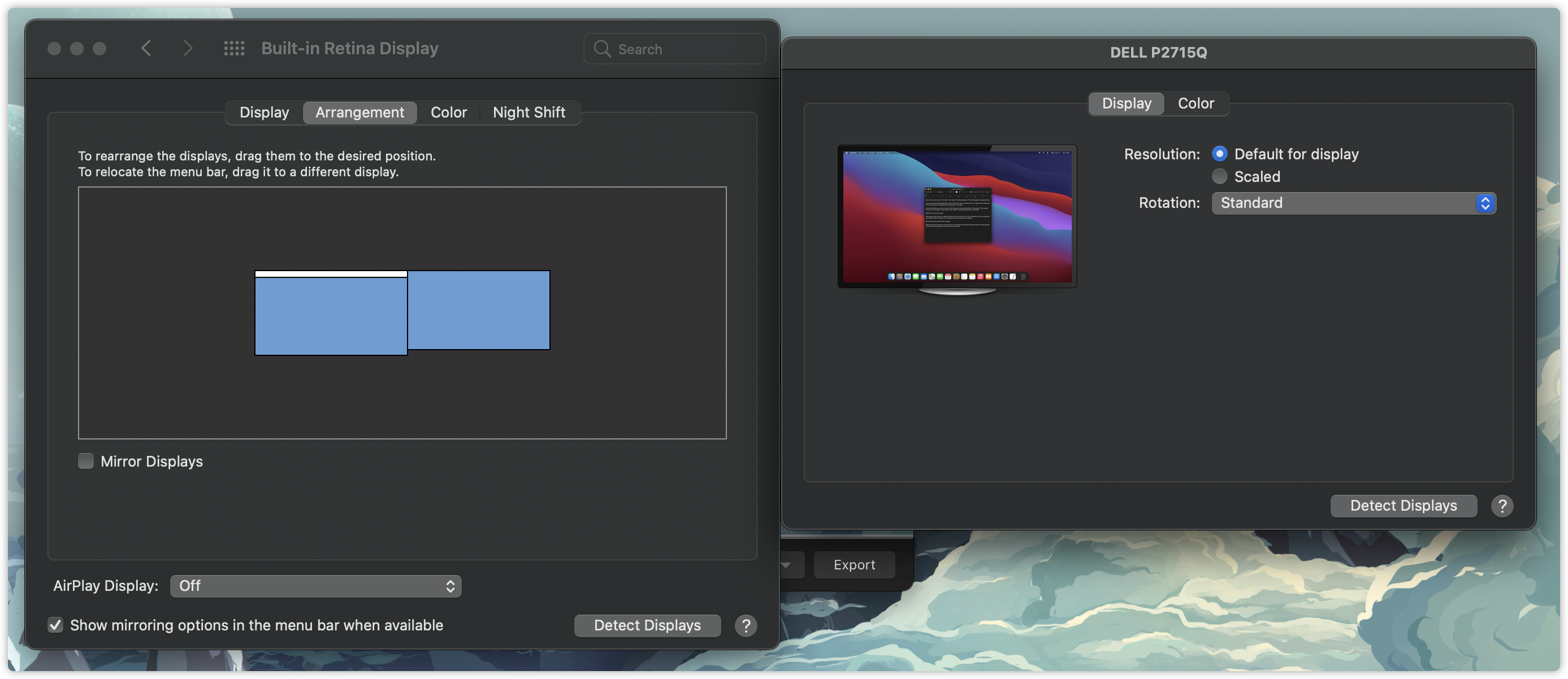
I had the same problem. The device is an iMac with an additional 27" monitor
image

When moving the "keystroke log" to the right side of the screen, it disappears, so try to quickly click on the key and I can see part of the "keystroke log" on the external display.

https://user-images.githubusercontent.com/38807139/119626872-387e8e80-be3e-11eb-9e9c-55184eb45ec4.mp4

<!-- gh-comment-id:848576032 --> @liby commented on GitHub (May 26, 2021): I had the same problem. The device is an iMac with an additional 27" monitor ![image](https://user-images.githubusercontent.com/38807139/119627928-379a2c80-be3f-11eb-8704-a679ec90ef3a.png) When moving the "keystroke log" to the right side of the screen, it disappears, so try to quickly click on the key and I can see part of the "keystroke log" on the external display. https://user-images.githubusercontent.com/38807139/119626872-387e8e80-be3e-11eb-9e9c-55184eb45ec4.mp4
Author
Owner

@akitchen commented on GitHub (Jul 29, 2021):

v0.9.11 included fixes to handle cases where the internal frame representation was too large and overlapped another monitor, causing it to "disappear" as macOS moved it to the next monitor, never to be seen again. Also, this release includes smarter padding and wrapping relative to the right edge of the screen.

Please re-try the various issues mentioned in this ticket in v0.9.11 and open new single-purpose issues if you run into anything weird.

<!-- gh-comment-id:888720926 --> @akitchen commented on GitHub (Jul 29, 2021): v0.9.11 included fixes to handle cases where the internal frame representation was too large and overlapped another monitor, causing it to "disappear" as macOS moved it to the next monitor, never to be seen again. Also, this release includes smarter padding and wrapping relative to the right edge of the screen. Please re-try the various issues mentioned in this ticket in v0.9.11 and open new single-purpose issues if you run into anything weird.
Author
Owner

@ghost commented on GitHub (Jul 29, 2021):

@akitchen Did it also fix https://github.com/keycastr/keycastr/issues/175#issuecomment-797561483 ? I didn't try the new version yet and only skimmed over the commits, but I couldn't spot anything related

<!-- gh-comment-id:888926388 --> @ghost commented on GitHub (Jul 29, 2021): @akitchen Did it also fix https://github.com/keycastr/keycastr/issues/175#issuecomment-797561483 ? I didn't try the new version yet and only skimmed over the commits, but I couldn't spot anything related
Sign in to join this conversation.
No milestone
No project
No assignees
1 participant
Notifications
Due date
The due date is invalid or out of range. Please use the format "yyyy-mm-dd".

No due date set.

Dependencies

No dependencies set.

Reference: github-starred/keycastr#147
No description provided.