[GH-ISSUE #944] SSH登录,Permission denied, please try again. #749

Closed
opened 2026-05-05 12:28:47 -06:00 by gitea-mirror · 8 comments
Owner

Originally created by @nemochin on GitHub (Oct 12, 2018).
Original GitHub issue: https://github.com/fatedier/frp/issues/944

Issue is only used for submiting bug report and documents typo. If there are same issues or answers can be found in documents, we will close it directly.
(为了节约时间,提高处理问题的效率,不按照格式填写的 issue 将会直接关闭。)

Use the commands below to provide key information from your environment:
You do NOT have to include this information if this is a FEATURE REQUEST

What version of frp are you using (./frpc -v or ./frps -v)?
0.21.0

What operating system and processor architecture are you using (go env)?
frps:centos7.4
frpc: centos7.4

Configures you used:
frps.ini
[common]
bind_port = 7000

frpc.ini
[common]
server_addr = 47.100.7.66
server_port = 7000

[ssh]
type = tcp
local_ip = 127.0.0.1
local_port = 22
remote_port = 6060

Steps to reproduce the issue:
1.阿里云服务器作为服务端,配置成功,启动成功,开放7000和6060端口
2.公司内网服务器作为客服端,配置成功,启动成功,也开放了7000和6060端口
3.在其他外网服务器上,运行ssh -v user_name@47.100.7.66 -p 6060

Describe the results you received:

image

Describe the results you expected:
是不是配置文件问题?还是ssh服务还需要一些配置?需要哪些?

Additional information you deem important (e.g. issue happens only occasionally):

Can you point out what caused this issue (optional)

Originally created by @nemochin on GitHub (Oct 12, 2018). Original GitHub issue: https://github.com/fatedier/frp/issues/944 Issue is only used for submiting bug report and documents typo. If there are same issues or answers can be found in documents, we will close it directly. (为了节约时间,提高处理问题的效率,不按照格式填写的 issue 将会直接关闭。) Use the commands below to provide key information from your environment: You do NOT have to include this information if this is a FEATURE REQUEST **What version of frp are you using (./frpc -v or ./frps -v)?** 0.21.0 **What operating system and processor architecture are you using (`go env`)?** frps:centos7.4 frpc: centos7.4 **Configures you used:** **frps.ini** [common] bind_port = 7000 **frpc.ini** [common] server_addr = 47.100.7.66 server_port = 7000 [ssh] type = tcp local_ip = 127.0.0.1 local_port = 22 remote_port = 6060 **Steps to reproduce the issue:** 1.阿里云服务器作为服务端,配置成功,启动成功,开放7000和6060端口 2.公司内网服务器作为客服端,配置成功,启动成功,也开放了7000和6060端口 3.在其他外网服务器上,运行ssh -v user_name@47.100.7.66 -p 6060 **Describe the results you received:** ![image](https://user-images.githubusercontent.com/13851088/46842848-9c292a00-ce02-11e8-8639-bd7546ea2d30.png) **Describe the results you expected:** **是不是配置文件问题?还是ssh服务还需要一些配置?需要哪些?** **Additional information you deem important (e.g. issue happens only occasionally):** **Can you point out what caused this issue (optional)**
Author
Owner

@nemochin commented on GitHub (Oct 12, 2018):

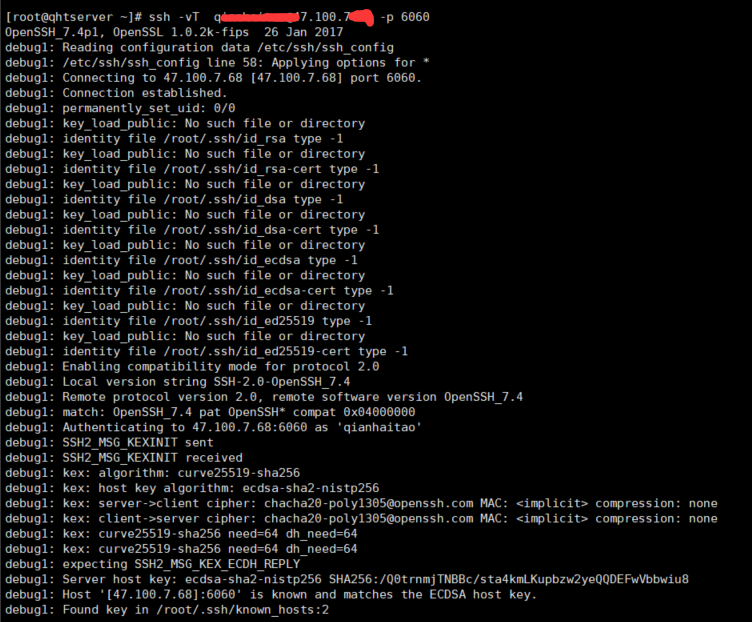
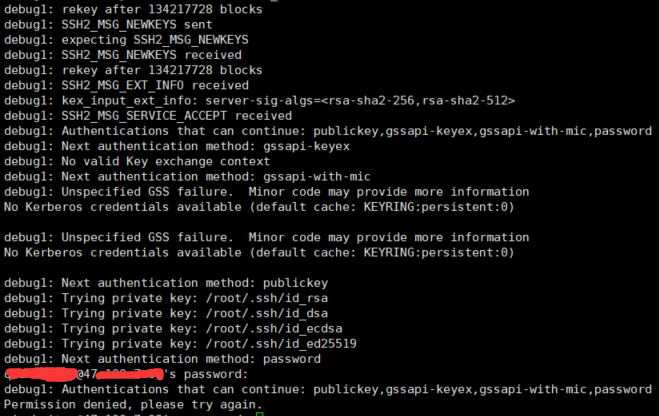
debug
image
image

<!-- gh-comment-id:429179709 --> @nemochin commented on GitHub (Oct 12, 2018): debug ![image](https://user-images.githubusercontent.com/13851088/46843651-756cf280-ce06-11e8-8ec8-591ee0272227.png) ![image](https://user-images.githubusercontent.com/13851088/46843759-d399d580-ce06-11e8-8955-a8b1f816e2fd.png)
Author
Owner

@nemochin commented on GitHub (Oct 12, 2018):

已经解决,frps端用root登录就可以了

<!-- gh-comment-id:429246427 --> @nemochin commented on GitHub (Oct 12, 2018): 已经解决,frps端用root登录就可以了
Author
Owner

@19706 commented on GitHub (Jan 11, 2020):

frps端为阿里云,默认就是root,但是我还是出现了这样的问题,

<!-- gh-comment-id:573296744 --> @19706 commented on GitHub (Jan 11, 2020): frps端为阿里云,默认就是root,但是我还是出现了这样的问题,
Author
Owner

@649459021 commented on GitHub (Jul 15, 2020):

frps端为阿里云,默认就是root,但是我还是出现了这样的问题,

请问你是如何解决的呢

<!-- gh-comment-id:658856348 --> @649459021 commented on GitHub (Jul 15, 2020): > frps端为阿里云,默认就是root,但是我还是出现了这样的问题, 请问你是如何解决的呢
Author
Owner

@19706 commented on GitHub (Jul 18, 2020):

未解决。

<!-- gh-comment-id:660413908 --> @19706 commented on GitHub (Jul 18, 2020): 未解决。
Author
Owner

@leelewin commented on GitHub (Jan 3, 2021):

ssh -p [端口] [用户名]@[IP]
这里的用户名是内网主机的用户名,不是公网服务器的用户名,我就是掉这坑里了
IP为公网服务器的公网IP
端口号为设置的远程端口

<!-- gh-comment-id:753560347 --> @leelewin commented on GitHub (Jan 3, 2021): ssh -p [端口] [用户名]@[IP] 这里的**用户名是内网主机的用户名**,不是公网服务器的用户名,我就是掉这坑里了 IP为公网服务器的公网IP 端口号为设置的远程端口
Author
Owner

@yunyuyuan commented on GitHub (Sep 7, 2022):

ssh -p [端口] [用户名]@[IP] 这里的用户名是内网主机的用户名,不是公网服务器的用户名,我就是掉这坑里了 IP为公网服务器的公网IP 端口号为设置的远程端口

而且不能为root,用户名最好和frps主机的用户名不同。

<!-- gh-comment-id:1240030420 --> @yunyuyuan commented on GitHub (Sep 7, 2022): > ssh -p [端口] [用户名]@[IP] 这里的**用户名是内网主机的用户名**,不是公网服务器的用户名,我就是掉这坑里了 IP为公网服务器的公网IP 端口号为设置的远程端口 而且不能为root,用户名最好和frps主机的用户名不同。
Author
Owner

@Jungle728 commented on GitHub (Jun 7, 2024):

ssh -p [端口] [用户名]@[IP] 这里的用户名是内网主机的用户名,不是公网服务器的用户名,我就是掉这坑里了 IP为公网服务器的公网IP 端口号为设置的远程端口

成功解决,我测试了两台内网机器,一台和公网服务器一个用户名 成功,另外一台用户名不一样 一直失败,快自闭了,看到你这个解决了~~!

<!-- gh-comment-id:2154266065 --> @Jungle728 commented on GitHub (Jun 7, 2024): > ssh -p [端口] [用户名]@[IP] 这里的**用户名是内网主机的用户名**,不是公网服务器的用户名,我就是掉这坑里了 IP为公网服务器的公网IP 端口号为设置的远程端口 成功解决,我测试了两台内网机器,一台和公网服务器一个用户名 成功,另外一台用户名不一样 一直失败,快自闭了,看到你这个解决了~~!
Sign in to join this conversation.
No milestone
No project
No assignees
1 participant
Notifications
Due date
The due date is invalid or out of range. Please use the format "yyyy-mm-dd".

No due date set.

Dependencies

No dependencies set.

Reference: github-starred/frp#749
No description provided.