mirror of
https://github.com/fatedier/frp.git
synced 2026-10-23 08:17:29 -06:00
[GH-ISSUE #729] frpc在window(10)上运行提示授权失败 #572
Labels
No labels
In Progress
WIP
WaitingForInfo
bug
doc
duplicate
easy
enhancement
future
help wanted
invalid
lifecycle/stale
need-issue-template
need-usage-help
no plan
proposal
pull-request
question
todo
No milestone
No project
No assignees
1 participant

Notifications
Due date
No due date set.
Dependencies
No dependencies set
Reference
github-starred/frp#572
Loading…
Reference in a new issue
No description provided.
Delete branch "%!s()"
Deleting a branch is permanent. Although the deleted branch may continue to exist for a short time before it actually gets removed, it CANNOT be undone in most cases. Continue?
Originally created by @RiverYangR on GitHub (Apr 29, 2018).
Original GitHub issue: https://github.com/fatedier/frp/issues/729
Issue is only used for submiting bug report and documents typo. If there are same issues or answers can be found in documents, we will close it directly.
(为了节约时间,提高处理问题的效率,不按照格式填写的 issue 将会直接关闭。)
Use the commands below to provide key information from your environment:
You do NOT have to include this information if this is a FEATURE REQUEST
What version of frp are you using (./frpc -v or ./frps -v)?
What operating system and processor architecture are you using (
go env)?win10 64位
Configures you used:
frpc.ini
frps配置
Steps to reproduce the issue:
服务器端:
1.在服务器上安装frps,并修改配置
2.运行frps服务
客户端:

1.下载安装包
修改frpc.ini
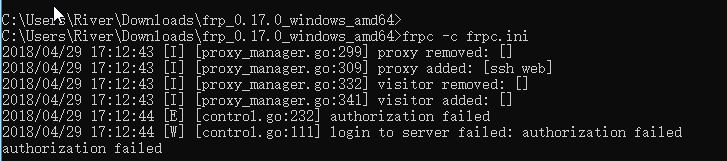
2.cmd窗口运行命令frpc -c frpc.ini
3.提示登录失败
Describe the results you received:
C:\Users\River\Downloads\frp_0.17.0_windows_amd64>frpc -c frpc.ini
2018/04/29 17:12:43 [I] [proxy_manager.go:299] proxy removed: []
2018/04/29 17:12:43 [I] [proxy_manager.go:309] proxy added: [ssh web]
2018/04/29 17:12:43 [I] [proxy_manager.go:332] visitor removed: []
2018/04/29 17:12:43 [I] [proxy_manager.go:341] visitor added: []
2018/04/29 17:12:44 [E] [control.go:232] authorization failed
2018/04/29 17:12:44 [W] [control.go:111] login to server failed: authorization failed
authorization failed
Describe the results you expected:
Additional information you deem important (e.g. issue happens only occasionally):
Can you point out what caused this issue (optional)
@fatedier commented on GitHub (Apr 29, 2018):
https://github.com/fatedier/frp/wiki#%E5%AE%A2%E6%88%B7%E7%AB%AF%E8%BF%9E%E6%8E%A5%E5%A4%B1%E8%B4%A5%E6%8F%90%E7%A4%BA-authorization-failed
@xiaoyell commented on GitHub (May 18, 2018):
1、查看服务端与客户端版本
2、查看token值
3、以上两条我都试了,还是这个问题
@xiaoyell commented on GitHub (May 18, 2018):
配置文件的token呢?
@1036427414 commented on GitHub (Jun 28, 2018):
我也这个问题,准备看看服务端有没有出错
@talway commented on GitHub (Mar 21, 2019):
win10 测试有这个问题
@garden4hu commented on GitHub (May 29, 2019):
在token一致的情况下,你可能需要把frpc.ini中的token放在 common 里面,如下:
[common]
server_addr = 123.123.123.123
server_port = 7000
token = 12345678
serverrole for server endpoint #4217