[GH-ISSUE #4168] x-forwarded-proto gets stripped away in http proxies #3283

Closed
opened 2026-05-05 14:07:10 -06:00 by gitea-mirror · 4 comments
Owner

Originally created by @panta82 on GitHub (Apr 17, 2024).
Original GitHub issue: https://github.com/fatedier/frp/issues/4168

Bug Description

I'm using setup:
nginx[443] (SSL termination) -> proxy_pass[http] -> frps[http] -> ...tunnel... -> frpc[http] -> local service[http]

This works, however on the other side, X-Forwarded-Proto header gets changed, which creates problems for cookies (the app thinks it's not behind HTTPS, which is incorrect).

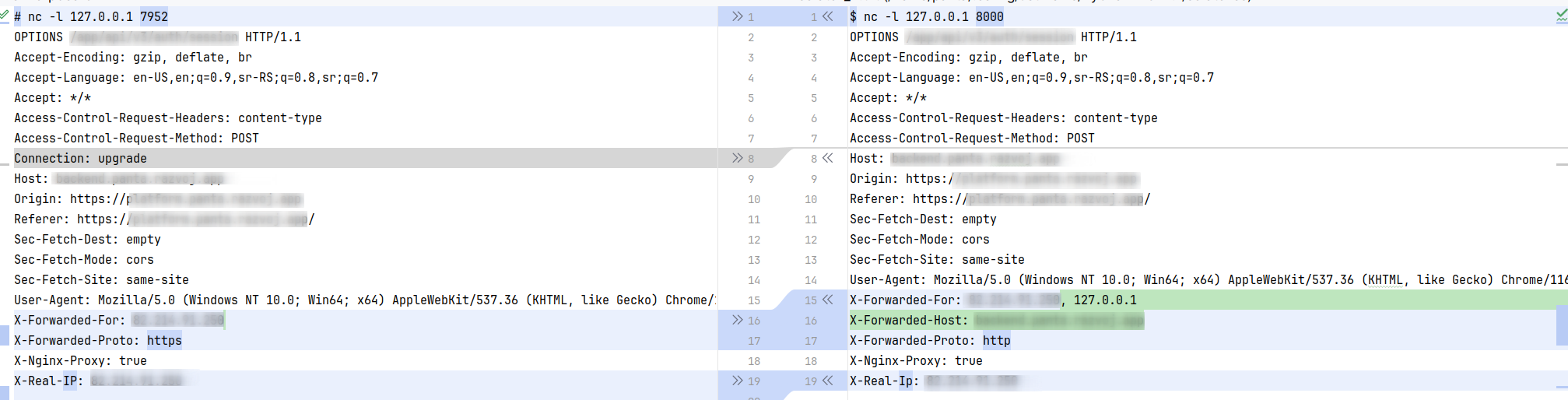
Here's the diff:
image

Left side: What is sent from nginx to frps
Right side: What is sent from frpc to the client

Frps adds X-Forwarded-Host (good), but changes X-Forwarded-Proto from https to http.

frpc Version

0.57.0

frps Version

0.57.0

System Architecture

linux/amd64

Configurations

frps.toml:

# This configuration file is for reference only. Please do not use this configuration directly to run the program as it may have various issues.

# A literal address or host name for IPv6 must be enclosed
# in square brackets, as in "[::1]:80", "[ipv6-host]:http" or "[ipv6-host%zone]:80"
# For single "bindAddr" field, no need square brackets, like `bindAddr = "::"`.
bindAddr = "0.0.0.0"
bindPort = 7852

# udp port used for kcp protocol, it can be same with 'bindPort'.
# if not set, kcp is disabled in frps.
kcpBindPort = 7852

# Pool count in each proxy will keep no more than maxPoolCount.
transport.maxPoolCount = 5

# If tcp stream multiplexing is used, default is true
transport.tcpMux = true

# If you want to support virtual host, you must set the http port for listening (optional)
# Note: http port and https port can be same with bindPort
vhostHTTPPort = 7952
#vhostHTTPSPort = 7952

# Configure the web server to enable the dashboard for frps.
# dashboard is available only if webServer.port is set.
webServer.addr = "127.0.0.1"
webServer.port = 8052
webServer.user = "admin"
webServer.password = "admin"

# console or real logFile path like ./frps.log
#log.to = "./frps.log"
# trace, debug, info, warn, error
#log.level = "info"
#log.maxDays = 3
# disable log colors when log.to is console, default is false
log.disablePrintColor = false

# DetailedErrorsToClient defines whether to send the specific error (with debug info) to frpc. By default, this value is true.
detailedErrorsToClient = true

auth.method = "token"
auth.token = "xxx"


# If subDomainHost is not empty, you can set subdomain when type is http or https in frpc's configure file
# When subdomain is test, the host used by routing is test.frps.com
subDomainHost = "client.example.com"

frpc.toml:

# your proxy name will be changed to {user}.{proxy}
#user = "your_name"

# A literal address or host name for IPv6 must be enclosed
# in square brackets, as in "[::1]:80", "[ipv6-host]:http" or "[ipv6-host%zone]:80"
# For single serverAddr field, no need square brackets, like serverAddr = "::".
serverAddr = "server.example.com"
serverPort = 7852

# Decide if exit program when first login failed, otherwise continuous relogin to frps
# default is true
loginFailExit = true

# console or real logFile path like ./frpc.log
#log.to = "./frpc.log"
# trace, debug, info, warn, error
log.level = "info"
log.maxDays = 3
# disable log colors when log.to is console, default is false
log.disablePrintColor = false

auth.method = "token"
auth.token = "xxx"

# connections will be established in advance, default value is zero
transport.poolCount = 5

# If tcp stream multiplexing is used, default is true, it must be same with frps
# transport.tcpMux = true

# Communication protocol used to connect to server
# supports tcp, kcp, quic, websocket and wss now, default is tcp
transport.protocol = "tcp"

# If tls.enable is true, frpc will connect frps by tls.
# Since v0.50.0, the default value has been changed to true, and tls is enabled by default.
transport.tls.enable = true

[[proxies]]
name = "app"
type = "http"
localIP = "127.0.0.1"
localPort = 8000
subdomain = "app"

client.example.com.conf (nginx):

server {
	listen 443 ssl;

	## Server name
	server_name client.example.com;

	## SSL Certificate
	ssl_certificate /etc/letsencrypt/live/example.com/fullchain.pem;
	ssl_certificate_key /etc/letsencrypt/live/example.com/privkey.pem;

	## Do not display server info in responses
	server_tokens off;

	## SSL security
	ssl_session_timeout 1d;
	ssl_session_cache shared:SSL:10m;
	ssl_session_tickets off;

	## Mozilla Intermediate configuration
	ssl_protocols TLSv1.2 TLSv1.3;
	ssl_ciphers ECDHE-ECDSA-AES128-GCM-SHA256:ECDHE-RSA-AES128-GCM-SHA256:ECDHE-ECDSA-AES256-GCM-SHA384:ECDHE-RSA-AES256-GCM-SHA384:ECDHE-ECDSA-CHACHA20-POLY1305:ECDHE-RSA-CHACHA20-POLY1305:DHE-RSA-AES128-GCM-SHA256:DHE-RSA-AES256-GCM-SHA384;

	## Increase max body size, to prevent strange errors
	client_max_body_size 200M;

	## Prevent problems with JWT token size
	large_client_header_buffers 8 64k;
	proxy_buffers               8 32k;
	proxy_buffer_size             32k;

	## Proxy pass
	location / {
		proxy_pass http://127.0.0.1:7952;
		proxy_http_version 1.1;
		proxy_set_header Upgrade $http_upgrade;
		proxy_set_header Connection "upgrade";
		proxy_set_header Host $http_host;

		proxy_set_header X-Real-IP $remote_addr;
		proxy_set_header X-Forwarded-For $remote_addr;
		#proxy_set_header X-Forwarded-Proto $scheme;
		proxy_set_header X-Forwarded-Proto https;
		proxy_set_header X-Nginx-Proxy true;

		proxy_redirect off;
	}
}

Logs

No response

Steps to reproduce

???

Affected area

  • Docs
  • Installation
  • Performance and Scalability
  • Security
  • User Experience
  • Test and Release
  • Developer Infrastructure
  • Client Plugin
  • Server Plugin
  • Extensions
  • Others
Originally created by @panta82 on GitHub (Apr 17, 2024). Original GitHub issue: https://github.com/fatedier/frp/issues/4168 ### Bug Description I'm using setup: `nginx[443] (SSL termination) -> proxy_pass[http] -> frps[http] -> ...tunnel... -> frpc[http] -> local service[http]` This works, however on the other side, `X-Forwarded-Proto` header gets changed, which creates problems for cookies (the app thinks it's not behind HTTPS, which is incorrect). Here's the diff: ![image](https://github.com/fatedier/frp/assets/4291324/02146571-a2e7-4e86-982c-724e45c61ef3) Left side: What is sent from nginx to frps Right side: What is sent from frpc to the client Frps adds `X-Forwarded-Host` (good), but changes `X-Forwarded-Proto` from `https` to `http`. ### frpc Version 0.57.0 ### frps Version 0.57.0 ### System Architecture linux/amd64 ### Configurations frps.toml: ```toml # This configuration file is for reference only. Please do not use this configuration directly to run the program as it may have various issues. # A literal address or host name for IPv6 must be enclosed # in square brackets, as in "[::1]:80", "[ipv6-host]:http" or "[ipv6-host%zone]:80" # For single "bindAddr" field, no need square brackets, like `bindAddr = "::"`. bindAddr = "0.0.0.0" bindPort = 7852 # udp port used for kcp protocol, it can be same with 'bindPort'. # if not set, kcp is disabled in frps. kcpBindPort = 7852 # Pool count in each proxy will keep no more than maxPoolCount. transport.maxPoolCount = 5 # If tcp stream multiplexing is used, default is true transport.tcpMux = true # If you want to support virtual host, you must set the http port for listening (optional) # Note: http port and https port can be same with bindPort vhostHTTPPort = 7952 #vhostHTTPSPort = 7952 # Configure the web server to enable the dashboard for frps. # dashboard is available only if webServer.port is set. webServer.addr = "127.0.0.1" webServer.port = 8052 webServer.user = "admin" webServer.password = "admin" # console or real logFile path like ./frps.log #log.to = "./frps.log" # trace, debug, info, warn, error #log.level = "info" #log.maxDays = 3 # disable log colors when log.to is console, default is false log.disablePrintColor = false # DetailedErrorsToClient defines whether to send the specific error (with debug info) to frpc. By default, this value is true. detailedErrorsToClient = true auth.method = "token" auth.token = "xxx" # If subDomainHost is not empty, you can set subdomain when type is http or https in frpc's configure file # When subdomain is test, the host used by routing is test.frps.com subDomainHost = "client.example.com" ``` frpc.toml: ```toml # your proxy name will be changed to {user}.{proxy} #user = "your_name" # A literal address or host name for IPv6 must be enclosed # in square brackets, as in "[::1]:80", "[ipv6-host]:http" or "[ipv6-host%zone]:80" # For single serverAddr field, no need square brackets, like serverAddr = "::". serverAddr = "server.example.com" serverPort = 7852 # Decide if exit program when first login failed, otherwise continuous relogin to frps # default is true loginFailExit = true # console or real logFile path like ./frpc.log #log.to = "./frpc.log" # trace, debug, info, warn, error log.level = "info" log.maxDays = 3 # disable log colors when log.to is console, default is false log.disablePrintColor = false auth.method = "token" auth.token = "xxx" # connections will be established in advance, default value is zero transport.poolCount = 5 # If tcp stream multiplexing is used, default is true, it must be same with frps # transport.tcpMux = true # Communication protocol used to connect to server # supports tcp, kcp, quic, websocket and wss now, default is tcp transport.protocol = "tcp" # If tls.enable is true, frpc will connect frps by tls. # Since v0.50.0, the default value has been changed to true, and tls is enabled by default. transport.tls.enable = true [[proxies]] name = "app" type = "http" localIP = "127.0.0.1" localPort = 8000 subdomain = "app" ``` client.example.com.conf (nginx): ```nginx server { listen 443 ssl; ## Server name server_name client.example.com; ## SSL Certificate ssl_certificate /etc/letsencrypt/live/example.com/fullchain.pem; ssl_certificate_key /etc/letsencrypt/live/example.com/privkey.pem; ## Do not display server info in responses server_tokens off; ## SSL security ssl_session_timeout 1d; ssl_session_cache shared:SSL:10m; ssl_session_tickets off; ## Mozilla Intermediate configuration ssl_protocols TLSv1.2 TLSv1.3; ssl_ciphers ECDHE-ECDSA-AES128-GCM-SHA256:ECDHE-RSA-AES128-GCM-SHA256:ECDHE-ECDSA-AES256-GCM-SHA384:ECDHE-RSA-AES256-GCM-SHA384:ECDHE-ECDSA-CHACHA20-POLY1305:ECDHE-RSA-CHACHA20-POLY1305:DHE-RSA-AES128-GCM-SHA256:DHE-RSA-AES256-GCM-SHA384; ## Increase max body size, to prevent strange errors client_max_body_size 200M; ## Prevent problems with JWT token size large_client_header_buffers 8 64k; proxy_buffers 8 32k; proxy_buffer_size 32k; ## Proxy pass location / { proxy_pass http://127.0.0.1:7952; proxy_http_version 1.1; proxy_set_header Upgrade $http_upgrade; proxy_set_header Connection "upgrade"; proxy_set_header Host $http_host; proxy_set_header X-Real-IP $remote_addr; proxy_set_header X-Forwarded-For $remote_addr; #proxy_set_header X-Forwarded-Proto $scheme; proxy_set_header X-Forwarded-Proto https; proxy_set_header X-Nginx-Proxy true; proxy_redirect off; } } ``` ### Logs _No response_ ### Steps to reproduce ??? ### Affected area - [ ] Docs - [X] Installation - [ ] Performance and Scalability - [ ] Security - [X] User Experience - [ ] Test and Release - [ ] Developer Infrastructure - [ ] Client Plugin - [ ] Server Plugin - [ ] Extensions - [ ] Others
Author
Owner

@fatedier commented on GitHub (Apr 18, 2024):

This should be expected, otherwise the client can pass any untrusted content.

In your scenario, you can test whether the issue can be resolved by using requestHeaders.set.x-forwarded-proto = "https".

<!-- gh-comment-id:2062910865 --> @fatedier commented on GitHub (Apr 18, 2024): This should be expected, otherwise the client can pass any untrusted content. In your scenario, you can test whether the issue can be resolved by using `requestHeaders.set.x-forwarded-proto = "https"`.
Author
Owner

@panta82 commented on GitHub (Apr 18, 2024):

Understood. I can certainly hack it in.

It might be useful though for frps to have some kind of "behind proxy" mode, where this header is trusted. Because I assume this will be a 99% use case for the tool.

(also, should x-real-ip then be passed through?)

<!-- gh-comment-id:2063315983 --> @panta82 commented on GitHub (Apr 18, 2024): Understood. I can certainly hack it in. It might be useful though for frps to have some kind of "behind proxy" mode, where this header is trusted. Because I assume this will be a 99% use case for the tool. (also, should `x-real-ip` then be passed through?)
Author
Owner

@fatedier commented on GitHub (Apr 18, 2024):

More about the configuration of the 7th layer HTTP will be planned for the future v2 version, and currently, no additional configuration options will be provided.

x-real-ip is not a standard header defined by the RFC. The current code uses the native handling logic of Go and does not perform any additional processing.

<!-- gh-comment-id:2063327937 --> @fatedier commented on GitHub (Apr 18, 2024): More about the configuration of the 7th layer HTTP will be planned for the future v2 version, and currently, no additional configuration options will be provided. `x-real-ip` is not a standard header defined by the RFC. The current code uses the native handling logic of Go and does not perform any additional processing.
Author
Owner

@panta82 commented on GitHub (Apr 18, 2024):

Ok, that's fair. Closing the issue.

<!-- gh-comment-id:2063338723 --> @panta82 commented on GitHub (Apr 18, 2024): Ok, that's fair. Closing the issue.
Sign in to join this conversation.
No milestone
No project
No assignees
1 participant
Notifications
Due date
The due date is invalid or out of range. Please use the format "yyyy-mm-dd".

No due date set.

Dependencies

No dependencies set.

Reference: github-starred/frp#3283
No description provided.