mirror of
https://github.com/fatedier/frp.git
synced 2026-10-23 08:17:29 -06:00
[GH-ISSUE #366] 客户端【树莓派Ubuntu Mate系统】正常跑一段时间后,就连不上【阿里云windows Server2008R2】服务器了 #268
Labels
No labels
In Progress
WIP
WaitingForInfo
bug
doc
duplicate
easy
enhancement
future
help wanted
invalid
lifecycle/stale
need-issue-template
need-usage-help
no plan
proposal
pull-request
question
todo
No milestone
No project
No assignees
1 participant

Notifications
Due date
No due date set.
Dependencies
No dependencies set
Reference
github-starred/frp#268
Loading…
Reference in a new issue
No description provided.
Delete branch "%!s()"
Deleting a branch is permanent. Although the deleted branch may continue to exist for a short time before it actually gets removed, it CANNOT be undone in most cases. Continue?
Originally created by @mymmoonoa on GitHub (Jun 15, 2017).
Original GitHub issue: https://github.com/fatedier/frp/issues/366
一、测试环境
服务器: 阿里云服务器, 操作系统:windows Server2008 R2 Enterprise 4GRAM 64位OS
frp: frp_0.11.0_windows_386
客户端: 硬件:树莓派Model 3B armv7 操作系统:ubuntu-mate-16.04.2-desktop-armhf-raspberry-pi.img
frp: frp_0.11.0_linux_arm.tar.gz
二、frp配置
[common] bind_port = 7000 vhost_http_port = 10001 subdomain_host = xxxx.club (省略) dashboard_port = 10000 dashboard_user = admin dashboard_pwd = ...(省略) privilege_allow_ports = 6999-7999,10000-20000 privilege_token = ...(省略) log_file = frps.log log_level = info log_max_days = 7[common] server_addr = 106.1x.xx.xxx server_port = 7000 privilege_token = chixxx [web] type = http local_port = 3000 subdomain = test三、测试步骤
dial tcp 106.xx.xx.xxx:7000: getsockopt: network is unreachableping 106.xx.xx.xxx和www.xxx.club的域名都返回PING 106.xx.xx.xxx(106.xx.xx.xxx) 56(84) bytes of data. From 192.168.1.1 icmp_seq=1 Destination Net Unreachable大神们有没有什么建议,能不能帮忙分析下域名,ping www.baidu.com其它站点都能正常ping通,frp所在主机域名没法正常ping;
树莓派重启后(不会!!)变好,这个要投入生产环境的,好想可以稳定工作啊
四、其它描述
这是第二次发现这种问题,在做crontab forever自动加载之前发生过一次。
要是需要完整域名和账号配置测试可以私信 ma_thilda@126.com
五、图片
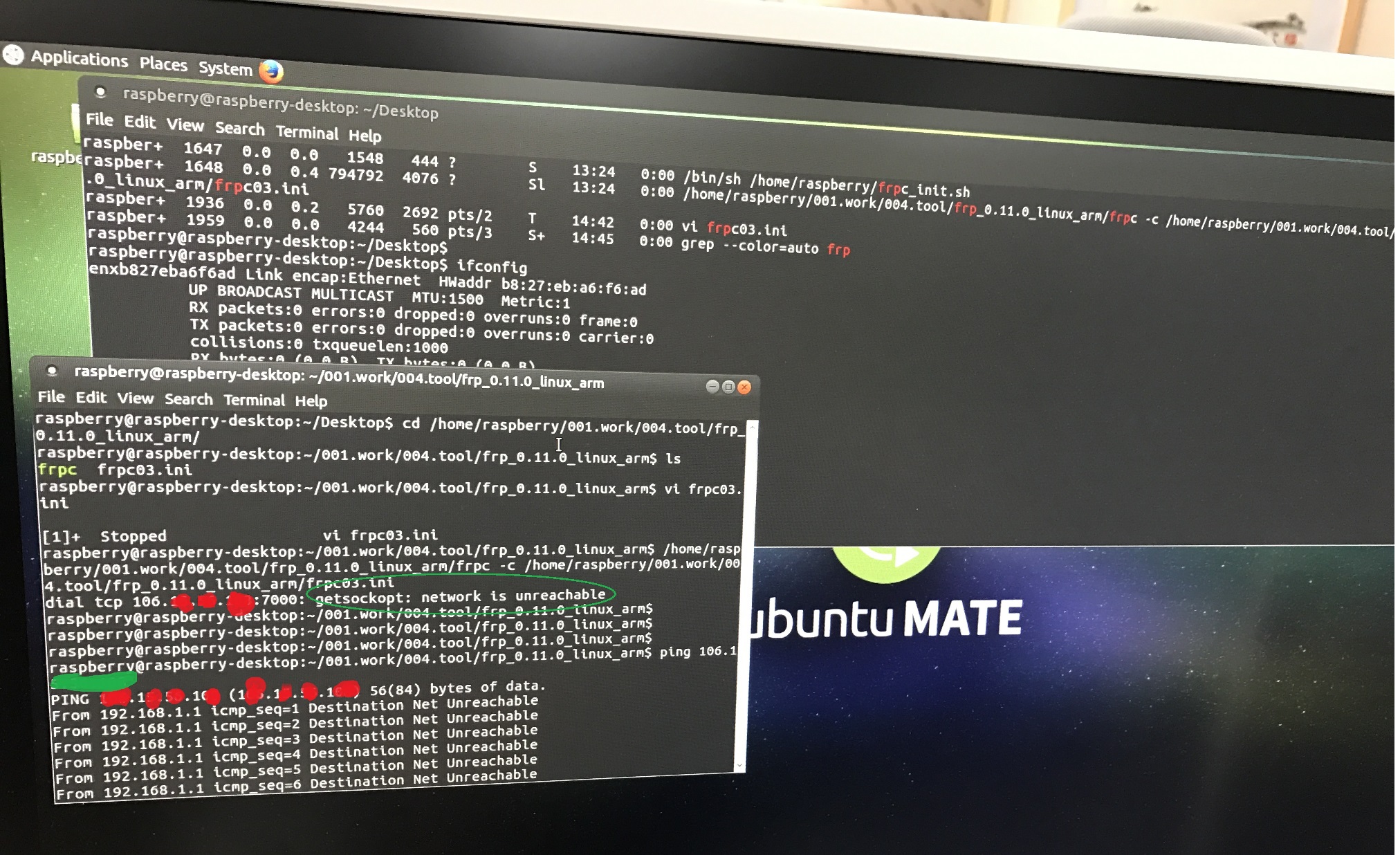
@mymmoonoa commented on GitHub (Jun 15, 2017):
ping www.baidu.com 都是
64Bytes from 180.97.33.108: ...这样的字段为什么frpc不能正常工作ping 自己的frps服务器都是
From 192.168.1.1啊@mymmoonoa commented on GitHub (Jun 15, 2017):
@fatedier 或者谁能能帮忙解释下原因,怎样才能修复这个问题吗,我这边补充些脚本的方式都可以,Linux用的比较少,很多东西不太懂的希望多多指导
@mymmoonoa commented on GitHub (Jun 15, 2017):
看了下路由表 http://www.ehowstuff.com/how-to-check-routing-table-on-linux-centos-6-2/
对比自己的稍有不同,不知道哪里有问题
@wxlg1117 commented on GitHub (Jun 15, 2017):
先看看frps的log判断是frpc主动掉的还是frps踢的,然后再分析
@wxlg1117 commented on GitHub (Jun 15, 2017):
而且我试过,lan内机器配置frpc转发服务到外网,lan网关(掉线)或者lan机器网络发生问题(比如网卡禁用)然后隔一段时间恢复正常,frpc重连正常的啊
@mymmoonoa commented on GitHub (Jun 15, 2017):
@wxlg1117
错误的信息
PING 106.xx.xx.xxx(106.xx.xx.xxx) 56(84) bytes of data. From 192.168.1.1 icmp_seq=1 Destination Net Unreachable
看了下Destination Net unreachable的解释
感觉好像是192.168.1.1网关没资格替我管frps服务器的ip了,它直接不知道找谁了
@mymmoonoa commented on GitHub (Jun 15, 2017):
我刚试了
sudo ifdown -a; sudo ifup -a
sudo /etc/init.d/networking restart; ... stop, ... start
sudo wlan0 down; ... up
网络重新连上后,问题依旧,其它网址都能正常访问,唯独frps的阿里云不行,看来只能reboot了
@mymmoonoa commented on GitHub (Jun 15, 2017):
好消息是,好像把路由器弄挂了, 我对树莓派gracefully reboot和直接断电后开机后,ping frps域名依旧是 Destination Net Unreachable错误提示,ping ip变了,一直挂着没反应。明天来公司看下路由器情况,再重启试验下
@mymmoonoa commented on GitHub (Jun 16, 2017):
但这个时候我仍然不能直接访问test.xxx.club:10001;
我这时kill -9 frpc的进程, 手动执行./frpc -c ./frpc03.ini后;报错提示
...[I][control.go:255] [...] login to serer success, get run id [...]
...[W][control.go:345][...] [web] start error: proxy name [web] is already in use
树莓派2号的frpc.ini的配置与树莓派1号一样,只有subdomain不同,我把树莓派2号关机后,就一切正常了
难道不能在所有的客户端的ini文件中都用
[web]吗??@mymmoonoa commented on GitHub (Jun 16, 2017):
所以结论是多个客户端frpc.ini中不能用相同的
[web]??我要再去读读文档了。。:-(
@wxlg1117 commented on GitHub (Jun 16, 2017):
貌似是不能有重复的,你干嘛不加个标识,人家文档都说了[web1]...[web2]...