mirror of
https://github.com/fatedier/frp.git
synced 2026-10-23 08:17:29 -06:00
[GH-ISSUE #3050] 配置了tls_enable = true之后,依旧出现login to server failed: EOF 这个错误 #2440
Labels
No labels
In Progress
WIP
WaitingForInfo
bug
doc
duplicate
easy
enhancement
future
help wanted
invalid
lifecycle/stale
need-issue-template
need-usage-help
no plan
proposal
pull-request
question
todo
No milestone
No project
No assignees
1 participant

Notifications
Due date
No due date set.
Dependencies
No dependencies set
Reference
github-starred/frp#2440
Loading…
Reference in a new issue
No description provided.
Delete branch "%!s()"
Deleting a branch is permanent. Although the deleted branch may continue to exist for a short time before it actually gets removed, it CANNOT be undone in most cases. Continue?
Originally created by @lanjing99 on GitHub (Aug 8, 2022).
Original GitHub issue: https://github.com/fatedier/frp/issues/3050
Bug Description
在配置了tls_enable = true之后,依旧出现login to server failed: EOF 这个错误
frpc Version
0.44
frps Version
0.44
System Architecture
linuxj/amd64
Configurations
服务端 frps.ini 配置如下
客户端 frpc.ini 配置如下:
Logs
No response
Steps to reproduce
基于frp 0.44版本搭建中转服务,遇到了如下错误:
[W] [service.go:128] login to server failed: EOF
网络上找到 https://blog.phpgao.com/frp_tcp_reset.html 这篇链接,添加依旧无效
tls_enable = true 配置依旧无效。
服务端 frps.ini 配置如下
客户端 frpc.ini 配置如下:
将frps服务配置在一个公网的frps服务器上。
使用
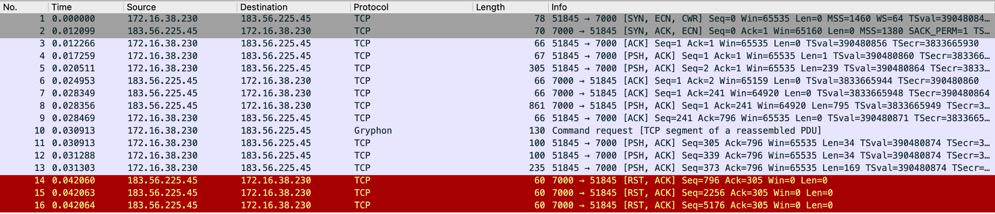
tls_enable = true选项 抓包如下在frpc client上抓包
在frps服务器上使用tcpdump抓包
客户端和服务器的有几个包对应不上,看来是客户端内网这边的NAT做了一些操作。
未使用

tls_enable = true选项,客户端配置去掉tls_enable = true抓包如下在frps服务器上使用tcpdump抓包
可以看到第5,6两个数据包(9,10两行),frps向frpc回复响应数据包,但是在客户端的第7,8,9却收到rst数据包,因为使用手机热点通过弹性公网IP可以访问frps,所以猜测是 frpc所在的NAT网络禁用了frp服务(还不知道这个怎么实现。)。
如果能在frpc网络的公网IP:219.131.131.150 上抓包,就能判断rst数据包是NAT客户端发送的,还是frps所在的公网发送的。目前倾向于是frpc所在的网络禁用了frp。
Affected area
@fatedier commented on GitHub (Aug 8, 2022):
写的很好,分析的也很好。
@Becods commented on GitHub (Aug 8, 2022):
大概率是防火墙禁止了frp
特征基本上均在这里,可以自己修改打包尝试一下
github.com/fatedier/frp@4af85da0c2/pkg/msg/msg.go (L64-L195)此外
@lanjing99 commented on GitHub (Aug 9, 2022):
收到,谢谢!我更改一下相关代码测试一下。
上午找我们公司的网管,他配置了一下规则允许frp的流量通过就可以连上了。
我有三个问题请教一下:
@lanjing99 commented on GitHub (Aug 9, 2022):
是公司的防火墙规则禁用了frp,开启之后就可以访问了。
@zhangsean commented on GitHub (Sep 22, 2022):
我所在的项目用到frp被深信服防火墙拦截了,请问有修改握手消息代码,可以成功绕过防火墙拦截的案例吗?