[GH-ISSUE #2831] Cant connect with tcp over tls, but non-tls tcp works #2263

Closed
opened 2026-05-05 13:27:32 -06:00 by gitea-mirror · 10 comments
Owner

Originally created by @presidenten on GitHub (Mar 10, 2022).
Original GitHub issue: https://github.com/fatedier/frp/issues/2831

Bug Description

tl;dr

What I did
I expose server through ingress with tcp - works
I expose server through ingress with tcp over tls and same port - login to server failed: session shutdown

What I expected to happen
I expected frp to connect like normal


Long version of setup and what I tried to verify that all parts are working

I have the frp server in a kubernetes cluster behind an ingress.

If I just expose frps trough tcp routing with sni '*', then frpc connects just fine.
image

But we need several frp instances in our cluster and want to do routing based on sni name, which requires tls.

So I got a certificates for a couple of subdomains from lets encrypt and tested with two tcp-echo containers, that got hosted on their own certificate and sni. Connecting with

openssl s_client -servername echo-1.mydomain.com -connect echo-1.mydomain.com:32000

and

openssl s_client -servername echo-2.mydomain.com -connect echo-2.mydomain.com:32000

that both go through the same LB into the same ingress works as expected. I can type messages and get them echoed.
image

But when I try to expose frps over tls things stop working.
The ingress terminates tls, and forwards the traffic to frps on binding port 80.

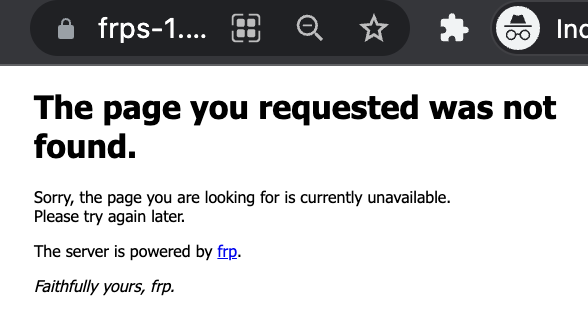
Even though I can still see the frp 404 screen if I use https in address, instead of http, like so - https://frps-1.mydomain.com:32000
image

frpc refuses to connect.
image

Openssl still reports perfectly fine tls certificate from lets encrypt...

openssl s_client -servername frps-1.mydomain.com -connect frps-1.mydomain.com:32000
image

Any ideas what needs to be configured or fixed to connect over tls with certificate termination in ingress?

frpc Version

0.39.1

frps Version

0.39.1

System Architecture

server: linux/amd64, client: apple silicon

Configurations

frps.ini

[common]
bind_port = 80
vhost_http_port = 80

frpc.ini

[common]
server_addr = frps-1.mydomain.com
server_port = 32000
tls_enable = true
log_level = trace

[ssh]
type = tcp
local_ip = 127.0.0.1
local_port = 22
remote_port = 6000

Logs

Even I run frps with log_level = trace I hardly get any useful logs....

Steps to reproduce

  1. Setup kubernetes with emissary ingress configured for tcp traffic
  2. Roll out deployment with frps
  3. Get lets encrypt certificates
  4. Expose frps with tls on the tcp listener
  5. Try to connect wtih frpc

Affected area

  • Docs
  • Installation
  • Performance and Scalability
  • Security
  • User Experience
  • Test and Release
  • Developer Infrastructure
  • Client Plugin
  • Server Plugin
  • Extensions
  • Others
Originally created by @presidenten on GitHub (Mar 10, 2022). Original GitHub issue: https://github.com/fatedier/frp/issues/2831 ### Bug Description ### tl;dr ### **What I did** I expose server through ingress with tcp - works I expose server through ingress with tcp over tls and same port - `login to server failed: session shutdown` **What I expected to happen** I expected frp to connect like normal --- ### Long version of setup and what I tried to verify that all parts are working ### I have the frp server in a kubernetes cluster behind an ingress. If I just expose frps trough tcp routing with sni '*', then frpc connects just fine. <img width="1092" alt="image" src="https://user-images.githubusercontent.com/3883897/157559379-316249f7-d48b-4bc4-909c-2a769283411b.png"> But we need several frp instances in our cluster and want to do routing based on sni name, which requires tls. So I got a certificates for a couple of subdomains from lets encrypt and tested with two tcp-echo containers, that got hosted on their own certificate and sni. Connecting with ```bash openssl s_client -servername echo-1.mydomain.com -connect echo-1.mydomain.com:32000 ``` and ```bash openssl s_client -servername echo-2.mydomain.com -connect echo-2.mydomain.com:32000 ``` that both go through the same LB into the same ingress works as expected. I can type messages and get them echoed. ![image](https://user-images.githubusercontent.com/3883897/157558554-ca1dc8b4-4c48-43cb-8844-2067b6870e79.png) But when I try to expose frps over tls things stop working. The ingress terminates tls, and forwards the traffic to frps on binding port 80. Even though I can still see the frp 404 screen if I use https in address, instead of http, like so - https://frps-1.mydomain.com:32000 <img width="294" alt="image" src="https://user-images.githubusercontent.com/3883897/157558370-3c8c81db-c828-4369-9dac-dc75902cf7cd.png"> frpc refuses to connect. <img width="749" alt="image" src="https://user-images.githubusercontent.com/3883897/157560661-5d37971e-1b1c-469e-ae5b-414093547e87.png"> Openssl still reports perfectly fine tls certificate from lets encrypt... ```bash openssl s_client -servername frps-1.mydomain.com -connect frps-1.mydomain.com:32000 ``` <img width="968" alt="image" src="https://user-images.githubusercontent.com/3883897/157561996-6ce59097-27f1-46be-9996-98e08c82e670.png"> --- Any ideas what needs to be configured or fixed to connect over tls with certificate termination in ingress? ### frpc Version 0.39.1 ### frps Version 0.39.1 ### System Architecture server: linux/amd64, client: apple silicon ### Configurations frps.ini ```ini [common] bind_port = 80 vhost_http_port = 80 ``` frpc.ini ```ini [common] server_addr = frps-1.mydomain.com server_port = 32000 tls_enable = true log_level = trace [ssh] type = tcp local_ip = 127.0.0.1 local_port = 22 remote_port = 6000 ``` ### Logs Even I run frps with `log_level = trace` I hardly get any useful logs.... ### Steps to reproduce 1. Setup kubernetes with emissary ingress configured for tcp traffic 2. Roll out deployment with frps 3. Get lets encrypt certificates 4. Expose frps with tls on the tcp listener 5. Try to connect wtih frpc ### Affected area - [ ] Docs - [ ] Installation - [ ] Performance and Scalability - [ ] Security - [X] User Experience - [ ] Test and Release - [ ] Developer Infrastructure - [X] Client Plugin - [ ] Server Plugin - [ ] Extensions - [ ] Others
Author
Owner

@fatedier commented on GitHub (Mar 10, 2022):

Try to add disable_custom_tls_first_byte = true in frpc.ini?

<!-- gh-comment-id:1063608464 --> @fatedier commented on GitHub (Mar 10, 2022): Try to add `disable_custom_tls_first_byte = true` in `frpc.ini`?
Author
Owner

@presidenten commented on GitHub (Mar 10, 2022):

@fatedier
I tried it already, by tested again.

❯ cat frpc.ini
[common]
server_addr = frps-1.mydomain.com
server_port = 32000
tls_server_name = frps-1.mydomain.com
tls_enable = true
log_level = trace
disable_custom_tls_first_byte = true

[ssh]
type = tcp
local_ip = 127.0.0.1
local_port = 22
remote_port = 6000

❯ docker run --rm -v $(pwd)/frpc.ini:/etc/frp/frpc.ini --name frpc snowdreamtech/frpc:0.39.1
2022/03/10 08:15:24 [W] [service.go:105] login to server failed: session shutdown
session shutdown

I could setup an environment in kubernetes for you to test it out if it would help?

Or if you have anything else I could try, Im all ears!

<!-- gh-comment-id:1063787162 --> @presidenten commented on GitHub (Mar 10, 2022): @fatedier I tried it already, by tested again. ``` ❯ cat frpc.ini [common] server_addr = frps-1.mydomain.com server_port = 32000 tls_server_name = frps-1.mydomain.com tls_enable = true log_level = trace disable_custom_tls_first_byte = true [ssh] type = tcp local_ip = 127.0.0.1 local_port = 22 remote_port = 6000 ❯ docker run --rm -v $(pwd)/frpc.ini:/etc/frp/frpc.ini --name frpc snowdreamtech/frpc:0.39.1 2022/03/10 08:15:24 [W] [service.go:105] login to server failed: session shutdown session shutdown ``` I could setup an environment in kubernetes for you to test it out if it would help? Or if you have anything else I could try, Im all ears!
Author
Owner

@fatedier commented on GitHub (Mar 10, 2022):

It's not https protocol between frpc and frps. I'm not sure if it can work in this way.

You can provide your ingress yaml.

<!-- gh-comment-id:1063799406 --> @fatedier commented on GitHub (Mar 10, 2022): It's not https protocol between frpc and frps. I'm not sure if it can work in this way. You can provide your ingress yaml.
Author
Owner

@presidenten commented on GitHub (Mar 10, 2022):

Sure.

First install emissary according to official instructions: https://www.getambassador.io/docs/emissary/latest/topics/install/helm/
But with overrides on available ports.

filename tcp.yaml

service:
  type: NodePort
  ports:
  - name: http
    port: 80
    targetPort: 8080
    protocol: TCP
    nodePort: 30080
  - name: https
    port: 443
    targetPort: 8443
    protocol: TCP
    nodePort: 30443
  - name: tcp
    port: 2222
    targetPort: 2222
    protocol: TCP
    nodePort: 32000

Then install emissary ingress

# Install emissary-ingress crds
kubectl apply -f https://app.getambassador.io/yaml/emissary/2.2.2/emissary-crds.yaml
kubectl wait --timeout=90s --for=condition=available deployment emissary-apiext -n emissary-system

# Install emissary-ingress
helm repo add datawire https://app.getambassador.io
helm repo update
# NOTE: extra flag: -f tcp.yaml
helm install -n emissary --create-namespace emissary-ingress -f tcp.yaml datawire/emissary-ingress

create a tcp tls listener in namespace emissary, the protocol needs to be set to TCP if you want to test without tls

apiVersion: getambassador.io/v3alpha1
kind: Listener
metadata:
  name: tcp
  namespace: emissary
spec:
  port: 2222
  protocol: TLS
  securityModel: XFP
  hostBinding:
    namespace:
      from: ALL

then in your working namespace apply the following:

---

apiVersion: v1
kind: Secret
type: kubernetes.io/tls
metadata:
  name: frps-ssl-1
data:
  tls.crt: LS0...  # base64 encoded cert 
  tls.key: LS0... # base64 encoded key 

---

apiVersion: getambassador.io/v3alpha1
kind: Host
metadata:
  name: frps-1
spec:
  hostname: "your-hostname-here"
  tlsSecret:
    name: frps-ssl-1
  requestPolicy:
    insecure:
      action: Route

---

apiVersion: getambassador.io/v3alpha1
kind: TLSContext
metadata:
  name: frps
spec:
  hosts:
  - your-hostname-here
  secret: frps-ssl-1

---

apiVersion: getambassador.io/v3alpha1
kind: TCPMapping
metadata:
  name: frps
spec:
  port: 2222
  host: your-hostname-here
  service: frps:80

If you are testing with listener with protocol TCP, just remove the .spec.host from the TCPMapping

For testing purposes you can just use nip.io, where your domain would be frps-1-2-3-4.nip.io if your public ip was 1.2.3.4.

<!-- gh-comment-id:1063812367 --> @presidenten commented on GitHub (Mar 10, 2022): Sure. First install emissary according to official instructions: https://www.getambassador.io/docs/emissary/latest/topics/install/helm/ But with overrides on available ports. filename `tcp.yaml` ``` service: type: NodePort ports: - name: http port: 80 targetPort: 8080 protocol: TCP nodePort: 30080 - name: https port: 443 targetPort: 8443 protocol: TCP nodePort: 30443 - name: tcp port: 2222 targetPort: 2222 protocol: TCP nodePort: 32000 ``` Then install emissary ingress ```bash # Install emissary-ingress crds kubectl apply -f https://app.getambassador.io/yaml/emissary/2.2.2/emissary-crds.yaml kubectl wait --timeout=90s --for=condition=available deployment emissary-apiext -n emissary-system # Install emissary-ingress helm repo add datawire https://app.getambassador.io helm repo update # NOTE: extra flag: -f tcp.yaml helm install -n emissary --create-namespace emissary-ingress -f tcp.yaml datawire/emissary-ingress ``` create a tcp tls listener in namespace emissary, the protocol needs to be set to TCP if you want to test without tls ```yaml apiVersion: getambassador.io/v3alpha1 kind: Listener metadata: name: tcp namespace: emissary spec: port: 2222 protocol: TLS securityModel: XFP hostBinding: namespace: from: ALL ``` then in your working namespace apply the following: ``` --- apiVersion: v1 kind: Secret type: kubernetes.io/tls metadata: name: frps-ssl-1 data: tls.crt: LS0... # base64 encoded cert tls.key: LS0... # base64 encoded key --- apiVersion: getambassador.io/v3alpha1 kind: Host metadata: name: frps-1 spec: hostname: "your-hostname-here" tlsSecret: name: frps-ssl-1 requestPolicy: insecure: action: Route --- apiVersion: getambassador.io/v3alpha1 kind: TLSContext metadata: name: frps spec: hosts: - your-hostname-here secret: frps-ssl-1 --- apiVersion: getambassador.io/v3alpha1 kind: TCPMapping metadata: name: frps spec: port: 2222 host: your-hostname-here service: frps:80 ``` If you are testing with listener with protocol TCP, just remove the .spec.host from the TCPMapping For testing purposes you can just use nip.io, where your domain would be `frps-1-2-3-4.nip.io` if your public ip was 1.2.3.4.
Author
Owner

@fatedier commented on GitHub (Mar 10, 2022):

Oh,it's not ingress-nginx.

I have not enough time to learn a new ingress implementation. Hope others can help you~

<!-- gh-comment-id:1063819394 --> @fatedier commented on GitHub (Mar 10, 2022): Oh,it's not ingress-nginx. I have not enough time to learn a new ingress implementation. Hope others can help you~
Author
Owner

@presidenten commented on GitHub (Mar 10, 2022):

@fatedier What if I create a cluster for you with everything preconfigured?

Normal ingress-nginx cant handle tcp routing with sni because its level 7

<!-- gh-comment-id:1063823299 --> @presidenten commented on GitHub (Mar 10, 2022): @fatedier What if I create a cluster for you with everything preconfigured? Normal ingress-nginx cant handle tcp routing with sni because its level 7
Author
Owner

@presidenten commented on GitHub (Mar 10, 2022):

@fatedier
It would be in our aws infra ofc. But Ill fix certificates, set it up with domain names, make sure echo servers are in place so you can verify sni routing is working etc.

Then you can just focus on the frp part?

<!-- gh-comment-id:1063826269 --> @presidenten commented on GitHub (Mar 10, 2022): @fatedier It would be in our aws infra ofc. But Ill fix certificates, set it up with domain names, make sure echo servers are in place so you can verify sni routing is working etc. Then you can just focus on the frp part?
Author
Owner

@fatedier commented on GitHub (Mar 10, 2022):

@bingtianbaihua Do you have time to track this issue?

<!-- gh-comment-id:1063833313 --> @fatedier commented on GitHub (Mar 10, 2022): @bingtianbaihua Do you have time to track this issue?
Author
Owner

@presidenten commented on GitHub (Mar 10, 2022):

I have an new, and otherwise empty dev cluster, prepared if you guys would be interested to test?
Its on its own vpc and not connected to anything else, so no risk of ruining anything.

<!-- gh-comment-id:1064036087 --> @presidenten commented on GitHub (Mar 10, 2022): I have an new, and otherwise empty dev cluster, prepared if you guys would be interested to test? Its on its own vpc and not connected to anything else, so no risk of ruining anything.
Author
Owner

@presidenten commented on GitHub (Mar 10, 2022):

I solved it.

PR coming soon.

<!-- gh-comment-id:1064117452 --> @presidenten commented on GitHub (Mar 10, 2022): I solved it. PR coming soon.
Sign in to join this conversation.
No milestone
No project
No assignees
1 participant
Notifications
Due date
The due date is invalid or out of range. Please use the format "yyyy-mm-dd".

No due date set.

Dependencies

No dependencies set.

Reference: github-starred/frp#2263
No description provided.