mirror of
https://github.com/fatedier/frp.git
synced 2026-10-23 08:17:29 -06:00
[GH-ISSUE #2793] Moonlight-qt client from network with default ports blocked #2232
Labels
No labels
In Progress
WIP
WaitingForInfo
bug
doc
duplicate
easy
enhancement
future
help wanted
invalid
lifecycle/stale
need-issue-template
need-usage-help
no plan
proposal
pull-request
question
todo
No milestone
No project
No assignees
1 participant

Notifications
Due date
No due date set.
Dependencies
No dependencies set
Reference
github-starred/frp#2232
Loading…
Reference in a new issue
No description provided.
Delete branch "%!s()"
Deleting a branch is permanent. Although the deleted branch may continue to exist for a short time before it actually gets removed, it CANNOT be undone in most cases. Continue?
Originally created by @ermac500 on GitHub (Feb 9, 2022).
Original GitHub issue: https://github.com/fatedier/frp/issues/2793
Bug Description
My Nvdia gamestream PC ( server ) has all the ports open and works remotely from about any network except one. Would frp let me bypass the client network blocked ports?
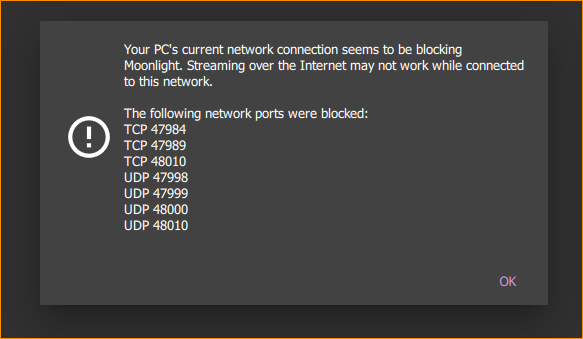
Moonlight Gamestream client states many of the ports are unnaccessible:
Did I not understand correctly how frp works? doesn't all the traffic go trough the bind_port(1194)?
frpc Version
0.36.1
frps Version
0.36.1
System Architecture
windows/amd64
Configurations
frps.ini
[common]
bind_port = 1194
bind_addr = 0.0.0.0
token = 5555
allow_ports = 47000-49000,5353
frpc.ini
[common]
server_addr = MYIP
server_port = 1194
token = 5555
[nvidia-stream-tcp-1]
type = tcp
local_ip = 127.0.0.1
local_port = 47984
remote_port = 47984
[nvidia-stream-tcp-2]
type = tcp
local_ip = 127.0.0.1
local_port = 47989
remote_port = 47989
[nvidia-stream-tcp-3]
type = tcp
local_ip = 127.0.0.1
local_port = 48010
remote_port = 48010
[nvidia-stream-udp-1]
type = udp
local_ip = 127.0.0.1
local_port = 5353
remote_port = 5353
[nvidia-stream-udp-2]
type = udp
local_ip = 127.0.0.1
local_port = 47998
remote_port = 47998
[nvidia-stream-udp-3]
type = udp
local_ip = 127.0.0.1
local_port = 47999
remote_port = 47999
[nvidia-stream-udp-4]
type = udp
local_ip = 127.0.0.1
local_port = 48000
remote_port = 48000
[nvidia-stream-udp-5]
type = udp
local_ip = 127.0.0.1
local_port = 48002
remote_port = 48002
[nvidia-stream-udp-6]
type = udp
local_ip = 127.0.0.1
local_port = 48010
remote_port = 48010
@fatedier commented on GitHub (Feb 9, 2022):
I'm not sure, just give it a try.
@ermac500 commented on GitHub (Feb 9, 2022):
I gave it. the photo was the result.
with frp connection or without still blocked. what am I doing wrong or did I understand incorrectly how to configure frp?
@apoklyps3 commented on GitHub (Feb 11, 2022):
I'm having a similar issue. I need to bypass the blocked ports on a client computer and no ideea how to achieve this
@apoklyps3 commented on GitHub (Mar 2, 2022):
no support offered it seems
@github-actions[bot] commented on GitHub (Apr 2, 2022):
Issues go stale after 30d of inactivity. Stale issues rot after an additional 7d of inactivity and eventually close.
@apoklyps3 commented on GitHub (Apr 2, 2022):
how is this stale with no answer provided?
@github-actions[bot] commented on GitHub (May 4, 2022):
Issues go stale after 30d of inactivity. Stale issues rot after an additional 7d of inactivity and eventually close.