[GH-ISSUE #2788] http proxy request error: no such domain - subdomain not work #2229

Closed
opened 2026-05-05 13:25:58 -06:00 by gitea-mirror · 2 comments
Owner

Originally created by @walejandromt on GitHub (Feb 6, 2022).
Original GitHub issue: https://github.com/fatedier/frp/issues/2788

Bug Description

i try configured frp server into server with public ip and server into NAT but when i configured subdomains is not work

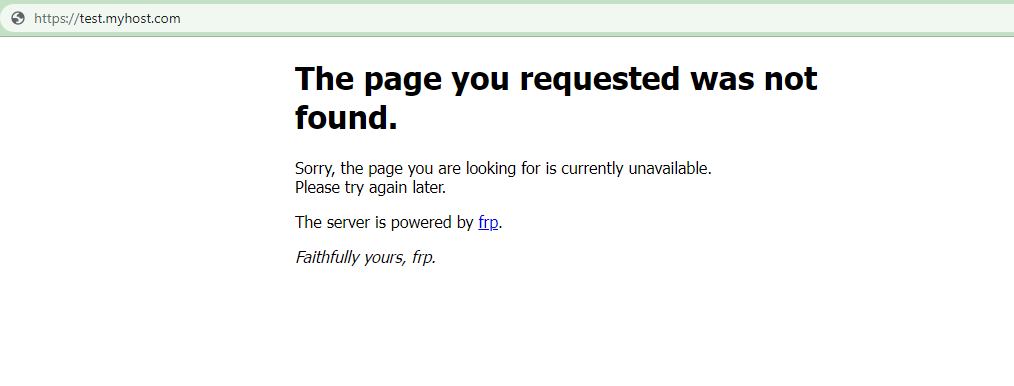
but into log frps i see https proxy listen for host [test.myhost.com] but when i try connect in the log i see error: no such domain: test.myhost.com

Website:
image

frpc Version

0.39.0

frps Version

0.39.0

System Architecture

linux/amd64

Configurations

frps.ini

# frps.ini
[common]
bind_port = 7000
authentication_method = token
token = 123456
vhost_http_port = 80
vhost_https_port = 443
subdomain_host = frps.myhost.com
log_level = trace

#Dashboard
dashboard_addr = 0.0.0.0
dashboard_port = 7500
dashboard_user = admin
dashboard_pwd = admin

frpc.ini

# frpc.ini
[common]
server_addr = remote.server.com
server_port = 7000
authentication_method = token
token = 123456

[web-http]
type = http
local_ip = 127.0.0.1
local_port = 32418
custom_domains = myhost.com

[web-https]
type = https
local_ip = 127.0.0.1
local_port = 31648
custom_domains = myhost.com

[www-web-https]
type = https
local_ip = 127.0.0.1
local_port = 31648
#subdomain = test
custom_domains = www.myhost.com

[test-web]
type = https
local_ip = 127.0.0.1
local_port = 31648
custom_domains = test.myhost.com

Logs

2022/02/06 06:59:18 [I] [root.go:200] frps uses config file: ./frps.ini
2022/02/06 06:59:18 [I] [service.go:192] frps tcp listen on 0.0.0.0:7000
2022/02/06 06:59:18 [I] [service.go:235] http service listen on 0.0.0.0:80
2022/02/06 06:59:18 [I] [service.go:250] https service listen on 0.0.0.0:443
2022/02/06 06:59:18 [I] [service.go:291] Dashboard listen on 0.0.0.0:7500
2022/02/06 06:59:18 [I] [root.go:209] frps started successfully
2022/02/06 06:59:20 [T] [service.go:394] start check TLS connection...
2022/02/06 06:59:20 [T] [service.go:403] check TLS connection success, isTLS: false custom: false
2022/02/06 06:59:20 [I] [service.go:448] [9a0735d1d5cd1174] client login info: ip [X.X.X.X:XXXXX] version [0.39.0] hostname [] os [linux] arch [amd64]
2022/02/06 06:59:20 [I] [http.go:92] [9a0735d1d5cd1174] [web-http] http proxy listen for host [myhost.com] location [] group []
2022/02/06 06:59:20 [I] [control.go:451] [9a0735d1d5cd1174] new proxy [web-http] success
2022/02/06 06:59:20 [D] [control.go:219] [9a0735d1d5cd1174] new work connection registered
2022/02/06 06:59:20 [I] [https.go:51] [9a0735d1d5cd1174] [test-web] https proxy listen for host [test.myhost.com]
2022/02/06 06:59:20 [I] [control.go:451] [9a0735d1d5cd1174] new proxy [test-web] success
2022/02/06 06:59:20 [I] [https.go:51] [9a0735d1d5cd1174] [web-https] https proxy listen for host [myhost.com]
2022/02/06 06:59:20 [I] [control.go:451] [9a0735d1d5cd1174] new proxy [web-https] success
2022/02/06 06:59:20 [I] [https.go:51] [9a0735d1d5cd1174] [www-web-https] https proxy listen for host [www.myhost.com]
2022/02/06 06:59:20 [I] [control.go:451] [9a0735d1d5cd1174] new proxy [www-web-https] success
2022/02/06 06:59:24 [W] [http.go:92] do http proxy request error: no such domain: test.myhost.com /
2022/02/06 06:59:44 [W] [http.go:92] do http proxy request error: no such domain: www.myhost.com /api-web/
2022/02/06 06:59:50 [D] [control.go:480] [9a0735d1d5cd1174] receive heartbeat

Steps to reproduce

...

Affected area

  • Docs
  • Installation
  • Performance and Scalability
  • Security
  • User Experience
  • Test and Release
  • Developer Infrastructure
  • Client Plugin
  • Server Plugin
  • Extensions
  • Others
Originally created by @walejandromt on GitHub (Feb 6, 2022). Original GitHub issue: https://github.com/fatedier/frp/issues/2788 ### Bug Description i try configured frp server into server with public ip and server into NAT but when i configured subdomains is not work but into log frps i see `https proxy listen for host [test.myhost.com]` but when i try connect in the log i see `error: no such domain: test.myhost.com` Website: ![image](https://user-images.githubusercontent.com/14278594/152671775-d2d89f07-b6b5-41ae-8224-777f338dab3a.png) ### frpc Version 0.39.0 ### frps Version 0.39.0 ### System Architecture linux/amd64 ### Configurations ### frps.ini ``` Properties # frps.ini [common] bind_port = 7000 authentication_method = token token = 123456 vhost_http_port = 80 vhost_https_port = 443 subdomain_host = frps.myhost.com log_level = trace #Dashboard dashboard_addr = 0.0.0.0 dashboard_port = 7500 dashboard_user = admin dashboard_pwd = admin ``` ### frpc.ini ``` Properties # frpc.ini [common] server_addr = remote.server.com server_port = 7000 authentication_method = token token = 123456 [web-http] type = http local_ip = 127.0.0.1 local_port = 32418 custom_domains = myhost.com [web-https] type = https local_ip = 127.0.0.1 local_port = 31648 custom_domains = myhost.com [www-web-https] type = https local_ip = 127.0.0.1 local_port = 31648 #subdomain = test custom_domains = www.myhost.com [test-web] type = https local_ip = 127.0.0.1 local_port = 31648 custom_domains = test.myhost.com ``` ### Logs ``` scala 2022/02/06 06:59:18 [I] [root.go:200] frps uses config file: ./frps.ini 2022/02/06 06:59:18 [I] [service.go:192] frps tcp listen on 0.0.0.0:7000 2022/02/06 06:59:18 [I] [service.go:235] http service listen on 0.0.0.0:80 2022/02/06 06:59:18 [I] [service.go:250] https service listen on 0.0.0.0:443 2022/02/06 06:59:18 [I] [service.go:291] Dashboard listen on 0.0.0.0:7500 2022/02/06 06:59:18 [I] [root.go:209] frps started successfully 2022/02/06 06:59:20 [T] [service.go:394] start check TLS connection... 2022/02/06 06:59:20 [T] [service.go:403] check TLS connection success, isTLS: false custom: false 2022/02/06 06:59:20 [I] [service.go:448] [9a0735d1d5cd1174] client login info: ip [X.X.X.X:XXXXX] version [0.39.0] hostname [] os [linux] arch [amd64] 2022/02/06 06:59:20 [I] [http.go:92] [9a0735d1d5cd1174] [web-http] http proxy listen for host [myhost.com] location [] group [] 2022/02/06 06:59:20 [I] [control.go:451] [9a0735d1d5cd1174] new proxy [web-http] success 2022/02/06 06:59:20 [D] [control.go:219] [9a0735d1d5cd1174] new work connection registered 2022/02/06 06:59:20 [I] [https.go:51] [9a0735d1d5cd1174] [test-web] https proxy listen for host [test.myhost.com] 2022/02/06 06:59:20 [I] [control.go:451] [9a0735d1d5cd1174] new proxy [test-web] success 2022/02/06 06:59:20 [I] [https.go:51] [9a0735d1d5cd1174] [web-https] https proxy listen for host [myhost.com] 2022/02/06 06:59:20 [I] [control.go:451] [9a0735d1d5cd1174] new proxy [web-https] success 2022/02/06 06:59:20 [I] [https.go:51] [9a0735d1d5cd1174] [www-web-https] https proxy listen for host [www.myhost.com] 2022/02/06 06:59:20 [I] [control.go:451] [9a0735d1d5cd1174] new proxy [www-web-https] success 2022/02/06 06:59:24 [W] [http.go:92] do http proxy request error: no such domain: test.myhost.com / 2022/02/06 06:59:44 [W] [http.go:92] do http proxy request error: no such domain: www.myhost.com /api-web/ 2022/02/06 06:59:50 [D] [control.go:480] [9a0735d1d5cd1174] receive heartbeat ``` ### Steps to reproduce 1. 2. 3. ... ### Affected area - [ ] Docs - [ ] Installation - [ ] Performance and Scalability - [ ] Security - [X] User Experience - [ ] Test and Release - [x] Developer Infrastructure - [ ] Client Plugin - [ ] Server Plugin - [ ] Extensions - [ ] Others
Author
Owner

@Becods commented on GitHub (Feb 7, 2022):

Cannot be reproduced

image.png

Alternatively, try whether the web server at 127.0.0.1:31648 is working properly

<!-- gh-comment-id:1031401467 --> @Becods commented on GitHub (Feb 7, 2022): Cannot be reproduced ![image.png](https://s2.loli.net/2022/02/07/OAas4LSYgfRctnz.png) Alternatively, try whether the web server at 127.0.0.1:31648 is working properly
Author
Owner

@walejandromt commented on GitHub (Feb 7, 2022):

Hi! thanks for you response

all services in 127.0.0.1:31648 its online but i dont know why i need configure https and http for all domains

all rigth work with this configure properties, only add http for all domains and now work!:

# frpc.ini
[common]
server_addr = remote.server.com
server_port = 7000
authentication_method = token
token = 123456

log_level = trace

[web-http]
type = http
local_ip = 127.0.0.1
local_port = 32418
custom_domains = myhost.com

[web-https]
type = https
local_ip = 127.0.0.1
local_port = 31648
custom_domains = myhost.com

[www-web-http]
type = http
local_ip = 127.0.0.1
local_port = 32418
subdomain = www

[www-web-https]
type = https
local_ip = 127.0.0.1
local_port = 31648
subdomain = www
#custom_domains = www.myhost.com

[test-web-http]
type = http
local_ip = 127.0.0.1
local_port = 32418
subdomain = test

[test-web]
type = https
local_ip = 127.0.0.1
local_port = 31648
subdomain = test

this is one case particularity becaose my localhost is inside double NAT maybe you dont can replicate configuration, now work with http and https in the configuration of frpc thanks!

<!-- gh-comment-id:1031764784 --> @walejandromt commented on GitHub (Feb 7, 2022): Hi! thanks for you response all services in 127.0.0.1:31648 its online but i dont know why i need configure https and http for all domains all rigth work with this configure properties, only add http for all domains and now work!: ``` properties # frpc.ini [common] server_addr = remote.server.com server_port = 7000 authentication_method = token token = 123456 log_level = trace [web-http] type = http local_ip = 127.0.0.1 local_port = 32418 custom_domains = myhost.com [web-https] type = https local_ip = 127.0.0.1 local_port = 31648 custom_domains = myhost.com [www-web-http] type = http local_ip = 127.0.0.1 local_port = 32418 subdomain = www [www-web-https] type = https local_ip = 127.0.0.1 local_port = 31648 subdomain = www #custom_domains = www.myhost.com [test-web-http] type = http local_ip = 127.0.0.1 local_port = 32418 subdomain = test [test-web] type = https local_ip = 127.0.0.1 local_port = 31648 subdomain = test ``` this is one case particularity becaose my localhost is inside double NAT maybe you dont can replicate configuration, now work with http and https in the configuration of frpc thanks!
Sign in to join this conversation.
No milestone
No project
No assignees
1 participant
Notifications
Due date
The due date is invalid or out of range. Please use the format "yyyy-mm-dd".

No due date set.

Dependencies

No dependencies set.

Reference: github-starred/frp#2229
No description provided.