mirror of
https://github.com/fatedier/frp.git
synced 2026-10-23 08:17:29 -06:00
[GH-ISSUE #2468] How to run the client as a service on windows 10? #1957
Labels
No labels
In Progress
WIP
WaitingForInfo
bug
doc
duplicate
easy
enhancement
future
help wanted
invalid
lifecycle/stale
need-issue-template
need-usage-help
no plan
proposal
pull-request
question
todo
No milestone
No project
No assignees
1 participant

Notifications
Due date
No due date set.
Dependencies
No dependencies set
Reference
github-starred/frp#1957
Loading…
Reference in a new issue
No description provided.
Delete branch "%!s()"
Deleting a branch is permanent. Although the deleted branch may continue to exist for a short time before it actually gets removed, it CANNOT be undone in most cases. Continue?
Originally created by @smac89 on GitHub (Jul 2, 2021).
Original GitHub issue: https://github.com/fatedier/frp/issues/2468
The solution you want
I would like to run an
frpclient on windows 10, however I don't know how to keep programs running on windows. The windows package comes withsystemdfiles, but I don't think systemd works on windows.Alternatives considered
How to implement this function
Application scenarios of this function
frpc/frpson windows platform@fatedier commented on GitHub (Jul 8, 2021):
I'm not familier with windows service. I will try to study it in future when i have time.
@ghost commented on GitHub (Jul 8, 2021):
HI,
in this case you could remove the systemd folder in the windows zip files. Because systemd is not available on windows systems ;)
@ghost commented on GitHub (Jul 8, 2021):
I figured it by doing the following steps:
.\WinSW-x64.exe install .\WinSW-x64.xmlNow u have a service in services.msc u could start/stop and so on
@fatedier
A better way is you provide a .Net wrapper for your golang service we can add as a service (maybe something like https://github.com/judwhite/go-svc is required)
@luangong commented on GitHub (Jul 9, 2021):
@smac89 I use NSSM (The Non-Sucking Service Manager) as a Windows service wrapper and it works very well. Just head over to https://nssm.cc/download, download the zip file, unzip it, and then run a command like this:
A dialog will show up where you can tweak all kinds of settings for the service. The only required fields are Path and Arguments. Enter the path to
frpc.exe(e.g.,C:\frp_0.37.0_amd64\frpc.exe) into the Path box and-c frpc.iniinto the Arguments box. The Startup directory is optional, and defaults to the directory containing yourfrpc.exe(C:\frp_0.37.0_amd64) if you leave it blank.You can optionally add a display name (e.g., "frp client") and a description for the frpc servic. When you are done, just hit the Edit service button and the frpc service will be up and running.
You can then double-check that the service is indeed running from within the task manager:
Finally, you can view/start/stop the service in Windows Services console (
services.msc).Note that the executable path is pointing to
nssm.exerather thanfrpc.exebecausenssm.exeis the wrapper program and it will startfrpc.exeas a child process.@luangong commented on GitHub (Jul 9, 2021):
If we are releasing frp as a portable zip file containing two console programs and a bunch of other files I would suggest we keep the executables as simple as possible and let the other service wrappers (e.g., NSSM, WinSW, etc) do the dirty work.
On the other hand, if we are releasing frp as a Windows installer (
.msi, etc) then I would suggest we provide native Windows service capability infrps.exeandfrpc.exe, probably through a command-line argument such as-s/--service/-d/--daemonto tell them to run in "service/daemon" mode.@ghost commented on GitHub (Jul 9, 2021):
I'm with you by portable installations. But I didn't like the idea with -s/-d by full installations because:
It's not so complicated to code frp with as a real Windows Service and starting a programm in a deamon mode is not the same like a windows services.
I think it's also ok to place a text in the Readme how to use frp as a windows services like both solutions above, if you down like to have a bit more coding work to get a real windows service.
For me the best solution is:
If you have an installer like msi file the installer should ask "do you like to use frp as a service" if yes then implement a correct windows service - if not do nothing like that.
only my 2 cents :)
cheers
@luangong commented on GitHub (Jul 9, 2021):
Agreed. Running in “daemon” mode is not enough. You have to actually “register” it as a service in Windows, and in Linux you also need a
frpc.servicefile for systemd to be able to manage it. Linux programs (e.g., rsync) that can be run either as an interactive, one-off command or as a background service usually provide a command-line argument like-d/--daemonso that the.servicefile can be like this:Another example is a web proxy called Privoxy which provides two additional command-line options
--installand--uninstallon Windows. If you runprivoxy.exe --install, Privoxy will register itself as a Windows service and have Windows run it asprivoxy.exe --service. You can check out their official documentation for more details.So I’m still with the
-d/--daemonflag 😄References:
@github-actions[bot] commented on GitHub (Aug 12, 2021):
Issues go stale after 30d of inactivity. Stale issues rot after an additional 7d of inactivity and eventually close.
@smac89 commented on GitHub (Aug 14, 2021):
Hey guys, I just want to say thanks for all the suggestions.
Shortly after posting this, I discovered that Windows actually has a perfectly capable tool for doing something like this, already built in. It's unsurprisingly called
Task Scheduler.Let me just explain why I needed to use frp on Windows:
I have an accountant friend who works part-time for a local store, and wanted to use quickbooks remotely in case she wasn't able to drive to the store. I had recently purchased a VPS and setup RDP on my work computer (running linux), using frpc. So I was kinda curious if this will work on Windows as well.
The steps
Enable WSL and install Alpine Linux
Alpine WSL, which is just alpine Linux packaged to work in WSL.Windows Terminal. It's a much better experience than CMD)wsland it should switch toAlpine)Install frp in Alpine
nanoworks)/etc/apk/repositoriesapk update && apk add frp@edgefrpfrp[cs].ini(choose the correct one) file somewhere in the Documents folder (hide it so it doesn't get deleted by mistake)rdpport, so use the correct one.Windows task scheduler automation
I won't go into much details on how this one works, but pretty much every Windows machine comes with one. Just play with it and it won't take long to figure out. I find you can quickly setup complex tasks in less time than if you are trying to do the same with something like
systemdoropenrc.frp[cs].inifile.End result
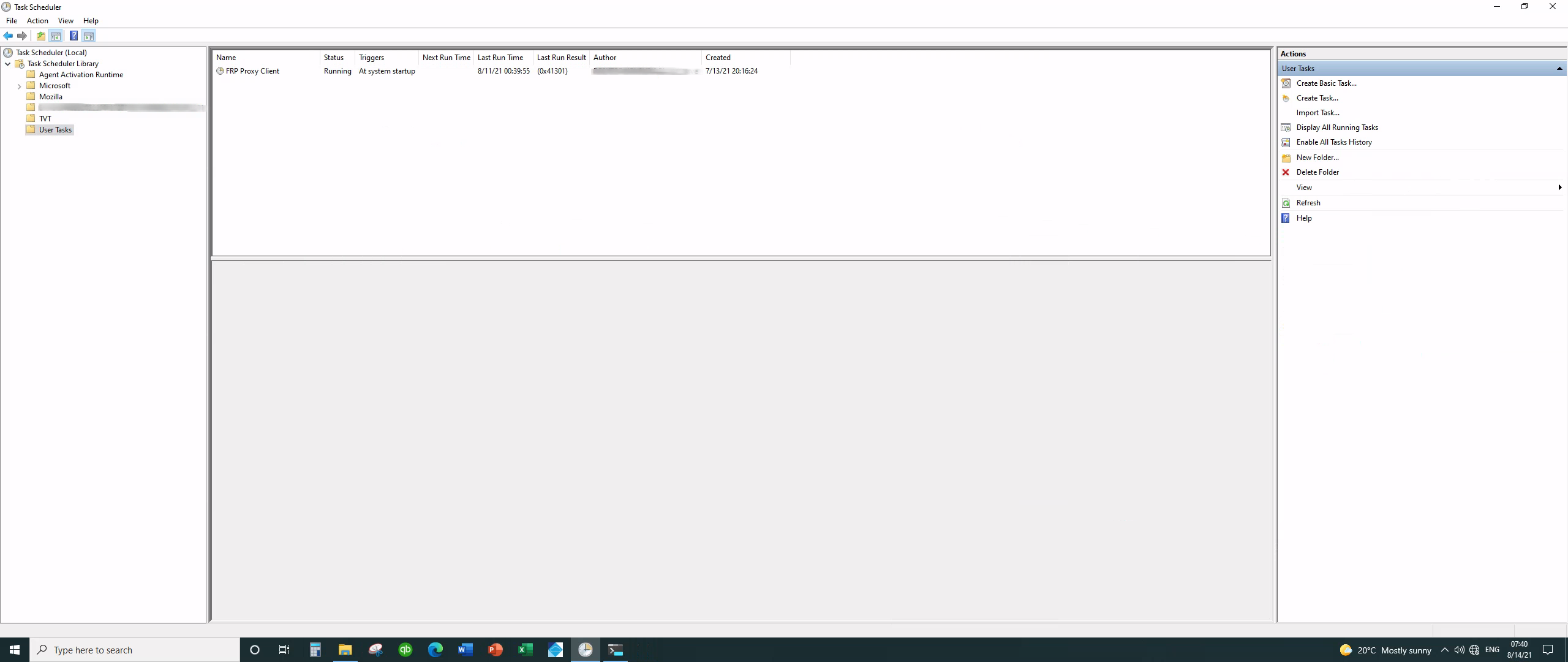
Oh and it is fast! Thanks guys!
@luangong commented on GitHub (Aug 14, 2021):
You can run TeamViewer / VNCViewer / Chrome Remote Desktop / AnyDesk Remote Desktop etc. on both computers so there is no need for a VPS or frp.
@smac89 commented on GitHub (Aug 14, 2021):
@luangong I didn't realize Chrome Remote Desktop can be be run as an RDP server. Good to know. I may have to try it out and see how fast it is.
The reason I went with
frpis because both machines I am trying to obtain remote access to are not publicly available (no public IP/ports). The first one is my work computer runningxrdpand it is hidden behind a private lan, and my friend's machine is more or less in the same boat.Secondly, I wanted a virtual desktop session for both sessions, so VNC was out of the question which pretty much eliminates all those other options you listed.
I didn't blindly go into this and just picked
frpfor no reason. Chrome Remote Desktop did not immediately scream "RDP server" on initial inspection, so I never paid it more attention.As I think about it, the setup offered by Chrome Remote Desktop is pretty much the same as what I have now with
frp, because theirs also does not require a public IP, can run headless, and also come with systemd services. I guess we'll see how much faster their setup can be especially on Linux.@github-actions[bot] commented on GitHub (Sep 14, 2021):
Issues go stale after 30d of inactivity. Stale issues rot after an additional 7d of inactivity and eventually close.
@kktt007 commented on GitHub (Mar 13, 2024):
注册服务后nssm不能卸载咯,有什么其他方式吗,让他成为系统的服务,像很多其他软件比如360那样,禁都禁不掉的那种
@donmor commented on GitHub (Oct 5, 2025):
我搞定了(是不是禁不掉另说)