[GH-ISSUE #2454] 在映射Nginx的端口的时候,有一个前导符造成访问不成功 #1949

Closed
opened 2026-05-05 13:15:16 -06:00 by gitea-mirror · 8 comments
Owner

Originally created by @zsinba on GitHub (Jun 22, 2021).
Original GitHub issue: https://github.com/fatedier/frp/issues/2454

[REQUIRED] hat version of frp are you using

Version: Latest(today)

[REQUIRED] What operating system and processor architecture are you using
OS: Raspberry 4B
CPU architecture: Arm

[REQUIRED] description of errors

confile

log file

Steps to reproduce the issue

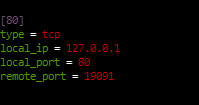
  1. FRPC 映射 80
    image

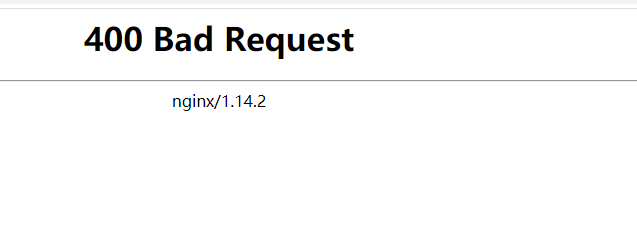
  2. Nginx 下面会出来
    image
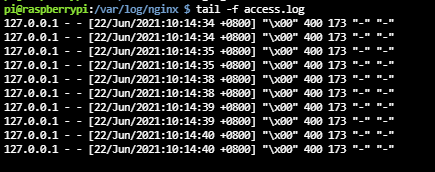
    怀疑是frp转发的时候,多了或者添加了什么字符的原因
    image

而正常的应该是这样的日志:
image

Supplementary information

Can you guess what caused this issue
配置原因或者代码原因, 转发时多了字符。
Checklist:

  • [] I included all information required in the sections above
  • [] I made sure there are no duplicates of this report (Use Search)
Originally created by @zsinba on GitHub (Jun 22, 2021). Original GitHub issue: https://github.com/fatedier/frp/issues/2454 <!-- From Chinese to English by machine translation, welcome to revise and polish. --> <!-- ⚠️⚠️ Incomplete reports will be marked as invalid, and closed, with few exceptions ⚠️⚠️ --> <!-- in addition, please use search well so that the same solution can be found in the feedback, we will close it directly --> <!-- for convenience of differentiation, use FRPS or FRPC to refer to the FRP server or client --> **[REQUIRED] hat version of frp are you using** <!-- Use ./frpc -v or ./frps -v --> Version: Latest(today) **[REQUIRED] What operating system and processor architecture are you using** OS: Raspberry 4B CPU architecture: Arm **[REQUIRED] description of errors** **confile** <!-- Please pay attention to hiding the token, server_addr and other privacy information --> **log file** <!-- If the file is too large, use Pastebin, for example https://pastebin.ubuntu.com/ --> **Steps to reproduce the issue** 1. FRPC 映射 80 ![image](https://user-images.githubusercontent.com/890157/122852244-e3ea0880-d342-11eb-886b-3aaaad3d0360.png) 2. Nginx 下面会出来 ![image](https://user-images.githubusercontent.com/890157/122852619-830f0000-d343-11eb-8e5e-1e1b792f1cea.png) 怀疑是frp转发的时候,多了或者添加了什么字符的原因 ![image](https://user-images.githubusercontent.com/890157/122852672-991cc080-d343-11eb-83bc-9c3113349c3e.png) 而正常的应该是这样的日志: ![image](https://user-images.githubusercontent.com/890157/122852714-a5088280-d343-11eb-80a1-f547ea6cf1f4.png) **Supplementary information** **Can you guess what caused this issue** 配置原因或者代码原因, 转发时多了字符。 **Checklist**: <!--- Make sure you've completed the following steps (put an "X" between of brackets): --> - [] I included all information required in the sections above - [] I made sure there are no duplicates of this report [(Use Search)](https://github.com/fatedier/frp/issues?q=is%3Aissue)
Author
Owner

@ax2009live commented on GitHub (Jun 23, 2021):

个人觉得应该是你配置有问题;
不管 type = https 还是 type = tcp ,我设置过很多,都没有出现问题;

你是通过ip访问还是域名访问?
你可以贴出frps的设置吗?
假如是ip访问:
frps的ip:192.168.0.1
frpc的ip:192.168.0.2
http://192.168.0.1:19091 等同于 http://192.168.0.2

<!-- gh-comment-id:866694913 --> @ax2009live commented on GitHub (Jun 23, 2021): 个人觉得应该是你配置有问题; 不管 type = https 还是 type = tcp ,我设置过很多,都没有出现问题; 你是通过ip访问还是域名访问? 你可以贴出frps的设置吗? 假如是ip访问: frps的ip:192.168.0.1 frpc的ip:192.168.0.2 http://192.168.0.1:19091 等同于 http://192.168.0.2
Author
Owner

@zsinba commented on GitHub (Jun 23, 2021):

我也是配置过很多次,没有出问题。 这是刚发现的。
FRPS是192。168。1。168
FRPC是192。168。1。123
168这个服务器是有外网IP的,双穴主机。
FRPC仅做了一个TCP端口转发,没其他配置。

我估计原因是Go编译的东西,在Raspberry下面有问题,造成多出来 一个字符。
这样怀疑的原因,是只有Raspberry下面才出现这个问题,我在其他arm下面并没有出现 这个问题,在Intel下面也没有这个问题。

所以:
要么是Raspberry+Nginx出来的问题
要么是新版本的FRP出的问题。
十分肯定不是我的配置的问题, 因为这个配置同样的在其他环境上正常。

<!-- gh-comment-id:866702934 --> @zsinba commented on GitHub (Jun 23, 2021): 我也是配置过很多次,没有出问题。 这是刚发现的。 FRPS是192。168。1。168 FRPC是192。168。1。123 168这个服务器是有外网IP的,双穴主机。 FRPC仅做了一个TCP端口转发,没其他配置。 我估计原因是Go编译的东西,在Raspberry下面有问题,造成多出来 一个字符。 这样怀疑的原因,是只有Raspberry下面才出现这个问题,我在其他arm下面并没有出现 这个问题,在Intel下面也没有这个问题。 所以: 要么是Raspberry+Nginx出来的问题 要么是新版本的FRP出的问题。 十分肯定不是我的配置的问题, 因为这个配置同样的在其他环境上正常。
Author
Owner

@zsinba commented on GitHub (Jun 23, 2021):

个人觉得应该是你配置有问题;
不管 type = https 还是 type = tcp ,我设置过很多,都没有出现问题;

你是通过ip访问还是域名访问?
你可以贴出frps的设置吗?
假如是ip访问:
frps的ip:192.168.0.1
frpc的ip:192.168.0.2
http://192.168.0.1:19091 等同于 http://192.168.0.2

我是通过域名访问的,非ip;
难道你是说Nginx并没有监听这个域名,所以出现这个问题?
我也怀疑过这个原因,Nginx没配置这个域名,所以过来的域名不处理嘛。 但是排查后似乎并不是这个原因。我做了星号匹配的监听。

<!-- gh-comment-id:866704103 --> @zsinba commented on GitHub (Jun 23, 2021): > 个人觉得应该是你配置有问题; > 不管 type = https 还是 type = tcp ,我设置过很多,都没有出现问题; > > 你是通过ip访问还是域名访问? > 你可以贴出frps的设置吗? > 假如是ip访问: > frps的ip:192.168.0.1 > frpc的ip:192.168.0.2 > http://192.168.0.1:19091 等同于 http://192.168.0.2 我是通过域名访问的,非ip; 难道你是说Nginx并没有监听这个域名,所以出现这个问题? 我也怀疑过这个原因,Nginx没配置这个域名,所以过来的域名不处理嘛。 但是排查后似乎并不是这个原因。我做了星号匹配的监听。
Author
Owner

@ax2009live commented on GitHub (Jun 23, 2021):

vhost_http_port = ??
vhost_https_port = ??
如果不是frp问题,
你有排查 frpc 这个 web 服务器本身有没有问题吗?在没有经过frp的时候访问是否正常?

<!-- gh-comment-id:866727037 --> @ax2009live commented on GitHub (Jun 23, 2021): vhost_http_port = ?? vhost_https_port = ?? 如果不是frp问题, 你有排查 frpc 这个 web 服务器本身有没有问题吗?在没有经过frp的时候访问是否正常?
Author
Owner

@zsinba commented on GitHub (Jun 27, 2021):

vhost_http_port = ??
vhost_https_port = ??
如果不是frp问题,
你有排查 frpc 这个 web 服务器本身有没有问题吗?在没有经过frp的时候访问是否正常?

我并没有使用WEB映射呀。 我仅使用TCP映射,跟WEB这个HTTP没关系。也没有使用Vhost。
我仅是做一个TCP穿透的映射而已。

<!-- gh-comment-id:869162914 --> @zsinba commented on GitHub (Jun 27, 2021): > vhost_http_port = ?? > vhost_https_port = ?? > 如果不是frp问题, > 你有排查 frpc 这个 web 服务器本身有没有问题吗?在没有经过frp的时候访问是否正常? 我并没有使用WEB映射呀。 我仅使用TCP映射,跟WEB这个HTTP没关系。也没有使用Vhost。 我仅是做一个TCP穿透的映射而已。
Author
Owner

@pub999 commented on GitHub (Jun 28, 2021):

nginx 配置加上 listen 80 proxy_protocol;试试,猜测是tcp转发了真实ip

<!-- gh-comment-id:869370261 --> @pub999 commented on GitHub (Jun 28, 2021): nginx 配置加上` listen 80 proxy_protocol;`试试,猜测是tcp转发了真实ip
Author
Owner

@zsinba commented on GitHub (Jun 29, 2021):

nginx 配置加上 listen 80 proxy_protocol;试试,猜测是tcp转发了真实ip

你是对的。 的确是这个原因。
加了你这句就正常了。
image

没有你这句,则是这样:
image

学习了。感谢指导

<!-- gh-comment-id:870415257 --> @zsinba commented on GitHub (Jun 29, 2021): > nginx 配置加上` listen 80 proxy_protocol;`试试,猜测是tcp转发了真实ip 你是对的。 的确是这个原因。 加了你这句就正常了。 ![image](https://user-images.githubusercontent.com/890157/123769287-b7625d80-d8fb-11eb-8066-ea1ac31eb1d1.png) 没有你这句,则是这样: ![image](https://user-images.githubusercontent.com/890157/123769311-c1845c00-d8fb-11eb-907d-89cce08060fd.png) 学习了。感谢指导
Author
Owner

@zsinba commented on GitHub (Jun 29, 2021):

image

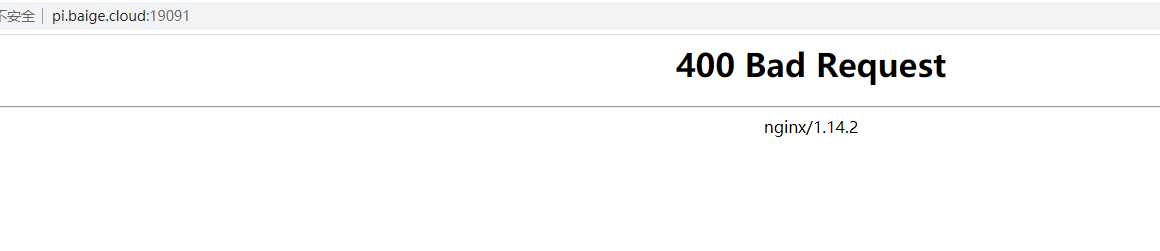
是这样做的测试。

<!-- gh-comment-id:870415976 --> @zsinba commented on GitHub (Jun 29, 2021): ![image](https://user-images.githubusercontent.com/890157/123769430-e37dde80-d8fb-11eb-9767-fd5be92645aa.png) 是这样做的测试。
Sign in to join this conversation.
No milestone
No project
No assignees
1 participant
Notifications
Due date
The due date is invalid or out of range. Please use the format "yyyy-mm-dd".

No due date set.

Dependencies

No dependencies set.

Reference: github-starred/frp#1949
No description provided.