mirror of
https://github.com/fatedier/frp.git
synced 2026-10-23 08:17:29 -06:00
[GH-ISSUE #2130] frp不按照frpc.ini 设定的端口进行穿透 #1695
Labels
No labels
In Progress
WIP
WaitingForInfo
bug
doc
duplicate
easy
enhancement
future
help wanted
invalid
lifecycle/stale
need-issue-template
need-usage-help
no plan
proposal
pull-request
question
todo
No milestone
No project
No assignees
1 participant

Notifications
Due date
No due date set.
Dependencies
No dependencies set
Reference
github-starred/frp#1695
Loading…
Reference in a new issue
No description provided.
Delete branch "%!s()"
Deleting a branch is permanent. Although the deleted branch may continue to exist for a short time before it actually gets removed, it CANNOT be undone in most cases. Continue?
Originally created by @kalonezero87 on GitHub (Dec 4, 2020).
Original GitHub issue: https://github.com/fatedier/frp/issues/2130
[REQUIRED] hat version of frp are you using
Version:0.34.3
[REQUIRED] What operating system and processor architecture are you using
OS:Debain 10.2
CPU architecture: AMD64
[REQUIRED] description of errors
没错,又是我,神奇的事情天天有。哈哈。在frp正常运行后,我尝试远程SSH访问内网的群晖。我22端口对应remote_port: 8222。神奇的事情发生了,frp监听的是我曾经的6006端口,配置重已经删了的,我将配置不变的情况下[SSH]改为[SSH2] 这时frp自动设置为8003.我增加其他服务时,frp一定会设置一个8003,哪怕让其他配置没有端口.....
confile
frpc.ini
[common]
server_addr = XXX.XXX.XXX.XXX
server_port = 7000
token = XXXXX
[DSM]
type = tcp
local_ip = 127.0.0.1
local_port = 5000
remote_port = 6001
[Jellyfin]
type = tcp
local_ip = 127.0.0.1
local_port = 8096
remote_port = 7001
[Tinymediamanger]
type = tcp
local_ip = 127.0.0.1
local_port = 5800
remote_port = 8001
[Qbittorrent]
type = tcp
local_ip = 127.0.0.1
local_port = 8989
remote_port = 9010
[NextCloud]
type = tcp
local_ip = 127.0.0.1
local_port = 8888
remote_port = 9888
[Onlyoffice]
type = tcp
local_ip = 127.0.0.1
local_port = 8002
remote_port = 8002
[SSH3]
type = tcp
local_ip = 127.0.0.1
local_port = 22
remote_port = 8222
[route]
type = tcp
local_ip = 192.168.2.1
local_port = 80
remote_port = 8021
[N1]
type = tcp
local_ip = 192.168.2.100
local_port = 80
remote_port = 8100
dashboard 显示的:
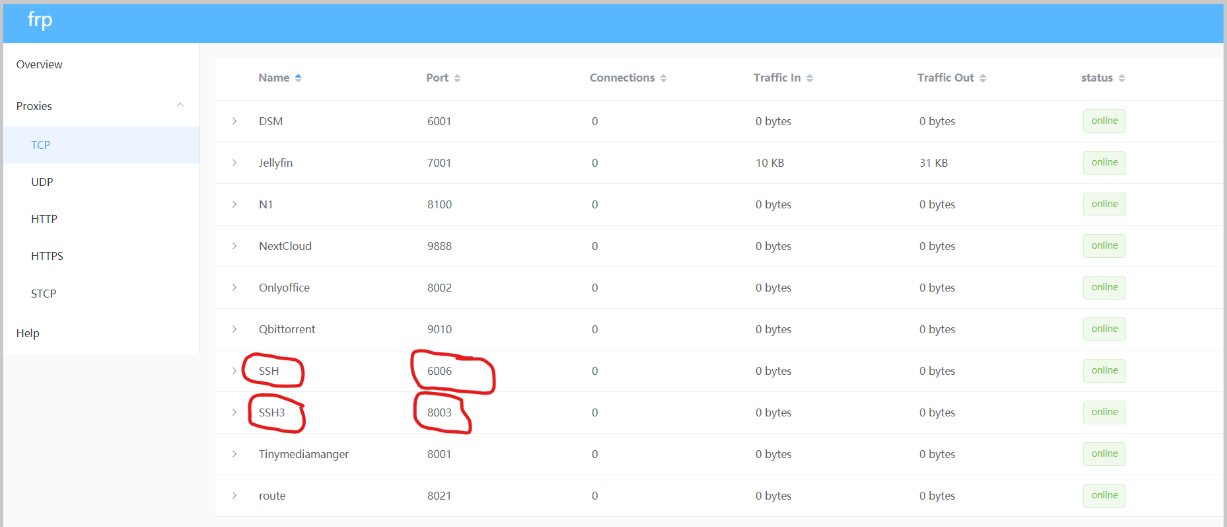

诡异的8003端口 直接在vps查看端口情况。
log file
Steps to reproduce the issue
1.
2.
3.
Supplementary information
Can you guess what caused this issue
Checklist: