[GH-ISSUE #2039] windows远程桌面该怎么配置啊? #1622

Closed
opened 2026-05-05 13:02:13 -06:00 by gitea-mirror · 6 comments
Owner

Originally created by @kyarazhan on GitHub (Oct 24, 2020).
Original GitHub issue: https://github.com/fatedier/frp/issues/2039

大佬们,想问下 OpenWRT路由器挂载的frp,可以正常的访问内网机器。window远程桌面需要怎么在vps、路由器、window上配置啊?求大佬指点下!!

Originally created by @kyarazhan on GitHub (Oct 24, 2020). Original GitHub issue: https://github.com/fatedier/frp/issues/2039 大佬们,想问下 OpenWRT路由器挂载的frp,可以正常的访问内网机器。window远程桌面需要怎么在vps、路由器、window上配置啊?求大佬指点下!!
Author
Owner

@kingwilliam commented on GitHub (Oct 24, 2020):

我不是用OpenWRT, 但大约如下
window远程桌面 最基本要 tcp3389, 如想支援udp 就同时开 tcp&udp 3389.(如您内网只有一部机器需要远程桌面)

client

[rdp-tcp]
type = tcp
local_ip = 192.168.0.1
local_port = 3389
remote_port = 3389

[rdp-udp]
type = udp
local_ip = 192.168.0.1
local_port = 3389
remote_port = 3389
<!-- gh-comment-id:716067254 --> @kingwilliam commented on GitHub (Oct 24, 2020): 我不是用OpenWRT, 但大约如下 window远程桌面 最基本要 tcp3389, 如想支援udp 就同时开 tcp&udp 3389.(如您内网只有一部机器需要远程桌面) client ``` [rdp-tcp] type = tcp local_ip = 192.168.0.1 local_port = 3389 remote_port = 3389 [rdp-udp] type = udp local_ip = 192.168.0.1 local_port = 3389 remote_port = 3389 ```
Author
Owner

@kyarazhan commented on GitHub (Oct 26, 2020):

谢谢大佬,RDP解决了。现在有个新的问题,内网window server机器搭建的FTP,用FRP穿透访问,可以出现认证的界面,输入账号密码后,连接不上了
image

====FTP软件连接 提示如下====
正在打开到的FTP连接dl.igoke.top
使用用户名登录FTPhellfire
<<< 220 Microsoft FTP Service

USER hellfire
<<< 331 Password required

PASS ***********
<<< 230 User logged in.

FEAT
<<< 211-Extended features supported:
LANG EN*
UTF8
AUTH TLS;TLS-C;SSL;TLS-P;
PBSZ
PROT C;P;
CCC
HOST
SIZE
MDTM
REST STREAM
211 END

CWD .
<<< 250 CWD command successful.

PWD
<<< 257 "/" is current directory.

CWD /
<<< 250 CWD command successful.

PWD
<<< 257 "/" is current directory.

Opening directory /...

PWD
<<< 257 "/" is current directory.

CWD /
<<< 250 CWD command successful.

TYPE A
<<< 200 Type set to A.

PASV
<<< 227 Entering Passive Mode (10,0,0,2,155,92).

LIST
<<< 150 Opening ASCII mode data connection.

<<< 550 Data channel timed out.

CWD /
<<< 250 CWD command successful.

Error EElFTPSError: 控制通道传输错误

<!-- gh-comment-id:716274065 --> @kyarazhan commented on GitHub (Oct 26, 2020): 谢谢大佬,RDP解决了。现在有个新的问题,内网window server机器搭建的FTP,用FRP穿透访问,可以出现认证的界面,输入账号密码后,连接不上了 ![image](https://user-images.githubusercontent.com/12757648/97129314-81bc1200-1779-11eb-94df-a1b8e2d007ad.png) ====FTP软件连接 提示如下==== 正在打开到的FTP连接dl.igoke.top 使用用户名登录FTPhellfire <<< 220 Microsoft FTP Service >>> USER hellfire <<< 331 Password required >>> PASS *********** <<< 230 User logged in. >>> FEAT <<< 211-Extended features supported: LANG EN* UTF8 AUTH TLS;TLS-C;SSL;TLS-P; PBSZ PROT C;P; CCC HOST SIZE MDTM REST STREAM 211 END >>> CWD . <<< 250 CWD command successful. >>> PWD <<< 257 "/" is current directory. >>> CWD / <<< 250 CWD command successful. >>> PWD <<< 257 "/" is current directory. Opening directory /... >>> PWD <<< 257 "/" is current directory. >>> CWD / <<< 250 CWD command successful. >>> TYPE A <<< 200 Type set to A. >>> PASV <<< 227 Entering Passive Mode (10,0,0,2,155,92). >>> LIST <<< 150 Opening ASCII mode data connection. <<< 550 Data channel timed out. >>> CWD / <<< 250 CWD command successful. Error EElFTPSError: 控制通道传输错误
Author
Owner

@ffffzi5 commented on GitHub (Oct 26, 2020):

ftp 有被动连接和主动连接,是看是否把20端口也代理了,或者给出文件传输端口范围。你可以查询一下ftp相关知识。

<!-- gh-comment-id:716280139 --> @ffffzi5 commented on GitHub (Oct 26, 2020): ftp 有被动连接和主动连接,是看是否把20端口也代理了,或者给出文件传输端口范围。你可以查询一下ftp相关知识。
Author
Owner

@kingwilliam commented on GitHub (Oct 27, 2020):

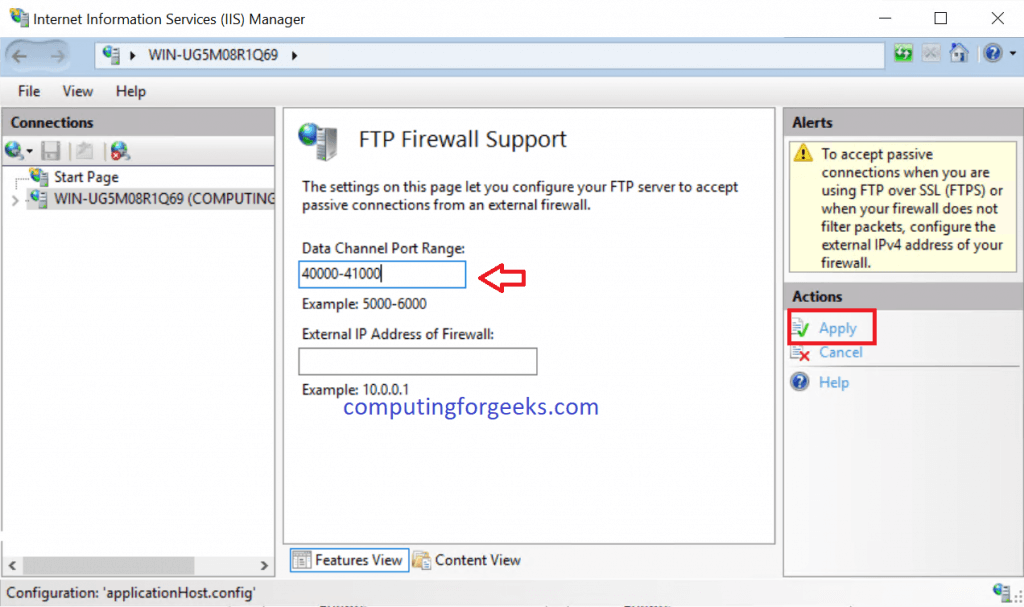
看您情况 估计是您windows ftp server设定了被动模式 现在有以下几点需要设定
1。到windows ftp server了解被动模式设定了那组端口(如果自用大约50就非常足够 如10001-10050)
2。要告诉ftp您的 vps 真ip地址
windows ftp server被动模式设定可参考 Install and Configure FTP Server on Windows Server 2019
image
image

3。在frp clients设定

[ftp-passive]
type = tcp
local_ip = 192.168.0.1
local_port = 10001-10050
remote_port = 10001-10050
<!-- gh-comment-id:717059627 --> @kingwilliam commented on GitHub (Oct 27, 2020): 看您情况 估计是您windows ftp server设定了被动模式 现在有以下几点需要设定 1。到windows ftp server了解被动模式设定了那组端口(如果自用大约50就非常足够 如10001-10050) 2。要告诉ftp您的 vps 真ip地址 windows ftp server被动模式设定可参考 [Install and Configure FTP Server on Windows Server 2019](https://computingforgeeks.com/install-and-configure-ftp-server-on-windows-server-2019/#:~:text=In%20passive%20mode%2C%20the%20client,connection%20back%20to%20the%20client. ) ![image](https://user-images.githubusercontent.com/3607762/97272506-03409c80-186d-11eb-8ac8-5caf48b2f9a2.png) ![image](https://user-images.githubusercontent.com/3607762/97272524-08055080-186d-11eb-8fbc-936a033d408b.png) 3。在frp clients设定 ``` [ftp-passive] type = tcp local_ip = 192.168.0.1 local_port = 10001-10050 remote_port = 10001-10050 ```
Author
Owner

@kyarazhan commented on GitHub (Oct 29, 2020):

看您情况 估计是您windows ftp server设定了被动模式 现在有以下几点需要设定
1。到windows ftp server了解被动模式设定了那组端口(如果自用大约50就非常足够 如10001-10050)
2。要告诉ftp您的 vps 真ip地址
windows ftp server被动模式设定可参考 Install and Configure FTP Server on Windows Server 2019
image
image

3。在frp clients设定

[ftp-passive]
type = tcp
local_ip = 192.168.0.1
local_port = 10001-10050
remote_port = 10001-10050

谢谢!

<!-- gh-comment-id:718688510 --> @kyarazhan commented on GitHub (Oct 29, 2020): > 看您情况 估计是您windows ftp server设定了被动模式 现在有以下几点需要设定 > 1。到windows ftp server了解被动模式设定了那组端口(如果自用大约50就非常足够 如10001-10050) > 2。要告诉ftp您的 vps 真ip地址 > windows ftp server被动模式设定可参考 [Install and Configure FTP Server on Windows Server 2019](https://computingforgeeks.com/install-and-configure-ftp-server-on-windows-server-2019/#:~:text=In%20passive%20mode%2C%20the%20client,connection%20back%20to%20the%20client.) > ![image](https://user-images.githubusercontent.com/3607762/97272506-03409c80-186d-11eb-8ac8-5caf48b2f9a2.png) > ![image](https://user-images.githubusercontent.com/3607762/97272524-08055080-186d-11eb-8fbc-936a033d408b.png) > > 3。在frp clients设定 > > ``` > [ftp-passive] > type = tcp > local_ip = 192.168.0.1 > local_port = 10001-10050 > remote_port = 10001-10050 > ``` 谢谢!
Author
Owner

@ZhelinCheng commented on GitHub (Nov 5, 2020):

QQ20201105-135909@2x 我是这样配置的,很完美
<!-- gh-comment-id:722161125 --> @ZhelinCheng commented on GitHub (Nov 5, 2020): <img width="655" alt="QQ20201105-135909@2x" src="https://user-images.githubusercontent.com/16441850/98203496-1d663300-1f6f-11eb-91a2-950c8eb787af.png"> 我是这样配置的,很完美
Sign in to join this conversation.
No milestone
No project
No assignees
1 participant
Notifications
Due date
The due date is invalid or out of range. Please use the format "yyyy-mm-dd".

No due date set.

Dependencies

No dependencies set.

Reference: github-starred/frp#1622
No description provided.