[GH-ISSUE #1392] 个别网页出现401错误 #1100

Closed
opened 2026-05-05 12:42:35 -06:00 by gitea-mirror · 8 comments
Owner

Originally created by @Nisekoi5 on GitHub (Aug 17, 2019).
Original GitHub issue: https://github.com/fatedier/frp/issues/1392

What version of frp are you using (./frpc -v or ./frps -v)?
frps: 0.28.2
frpc: 0.28.2

What operating system and processor architecture are you using (go env)?
Server: CentOS7
Client: Openwrt x86

Configures you used:
Server:

[common]
bind_port = 7000
dashboard_port = 7500
dashboard_user = *******
dashboard_pwd = *******
vhost_http_port = 10080
token = ********
vhost_https_port = 10443
subdomain_host = 域名.com

Client:

[common]
server_addr = 域名
server_port = 7000
token = ******

[lede]
type = http
local_ip = 192.168.51.1
local_port = 80
subdomain = lede

[dsmqb]
type = http
local_ip = 192.168.51.235
local_port = 12321
subdomain = qb

Steps to reproduce the issue:

  1. ./frps -c ./frps.ini
  2. ./frpc -c ./frpc.ini
  3. 打开网站 qb.域名.com:10080lede.域名.com:10080
  4. qb报错 HTTP ERROR 401,lede正常打开
  5. 打开qb所代理的网页,即192.168.51.235:12321正常打开

Describe the results you received:
Server:

2019/08/17 12:36:09 [I] [service.go:146] frps tcp listen on 0.0.0.0:7000
2019/08/17 12:36:09 [I] [service.go:188] http service listen on 0.0.0.0:10080
2019/08/17 12:36:09 [I] [service.go:209] https service listen on 0.0.0.0:10443
2019/08/17 12:36:09 [I] [service.go:239] Dashboard listen on 0.0.0.0:7500
2019/08/17 12:36:09 [I] [root.go:204] Start frps success
2019/08/17 12:36:16 [I] [service.go:356] client login info: ip [116.238.192.154:12870] version [0.28.2] hostname [] os [linux] arch [amd64]
2019/08]/17 12:36:16 [I] [tcp.go:66] [de5b26d25a8b2faa] [ssh] tcp proxy listen port [6000]
2019/08/17 12:36:16 [I] [control.go:398] [de5b26d25a8b2faa] new proxy [ssh] success
2019/08/17 12:36:16 [I] [https.go:65] [de5b26d25a8b2faa] [pve] https proxy listen for host [pve.域名.com]
2019/08/17 12:36:16 [I] [control.go:398] [de5b26d25a8b2faa] new proxy [pve] success
2019/08/17 12:36:16 [I] [http.go:124] [de5b26d25a8b2faa] [na] http proxy listen for host [na.域名.com] location [] group []
2019/08/17 12:36:16 [I] [control.go:398] [de5b26d25a8b2faa] new proxy [na] success
2019/08/17 12:36:16 [I] [https.go:65] [de5b26d25a8b2faa] [nas] https proxy listen for host [nas.域名.com]
2019/08/17 12:36:16 [I] [control.go:398] [de5b26d25a8b2faa] new proxy [nas] success
2019/08/17 12:36:16 [I] [http.go:124] [de5b26d25a8b2faa] [web] http proxy listen for host [web.域名.com] location [] group []
2019/08/17 12:36:16 [I] [control.go:398] [de5b26d25a8b2faa] new proxy [web] success
2019/08/17 12:36:16 [I] [http.go:124] [de5b26d25a8b2faa] [lede] http proxy listen for host [lede.域名.com] location [] group []
2019/08/17 12:36:16 [I] [control.go:398] [de5b26d25a8b2faa] new proxy [lede] success
2019/08/17 12:36:16 [I] [http.go:124] [de5b26d25a8b2faa] [phot] http proxy listen for host [phot.域名.com] location [] group []
2019/08/17 12:36:16 [I] [control.go:398] [de5b26d25a8b2faa] new proxy [phot] success
2019/08/17 12:36:16 [I] [tcp.go:66] [de5b26d25a8b2faa] [win] tcp proxy listen port [6001]
2019/08/17 12:36:16 [I] [control.go:398] [de5b26d25a8b2faa] new proxy [win] success
2019/08/17 12:36:16 [I] [http.go:124] [de5b26d25a8b2faa] [dsmqb] http proxy listen for host [qb.域名.com] location [] group []
2019/08/17 12:36:16 [I] [control.go:398] [de5b26d25a8b2faa] new proxy [dsmqb] success
2019/08/17 12:36:16 [I] [http.go:124] [de5b26d25a8b2faa] [pan] http proxy listen for host [pan123.域名.com] location [] group []
2019/08/17 12:36:16 [I] [control.go:398] [de5b26d25a8b2faa] new proxy [pan] success
2019/08/17 12:36:34 [I] [proxy.go:84] [de5b26d25a8b2faa] [dsmqb] get a new work connection: [116.238.192.154:12870]
2019/08/17 12:36:36 [I] [proxy.go:84] [de5b26d25a8b2faa] [dsmqb] get a new work connection: [116.238.192.154:12870]
2019/08/17 12:38:52 [I] [proxy.go:84] [de5b26d25a8b2faa] [lede] get a new work connection: [116.238.192.154:12870]

Client:

root@Openwrt:/koolshare/frpc# ./frpc -c ./frpc.ini
2019/08/17 12:41:07 [I] [service.go:224] login to server success, get run id [614ca8faa8455b6a], server udp port [0]
2019/08/17 12:41:07 [I] [proxy_manager.go:137] [614ca8faa8455b6a] proxy added: [web lede phot ssh pve pan dsmqb nas na win]
2019/08/17 12:41:07 [I] [control.go:144] [pve] start proxy success
2019/08/17 12:41:07 [I] [control.go:144] [nas] start proxy success
2019/08/17 12:41:07 [I] [control.go:144] [na] start proxy success
2019/08/17 12:41:07 [I] [control.go:144] [win] start proxy success
2019/08/17 12:41:07 [I] [control.go:144] [dsmqb] start proxy success
2019/08/17 12:41:07 [I] [control.go:144] [lede] start proxy success
2019/08/17 12:41:07 [I] [control.go:144] [web] start proxy success
2019/08/17 12:41:07 [I] [control.go:144] [pan] start proxy success
2019/08/17 12:41:07 [I] [control.go:144] [phot] start proxy success
2019/08/17 12:41:07 [I] [control.go:144] [ssh] start proxy success

Describe the results you expected:
网页qb所代理的网页为bt软件qbittorrent 的web界面,外部端口为12321,软件是使用docker运行的。此处附上docker配置图与网页打开界面
docker配置
https://i.loli.net/2019/08/17/xyg7JfCkbzS8ohV.png
内网打开qbittorrent
https://i.loli.net/2019/08/17/3y6LTknMYbgKfp5.png
frp打开lede
https://i.loli.net/2019/08/17/R3EOtwcsZpYFMhb.png
frp打开qb
https://i.loli.net/2019/08/17/qI9lm4B5t2rC76R.png

我想用内网穿透实现在外网添加种子等操作。但是无论怎么设置都出现http 401错误,且只在这一个页面上出现。在仪表盘或者服务器日志均无异常。

Additional information you deem important (e.g. issue happens only occasionally):

Can you point out what caused this issue (optional)

Originally created by @Nisekoi5 on GitHub (Aug 17, 2019). Original GitHub issue: https://github.com/fatedier/frp/issues/1392 **What version of frp are you using (./frpc -v or ./frps -v)?** frps: 0.28.2 frpc: 0.28.2 **What operating system and processor architecture are you using (`go env`)?** Server: CentOS7 Client: Openwrt x86 **Configures you used:** Server: ``` [common] bind_port = 7000 dashboard_port = 7500 dashboard_user = ******* dashboard_pwd = ******* vhost_http_port = 10080 token = ******** vhost_https_port = 10443 subdomain_host = 域名.com ``` Client: ``` [common] server_addr = 域名 server_port = 7000 token = ****** [lede] type = http local_ip = 192.168.51.1 local_port = 80 subdomain = lede [dsmqb] type = http local_ip = 192.168.51.235 local_port = 12321 subdomain = qb ``` **Steps to reproduce the issue:** 1. ./frps -c ./frps.ini 2. ./frpc -c ./frpc.ini 3. 打开网站 `qb.域名.com:10080` 与`lede.域名.com:10080` 4. `qb`报错 HTTP ERROR 401,`lede`正常打开 5. 打开`qb`所代理的网页,即`192.168.51.235:12321`正常打开 **Describe the results you received:** Server: ``` 2019/08/17 12:36:09 [I] [service.go:146] frps tcp listen on 0.0.0.0:7000 2019/08/17 12:36:09 [I] [service.go:188] http service listen on 0.0.0.0:10080 2019/08/17 12:36:09 [I] [service.go:209] https service listen on 0.0.0.0:10443 2019/08/17 12:36:09 [I] [service.go:239] Dashboard listen on 0.0.0.0:7500 2019/08/17 12:36:09 [I] [root.go:204] Start frps success 2019/08/17 12:36:16 [I] [service.go:356] client login info: ip [116.238.192.154:12870] version [0.28.2] hostname [] os [linux] arch [amd64] 2019/08]/17 12:36:16 [I] [tcp.go:66] [de5b26d25a8b2faa] [ssh] tcp proxy listen port [6000] 2019/08/17 12:36:16 [I] [control.go:398] [de5b26d25a8b2faa] new proxy [ssh] success 2019/08/17 12:36:16 [I] [https.go:65] [de5b26d25a8b2faa] [pve] https proxy listen for host [pve.域名.com] 2019/08/17 12:36:16 [I] [control.go:398] [de5b26d25a8b2faa] new proxy [pve] success 2019/08/17 12:36:16 [I] [http.go:124] [de5b26d25a8b2faa] [na] http proxy listen for host [na.域名.com] location [] group [] 2019/08/17 12:36:16 [I] [control.go:398] [de5b26d25a8b2faa] new proxy [na] success 2019/08/17 12:36:16 [I] [https.go:65] [de5b26d25a8b2faa] [nas] https proxy listen for host [nas.域名.com] 2019/08/17 12:36:16 [I] [control.go:398] [de5b26d25a8b2faa] new proxy [nas] success 2019/08/17 12:36:16 [I] [http.go:124] [de5b26d25a8b2faa] [web] http proxy listen for host [web.域名.com] location [] group [] 2019/08/17 12:36:16 [I] [control.go:398] [de5b26d25a8b2faa] new proxy [web] success 2019/08/17 12:36:16 [I] [http.go:124] [de5b26d25a8b2faa] [lede] http proxy listen for host [lede.域名.com] location [] group [] 2019/08/17 12:36:16 [I] [control.go:398] [de5b26d25a8b2faa] new proxy [lede] success 2019/08/17 12:36:16 [I] [http.go:124] [de5b26d25a8b2faa] [phot] http proxy listen for host [phot.域名.com] location [] group [] 2019/08/17 12:36:16 [I] [control.go:398] [de5b26d25a8b2faa] new proxy [phot] success 2019/08/17 12:36:16 [I] [tcp.go:66] [de5b26d25a8b2faa] [win] tcp proxy listen port [6001] 2019/08/17 12:36:16 [I] [control.go:398] [de5b26d25a8b2faa] new proxy [win] success 2019/08/17 12:36:16 [I] [http.go:124] [de5b26d25a8b2faa] [dsmqb] http proxy listen for host [qb.域名.com] location [] group [] 2019/08/17 12:36:16 [I] [control.go:398] [de5b26d25a8b2faa] new proxy [dsmqb] success 2019/08/17 12:36:16 [I] [http.go:124] [de5b26d25a8b2faa] [pan] http proxy listen for host [pan123.域名.com] location [] group [] 2019/08/17 12:36:16 [I] [control.go:398] [de5b26d25a8b2faa] new proxy [pan] success 2019/08/17 12:36:34 [I] [proxy.go:84] [de5b26d25a8b2faa] [dsmqb] get a new work connection: [116.238.192.154:12870] 2019/08/17 12:36:36 [I] [proxy.go:84] [de5b26d25a8b2faa] [dsmqb] get a new work connection: [116.238.192.154:12870] 2019/08/17 12:38:52 [I] [proxy.go:84] [de5b26d25a8b2faa] [lede] get a new work connection: [116.238.192.154:12870] 2019/08/17 12:38:52 [I] [proxy.go:84] [de5b26d25a8b2faa] [lede] get a new work connection: [116.238.192.154:12870] 2019/08/17 12:38:52 [I] [proxy.go:84] [de5b26d25a8b2faa] [lede] get a new work connection: [116.238.192.154:12870] 2019/08/17 12:38:52 [I] [proxy.go:84] [de5b26d25a8b2faa] [lede] get a new work connection: [116.238.192.154:12870] 2019/08/17 12:38:52 [I] [proxy.go:84] [de5b26d25a8b2faa] [lede] get a new work connection: [116.238.192.154:12870] 2019/08/17 12:38:52 [I] [proxy.go:84] [de5b26d25a8b2faa] [lede] get a new work connection: [116.238.192.154:12870] ``` Client: ``` root@Openwrt:/koolshare/frpc# ./frpc -c ./frpc.ini 2019/08/17 12:41:07 [I] [service.go:224] login to server success, get run id [614ca8faa8455b6a], server udp port [0] 2019/08/17 12:41:07 [I] [proxy_manager.go:137] [614ca8faa8455b6a] proxy added: [web lede phot ssh pve pan dsmqb nas na win] 2019/08/17 12:41:07 [I] [control.go:144] [pve] start proxy success 2019/08/17 12:41:07 [I] [control.go:144] [nas] start proxy success 2019/08/17 12:41:07 [I] [control.go:144] [na] start proxy success 2019/08/17 12:41:07 [I] [control.go:144] [win] start proxy success 2019/08/17 12:41:07 [I] [control.go:144] [dsmqb] start proxy success 2019/08/17 12:41:07 [I] [control.go:144] [lede] start proxy success 2019/08/17 12:41:07 [I] [control.go:144] [web] start proxy success 2019/08/17 12:41:07 [I] [control.go:144] [pan] start proxy success 2019/08/17 12:41:07 [I] [control.go:144] [phot] start proxy success 2019/08/17 12:41:07 [I] [control.go:144] [ssh] start proxy success ``` **Describe the results you expected:** 网页`qb`所代理的网页为bt软件`qbittorrent` 的web界面,外部端口为12321,软件是使用docker运行的。此处附上docker配置图与网页打开界面 docker配置 https://i.loli.net/2019/08/17/xyg7JfCkbzS8ohV.png 内网打开qbittorrent https://i.loli.net/2019/08/17/3y6LTknMYbgKfp5.png frp打开lede https://i.loli.net/2019/08/17/R3EOtwcsZpYFMhb.png frp打开qb https://i.loli.net/2019/08/17/qI9lm4B5t2rC76R.png 我想用内网穿透实现在外网添加种子等操作。但是无论怎么设置都出现http 401错误,且只在这一个页面上出现。在仪表盘或者服务器日志均无异常。 **Additional information you deem important (e.g. issue happens only occasionally):** **Can you point out what caused this issue (optional)**
Author
Owner

@fatedier commented on GitHub (Aug 17, 2019):

401 表示鉴权失败,这个一般是你自己的内网的 web 服务返回的,你需要确认一下是否是这方面的原因。

<!-- gh-comment-id:522251128 --> @fatedier commented on GitHub (Aug 17, 2019): 401 表示鉴权失败,这个一般是你自己的内网的 web 服务返回的,你需要确认一下是否是这方面的原因。
Author
Owner

@bingzhangdai commented on GitHub (Jun 22, 2020):

@Nisekoi5 Same problem here. 我也只有这一个网页出错,但配置应该是没有问题的,所有的网页都是同一个配置,并且内网访问没有问题,内网也是通过一个reverse proxy访问的。

<!-- gh-comment-id:647506865 --> @bingzhangdai commented on GitHub (Jun 22, 2020): @Nisekoi5 Same problem here. 我也只有这一个网页出错,但配置应该是没有问题的,所有的网页都是同一个配置,并且内网访问没有问题,内网也是通过一个reverse proxy访问的。
Author
Owner

@Nisekoi5 commented on GitHub (Jun 22, 2020):

@Nisekoi5 Same problem here. 我也只有这一个网页出错,但配置应该是没有问题的,所有的网页都是同一个配置,并且内网访问没有问题,内网也是通过一个reverse proxy访问的。

关闭CSRF即可

<!-- gh-comment-id:647545785 --> @Nisekoi5 commented on GitHub (Jun 22, 2020): > @Nisekoi5 Same problem here. 我也只有这一个网页出错,但配置应该是没有问题的,所有的网页都是同一个配置,并且内网访问没有问题,内网也是通过一个reverse proxy访问的。 关闭CSRF即可
Author
Owner

@bingzhangdai commented on GitHub (Jun 23, 2020):

@Nisekoi5 Same problem here. 我也只有这一个网页出错,但配置应该是没有问题的,所有的网页都是同一个配置,并且内网访问没有问题,内网也是通过一个reverse proxy访问的。

关闭CSRF即可

感谢提醒,但似乎是关掉 Host header validation 才行。

<!-- gh-comment-id:647988608 --> @bingzhangdai commented on GitHub (Jun 23, 2020): > > @Nisekoi5 Same problem here. 我也只有这一个网页出错,但配置应该是没有问题的,所有的网页都是同一个配置,并且内网访问没有问题,内网也是通过一个reverse proxy访问的。 > > 关闭CSRF即可 感谢提醒,但似乎是关掉 Host header validation 才行。
Author
Owner

@youthlin commented on GitHub (Apr 7, 2021):

@Nisekoi5 Same problem here. 我也只有这一个网页出错,但配置应该是没有问题的,所有的网页都是同一个配置,并且内网访问没有问题,内网也是通过一个reverse proxy访问的。

关闭CSRF即可

感谢提醒,但似乎是关掉 Host header validation 才行。

遇到同样的问题,请问是怎么关掉这个验证的呀

<!-- gh-comment-id:814579986 --> @youthlin commented on GitHub (Apr 7, 2021): > > > @Nisekoi5 Same problem here. 我也只有这一个网页出错,但配置应该是没有问题的,所有的网页都是同一个配置,并且内网访问没有问题,内网也是通过一个reverse proxy访问的。 > > > > > > 关闭CSRF即可 > > 感谢提醒,但似乎是关掉 Host header validation 才行。 遇到同样的问题,请问是怎么关掉这个验证的呀
Author
Owner

@flybird027 commented on GitHub (Jan 10, 2022):

登陆后 --工具--选项--webUI-- 下滑找到 【验证】 这里
取消勾选 Host header 属性验证

实测有效

<!-- gh-comment-id:1008960538 --> @flybird027 commented on GitHub (Jan 10, 2022): 登陆后 --工具--选项--webUI-- 下滑找到 【验证】 这里 取消勾选 Host header 属性验证 实测有效
Author
Owner

@shermanx commented on GitHub (Jul 6, 2022):

openwrt+nginx也出现这个问题,请教如何解决?
frpc 0.43.0

<!-- gh-comment-id:1176099767 --> @shermanx commented on GitHub (Jul 6, 2022): openwrt+nginx也出现这个问题,请教如何解决? frpc 0.43.0
Author
Owner

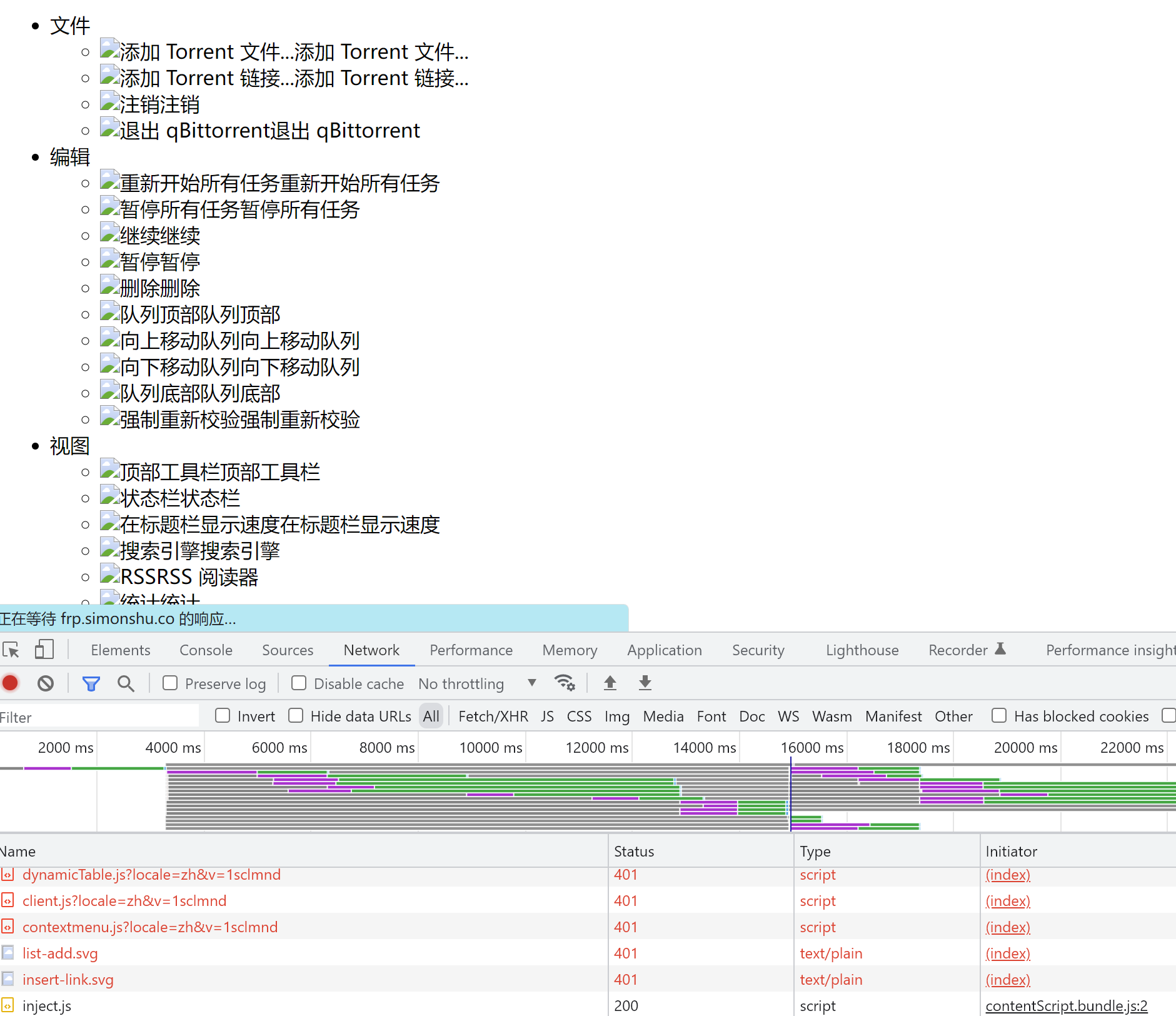
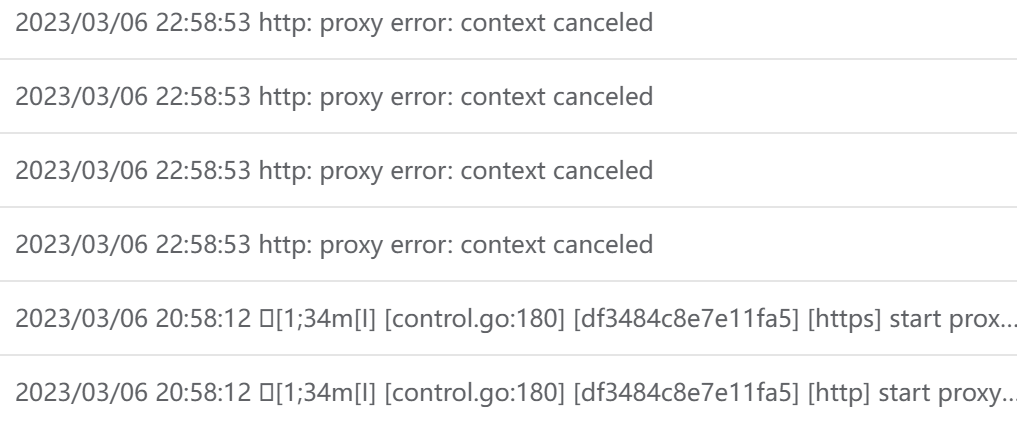
@yikexiaoyao commented on GitHub (Mar 6, 2023):

http能正常访问,但是https显示401,页面元素加载异常
image
image
求教,怎么解决,感谢

<!-- gh-comment-id:1456300710 --> @yikexiaoyao commented on GitHub (Mar 6, 2023): http能正常访问,但是https显示401,页面元素加载异常 ![image](https://user-images.githubusercontent.com/36374114/223147650-f0ce83b0-066f-4c0f-bf0a-4a361e0ec1f2.png) ![image](https://user-images.githubusercontent.com/36374114/223148113-134c0d22-b5e8-496e-a678-740d715dc575.png) 求教,怎么解决,感谢
Sign in to join this conversation.
No milestone
No project
No assignees
1 participant
Notifications
Due date
The due date is invalid or out of range. Please use the format "yyyy-mm-dd".

No due date set.

Dependencies

No dependencies set.

Reference: github-starred/frp#1100
No description provided.