[GH-ISSUE #1295] tcp转发实现ip:port访问内网web方式出现login to server failed : EOF #1024

Closed
opened 2026-05-05 12:39:37 -06:00 by gitea-mirror · 6 comments
Owner

Originally created by @JKSTAFF on GitHub (Jun 25, 2019).
Original GitHub issue: https://github.com/fatedier/frp/issues/1295

What version of frp are you using (./frpc -v or ./frps -v)?
0.21 (both)

What operating system and processor architecture are you using (go env)?
debian 9

Configures you used:
frps

[common]
bind_port = 7000
token = fdasfse343rw35t3ew2rffsd3

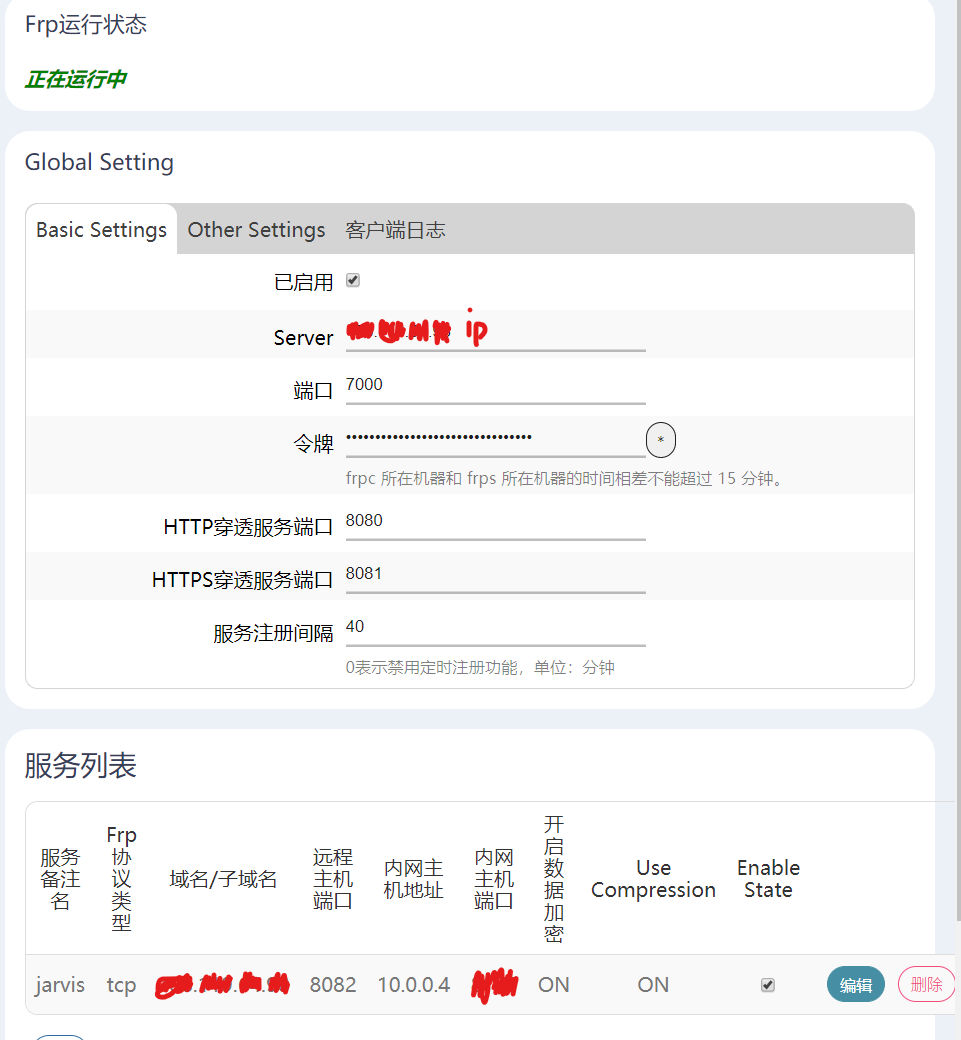
frpc
pic

Describe the results you received:
login to server failed
login to server failed: dial tcp ip:7000: connect: connection refused
Describe the results you expected:
使用tcp转发实现ip:port访问内网web
Additional information you deem important (e.g. issue happens only occasionally):
systemctl status frps显示正常云行

Originally created by @JKSTAFF on GitHub (Jun 25, 2019). Original GitHub issue: https://github.com/fatedier/frp/issues/1295 **What version of frp are you using (./frpc -v or ./frps -v)?** 0.21 (both) **What operating system and processor architecture are you using (`go env`)?** debian 9 **Configures you used:** frps ``` [common] bind_port = 7000 token = fdasfse343rw35t3ew2rffsd3 ``` frpc ![pic](https://i.loli.net/2019/06/25/5d1228fb82ef238171.png) **Describe the results you received:** login to server failed login to server failed: dial tcp ip:7000: connect: connection refused **Describe the results you expected:** 使用tcp转发实现ip:port访问内网web **Additional information you deem important (e.g. issue happens only occasionally):** systemctl status frps显示正常云行
Author
Owner

@chavyleung commented on GitHub (Jun 26, 2019):

表示遇到同样问题,dashboard显示client已经连接上
client端每隔几秒种打印:

work connection closed, EOF
control writer is closing
try to reconnect to server...
login to server success, get run id [xxxxxxxxxx], server udp port [0]
<!-- gh-comment-id:505728308 --> @chavyleung commented on GitHub (Jun 26, 2019): 表示遇到同样问题,dashboard显示client已经连接上 client端每隔几秒种打印: ``` work connection closed, EOF control writer is closing try to reconnect to server... login to server success, get run id [xxxxxxxxxx], server udp port [0] ```
Author
Owner

@fatedier commented on GitHub (Jun 30, 2019):

login to server failed: dial tcp ip:7000: connect: connection refused 表示对端 7000 端口没有监听。

<!-- gh-comment-id:507050493 --> @fatedier commented on GitHub (Jun 30, 2019): `login to server failed: dial tcp ip:7000: connect: connection refused` 表示对端 7000 端口没有监听。
Author
Owner

@chavyleung commented on GitHub (Jul 1, 2019):

@fatedier 老大,二楼的问题有解吗?同样的client端在我pc上(连公司的网络)能正常运行
所以配置上应该不存在问题,但一旦放在放在公司的服务器运行,就是无限重复打印这段日志:

work connection closed, EOF
control writer is closing
try to reconnect to server...
login to server success, get run id [xxxxxxxxxx], server udp port [0]
<!-- gh-comment-id:507139676 --> @chavyleung commented on GitHub (Jul 1, 2019): @fatedier 老大,二楼的问题有解吗?同样的client端在我pc上(连公司的网络)能正常运行 所以配置上应该不存在问题,但一旦放在放在公司的服务器运行,就是无限重复打印这段日志: ```bash work connection closed, EOF control writer is closing try to reconnect to server... login to server success, get run id [xxxxxxxxxx], server udp port [0] ```
Author
Owner

@chavyleung commented on GitHub (Jul 1, 2019):

version:0.27.0

client

[common]
server_addr = xx.xx.com
server_port = 7000
token = xx.com

[mstsc_214]
type = tcp
local_ip = 0.0.0.0
local_port = 3389
remote_port = 50001
custom_domains = xx.xx.xx.com

server

[common]
bind_addr = 0.0.0.0
bind_port = 7000
kcp_bind_port = 7000
vhost_http_port = 80
vhost_https_port = 443
token = xx.com

dashboard_port = 7500
dashboard_user = admin
dashboard_pwd = xx
<!-- gh-comment-id:507141348 --> @chavyleung commented on GitHub (Jul 1, 2019): `version:0.27.0` `client` ```ini [common] server_addr = xx.xx.com server_port = 7000 token = xx.com [mstsc_214] type = tcp local_ip = 0.0.0.0 local_port = 3389 remote_port = 50001 custom_domains = xx.xx.xx.com ``` `server` ```ini [common] bind_addr = 0.0.0.0 bind_port = 7000 kcp_bind_port = 7000 vhost_http_port = 80 vhost_https_port = 443 token = xx.com dashboard_port = 7500 dashboard_user = admin dashboard_pwd = xx ```
Author
Owner

@z0ow commented on GitHub (Jul 6, 2019):

我也遇到了这种问题,服务器和客户端的版本均为0.27.0,部分局域网段客户端可以正常连接,但在校区内部的局域网,无论centos、ubuntu和windows,均无法正常与服务端建立连接,返回错误:
[W] [service.go:82] login to server failed: EOF

<!-- gh-comment-id:508886206 --> @z0ow commented on GitHub (Jul 6, 2019): 我也遇到了这种问题,服务器和客户端的版本均为0.27.0,部分局域网段客户端可以正常连接,但在校区内部的局域网,无论centos、ubuntu和windows,均无法正常与服务端建立连接,返回错误: [W] [service.go:82] login to server failed: EOF
Author
Owner

@fatedier commented on GitHub (Jul 7, 2019):

不明原因的情况下被断开连接,一般是你的网络环境问题,比如 frp 相关的内容被屏蔽了。

建议可以尝试多换一些协议,protocol 可以为 tcp、 kcp 或者 websocket。然后 frpc 还可以通过 http proxy 或 socks5 proxy 连接 frps。

<!-- gh-comment-id:508967436 --> @fatedier commented on GitHub (Jul 7, 2019): 不明原因的情况下被断开连接,一般是你的网络环境问题,比如 frp 相关的内容被屏蔽了。 建议可以尝试多换一些协议,protocol 可以为 tcp、 kcp 或者 websocket。然后 frpc 还可以通过 http proxy 或 socks5 proxy 连接 frps。
Sign in to join this conversation.
No milestone
No project
No assignees
1 participant
Notifications
Due date
The due date is invalid or out of range. Please use the format "yyyy-mm-dd".

No due date set.

Dependencies

No dependencies set.

Reference: github-starred/frp#1024
No description provided.