mirror of
https://github.com/debauchee/barrier.git
synced 2026-10-23 08:07:53 -06:00
[GH-ISSUE #1137] Copy from linux to windows gives chinese characters #914
Labels
No labels
HiDPI
bounty
bsd/freebsd
bsd/openbsd
bug
bug
build-infra
cantfix
critical
doc
duplicate
enhancement
fix-available
from git
from release
good first issue
help wanted
installer/package
invalid
linux
macOS
meta
needs testing
pull-request
query
question
regression
regression
v2.4.0
windows
wontfix
work-in-progress
No milestone
No project
No assignees
1 participant

Notifications
Due date
No due date set.
Dependencies
No dependencies set
Reference
github-starred/barrier#914
Loading…
Reference in a new issue
No description provided.
Delete branch "%!s()"
Deleting a branch is permanent. Although the deleted branch may continue to exist for a short time before it actually gets removed, it CANNOT be undone in most cases. Continue?
Originally created by @devilish2o on GitHub (Apr 19, 2021).
Original GitHub issue: https://github.com/debauchee/barrier/issues/1137
Copy from linux to windows gives chinese characters
Server in the middle : raspbian linux (latest)
Left laptop : windows 10
Right laptop : Macbook pro
When I select/copy a text in Thunderbird in Linux and copy the same in windows I get chinese characters. If I paste/copy the same in Text Editor in linux and paste in windows then it works.
To Reproduce
Steps to reproduce the behavior:
Expected behavior
Get normal text.
Screenshots
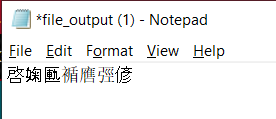
Please do not link to image hosting sites, as these can be ephemeral. Instead, attach them to the issue.
Desktop (please complete the following information):
OS Server : Raspbian GNU/Linux 10 (buster)
Barrier version : 2-2-0-Release-00000000 (installed from apt repo)
OS Client : Windows 10 Enterprise N 20H2
Barrier version : 2.3.3-release-3395cca9
Additional context
Add any other context about the problem here.
@yan12125 commented on GitHub (May 3, 2021):
Seems the same issue as #1037 - copying from Linux to Windows resulting in Chinese characters.