[GH-ISSUE #116] Not Working on Win 10 Server + OSX 10.10 Client #89

Closed
opened 2026-05-05 05:13:54 -06:00 by gitea-mirror · 7 comments
Owner

Originally created by @theinfinitypoint on GitHub (Aug 21, 2018).
Original GitHub issue: https://github.com/debauchee/barrier/issues/116

Operating Systems

Server: Windows 10
Client: OSX 10.10.5

Barrier Version

2.10

Steps to reproduce bug

Background: I just installed Barrier 2.10 on both my laptop (OSX) and Desktop (Win 10). I've been using synergy for almost 10 years now so I have a good grasp of how to change settings, and what they do.

That said I'm having problems setting up my Win 10 (named Hadron) to be the server and OSX (named Gluon) to be the client. I tried reversing the roles (OSX=server, Win 10=client) and it actually worked great, but that's not the set up I need. I also tried enabling/disabling SSH which didn't fix it. My Win 10 installation is brand new so there may be some other firewall settings I haven't tried changing. I did however add all 3 barrier exe's (barrier, barrierc, barriers) to be allowed through the Windows firewall as both incoming and outgoing rules ("Windows Defender Firewall"). On the mac side I've been able to explicitly at least allow communication for barrier and barriers within Barrier.app, and also allowed communication for Barrier.app itself, but NOT barrierc (within Barrier.app) through the OSX firewall (System Preferences --> Security & Privacy, Firewall tab, Firewall Options button). Installation was done using the compiled binaries (exe and dmg) I found in the wiki.

Here's the server (Win 10) side log (on the machine named Hadron):

[2018-08-20T18:28:31] INFO: connecting to service...
[2018-08-20T18:28:31] INFO: connection established
[2018-08-20T16:53:29] INFO: using last known command: "C:/Program Files/Barrier/barriers.exe" -f --no-tray --debug INFO --name Hadron --ipc --enable-drag-drop --enable-crypto --profile-dir "C:\Users[redacted]\AppData\Local\Barrier" -c "C:/Users/[redacted]/AppData/Local/Temp/Barrier.gL1780" --address [192.168.1.26]:8500
[2018-08-20T16:53:29] INFO: service command updated
[2018-08-20T16:53:29] INFO: starting new process as privileged user
[2018-08-20T16:53:30] INFO: server status: active
[2018-08-20T16:53:30] INFO: drag and drop enabled
[2018-08-20T16:53:30] ERROR: failed to get desktop path, no drop target available, error=2
[2018-08-20T16:53:30] NOTE: started server (IPv4), waiting for clients
[2018-08-20T18:28:31] INFO: server status: active

and on the client side (OSX 10.10.5) (on the machine named Gluon):

2018-08-20T18:31:45] INFO: starting client
[2018-08-20T18:31:45] INFO: config file: /var/folders/fx/z2n88bjn1jb2pyzs1gmllqkr0000gn/T/Barrier.vTLnCO
[2018-08-20T18:31:45] INFO: log level: INFO
[2018-08-20T18:31:45] INFO: drag and drop enabled
[2018-08-20T18:31:45] NOTE: started client
[2018-08-20T18:31:45] NOTE: connecting to '192.168.1.26': 192.168.1.26:8500
[2018-08-20T18:31:45] INFO: OpenSSL 1.0.2n 7 Dec 2017
2018-08-20 18:31:45.379 barrierc[52296:31423094] starting cocoa loop
[2018-08-20T18:32:00] WARNING: failed to connect to server: Timed out
[2018-08-20T18:32:01] NOTE: connecting to '192.168.1.26': 192.168.1.26:8500
[2018-08-20T18:32:01] INFO: OpenSSL 1.0.2n 7 Dec 2017
[2018-08-20T18:32:16] WARNING: failed to connect to server: Timed out

Here is my Win 10 server setup:
image
image
image

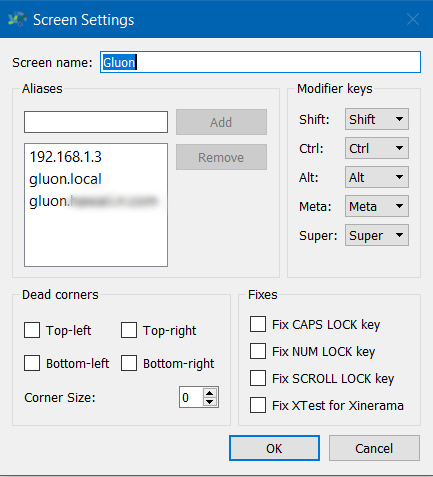
and this is the relevant set up on my OSX client:
image

Other info

  • When did the problem start to occur? When I first installed it
  • Is there a way to work around it? No.
  • Does this bug prevent you from using Barrier entirely? Yes.

Let me know if there is any other info you need, thanks!

Originally created by @theinfinitypoint on GitHub (Aug 21, 2018). Original GitHub issue: https://github.com/debauchee/barrier/issues/116 ### Operating Systems ### Server: Windows 10 Client: OSX 10.10.5 ### Barrier Version ### 2.10 ### Steps to reproduce bug ### Background: I just installed Barrier 2.10 on both my laptop (OSX) and Desktop (Win 10). I've been using synergy for almost 10 years now so I have a good grasp of how to change settings, and what they do. That said I'm having problems setting up my Win 10 (named Hadron) to be the server and OSX (named Gluon) to be the client. I tried reversing the roles (OSX=server, Win 10=client) and it actually worked great, but that's not the set up I need. I also tried enabling/disabling SSH which didn't fix it. My Win 10 installation is brand new so there may be some other firewall settings I haven't tried changing. I did however add all 3 barrier exe's (barrier, barrierc, barriers) to be allowed through the Windows firewall as both incoming and outgoing rules ("Windows Defender Firewall"). On the mac side I've been able to explicitly at least allow communication for barrier and barriers within Barrier.app, and also allowed communication for Barrier.app itself, but NOT barrierc (within Barrier.app) through the OSX firewall (System Preferences --> Security & Privacy, Firewall tab, Firewall Options button). Installation was done using the compiled binaries (exe and dmg) I found in the wiki. Here's the server (Win 10) side log (on the machine named Hadron): > [2018-08-20T18:28:31] INFO: connecting to service... [2018-08-20T18:28:31] INFO: connection established [2018-08-20T16:53:29] INFO: using last known command: "C:/Program Files/Barrier/barriers.exe" -f --no-tray --debug INFO --name Hadron --ipc --enable-drag-drop --enable-crypto --profile-dir "C:\Users\[redacted]\AppData\Local\Barrier" -c "C:/Users/[redacted]/AppData/Local/Temp/Barrier.gL1780" --address [192.168.1.26]:8500 [2018-08-20T16:53:29] INFO: service command updated [2018-08-20T16:53:29] INFO: starting new process as privileged user [2018-08-20T16:53:30] INFO: server status: active [2018-08-20T16:53:30] INFO: drag and drop enabled [2018-08-20T16:53:30] ERROR: failed to get desktop path, no drop target available, error=2 [2018-08-20T16:53:30] NOTE: started server (IPv4), waiting for clients [2018-08-20T18:28:31] INFO: server status: active and on the client side (OSX 10.10.5) (on the machine named Gluon): > 2018-08-20T18:31:45] INFO: starting client [2018-08-20T18:31:45] INFO: config file: /var/folders/fx/z2n88bjn1jb2pyzs1gmllqkr0000gn/T/Barrier.vTLnCO [2018-08-20T18:31:45] INFO: log level: INFO [2018-08-20T18:31:45] INFO: drag and drop enabled [2018-08-20T18:31:45] NOTE: started client [2018-08-20T18:31:45] NOTE: connecting to '192.168.1.26': 192.168.1.26:8500 [2018-08-20T18:31:45] INFO: OpenSSL 1.0.2n 7 Dec 2017 2018-08-20 18:31:45.379 barrierc[52296:31423094] starting cocoa loop [2018-08-20T18:32:00] WARNING: failed to connect to server: Timed out [2018-08-20T18:32:01] NOTE: connecting to '192.168.1.26': 192.168.1.26:8500 [2018-08-20T18:32:01] INFO: OpenSSL 1.0.2n 7 Dec 2017 [2018-08-20T18:32:16] WARNING: failed to connect to server: Timed out Here is my Win 10 server setup: ![image](https://user-images.githubusercontent.com/26639888/44384876-5bbfc680-a4b9-11e8-82dc-ed18aa5dcf70.png) ![image](https://user-images.githubusercontent.com/26639888/44384895-6f6b2d00-a4b9-11e8-9da0-ae7f09a385af.png) ![image](https://user-images.githubusercontent.com/26639888/44384899-76923b00-a4b9-11e8-8888-d75e7dde8a98.png) and this is the relevant set up on my OSX client: ![image](https://user-images.githubusercontent.com/26639888/44384921-90cc1900-a4b9-11e8-8811-c178ac55e4ef.png) ### Other info ### * When did the problem start to occur? When I first installed it * Is there a way to work around it? No. * Does this bug prevent you from using Barrier entirely? Yes. Let me know if there is any other info you need, thanks!
gitea-mirror 2026-05-05 05:13:54 -06:00
Author
Owner

@theinfinitypoint commented on GitHub (Aug 25, 2018):

Any suggestions anyone?

<!-- gh-comment-id:415969641 --> @theinfinitypoint commented on GitHub (Aug 25, 2018): Any suggestions anyone?
Author
Owner

@AdrianKoshka commented on GitHub (Aug 25, 2018):

Sadly I don't have macOS and Windows test machines, so I can't really be of much help :c

<!-- gh-comment-id:415994950 --> @AdrianKoshka commented on GitHub (Aug 25, 2018): Sadly I don't have macOS and Windows test machines, so I can't really be of much help :c
Author
Owner

@walker0643 commented on GitHub (Aug 26, 2018):

@theinfinitypoint can you try specifically allowing port 24800 through the windows firewall?

<!-- gh-comment-id:416006693 --> @walker0643 commented on GitHub (Aug 26, 2018): @theinfinitypoint can you try specifically allowing port 24800 through the windows firewall?
Author
Owner

@theinfinitypoint commented on GitHub (Aug 26, 2018):

@walker0643 that actually helped. My OSX client saw it right away after I added 24800 to get through the firewall. However I still cannot move my mouse on my client machine. After I start up Barrier on both machines, and I move my mouse over, the cursor is stuck in the lower right corner of my client (my client is sitting to the left of my server). I can still control the buttons, ie left and right mouse buttons work, but I cannot move it around the screen for some reason. If I manually move my mouse using my client's trackpad, then left or right click on my server's mouse (which is "in" the client desktop), the cursor will instantaneously move back to the lower right corner of the client's desktop. Additionally I cannot move the mouse "back" onto the server without stopping Barrier on my client (OSX). Also interestingly I can use my client mouse's scroll wheel which won't reset the position of the cursor to the lower right corner of the client desktop.

I actually had the same problem using Synergy 1.3.1 on my new Win 10 installation, which I tried using before I installed Barrier. On my previous Win 7 installation Synergy 1.3.1 worked perfect for me (with the same OSX client). I tried disabling (I think) all of the optional settings and nothing seems to help that.

Any other suggestions to try?

<!-- gh-comment-id:416011208 --> @theinfinitypoint commented on GitHub (Aug 26, 2018): @walker0643 that actually helped. My OSX client saw it right away after I added 24800 to get through the firewall. However I still cannot move my mouse on my client machine. After I start up Barrier on both machines, and I move my mouse over, the cursor is stuck in the lower right corner of my client (my client is sitting to the left of my server). I can still control the buttons, ie left and right mouse buttons work, but I cannot move it around the screen for some reason. If I manually move my mouse using my client's trackpad, then left or right click on my server's mouse (which is "in" the client desktop), the cursor will instantaneously move back to the lower right corner of the client's desktop. Additionally I cannot move the mouse "back" onto the server without stopping Barrier on my client (OSX). Also interestingly I can use my client mouse's scroll wheel which won't reset the position of the cursor to the lower right corner of the client desktop. I actually had the same problem using Synergy 1.3.1 on my new Win 10 installation, which I tried using before I installed Barrier. On my previous Win 7 installation Synergy 1.3.1 worked perfect for me (with the same OSX client). I tried disabling (I think) all of the optional settings and nothing seems to help that. Any other suggestions to try?
Author
Owner

@walker0643 commented on GitHub (Sep 8, 2018):

@theinfinitypoint if you're comfortable building barrier yourself, could you try from 075d4f4758? or if you prefer to wait this fix will be in the next release (2.2). thanks!

<!-- gh-comment-id:419664333 --> @walker0643 commented on GitHub (Sep 8, 2018): @theinfinitypoint if you're comfortable building barrier yourself, could you try from 075d4f4758f86c49ef0b5257a2de076b1d7d4569? or if you prefer to wait this fix will be in the next release (2.2). thanks!
Author
Owner

@walker0643 commented on GitHub (Sep 8, 2018):

also 3794767459 will have the installer create the rule needed for newer windows installers

<!-- gh-comment-id:419673127 --> @walker0643 commented on GitHub (Sep 8, 2018): also 3794767459f83e812cd4d9cf9e8d4da56bc19bd3 will have the installer create the rule needed for newer windows installers
Author
Owner

@walker0643 commented on GitHub (Sep 8, 2018):

Please reopen if your issue isn't fixed after 2.2. Thanks!

<!-- gh-comment-id:419677037 --> @walker0643 commented on GitHub (Sep 8, 2018): Please reopen if your issue isn't fixed after 2.2. Thanks!
Sign in to join this conversation.
No milestone
No project
No assignees
1 participant
Notifications
Due date
The due date is invalid or out of range. Please use the format "yyyy-mm-dd".

No due date set.

Dependencies

No dependencies set.

Reference: github-starred/barrier#89
No description provided.