[GH-ISSUE #1050] Wrong mouse speed with Retina / Windows Scaling #833

Open
opened 2026-05-05 07:11:49 -06:00 by gitea-mirror · 4 comments
Owner

Originally created by @kura34 on GitHub (Feb 2, 2021).
Original GitHub issue: https://github.com/debauchee/barrier/issues/1050

Hi,

I have Macbook Pro and external screen (3840x2160). It's set up to show everything as 1080p. So 4 pixels as 1 - that way I have perfect quality - the same way as Retina displays works.

My Macbook works as server and it's connect to same setup Windows PC - also 3840x2160. But in Windows to have that effect I need to change scaling to 200% - so one pixel is made with 2 vertical and 2 horizontal pixels. On the end it's same effect but on other operating systems

Everything works perfect except that somehow Barrier see those screens in different size - I see one system as 1080p and on another as 4K.

Effect of that is that when I go from my Mac to Barrier (on Windows) screen mouse is super slow :(

Can you make a feature that I will be take scaling into consideration for desire mouse speed or something that I will be able to setup independently speed on one machine and independently on another machine?

Originally created by @kura34 on GitHub (Feb 2, 2021). Original GitHub issue: https://github.com/debauchee/barrier/issues/1050 Hi, I have Macbook Pro and external screen (3840x2160). It's set up to show everything as 1080p. So 4 pixels as 1 - that way I have perfect quality - the same way as Retina displays works. My Macbook works as server and it's connect to same setup Windows PC - also 3840x2160. But in Windows to have that effect I need to change scaling to 200% - so one pixel is made with 2 vertical and 2 horizontal pixels. On the end it's same effect but on other operating systems Everything works perfect except that somehow Barrier see those screens in different size - I see one system as 1080p and on another as 4K. Effect of that is that when I go from my Mac to Barrier (on Windows) screen mouse is super slow :( Can you make a feature that I will be take scaling into consideration for desire mouse speed or something that I will be able to setup independently speed on one machine and independently on another machine?
Author
Owner

@kodemeister commented on GitHub (Feb 13, 2021):

I have exactly the opposite problem - mouse speed is 2x faster than normal one :) I'm running barrier server on Linux and client on Mac. Both systems use external 3840x2160 screens with 200% scaling. On Linux mouse speed is fine but on Mac it is much faster.

Occassionally, I also use Windows instead of Mac together with the same Linux server. I haven't noticed any issues with mouse speed on this particular setup. So Mac version of barrier seems to be the culprit.

It would definitely be good to fix scaling issue on Mac or at least add some option to control mouse speed factor on different machines.

<!-- gh-comment-id:778628463 --> @kodemeister commented on GitHub (Feb 13, 2021): I have exactly the opposite problem - mouse speed is 2x faster than normal one :) I'm running barrier server on Linux and client on Mac. Both systems use external 3840x2160 screens with 200% scaling. On Linux mouse speed is fine but on Mac it is much faster. Occassionally, I also use Windows instead of Mac together with the same Linux server. I haven't noticed any issues with mouse speed on this particular setup. So Mac version of barrier seems to be the culprit. It would definitely be good to fix scaling issue on Mac or at least add some option to control mouse speed factor on different machines.
Author
Owner

@kura34 commented on GitHub (Feb 13, 2021):

In mouse share beta you already have that option

On Sat, 13 Feb 2021, 15:40 kodemeister, notifications@github.com wrote:

I have exactly the opposite problem - mouse speed is 2x faster than normal
one :) I'm running barrier server on Linux and client on Mac. Both systems
use external 3840x2160 screens with 200% scaling. On Linux mouse speed is
fine but on Mac it is much faster.

Occassionally, I also use Windows instead of Mac together with the same
Linux server. I haven't noticed any issues with mouse speed on this
particular setup. So Mac version of barrier seems to be the culprit.

It would definitely be good to fix scaling issue on Mac or at least add
some option to control mouse speed factor on different machines.


You are receiving this because you authored the thread.
Reply to this email directly, view it on GitHub
https://github.com/debauchee/barrier/issues/1050#issuecomment-778628463,
or unsubscribe
https://github.com/notifications/unsubscribe-auth/ABPSQEI2M6A53O5HEIBZXJDS62FORANCNFSM4W6IMTRQ
.

<!-- gh-comment-id:778644477 --> @kura34 commented on GitHub (Feb 13, 2021): In mouse share beta you already have that option On Sat, 13 Feb 2021, 15:40 kodemeister, <notifications@github.com> wrote: > I have exactly the opposite problem - mouse speed is 2x faster than normal > one :) I'm running barrier server on Linux and client on Mac. Both systems > use external 3840x2160 screens with 200% scaling. On Linux mouse speed is > fine but on Mac it is much faster. > > Occassionally, I also use Windows instead of Mac together with the same > Linux server. I haven't noticed any issues with mouse speed on this > particular setup. So Mac version of barrier seems to be the culprit. > > It would definitely be good to fix scaling issue on Mac or at least add > some option to control mouse speed factor on different machines. > > — > You are receiving this because you authored the thread. > Reply to this email directly, view it on GitHub > <https://github.com/debauchee/barrier/issues/1050#issuecomment-778628463>, > or unsubscribe > <https://github.com/notifications/unsubscribe-auth/ABPSQEI2M6A53O5HEIBZXJDS62FORANCNFSM4W6IMTRQ> > . >
Author
Owner

@kodemeister commented on GitHub (Feb 13, 2021):

Thanks for the tip! I'll take a look. This might help when using Windows together with Mac.

I believe ShareMouse doesn't support Linux though, that's why I'm using Synergy/barrier in Linux-Mac scenario.

<!-- gh-comment-id:778663930 --> @kodemeister commented on GitHub (Feb 13, 2021): Thanks for the tip! I'll take a look. This might help when using Windows together with Mac. I believe ShareMouse doesn't support Linux though, that's why I'm using Synergy/barrier in Linux-Mac scenario.
Author
Owner

@siathalysedI commented on GitHub (Aug 27, 2021):

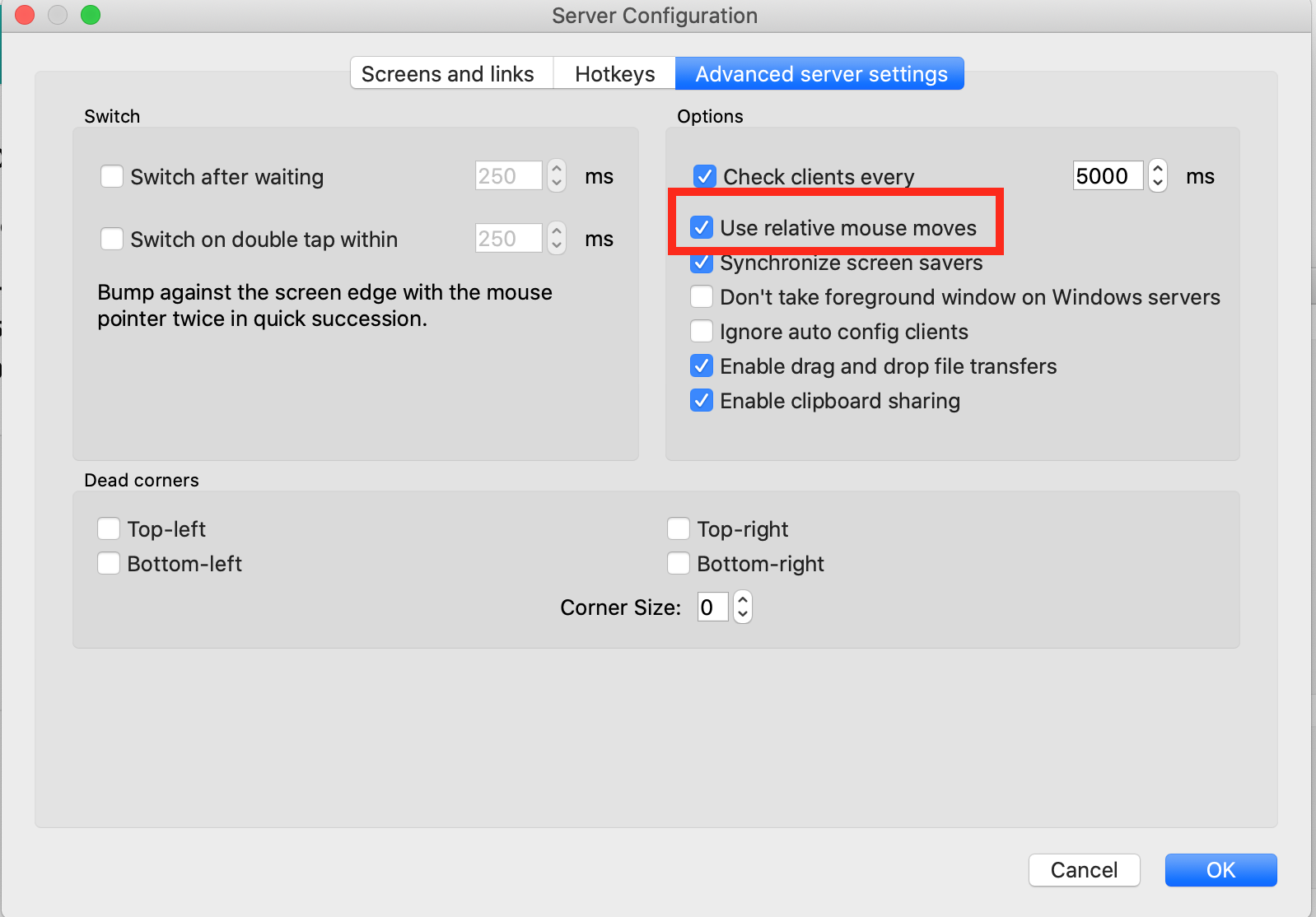
For me it was solved selecting: "Use relative mouse moves":
Screen Shot 2021-08-27 at 0 25 46_2

<!-- gh-comment-id:906958674 --> @siathalysedI commented on GitHub (Aug 27, 2021): For me it was solved selecting: "Use relative mouse moves": <img width="799" alt="Screen Shot 2021-08-27 at 0 25 46_2" src="https://user-images.githubusercontent.com/548549/131082165-72407224-aab9-45aa-b90b-4d1b1f53512b.png">
Sign in to join this conversation.
No milestone
No project
No assignees
1 participant
Notifications
Due date
The due date is invalid or out of range. Please use the format "yyyy-mm-dd".

No due date set.

Dependencies

No dependencies set.

Reference: github-starred/barrier#833
No description provided.