[GH-ISSUE #1040] Changed my PC and Macbook names under Configure Server, now stuck on "Barrier is starting." on the client #823

Open
opened 2026-05-05 07:11:10 -06:00 by gitea-mirror · 1 comment
Owner

Originally created by @ravendward on GitHub (Jan 28, 2021).
Original GitHub issue: https://github.com/debauchee/barrier/issues/1040

Describe the bug

Seems to be working fine on my server, log reads:

[2021-01-27T18:38:02] INFO: starting server
[2021-01-27T18:38:02] INFO: config file: C:/Users/raven/AppData/Local/Temp/Barrier.bFPFtc
[2021-01-27T18:38:02] INFO: log level: INFO
[2021-01-27T18:38:02] INFO: service command updated
[2021-01-27T18:38:03] INFO: starting new process as privileged user
[2021-01-27T18:38:03] INFO: drag and drop enabled
[2021-01-27T18:38:03] ERROR: failed to get desktop path, no drop target available, error=2
started server (IPv4/IPv6), waiting for clients
server status: active

Client side keeps printing:

NOTE: connecting to 'xxx.xxx.xx.xx': xxx.xxx.xx.xx:24800
INFO OpenSSL 1.1.1g 21 Apr 2020
WARNING: failed to connect to server: Connection refused

Desktop (please complete the following information):

  • Server OS: is Windows 10
  • Client OS: MacOS Big Sur 11.1
  • Barrier version 2.3.3

Additional context

The only changes I made that seem to have broken Barrier is changing the Screen Names to be a bit more descriptive. I deleted a 3rd screen that might be related to my HDMI switcher, explained below.

Tried reinstalling after clearing all files, tried autoconfig and manual, turned off firewalls on both sides, connecting via WiFi and Ethernet, no dice.

Note: I have an HDMI switcher (switches my main monitor between my Windows PC and my Macbook, so I can alternate between [Macbook] [PC] and [Macbook] [Extended Macbook screen]). This is why I want to use barriers, so I can flick that HDMI switcher and just keep using my mouse attached to my PC. There was a 3rd screen on the Configure Server screen before, I deleted it. Does this matter? I can't remember what the name of it was and it doesn't automatically add itself when I do a fresh reinstall (even after deleting all the temp files etc on both machines).

Originally created by @ravendward on GitHub (Jan 28, 2021). Original GitHub issue: https://github.com/debauchee/barrier/issues/1040 **Describe the bug** Seems to be working fine on my server, log reads: ``` [2021-01-27T18:38:02] INFO: starting server [2021-01-27T18:38:02] INFO: config file: C:/Users/raven/AppData/Local/Temp/Barrier.bFPFtc [2021-01-27T18:38:02] INFO: log level: INFO [2021-01-27T18:38:02] INFO: service command updated [2021-01-27T18:38:03] INFO: starting new process as privileged user [2021-01-27T18:38:03] INFO: drag and drop enabled [2021-01-27T18:38:03] ERROR: failed to get desktop path, no drop target available, error=2 started server (IPv4/IPv6), waiting for clients server status: active ``` Client side keeps printing: ``` NOTE: connecting to 'xxx.xxx.xx.xx': xxx.xxx.xx.xx:24800 INFO OpenSSL 1.1.1g 21 Apr 2020 WARNING: failed to connect to server: Connection refused ``` **Desktop (please complete the following information):** - Server OS: is Windows 10 - Client OS: MacOS Big Sur 11.1 - Barrier version 2.3.3 **Additional context** The only changes I made that seem to have broken Barrier is changing the Screen Names to be a bit more descriptive. I deleted a 3rd screen that might be related to my HDMI switcher, explained below. Tried reinstalling after clearing all files, tried autoconfig and manual, turned off firewalls on both sides, connecting via WiFi and Ethernet, no dice. Note: I have an HDMI switcher (switches my main monitor between my Windows PC and my Macbook, so I can alternate between [Macbook] [PC] and [Macbook] [Extended Macbook screen]). This is why I want to use barriers, so I can flick that HDMI switcher and just keep using my mouse attached to my PC. There was a 3rd screen on the **Configure Server** screen before, I deleted it. Does this matter? I can't remember what the name of it was and it doesn't automatically add itself when I do a fresh reinstall (even after deleting all the temp files etc on both machines).
Author
Owner

@salihcaan commented on GitHub (Jan 28, 2021):

@ravendward , I have the same exact setup;

  • one Msi(Windows10) on the left,
  • one Macbook(MacOS) on the right,
  • a DELL monitor in the middle. Both computers are connected to the DELL monitor via hdmi and usb-c.

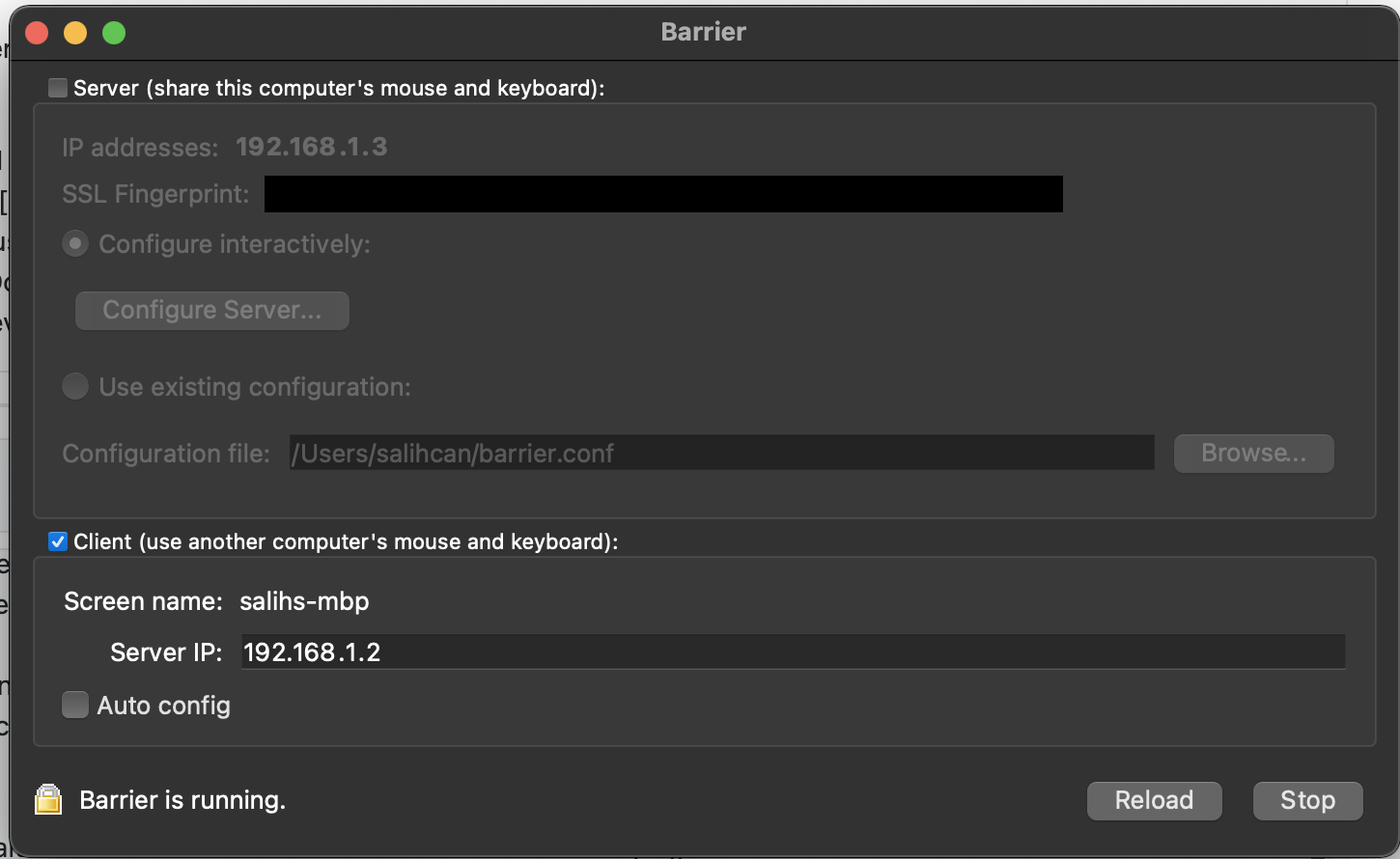
Mine setup is working. I am attaching down the screenshots from both computers. The name of the hosts you've assigned in the Barrier matters, can you please check them to see if they have the same hosts with the same name?

On Window:
Screen Shot 2021-01-28 at 16 04 58

On MacOs:
Screen Shot 2021-01-28 at 16 07 58

Hope it helps.

<!-- gh-comment-id:769042038 --> @salihcaan commented on GitHub (Jan 28, 2021): @ravendward , I have the same exact setup; - one Msi(Windows10) on the left, - one Macbook(MacOS) on the right, - a DELL monitor in the middle. Both computers are connected to the DELL monitor via hdmi and usb-c. *Mine setup is working.* I am attaching down the screenshots from both computers. **The name of the hosts you've assigned in the Barrier matters, can you please check them to see if they have the same hosts with the same name?** On Window: <img width="1479" alt="Screen Shot 2021-01-28 at 16 04 58" src="https://user-images.githubusercontent.com/19890112/106142469-94802180-6182-11eb-9cf8-263a00837189.png"> On MacOs: <img width="725" alt="Screen Shot 2021-01-28 at 16 07 58" src="https://user-images.githubusercontent.com/19890112/106142935-212adf80-6183-11eb-9812-93d41b1798f8.png"> Hope it helps.
Sign in to join this conversation.
No milestone
No project
No assignees
1 participant
Notifications
Due date
The due date is invalid or out of range. Please use the format "yyyy-mm-dd".

No due date set.

Dependencies

No dependencies set.

Reference: github-starred/barrier#823
No description provided.