mirror of
https://github.com/debauchee/barrier.git
synced 2026-10-23 08:07:53 -06:00
[GH-ISSUE #941] Resume on Windows with Sign-in off #751
Labels
No labels
HiDPI
bounty
bsd/freebsd
bsd/openbsd
bug
bug
build-infra
cantfix
critical
doc
duplicate
enhancement
fix-available
from git
from release
good first issue
help wanted
installer/package
invalid
linux
macOS
meta
needs testing
pull-request
query
question
regression
regression
v2.4.0
windows
wontfix
work-in-progress
No milestone
No project
No assignees
1 participant

Notifications
Due date
No due date set.
Dependencies
No dependencies set
Reference
github-starred/barrier#751
Loading…
Reference in a new issue
No description provided.
Delete branch "%!s()"
Deleting a branch is permanent. Although the deleted branch may continue to exist for a short time before it actually gets removed, it CANNOT be undone in most cases. Continue?
Originally created by @igordovgaluk on GitHub (Nov 10, 2020).
Original GitHub issue: https://github.com/debauchee/barrier/issues/941
After Windows 10 resume with Sign-in option is turned off, the mouse cannot be moved to the client's screen.
Requires server restart to workaround the problem.
Steps to reproduce the behavior:
After restart of barrier on the server the problem is resolved - can move the mouse to the client's screen.
Expected behavior
The mouse cursor should be able to leave the server screen and move to the client's screen
Screenshots
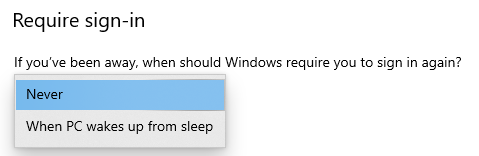
Additional details
In both logs I can see the client is connected.
@gbronner commented on GitHub (Nov 25, 2020):
I've seen this regularly -- when I go away from my computer for a few hours, the last item in the server log is 'Suspend' It never resumes. When I hit the stop / start button on the server, I get the following:
Looks like maybe it needs to register for some event?
[2020-11-25T05:33:00] INFO: service command updated
[2020-11-25T05:33:01] INFO: process started but command is empty, shutting down
[2020-11-25T08:33:01] INFO: resume
@dev-101 commented on GitHub (Feb 13, 2021):
Hi, I have also reported similar #997 issue. This is why I decided to revert back to original Synergy 1.88 which does not seem to suffer from this bug.
[GH-ISSUE #941] Resume on Windows with Sign-in offto [GH-ISSUE #941] Resume on Windows with Sign-in off