[GH-ISSUE #894] Pasting from Windows server to MacOS Big Sur client results in Kanji #712

Open
opened 2026-05-05 06:58:50 -06:00 by gitea-mirror · 12 comments
Owner

Originally created by @jasontfox on GitHub (Sep 29, 2020).
Original GitHub issue: https://github.com/debauchee/barrier/issues/894

Describe the bug
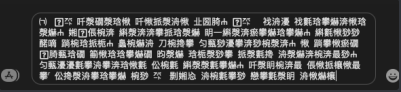
Hi, this is no doubt a strange one. I have a Windows 10 Server (2.3.3) and a MacOS Client (2.3.3). The Mac is running Big Sur, MacOS 11.0. If I copy text from my Windows server machine and paste it into the Messages app on the Mac it appears to paste as Kanji or some wide-character values. I've attached a picture of the text I copy and then the resulting paste into Messages.

To Reproduce

Steps to reproduce the behavior:

  1. Connect Windows 10 and MacOS 11.0 Big Sur machines (either can be server or client)
  2. Copy text from the Windows 10 machine
  3. Attempt to paste the text into the Messages app on the Mac
  4. See kanji pasted instead

Expected behavior
Pasting the original text value into Messages

Screenshots
Text to copy:
image

Result:
image

Desktop (please complete the following information):

  • OS: Windows 10, MacOS 11.0 Big Sur
  • Barrier version: 2.3.3 on both

Additional context

Interestingly, pasting the same text into Safari or Discord on the Mac does not result in Kanji.

Originally created by @jasontfox on GitHub (Sep 29, 2020). Original GitHub issue: https://github.com/debauchee/barrier/issues/894 **Describe the bug** Hi, this is no doubt a strange one. I have a Windows 10 Server (2.3.3) and a MacOS Client (2.3.3). The Mac is running Big Sur, MacOS 11.0. If I copy text from my Windows server machine and paste it into the Messages app on the Mac it appears to paste as Kanji or some wide-character values. I've attached a picture of the text I copy and then the resulting paste into Messages. **To Reproduce** Steps to reproduce the behavior: 1. Connect Windows 10 and MacOS 11.0 Big Sur machines (either can be server or client) 2. Copy text from the Windows 10 machine 3. Attempt to paste the text into the Messages app on the Mac 4. See kanji pasted instead **Expected behavior** Pasting the original text value into Messages **Screenshots** Text to copy: ![image](https://user-images.githubusercontent.com/4161622/94612358-0007c000-0271-11eb-85d3-7fe9f6bfe355.png) Result: ![image](https://user-images.githubusercontent.com/4161622/94612387-09912800-0271-11eb-84cc-138db328afaf.png) **Desktop (please complete the following information):** - OS: Windows 10, MacOS 11.0 Big Sur - Barrier version: 2.3.3 on both **Additional context** Interestingly, pasting the same text into Safari or Discord on the Mac does not result in Kanji.
Author
Owner

@toastedcrumpets commented on GitHub (Oct 1, 2020):

I have the same issue pasting from Ubuntu into windows. Not sure what is going on.

<!-- gh-comment-id:701938156 --> @toastedcrumpets commented on GitHub (Oct 1, 2020): I have the same issue pasting from Ubuntu into windows. Not sure what is going on.
Author
Owner

@vraicovi commented on GitHub (Nov 17, 2020):

Same problem from Windows 10 (Version 2004 - Build 19041.630) to Big Sur (11.0.1).

<!-- gh-comment-id:728972086 --> @vraicovi commented on GitHub (Nov 17, 2020): Same problem from Windows 10 (Version 2004 - Build 19041.630) to Big Sur (11.0.1).
Author
Owner

@NuclearMonster commented on GitHub (Nov 18, 2020):

also have this issue with Big Sur (client) and Windows 10 (host

<!-- gh-comment-id:729599136 --> @NuclearMonster commented on GitHub (Nov 18, 2020): also have this issue with Big Sur (client) and Windows 10 (host
Author
Owner

@PCAri75 commented on GitHub (Dec 3, 2020):

Also having this issue w/ Win10 20H2 (19042.630) as the host and macOS Big Sur 11.0.1 as the client, and experienced the problem in 2.3.1, 2.3.2, and 2.3.3.

Having a different problem, too, where typing on my Win10 host's keyboard results in crazy gibberish on the macOS client.

UNLESS!

Unless the Win10 host has Barrier open and in the foreground on the desktop - THAT was fun to suss out.

Now I'm trying to find others with the same problem rather than starting a new thread and figured those in this thread might have some leads on that? (apologies in advance for mingling issues)

<!-- gh-comment-id:738452674 --> @PCAri75 commented on GitHub (Dec 3, 2020): Also having this issue w/ Win10 20H2 (19042.630) as the host and macOS Big Sur 11.0.1 as the client, and experienced the problem in 2.3.1, 2.3.2, and 2.3.3. Having a different problem, too, where typing on my Win10 host's keyboard results in crazy gibberish on the macOS client. UNLESS! Unless the Win10 host has Barrier open and in the foreground on the desktop - THAT was fun to suss out. Now I'm trying to find others with the same problem rather than starting a new thread and figured those in this thread might have some leads on that? (apologies in advance for mingling issues)
Author
Owner

@vraicovi commented on GitHub (Dec 12, 2020):

Now I'm trying to find others with the same problem rather than starting a new thread and figured those in this thread might have some leads on that? (apologies in advance for mingling issues)

I'm not having the same experience as you. Almost a month later now and I'm on the same builds of Windows and macOS.

I am still unable to paste text from Windows to Mac - it shows up in Kanji. I'm still unable to paste images. These both worked prior to upgrading to Big Sur. I tried bringing the host Barrier (Win10) to the foreground and tried again with no success. Unlike you, I have no issues typing from my Win10 host's keyboard on my macOS client.

<!-- gh-comment-id:743757778 --> @vraicovi commented on GitHub (Dec 12, 2020): > Now I'm trying to find others with the same problem rather than starting a new thread and figured those in this thread might have some leads on that? (apologies in advance for mingling issues) I'm not having the same experience as you. Almost a month later now and I'm on the same builds of Windows and macOS. I am still unable to paste text from Windows to Mac - it shows up in Kanji. I'm still unable to paste images. These both worked prior to upgrading to Big Sur. I tried bringing the host Barrier (Win10) to the foreground and tried again with no success. Unlike you, I have no issues typing from my Win10 host's keyboard on my macOS client.
Author
Owner

@vraicovi commented on GitHub (Dec 12, 2020):

Interestingly, pasting the same text into Safari or Discord on the Mac does not result in Kanji.

The handful of times that I checked this thread and replied, I missed this line. I just tested it myself and can confirm the same behavior. I only have pasting issues into Messages.

<!-- gh-comment-id:743759120 --> @vraicovi commented on GitHub (Dec 12, 2020): > Interestingly, pasting the same text into Safari or Discord on the Mac does not result in Kanji. The handful of times that I checked this thread and replied, I missed this line. I just tested it myself and can confirm the same behavior. I only have pasting issues into Messages.
Author
Owner

@jasontfox commented on GitHub (Dec 14, 2020):

I gave up on an official solution. I ended up writing an applescript service to copy the existing clipboard data into the clipboard again and that fixes it. It just means I have to hit CMD-CTRL-V to paste or I get the kanji :)

<!-- gh-comment-id:744123358 --> @jasontfox commented on GitHub (Dec 14, 2020): I gave up on an official solution. I ended up writing an applescript service to copy the existing clipboard data into the clipboard again and that fixes it. It just means I have to hit CMD-CTRL-V to paste or I get the kanji :)
Author
Owner

@vraicovi commented on GitHub (Dec 25, 2020):

I ended up writing an applescript service to copy the existing clipboard data into the clipboard again and that fixes it. It just means I have to hit CMD-CTRL-V to paste or I get the kanji :)

Any chance you'll share, @SuburbanSpetsnaz? I'm a novice to applescript and my attempts are not yielding the desired results:

set the clipboard to (get the clipboard)

<!-- gh-comment-id:751280105 --> @vraicovi commented on GitHub (Dec 25, 2020): > I ended up writing an applescript service to copy the existing clipboard data into the clipboard again and that fixes it. It just means I have to hit CMD-CTRL-V to paste or I get the kanji :) Any chance you'll share, @SuburbanSpetsnaz? I'm a novice to applescript and my attempts are not yielding the desired results: `set the clipboard to (get the clipboard)`
Author
Owner

@hdwatts commented on GitHub (Jan 4, 2021):

Also having this issue, only occurs when pasting into Messages. I can paste into a text editor, recopy, and then paste properly into iMessage.

<!-- gh-comment-id:754078830 --> @hdwatts commented on GitHub (Jan 4, 2021): Also having this issue, only occurs when pasting into Messages. I can paste into a text editor, recopy, and then paste properly into iMessage.
Author
Owner

@jasontfox commented on GitHub (Jan 4, 2021):

I ended up writing an applescript service to copy the existing clipboard data into the clipboard again and that fixes it. It just means I have to hit CMD-CTRL-V to paste or I get the kanji :)

Any chance you'll share, @SuburbanSpetsnaz? I'm a novice to applescript and my attempts are not yielding the desired results:

set the clipboard to (get the clipboard)

Yes, sure thing! I just used this little bit of script and then installed it as a service:

do shell script "pbpaste | pbcopy"

you can also just do pbpaste | pbcopy in a terminal. It's a kludge for sure, but it made things somewhat better until (if) there's a real fix.

<!-- gh-comment-id:754135817 --> @jasontfox commented on GitHub (Jan 4, 2021): > > I ended up writing an applescript service to copy the existing clipboard data into the clipboard again and that fixes it. It just means I have to hit CMD-CTRL-V to paste or I get the kanji :) > > Any chance you'll share, @SuburbanSpetsnaz? I'm a novice to applescript and my attempts are not yielding the desired results: > > `set the clipboard to (get the clipboard)` Yes, sure thing! I just used this little bit of script and then installed it as a service: `do shell script "pbpaste | pbcopy"` you can also just do `pbpaste | pbcopy` in a terminal. It's a kludge for sure, but it made things somewhat better until (if) there's a real fix.
Author
Owner

@treellama commented on GitHub (Jun 22, 2021):

Curiously, if you select "Paste and Match Style" from the edit menu (command option shift V) it works

<!-- gh-comment-id:866019277 --> @treellama commented on GitHub (Jun 22, 2021): Curiously, if you select "Paste and Match Style" from the edit menu (command option shift V) it works
Author
Owner

@ChrisRegado commented on GitHub (Sep 2, 2021):

This was an issue in upstream Synergy as well, which was fixed in this commit: 0b2722c55e

<!-- gh-comment-id:911681384 --> @ChrisRegado commented on GitHub (Sep 2, 2021): This was an issue in upstream Synergy as well, which was fixed in this commit: https://github.com/symless/synergy-core/commit/0b2722c55ed609223b6ce94f9ce349705de7f179
Sign in to join this conversation.
No milestone
No project
No assignees
1 participant
Notifications
Due date
The due date is invalid or out of range. Please use the format "yyyy-mm-dd".

No due date set.

Dependencies

No dependencies set.

Reference: github-starred/barrier#712
No description provided.