mirror of
https://github.com/debauchee/barrier.git
synced 2026-10-23 08:07:53 -06:00
[GH-ISSUE #577] Have to add "/bin/sh" to Accessibility to launch Barrier #454
Labels
No labels
HiDPI
bounty
bsd/freebsd
bsd/openbsd
bug
bug
build-infra
cantfix
critical
doc
duplicate
enhancement
fix-available
from git
from release
good first issue
help wanted
installer/package
invalid
linux
macOS
meta
needs testing
pull-request
query
question
regression
regression
v2.4.0
windows
wontfix
work-in-progress
No milestone
No project
No assignees
1 participant

Notifications
Due date
No due date set.
Dependencies
No dependencies set
Reference
github-starred/barrier#454
Loading…
Reference in a new issue
No description provided.
Delete branch "%!s()"
Deleting a branch is permanent. Although the deleted branch may continue to exist for a short time before it actually gets removed, it CANNOT be undone in most cases. Continue?
Originally created by @fredsted on GitHub (Mar 1, 2020).
Original GitHub issue: https://github.com/debauchee/barrier/issues/577
Operating Systems
Server: macOS 10.14.6
Client: macOS 10.15.3
Barrier Version
Steps to reproduce bug
This was an issue on my 10.15 machine, but not on 10.14.
I installed Barrier via homebrew,
brew install homebrew/cask/barrier.Upon starting it for the first time, the Accessibility settings dialog came up and wanted me to add
shto the list of applications. I could not start Barrier without doing so.So I added
/bin/shto the list by clicking on the plus button, and it worked; Barrier started without any problems after that.I'm creating this bug ticket because it seems a little strange, and on my 10.14 machine, it correctly asked me to add "Barrier", and it was also shown on the list of apps without having to add it with the + button.
@davidmwhynot commented on GitHub (Mar 15, 2020):
Would like to add that, in addition to this, if you download
Barrier-2.3.2-Release.dmgfrom the release page and try to run it, with the default macOS security settings, you are not able to launch barrier due to macOS being unable to verify that the .app does not contain malware.To get around this, you have to control + click the .app and then click open, and then open is an option in the security prompt.
After all of this, you have to do what is indicated in @fredsted 's issue above, adding /bin/sh to the allowed Accessibility apps.
This is using 10.15.3.
@cksachdev commented on GitHub (Jun 11, 2020):
I am facing the same issue.
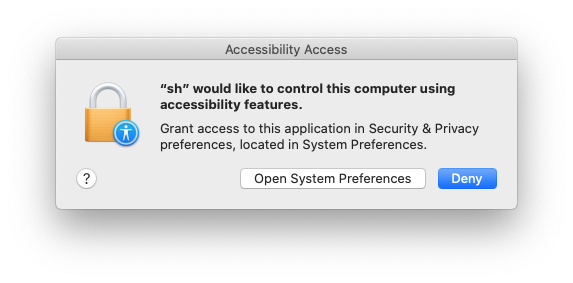
OS: macOS Catalina 10.15.5
@simons-public commented on GitHub (Jun 13, 2020):
This was fixed in newer builds with #487. You can download newer builds from Azure Pipelines until they make another release version.
@github-actions[bot] commented on GitHub (Sep 28, 2020):
This issue has been automatically marked as stale due to inactivity. It will be closed if no further activity occurs. Thank you for your contributions.