[GH-ISSUE #429] Not detecting edge territory properly #331

Open
opened 2026-05-05 06:02:57 -06:00 by gitea-mirror · 1 comment
Owner

Originally created by @jhughes2112 on GitHub (Sep 4, 2019).
Original GitHub issue: https://github.com/debauchee/barrier/issues/429

Server: Windows 10 Pro (Insider Preview ver 1903, for Windows Subsystem Linux 2)
Barrier Version: 2.3.1-snapshot from Friday Aug 9th, 2019.

Client: Mac OSX Mojave 10.14.6
Barrier Version: 2.3.1-snapshot from Friday Aug 9th, 2019.

(it also happend on previous versions of Barrier, I upgrade to see if it would fix)

Steps to reproduce bug

  1. Laptop is a 4k screen and a (smaller) 1920x1080 screen on the left side, with the bottom edge aligned with the bottom of the 4k screen in Windows.
  2. Mac is farther to left of the secondary monitor between them. Configure Barrier this way.
  3. Mouse will NOT travel from 2nd monitor to the Mac, due to not recognizing the leftmost edge of 2nd screen.
  4. Using a hotkey, swap to Mac. Cursor controls properly, and will exit cleanly to 2nd monitor, but not return to Mac.

Other info

  • When did the problem start to occur? As soon as I changed laptops to one with a 4k screen. Did NOT have a problem with another laptop and a 1920x1080 screen. It may be relevant that previous laptop had two screens (vertically stacked) to the left, so I currently have a top-left-corner that is lower than the main screen, but previously it was taller.
  • Is there a way to work around it? Yes, you can map a hotkey to swap screens.
  • Does this bug prevent you from using Barrier entirely? No, but loses a lot of value.

For what it's worth, I also have an Ubuntu Linux box in the mix farther to the left of the Mac, and I can go between the Mac and Linux box freely, but once I get over to the Windows machine, it won't escape the left edge.

Thanks so much for the software, and for your time and efforts. I really enjoy Barrier.

Originally created by @jhughes2112 on GitHub (Sep 4, 2019). Original GitHub issue: https://github.com/debauchee/barrier/issues/429 Server: Windows 10 Pro (Insider Preview ver 1903, for Windows Subsystem Linux 2) Barrier Version: 2.3.1-snapshot from Friday Aug 9th, 2019. Client: Mac OSX Mojave 10.14.6 Barrier Version: 2.3.1-snapshot from Friday Aug 9th, 2019. (it also happend on previous versions of Barrier, I upgrade to see if it would fix) ### Steps to reproduce bug ### 1. Laptop is a 4k screen and a (smaller) 1920x1080 screen on the left side, with the bottom edge aligned with the bottom of the 4k screen in Windows. 2. Mac is farther to left of the secondary monitor between them. Configure Barrier this way. 3. Mouse will NOT travel from 2nd monitor to the Mac, due to not recognizing the leftmost edge of 2nd screen. 4. Using a hotkey, swap to Mac. Cursor controls properly, and will exit cleanly to 2nd monitor, but not return to Mac. ### Other info ### * When did the problem start to occur? As soon as I changed laptops to one with a 4k screen. Did NOT have a problem with another laptop and a 1920x1080 screen. It may be relevant that previous laptop had two screens (vertically stacked) to the left, so I currently have a top-left-corner that is lower than the main screen, but previously it was taller. * Is there a way to work around it? Yes, you can map a hotkey to swap screens. * Does this bug prevent you from using Barrier entirely? No, but loses a lot of value. For what it's worth, I also have an Ubuntu Linux box in the mix farther to the left of the Mac, and I can go between the Mac and Linux box freely, but once I get over to the Windows machine, it won't escape the left edge. Thanks so much for the software, and for your time and efforts. I really enjoy Barrier.
Author
Owner

@oscpprep commented on GitHub (Aug 15, 2021):

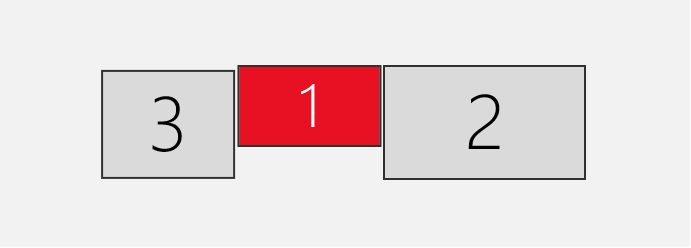
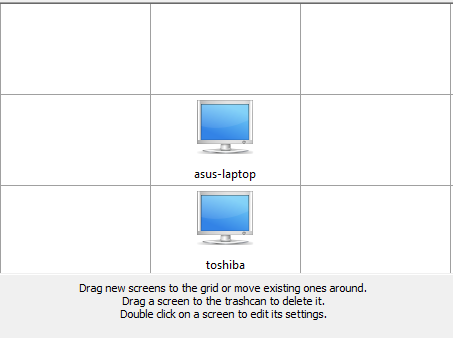
I have a similar issue: on my main pc I have 3 monitors, out of the 3, the 2 extended monitors can access the bottom barrier client, the main one is unable to reach the bottom client. very odd but I've just been living with it.
image
image

[edit][update]
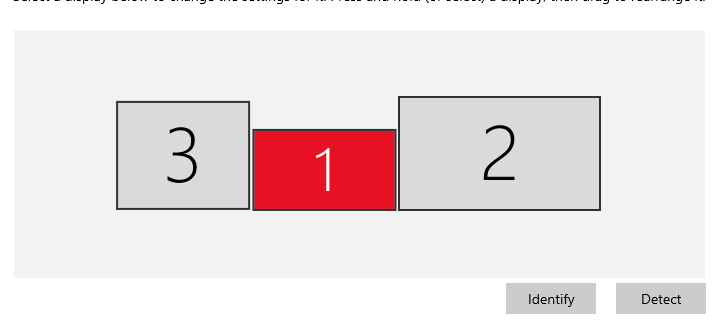
Reading many posts, I figured that barrier needs a consistent edge, otherwise it'll just use the lowest edge found: check my setup now:
image

<!-- gh-comment-id:899030383 --> @oscpprep commented on GitHub (Aug 15, 2021): I have a similar issue: on my main pc I have 3 monitors, out of the 3, the 2 extended monitors can access the bottom barrier client, the main one is unable to reach the bottom client. very odd but I've just been living with it. ![image](https://user-images.githubusercontent.com/88808184/129475666-527e1f60-f78f-4d62-ad22-41b7217b53b2.png) ![image](https://user-images.githubusercontent.com/88808184/129475688-66aaf604-0458-4d97-826f-a44eeb57850c.png) [edit][update] Reading many posts, I figured that barrier needs a consistent edge, otherwise it'll just use the lowest edge found: check my setup now: ![image](https://user-images.githubusercontent.com/88808184/129476107-ee06a004-544b-4075-8383-624fa19c92e2.png)
Sign in to join this conversation.
No milestone
No project
No assignees
1 participant
Notifications
Due date
The due date is invalid or out of range. Please use the format "yyyy-mm-dd".

No due date set.

Dependencies

No dependencies set.

Reference: github-starred/barrier#331
No description provided.