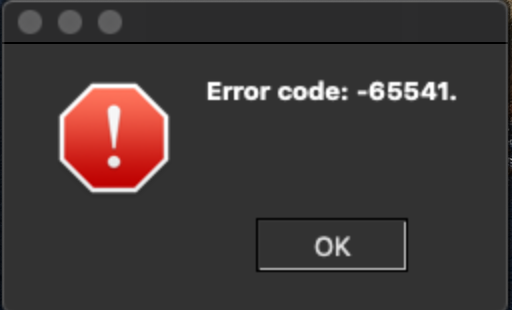
[GH-ISSUE #364] Infinite dialog crash with error code -65541 when restarting DNS service on Mac #289

Open
opened 2026-05-05 05:57:49 -06:00 by gitea-mirror · 11 comments
Owner

Originally created by @evictor on GitHub (Jul 19, 2019).
Original GitHub issue: https://github.com/debauchee/barrier/issues/364

Note I believe client is irrelevant to this ticket but I am including those details anyway. The problem as experienced is solely on the MacOS server.

Operating Systems

Server: macOS Mojave 10.14.5 (18F132)

Client: Ubuntu 18.04.2 LTS

Barrier Version

Server: 2.1.0-RELEASE-8b69f9fe
Client: 2.2.0-snapshot-00000000

Steps to reproduce bug

  1. Connect Barrier server to a client (i.e. Mac server => x client)
  2. Cause a restart of the DNS service on Mac, for example with sudo killall -v mDNSResponder -- NOTE: why would one ever do this? To cause DNS cache to purge, e.g. after connecting to a VPN, which we regularly do at work
  3. Infinite popup windows start flying up in Barrier with error code -65541 (see image below) and Barrier needs to be Force Quit

image

Other info

  • Is there a way to work around it? No/Yes, you can...

Force quit

  • Does this bug prevent you from using Barrier entirely? Yes/No

No; I force quit and restart it and everything is fine

Originally created by @evictor on GitHub (Jul 19, 2019). Original GitHub issue: https://github.com/debauchee/barrier/issues/364 Note I believe client is irrelevant to this ticket but I am including those details anyway. The problem as experienced is solely on the MacOS server. ### Operating Systems ### Server: macOS Mojave 10.14.5 (18F132) Client: Ubuntu 18.04.2 LTS ### Barrier Version ### Server: 2.1.0-RELEASE-8b69f9fe Client: 2.2.0-snapshot-00000000 ### Steps to reproduce bug ### 1. Connect Barrier server to a client (i.e. Mac server => x client) 2. Cause a restart of the DNS service on Mac, for example with `sudo killall -v mDNSResponder` -- NOTE: why would one ever do this? To cause DNS cache to purge, e.g. after connecting to a VPN, which we regularly do at work 3. Infinite popup windows start flying up in Barrier with error code -65541 (see image below) and Barrier needs to be Force Quit ![image](https://user-images.githubusercontent.com/1620156/61566429-fbbb0280-aa30-11e9-90f4-fad40ab752b0.png) ### Other info ### * Is there a way to work around it? No/Yes, you can... Force quit * Does this bug prevent you from using Barrier entirely? Yes/No No; I force quit and restart it and everything is fine
gitea-mirror added the
macOS
label 2026-05-05 05:57:49 -06:00
Author
Owner

@alanhogan commented on GitHub (Oct 22, 2020):

+1 to this issue. This happened to me (infinite error messages coming at a rate of more than one per second) when running a script that configures a Docker virtual machine-type setup. (I cannot share exact steps to reproduce publicly).

I am on macOS Catalina 10.15.7.

At first, I didn’t realize the error message was coming from Barrier.

So while an ideal fix handles the situation (DNS refresh or whatever) gracefully, some "quick wins" would be:

  • Add "Barrier:" to the error message so it’s obvious where it is coming from.
  • Throttle or use application state to otherwise prevent infinite error messages.
Screen Shot 2020-10-22 at 12 44 49 PM
<!-- gh-comment-id:714756063 --> @alanhogan commented on GitHub (Oct 22, 2020): +1 to this issue. This happened to me (infinite error messages coming at a rate of more than one per second) when running a script that configures a Docker virtual machine-type setup. (I cannot share exact steps to reproduce publicly). I am on macOS Catalina 10.15.7. At first, I didn’t realize the error message was coming from Barrier. So while an ideal fix handles the situation (DNS refresh or whatever) gracefully, some "quick wins" would be: * Add "Barrier:" to the error message so it’s obvious where it is coming from. * Throttle or use application state to otherwise prevent infinite error messages. <img width="355" alt="Screen Shot 2020-10-22 at 12 44 49 PM" src="https://user-images.githubusercontent.com/6808/96928719-dad03100-146d-11eb-8ae9-5435ae245aae.png">
Author
Owner

@Radek27 commented on GitHub (Nov 19, 2020):

I have same problem and also did not realised it's from Barrier. It always happend when I installed "Little Snitch", so I contacted it's developer and he said that it's some other software making it. I never had that problem on other mac where is not Barrier, so I thought that it's correct. I just was not able to find out culprit.
It's same on Catalina and also Big Sur.

<!-- gh-comment-id:730532445 --> @Radek27 commented on GitHub (Nov 19, 2020): I have same problem and also did not realised it's from Barrier. It always happend when I installed "Little Snitch", so I contacted it's developer and he said that it's some other software making it. I never had that problem on other mac where is not Barrier, so I thought that it's correct. I just was not able to find out culprit. It's same on Catalina and also Big Sur.
Author
Owner

@sumitb commented on GitHub (Dec 6, 2020):

I experienced this today and it left me bewildered. It felt like I was dragged back into early 2000s and opened up a website without ad-blocker.
Screen Shot 2020-12-06 at 2 59 28 PM

<!-- gh-comment-id:739580905 --> @sumitb commented on GitHub (Dec 6, 2020): I experienced this today and it left me bewildered. It felt like I was dragged back into early 2000s and opened up a website without ad-blocker. <img width="256" alt="Screen Shot 2020-12-06 at 2 59 28 PM" src="https://user-images.githubusercontent.com/1455135/101295809-b9849380-37d4-11eb-8cfc-958583eacefd.png">
Author
Owner

@angelotc commented on GitHub (Jun 26, 2022):

Happening to me on my M1 macbook like half the time. Following.

<!-- gh-comment-id:1166668602 --> @angelotc commented on GitHub (Jun 26, 2022): Happening to me on my M1 macbook like half the time. Following.
Author
Owner

@itoldusoandso commented on GitHub (Apr 1, 2023):

Happening here as well on 10.12, 10.13, 10.14... all systems way up any machine MacAir, MacMini, MacPro all of them. It eats up 100% resources and wait for longer and Window Server will freeze from the repeated popups.

<!-- gh-comment-id:1493172667 --> @itoldusoandso commented on GitHub (Apr 1, 2023): Happening here as well on 10.12, 10.13, 10.14... all systems way up any machine MacAir, MacMini, MacPro all of them. It eats up 100% resources and wait for longer and Window Server will freeze from the repeated popups.
Author
Owner

@jauling commented on GitHub (Oct 20, 2023):

Still happening on M1 Macbook. Like the other responders above, this happens sometimes, and I think it only does when the OS comes out of sleep.

macOS Ventura 13.6
Barrier 2.4.0-release-3e0d758b

<!-- gh-comment-id:1772692016 --> @jauling commented on GitHub (Oct 20, 2023): Still happening on M1 Macbook. Like the other responders above, this happens _sometimes_, and I think it only does when the OS comes out of sleep. macOS Ventura 13.6 Barrier 2.4.0-release-3e0d758b
Author
Owner

@piyushsoni commented on GitHub (Feb 23, 2024):

I'm affected by it too. But it is only happening on this M3 laptop on Sonama (14.). On my old Intel MBP laptop on macOS 12. it didn't happen. Restarting the app makes it work for some time, until it happens again.

@jauling : For me it happens while I'm actively using the macbook as well, so probably not related to sleep.

Has someone found a fix yet?

<!-- gh-comment-id:1961114344 --> @piyushsoni commented on GitHub (Feb 23, 2024): I'm affected by it too. But it is only happening on this M3 laptop on Sonama (14.*). On my old Intel MBP laptop on macOS 12.* it didn't happen. Restarting the app makes it work for some time, until it happens again. @jauling : For me it happens while I'm actively using the macbook as well, so probably not related to sleep. Has someone found a fix yet?
Author
Owner

@piyushsoni commented on GitHub (Feb 23, 2024):

Looks like even Synergy was affected by it, but may be it was fixed there? :

https://github.com/symless/synergy-core/issues/4303

<!-- gh-comment-id:1961121424 --> @piyushsoni commented on GitHub (Feb 23, 2024): Looks like even Synergy was affected by it, but may be it was fixed there? : https://github.com/symless/synergy-core/issues/4303
Author
Owner

@piyushsoni commented on GitHub (Feb 23, 2024):

At least I have found ONE cause for it. In my company they use this so called security software called "ZScaler". I generally keep it 'OFF' as long as they still allow us. But as soon as it's automatically enabled again, it gives me this error infinite number of times.

<!-- gh-comment-id:1961133254 --> @piyushsoni commented on GitHub (Feb 23, 2024): At least I have found ONE cause for it. In my company they use this so called security software called "ZScaler". I generally keep it 'OFF' as long as they still allow us. But as soon as it's automatically enabled again, it gives me this error infinite number of times.
Author
Owner

@jauling commented on GitHub (Feb 23, 2024):

@piyushsoni well, I guess we can blame zscaler (again). I also am forced to run that for work. I've also found that just having Barrier in memory without connecting to the server will trigger this infinite dialog crash. I basically only run Barrier now when I need it, and stop it when I don't.

<!-- gh-comment-id:1961146078 --> @jauling commented on GitHub (Feb 23, 2024): @piyushsoni well, I guess we can blame zscaler (again). I also am forced to run that for work. I've also found that just having Barrier in memory without connecting to the server will trigger this infinite dialog crash. I basically only run Barrier now when I need it, and stop it when I don't.
Author
Owner

@piyushsoni commented on GitHub (Feb 23, 2024):

Wow. At least we've found one common enemy. :|

<!-- gh-comment-id:1961195450 --> @piyushsoni commented on GitHub (Feb 23, 2024): Wow. At least we've found one common enemy. :|
Sign in to join this conversation.
No milestone
No project
No assignees
1 participant
Notifications
Due date
The due date is invalid or out of range. Please use the format "yyyy-mm-dd".

No due date set.

Dependencies

No dependencies set.

Reference: github-starred/barrier#289
No description provided.