mirror of
https://github.com/debauchee/barrier.git
synced 2026-10-23 08:07:53 -06:00
[GH-ISSUE #299] [Feature] Switch only while a shortcut key is pressed. #241
Labels
No labels
HiDPI
bounty
bsd/freebsd
bsd/openbsd
bug
bug
build-infra
cantfix
critical
doc
duplicate
enhancement
fix-available
from git
from release
good first issue
help wanted
installer/package
invalid
linux
macOS
meta
needs testing
pull-request
query
question
regression
regression
v2.4.0
windows
wontfix
work-in-progress
No milestone
No project
No assignees
1 participant

Notifications
Due date
No due date set.
Dependencies
No dependencies set
Reference
github-starred/barrier#241
Loading…
Reference in a new issue
No description provided.
Delete branch "%!s()"
Deleting a branch is permanent. Although the deleted branch may continue to exist for a short time before it actually gets removed, it CANNOT be undone in most cases. Continue?
Originally created by @domske on GitHub (May 4, 2019).
Original GitHub issue: https://github.com/debauchee/barrier/issues/299
I don't know if this is already possible, but if not, I think it's a great feature.
Only switch the mouse to a client while a shortcut key is pressed.
In my case, I have a client on top screen. Now it's annoying because I can't use Aero Snap from Windows or doing other stuff on the top area. Because the mouse is immediately switching on screens. I know the delay option, but I think the shortcut solution is better for more control.
Example:
Press the
Shiftkey while moving the mouse to the next screen. Until the shift key is not pressed, it's not possible to leave the current screen. This shortcut should be customizable and allows only control keys likeShift,Ctrl,Alt,Super(Windows) or combinations likeCtrl + Shift.Any questions? I am glad to help.
Server: Windows 10 Home (2.2.0)
Client: Mac OS X High Sierra (2.10)
@domske commented on GitHub (May 4, 2019):
Solved by the hotkey option "Lock cursor to screen".
@NapAlot commented on GitHub (Oct 15, 2020):
Can this be reopened? I think that OP meant they wanted an option to keep the cursor on a screen until you want it moved. Example would be allowing hotkey to move the cursor between screens while locking the cursor to the screen your on. Never auto switching.
Example:
If you press CTRL+` then you switch screens. But you never are able to automatically drift from one screen to the other by bumping the edges. Its always locked to the screen your on.
@AlbertBaubleDeem commented on GitHub (Mar 14, 2021):
Please reopen this one. I think a shortcut (user defined shortcut on keyboard or using an mouse button) for switching screens would be really useful.
Example:
If ScrlLk is activated, screens can be switched only using the shortcut.
If ScrlLk is deactivated, screens can be switched by mouse drifting from one to another OR by the shortcut.
I can see it would greatly speed up production on more complex setups as it would save the user the time needed to drift from one screen to another.
@melid404 commented on GitHub (May 24, 2021):
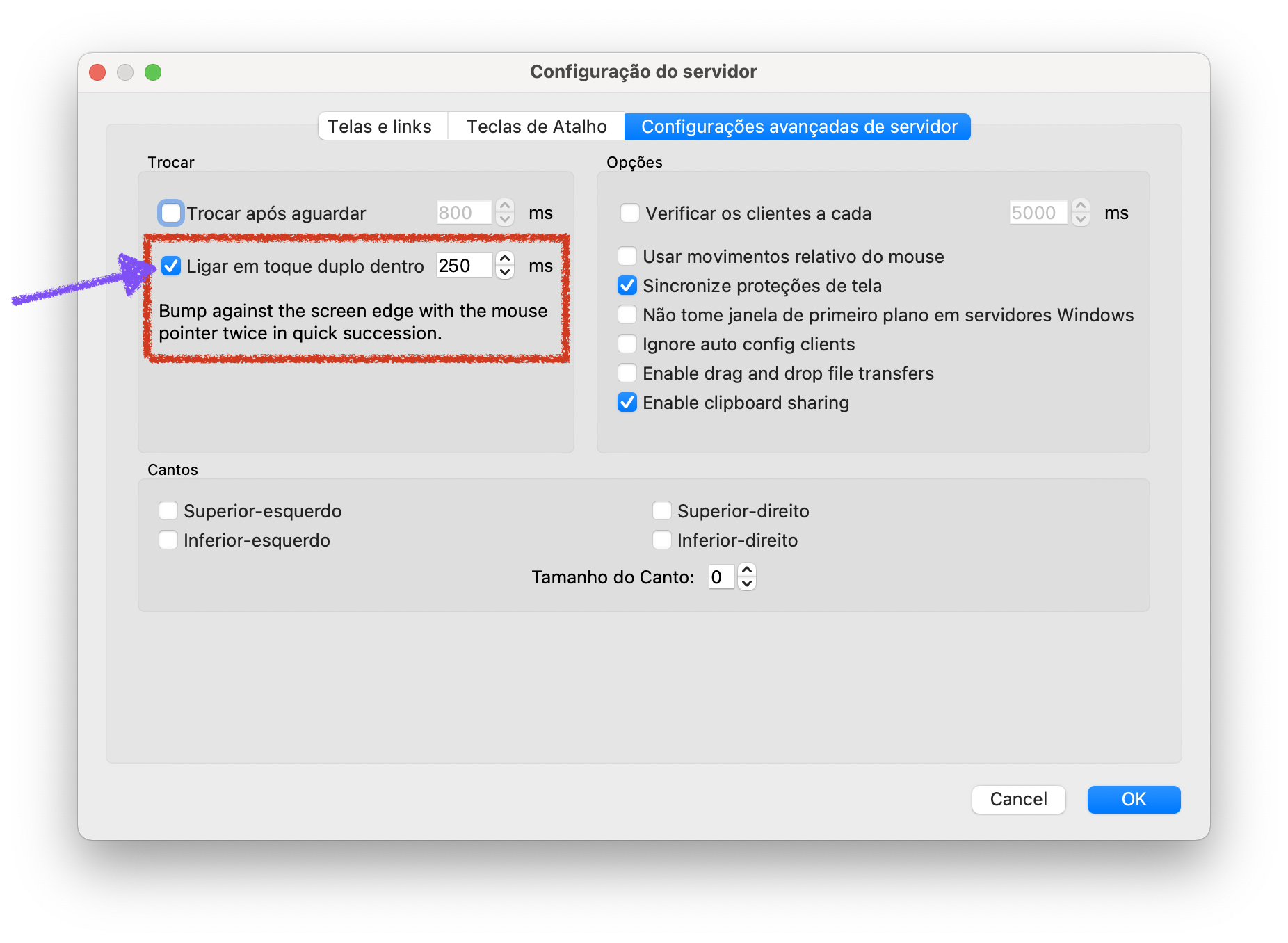
I was looking for this feature and found that adding 5000ms delay to switch on advanced settings helped me. I did setup a hotkey for toggling active screen and can now only switch to other machine by sending the hotkey. I also added the combo of hotkey to a specific mouse button via Logitech Gaming Software on Windows.
@LuizSiqueiraNeto commented on GitHub (Oct 4, 2021):
This option worked very well for me, just tap quickly twice on the edge to move to the other monitor.
@NapAlot commented on GitHub (Oct 4, 2021):
This is exactly what I did. I have a key that switches on my Logitech mouse. It would be nice to have a setting that is persistent "lock to screen". Right now I have a hot key to lock to screen. But it resets after each lock / unlock of computer.
@msgol commented on GitHub (Dec 21, 2021):
Please reopen this, as this topic is the first result while searching on google and it doesn't really give us what we are looking for.
The feature to always lock to screen and ONLY allow out of screen while a key is pressed.
Im suspecting anyone using inputdirector and wanting to move to barrier for its cross platform feature needs this.