mirror of
https://github.com/debauchee/barrier.git
synced 2026-10-23 08:07:53 -06:00
[GH-ISSUE #233] Cursor jumps when moving between computers with different desktop sizes #187
Labels
No labels
HiDPI
bounty
bsd/freebsd
bsd/openbsd
bug
bug
build-infra
cantfix
critical
doc
duplicate
enhancement
fix-available
from git
from release
good first issue
help wanted
installer/package
invalid
linux
macOS
meta
needs testing
pull-request
query
question
regression
regression
v2.4.0
windows
wontfix
work-in-progress
No milestone
No project
No assignees
1 participant

Notifications
Due date
No due date set.
Dependencies
No dependencies set
Reference
github-starred/barrier#187
Loading…
Reference in a new issue
No description provided.
Delete branch "%!s()"
Deleting a branch is permanent. Although the deleted branch may continue to exist for a short time before it actually gets removed, it CANNOT be undone in most cases. Continue?
Originally created by @saberhawk on GitHub (Jan 20, 2019).
Original GitHub issue: https://github.com/debauchee/barrier/issues/233
Operating Systems
Server: Windows 10 v1809 build 17763.253
Client: Windows 10 v1809 build 17763.253
Barrier Version
2.1.0-RELEASE-0b2dfd80
Steps to reproduce bug
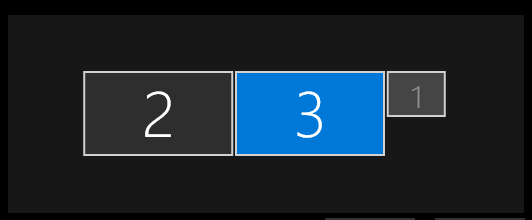
I have a workstation with three identical monitors running at 2560x1440. The server system is using the left two monitors and the display arrangement currently looks like:
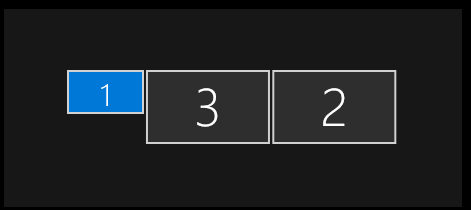
The only client system is using the last monitor on the right, but it also has a pair of 4096x2400 projectors attached. The display arrangement on that looks like:
Barrier was configured to place the client system to the right of the server system with the GUI, the config looks like:
section: links DESKTOP-SERVER: right = DESKTOP-CLIENT DESKTOP-CLIENT: left = DESKTOP-SERVER endWhen I move the cursor from the top right of the server onto the top left of the client, the cursor appears at the right place. As I move the cursor down and across the two systems, it jumps vertically, but to a consistent place. It appears to be using coordinates relative to overall desktop size rather than entry/exit monitor size.
@AdrianKoshka commented on GitHub (Jan 20, 2019):
Could you check out #229 to see if what you're experiencing is similar?
@saberhawk commented on GitHub (Jan 20, 2019):
Yeah, sounds similar but under a different platform. However, I can definitely see a visible cursor in the middle of display 1 on the client when the cursor is on the server. If I try taking a desktop screenshot on the client I get a 10752x2400 image.
@andreaslutsch commented on GitHub (Feb 15, 2019):
I have a similar issue, I got 1920x1080 resolution on my laptop with Ubuntu 18.04 (client with 2.2.0) and 3840x2160 resolution on my PC with Windows 10, scaled to 150% (Server 2.1.0)
The cursor gets stuck in a corner or center of the screen of the client and it would work normally only if I set the scaling to 100% or to the same resolution as the laptop on my PC.
@andreaslutsch commented on GitHub (Feb 15, 2019):
I have built 2.2.0 on Windows and this issue seems to be fixed and it works fine, though I had to manually add the barrierd.exe service and opened the 24800 port.
@ghost commented on GitHub (Mar 10, 2019):
I have the same issue where windows is the server and the mouse only works on clients when windows is at 100% scale. I don't have enough hard drive space to build and install 2.2.0. When is 2.2.0 planned to be released? Thanks.
@AdrianKoshka commented on GitHub (Mar 10, 2019):
There sadly isn't any ETA for a 2.2.0 release for windows...only one person (to my knowledge) knows how to package the windows installer, and they just aren't around often. If anyone wants to jump on and help, it'd really be appreciated.
@emonget commented on GitHub (Jul 9, 2019):
I have the same issue.
Previous comments helped to better diagnose the issue.
It is indeed correlated to the scaling when using hidpi resolution screen.
On my laptop screen acting as a server I have 250% scale enabled (due to huge screen resolution 3840x2160).
When scale is activated mouse cannot go to the client, it remains stucked on server.
If I scale to normal (100%) the mouse is working again but screen on server become unreadable (due to text size), so I opted for resolution downgrade to 1920x1080 for now... until a solution is found
(my server version is 2.3.0 on WIN10 and client is 2.2.0 on KUBUNTU)
@saberhawk commented on GitHub (Jul 9, 2019):
My original report isn't related to DPI scaling at all. Both systems have DPI scaling set to 100% (or "off").
The problem is that the cursor is scaled down into a 0..1 relative space when leaving one system and back up into the 0.."desktop" space on the remote system.
The monitor the cursor is leaving is 2560x1440 and the adjacent identical monitor the cursor is trying to enter is 2560x1440.
However, the second system has a pair of fixed-resolution 4K "monitors" from a custom VR device. It isn't usable as an actual monitor and the resolution cannot be changed.
This stretches the vertical "desktop" dimension from 1440 to 2400 and causes the cursor to jump when moving in a straight line between systems.
This can be fixed by scaling between exiting/entering monitor dimensions instead of entering/exiting system desktop dimensions.
@davidkennedydev commented on GitHub (Oct 21, 2022):
https://github.com/debauchee/barrier/discussions/1451