mirror of
https://github.com/debauchee/barrier.git
synced 2026-10-23 08:07:53 -06:00
[GH-ISSUE #1855] Accessibility Access fails after updating MacOS Ventura to 3.1 #1355
Labels
No labels
HiDPI
bounty
bsd/freebsd
bsd/openbsd
bug
bug
build-infra
cantfix
critical
doc
duplicate
enhancement
fix-available
from git
from release
good first issue
help wanted
installer/package
invalid
linux
macOS
meta
needs testing
pull-request
query
question
regression
regression
v2.4.0
windows
wontfix
work-in-progress
No milestone
No project
No assignees
1 participant

Notifications
Due date
No due date set.
Dependencies
No dependencies set
Reference
github-starred/barrier#1355
Loading…
Reference in a new issue
No description provided.
Delete branch "%!s()"
Deleting a branch is permanent. Although the deleted branch may continue to exist for a short time before it actually gets removed, it CANNOT be undone in most cases. Continue?
Originally created by @ej-github on GitHub (Dec 14, 2022).
Original GitHub issue: https://github.com/debauchee/barrier/issues/1855
What happened?
Barrier was working great on Monterey and the GA release of Ventura. I just updated my MBP M1 to Ventura 3.1 and Barrier is stuck on the Accessibility Access screen for System Settings. It is already enabled in there. The only options are to Open System Settings, and Deny.
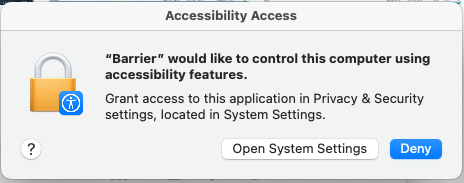
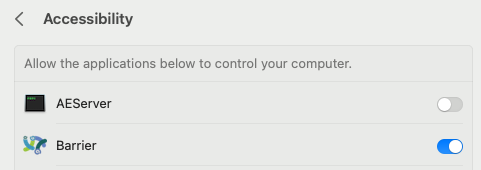
System Settings screenshot:
Version
v2.4.0
Git commit hash (if applicable)
No response
If applicable, where did you install Barrier from?
Downloaded from official release.
What OSes are you seeing the problem on? (Check all that apply)
macOS
What OS versions are you using?
Ventura 3.1
Relevant log output
No response
Any other information
No response
@myd-shakepay commented on GitHub (Dec 14, 2022):
Same issue here :(
@myd-shakepay commented on GitHub (Dec 14, 2022):
@ej-github I got it to work by removing it from the accessibility list in system settings and then relaunching barrier + re-enabling.
@Ligthert commented on GitHub (Dec 14, 2022):
The workaround by @mdewji-shakepay worked for me.
@ej-github commented on GitHub (Dec 14, 2022):
Thanks, that worked for me! I was toggling it on/off and didn't see the remove below.